
1. Safety Information
WARNING: Adult supervision is required at all times when the product is in use.
- This product is intended for children aged 18-36 months.
- Maximum weight capacity: 55 lbs (25 kg).
- Always ensure the child wears appropriate safety gear, including a helmet, when operating the ATV.
- Operate the ATV only on flat, level surfaces. Avoid slopes, uneven terrain, sand, loose dirt, or wet areas.
- Keep hands, hair, and clothing away from moving parts.
- Do not allow children to stand on the ATV while it is in motion.
- Ensure all connections are secure before each use.
- This product complies with ASTM and CPSIA safety standards.
2. Package Contents
Please check that all components are present and undamaged before assembly:
- 1 × Ride on ATV
- 1 × Charger
- 1 × Instruction Manual
3. Assembly Instructions
Follow these steps to assemble your Costzon Kids ATV. Refer to the assembly video for visual guidance.
Video: Costzon 6V CAT Licensed Kids ATV Assembly Guide. This video demonstrates the step-by-step process of assembling the ATV, including attaching wheels, handlebars, and connecting the battery.
Step-by-Step Assembly:
- Prepare the Body: Unscrew the seat to access the internal wiring. Insert the axle through the designated holes in the ATV body.
- Attach Rear Wheels: Slide the motor onto the axle, ensuring it aligns with the motor housing. Attach the rear wheels, securing each with a washer and cotter pin. Cover with the wheel cover. Repeat for the other side.
- Install Handlebar: Connect the battery wires inside the ATV body. Insert the handlebar stem into the steering column. Secure the handlebar with the provided screw.
- Attach Front Wheels: Turn the ATV upside down. Attach the front wheels to the front axle, securing each with a washer and cotter pin. Cover with the wheel cover.
- Install Bumper: Attach the front bumper to the designated slots on the front of the ATV. Secure it with screws.
- Connect Battery and Secure Seat: Connect the battery terminals. Place the seat back onto the ATV body and secure it with the screw.

Image: The fully assembled Costzon Kids ATV in yellow, ready for use.
4. Charging Instructions
The ATV is powered by a 6V 4AH rechargeable battery. Ensure the ATV is turned OFF before charging.
- Locate the charging port on the ATV (typically near the battery compartment or under the seat).
- Plug the charger into a standard wall outlet.
- Connect the charger's output plug to the ATV's charging port.
- Allow the battery to charge for the recommended duration (refer to charger instructions for specific times, typically 8-12 hours for a full charge). Do not overcharge.
- Disconnect the charger once charging is complete.

Image: The Costzon Kids ATV highlighting the convenient charging port and battery specifications.
5. Operating Instructions
Operating the Costzon Kids ATV is designed to be simple and intuitive for young children.
- Power On/Off: Locate the power switch (if present) and turn the ATV ON.
- Forward Motion: Press the foot pedal to engage the motor and move the ATV forward. The bright LED headlight will automatically activate while driving.
- Stopping: Release the foot pedal to bring the ATV to a stop.
- Horn: Press the horn button on the handlebar for fun sound effects.
- Steering: Use the easy-to-grip handlebars to steer the ATV left or right.
- Comfort and Safety: The ergonomic seat and anti-slip footrests ensure a secure and comfortable ride. The controlled speed limit is 1.7 mph (2.8 km/h).
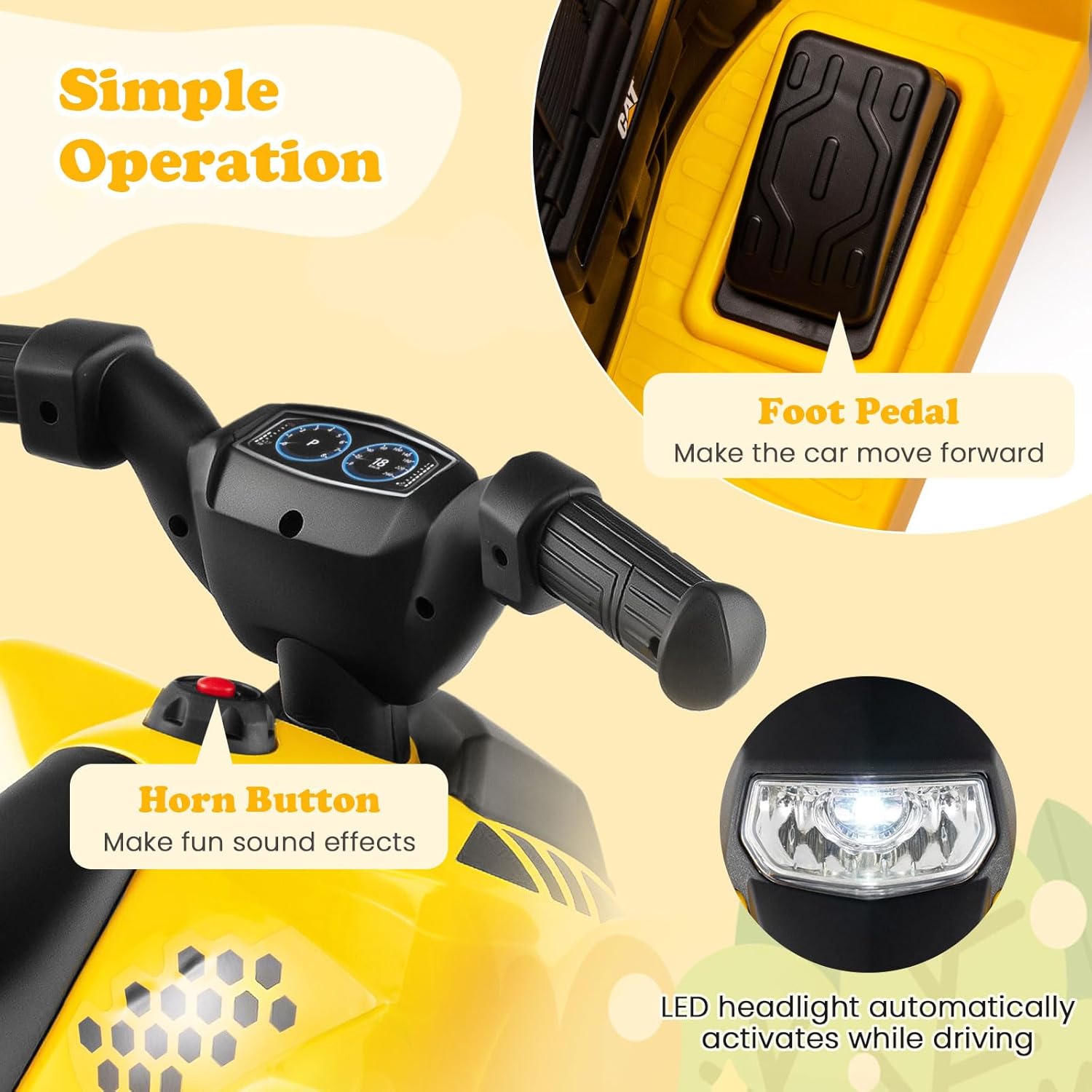
Image: Close-up view of the ATV's simple operation features, including the foot pedal, horn button, and LED headlight.

Image: The ATV's features designed for a joyful driving experience, such as the simulated dashboard, ergonomic seat, and easy-to-grip handlebars.
6. Maintenance
Regular maintenance ensures the longevity and safe operation of your ATV.
- Cleaning: Wipe the ATV with a soft, damp cloth. Do not use abrasive cleaners or solvents. Avoid spraying water directly onto electrical components.
- Battery Care: Charge the battery fully after each use. If storing for an extended period, charge the battery at least once a month to prolong its lifespan.
- Storage: Store the ATV in a dry, cool place away from direct sunlight and moisture.
- Inspection: Periodically check all screws, nuts, and connections to ensure they are tight and secure. Inspect wheels for wear and tear.
7. Troubleshooting
If you encounter any issues, refer to these common solutions:
- ATV does not turn on: Check if the battery is fully charged. Ensure all battery connections are secure. Verify the power switch is in the ON position.
- ATV does not move: Ensure the foot pedal is fully pressed. Check if the forward/reverse switch (if applicable) is in the correct position. Verify motor connections.
- Slow speed: The battery may be low; recharge it. Ensure the ATV is not overloaded beyond its weight capacity.
- Unusual noises: Inspect for loose parts or obstructions in the wheels or motor area.
If problems persist, please contact Costzon customer support.
8. Specifications
| Feature | Detail |
|---|---|
| Product Dimensions | 25" × 15" × 17" (L x W x H) |
| Item Weight | 10 lbs (4.5 kg) |
| Weight Capacity | 55 lbs (25 kg) |
| Suitable Ages | 18-36 Months Old |
| Motor | 6V 30W |
| Battery | 6V 4AH Rechargeable |
| Speed | 1.7 Mph (2.8 Km/h) |
| Safety Standards | ASTM and CPSIA Compliant |

Image: Detailed dimensions and weight capacity of the Costzon Kids ATV.

Image: The ATV's four large treaded wheels, suitable for various surfaces like concrete, brick, rubber, asphalt, and wood.
9. Warranty and Support
For warranty information, technical support, or replacement parts, please contact Costzon customer service directly. Refer to your purchase documentation for specific contact details.