
HJT Ex-S4NAB0226T
Explosion Proof POE PTZ Camera
User Manual
Model: Ex-S4NAB0226T | Brand: HJT
1. Introduction
This manual provides essential information for the safe and effective installation, operation, and maintenance of your HJT Explosion Proof POE PTZ Camera. Designed for demanding environments, this camera offers robust surveillance capabilities in hazardous locations. Please read this manual thoroughly before using the product and retain it for future reference.

Figure 1.1: HJT Explosion Proof POE PTZ Camera with integrated mounting bracket.
2. Safety Information
WARNING: Improper installation or operation can lead to serious injury or equipment damage. Always adhere to local electrical codes and safety regulations.
- Ensure power is disconnected before any installation, maintenance, or repair work.
- This camera is certified for specific hazardous areas (Ex d II C T6 Gb/EX tD A21). Do not install in environments exceeding its certified capabilities.
- All wiring and connections must be performed by qualified personnel in accordance with applicable standards for hazardous locations.
- Do not open the camera housing in a hazardous atmosphere.
- Use only specified accessories and replacement parts.
- Protect cables from damage and ensure proper grounding.
3. Product Overview
3.1 Key Features
- Extreme Durability: 304 stainless steel explosion-proof housing, IP68 waterproof rating, and corrosion resistance, built for harsh industrial environments (-30°C to +70°C).
- Advanced Safety Certification: Certified for Zone 1/21/22 hazardous areas (Ex d II C T6 Gb/EX tD A21), ideal for oil, gas, chemical, and military facilities.
- Crystal-Clear Monitoring: 25X optical zoom, 2MP sensor, and 1920x1080 Full HD resolution with H.265/H.264 encoding for sharp, low-bandwidth video.
- 360° Flexible Control: Motorized PTZ (Pan-Tilt-Zoom), 360° rotation + 90° tilt, and 0.001 Lux low-light performance for 24/7 surveillance.
3.2 Components
The product package includes the following main components:
- Camera Housing (with integrated PTZ camera module)

Figure 3.1: View of the camera housing and internal components.

Figure 3.2: Disassembled view showing the camera housing and separate mounting bracket components.
4. Specifications
| Attribute | Value |
|---|---|
| Model Number | Ex-S4NAB0226T |
| Brand | HJT |
| Material | 304 stainless steel |
| Water Resistance Level | Waterproof (IP68) |
| Connectivity Technology | Wired (POE) |
| Special Feature | Night Vision, PTZ Technology |
| Indoor/Outdoor Usage | Outdoor, Indoor |
| Item Weight | 11 Kilograms (24.2 pounds) |
| Package Dimensions | 28.6 x 19.9 x 16 inches |
| Included Components | Camera Housing |
5. Setup
5.1 Mounting
The camera is designed for secure mounting in various orientations. Ensure the mounting surface is strong enough to support the camera's weight and withstand environmental factors. Use appropriate hardware for installation.
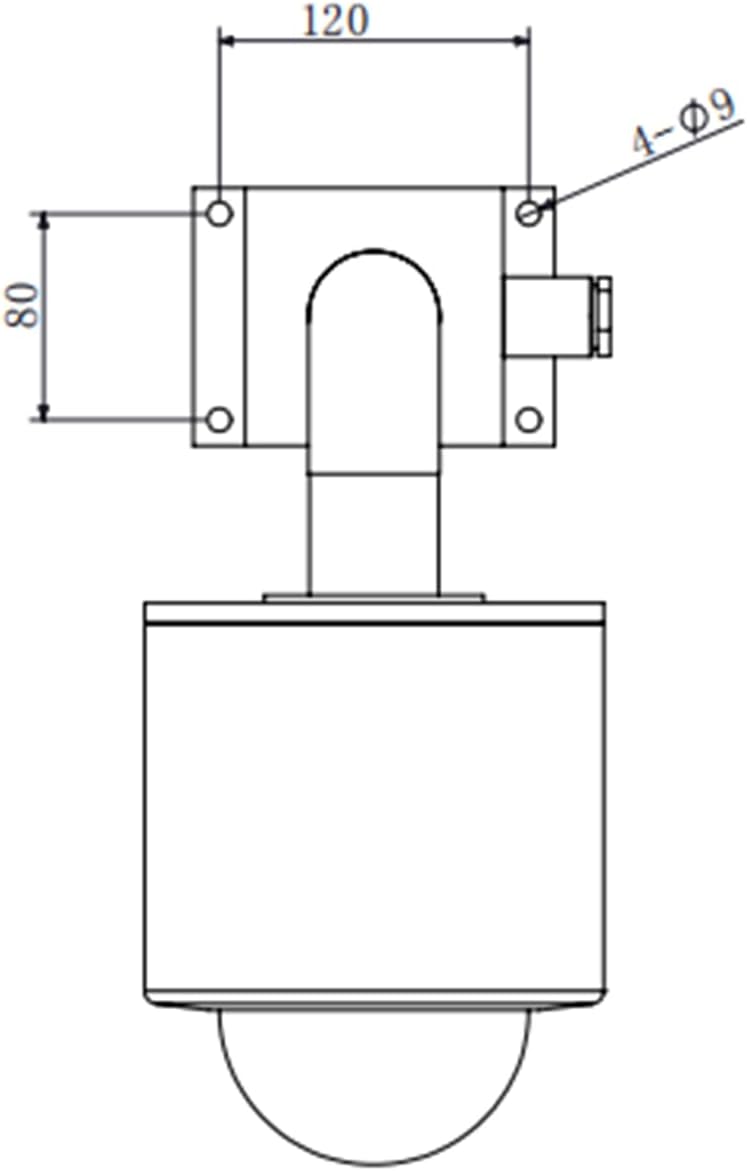
Figure 5.1: Top-down dimension drawing showing mounting points and overall width (dimensions in mm).
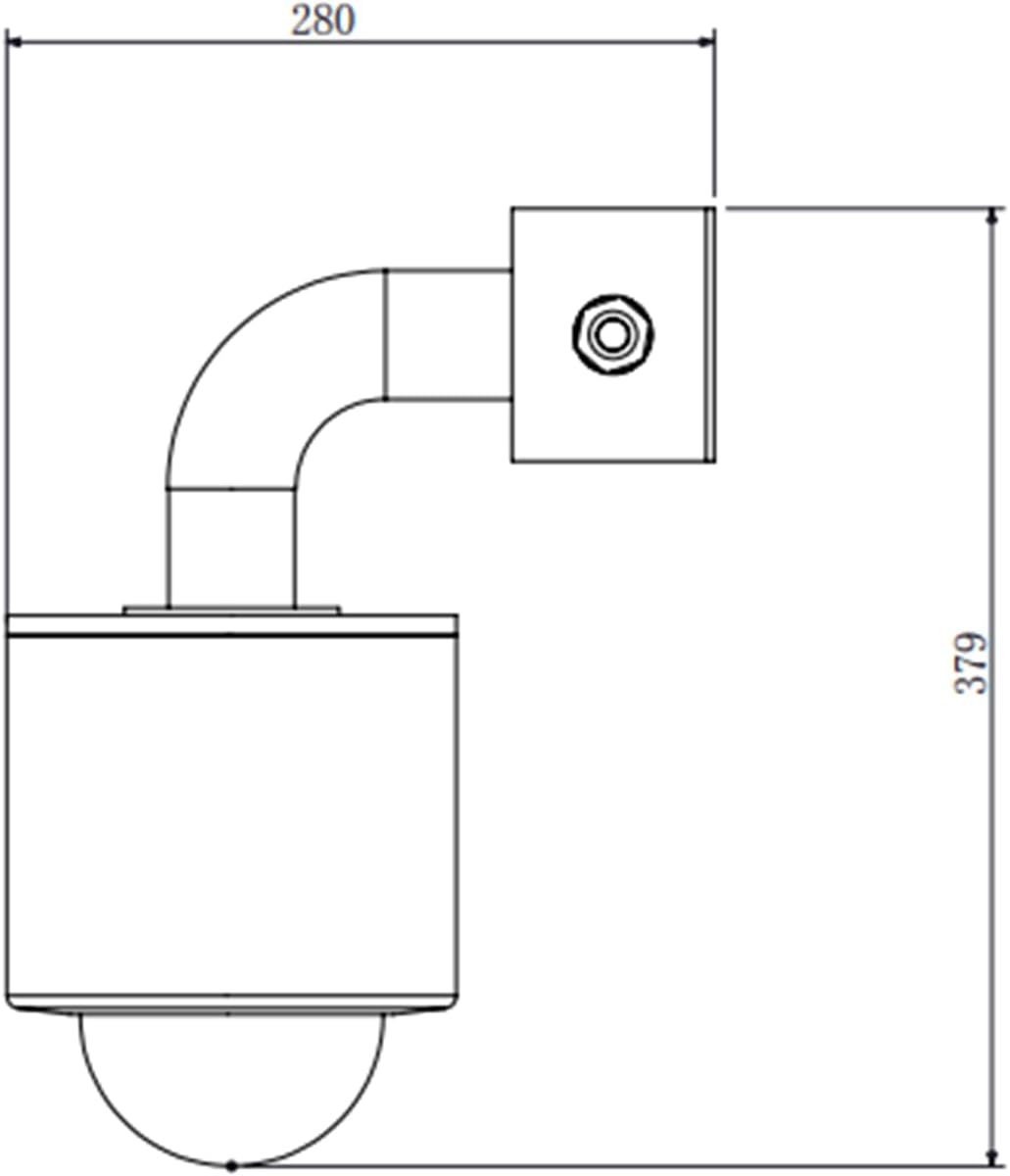
Figure 5.2: Side dimension drawing showing overall height and depth (dimensions in mm).
Refer to the dimension drawings for precise measurements and mounting hole locations. Secure the camera firmly to prevent vibration or displacement.
5.2 Wiring Diagram
The camera supports Power over Ethernet (POE) for simplified installation, requiring only a single Ethernet cable for both power and data. For systems requiring multiple cameras or specific network configurations, refer to the following diagram.

Figure 5.3: Typical system connection diagram showing explosion-proof cameras connected via an explosion-proof junction box to a switch, NVR, and monitor/computer.
Connect the camera's Ethernet port to a POE-enabled switch or NVR. Ensure all connections are secure and sealed according to hazardous area requirements. For non-POE setups, a separate power supply (AC100-240V) will be required, typically routed through an explosion-proof junction box.
6. Operation
Once properly installed and powered, the camera can be accessed and controlled via a compatible Network Video Recorder (NVR) or surveillance software on a computer. Refer to your NVR or software manual for specific instructions on adding and managing IP cameras.
- Live View: Access the camera's live feed through your NVR or client software.
- PTZ Control: Use the software interface to pan (360°), tilt (90°), and zoom (25X optical) the camera.
- Recording: Configure recording schedules, motion detection, and alarm triggers through your NVR or software.
- Image Settings: Adjust brightness, contrast, saturation, and other image parameters as needed for optimal viewing.
- Night Vision: The camera automatically switches to infrared night vision in low-light conditions.
7. Maintenance
Regular maintenance ensures optimal performance and longevity of your explosion-proof camera. Always disconnect power before performing any maintenance.
- Cleaning: Periodically clean the camera's lens and housing with a soft, damp cloth. Do not use abrasive cleaners or solvents.
- Inspection: Regularly inspect the camera housing, cables, and mounting hardware for any signs of damage, corrosion, or loose connections.
- Seals: Ensure all seals and gaskets are intact and properly seated to maintain the IP68 rating and explosion-proof integrity.
- Firmware Updates: Check the manufacturer's website for any available firmware updates to ensure the camera operates with the latest features and security enhancements.
8. Troubleshooting
If you encounter issues with your camera, refer to the table below for common problems and their solutions.
| Problem | Possible Cause | Solution |
|---|---|---|
| No image/video feed | No power; Network connection issue; Incorrect IP address | Check power supply and POE connection; Verify network cable and switch; Confirm camera's IP address and network settings. |
| PTZ control not responding | Network latency; Software issue; Camera malfunction | Check network stability; Restart surveillance software/NVR; Power cycle the camera. |
| Poor image quality | Dirty lens; Incorrect focus; Low light conditions; Network bandwidth | Clean the lens; Adjust focus via software; Ensure adequate lighting or verify night vision operation; Check network bandwidth. |
| Camera offline intermittently | Unstable network; Loose cable connection; Power fluctuations | Check network infrastructure; Secure all cable connections; Ensure stable power supply. |
If the problem persists after attempting these solutions, please contact technical support.
9. Certifications
This HJT Explosion Proof POE PTZ Camera is certified to meet stringent safety and performance standards for hazardous environments.

Figure 9.1: Examples of product certification documents, including China Compulsory Product Certification (CCC) and explosion-proof qualification.
10. Warranty and Support
HJT provides a limited warranty for this product against defects in materials and workmanship under normal use. The warranty period begins from the date of purchase. Please retain your proof of purchase for warranty claims.
For technical support, troubleshooting assistance, or warranty inquiries, please contact HJT customer service through the vendor's contact information provided at the point of purchase or visit the official HJT website.
Contact Information: Refer to your purchase documentation or the HJT official website for the most current support details.