
Introduction
Thank you for choosing the Cegimus Automatic Self-Cleaning Cat Litter Box. This innovative device is designed to simplify cat care by providing an automated, hygienic solution for litter management. Featuring app control, an open-style design suitable for medium cats and kittens, smart health monitoring, and advanced safety mechanisms, this litter box ensures a clean environment for your feline companion and peace of mind for you. Please read this manual thoroughly before setup and operation to ensure proper use and longevity of your product.

Image: The Cegimus Automatic Self-Cleaning Cat Litter Box in grey, featuring an open design and a digital display. A cat is shown sitting inside the litter box, and a smartphone screen displays the companion app's interface, highlighting its smart control capabilities.
Setup Guide
1. Unpacking and Inspection
- Carefully remove all components from the packaging.
- Verify that all parts are present and undamaged. Refer to the packing list for a complete inventory.
2. Assembly
The Cegimus Automatic Self-Cleaning Cat Litter Box is designed for easy assembly. No complex tools are required.
- Place the main unit on a flat, stable surface.
- Ensure the waste drawer is correctly inserted into the base.
- Connect the power adapter to the unit and then to a power outlet.
3. Adding Cat Litter
- Open the top cover of the litter box.
- Fill the litter compartment with clumping cat litter. Do not exceed the maximum fill line indicated inside the drum.
- After adding litter, press the 'Level' button on the control panel or use the app to initiate a leveling cycle. This ensures proper distribution of the litter.
4. App Installation and Connection
The companion app allows for remote control and monitoring of your litter box.
- Download the 'Kitten Mew' app from your smartphone's app store (iOS or Android).
- Follow the in-app instructions to create an account and add your device.
- Important: The device supports 2.4GHz Wi-Fi networks only. Ensure your smartphone is connected to a 2.4GHz network during the setup process.

Image: A smartphone screen showing the 'Kitten Mew' app interface. The app provides options for one-touch cleaning, scheduled cleaning, cat weight monitoring, and adjusting cleaning frequency, demonstrating comprehensive remote control capabilities.
Operating Instructions
1. Automatic Cleaning Cycle
The litter box is equipped with sensors that detect when your cat has used the box and exited. Approximately one minute after your cat leaves, the automatic cleaning cycle will begin. This delay ensures your cat has safely exited before the drum rotates.
2. Manual and Scheduled Cleaning
- One-Touch Cleaning: Press the designated button on the control panel or within the app to initiate an immediate cleaning cycle.
- Scheduled Cleaning: Use the app to set custom cleaning schedules based on your preferences and your cat's habits.
3. Smart Health Monitoring (via App)
The app provides valuable insights into your cat's health and litter box usage:
- Cat Weight: Monitors and records your cat's weight with each visit.
- Visit Records: Tracks the number of toilet visits, visit times, and the duration of each visit.
- Pattern Tracking: Allows you to observe trends and patterns in your cat's litter box usage over time, which can be an indicator of health changes.

Image: A woman on an airplane uses her smartphone to view the 'Kitten Mew' app, which displays her cat's weight, number of visits, visit times, and duration of each visit. This illustrates the remote health monitoring capabilities of the litter box.
4. Safety Features
- Anti-Pinch Protection: If a cat or object is detected during a cleaning cycle, the unit will immediately stop operation to prevent injury.
- Gravity Sensor Monitoring: The litter box continuously monitors for presence. If your cat touches the unit during operation, it stops immediately and resumes only after the cat leaves.

Image: A visual representation highlighting the safety features of the litter box. It shows the 'Anti-Pinch Design' which prevents fingers or paws from getting caught, and 'Gravity Sensor Monitoring' which immediately stops operation if a cat touches the unit.
5. Quiet Operation
The Cegimus litter box operates at a low noise level, typically below 32dB, comparable to a quiet refrigerator hum. This ensures a peaceful environment for both you and your cat, even during cleaning cycles.

Image: A bedroom scene at night with a couple sleeping soundly. In the foreground, the Cegimus Automatic Self-Cleaning Cat Litter Box is shown operating quietly (indicated by '≤32dB'), with a cat resting nearby, emphasizing its ultra-quiet performance.
Maintenance
1. Emptying the Waste Bin
- The waste bin is designed for large capacity, typically requiring emptying every few days for a single cat.
- To empty, simply pull out the waste drawer from the base of the unit.
- If using waste bags (a starter roll is included), tie off the bag and dispose of it. Replace with a new bag. The waste bin can also be used without bags.
- Slide the waste drawer back into place until it clicks securely.
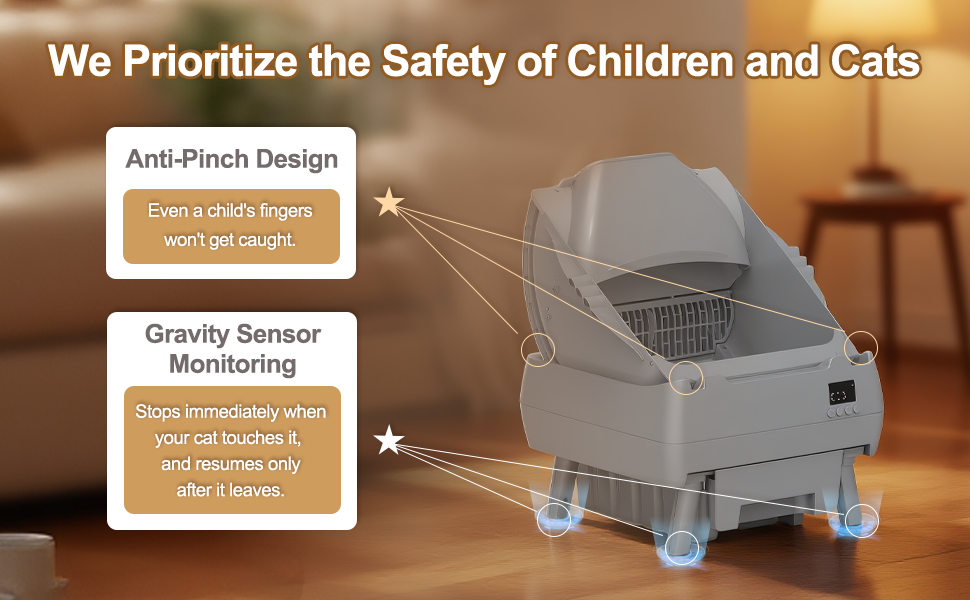
Image: The Cegimus Automatic Self-Cleaning Cat Litter Box with a 'Full Waste Bin Alert' notification on its display. A small kitten is sleeping peacefully on the floor nearby, emphasizing the quiet operation even with alerts.
2. Cleaning the Unit
The litter box features a snap-free design for easy and thorough cleaning.
- Unplug the unit from the power outlet before cleaning.
- Simply lift the inner drum out of the base. No complex disassembly is required.
- The entire drum is fully washable. You can rinse it with water and mild soap. Ensure it is completely dry before reinserting.
- Wipe down the base unit with a damp cloth. Avoid getting water into electronic components.
- Reinsert the dry drum into the base, ensuring it is properly seated.

Image: A sequence of three images illustrating the easy cleaning process. The first shows the assembled litter box, the second shows the inner drum lifted out of the base, and the third shows the base unit separated from the drum, highlighting the snap-free design for hassle-free maintenance.
Troubleshooting
| Issue | Possible Cause | Solution |
|---|---|---|
| Litter box not cleaning automatically. | Sensors obstructed or unit not powered. | Ensure sensors are clean. Check power connection. Verify cat has exited the box completely. |
| App not connecting to the device. | Incorrect Wi-Fi band or network issues. | Confirm your router is broadcasting a 2.4GHz Wi-Fi signal and your phone is connected to it during setup. Restart router and device. |
| Odor present despite cleaning. | Waste bin full or unit requires deeper cleaning. | Empty waste bin more frequently. Perform a thorough cleaning of the drum and base unit. Ensure clumping litter is used. |
| Cat hesitant to use the new litter box. | Adjustment period needed. | Place the new litter box next to the old one for a few days to two weeks. Gradually remove the old litter box once your cat is comfortable. |
| Litter not leveling correctly. | Insufficient litter or incorrect litter type. | Ensure sufficient clumping litter is used and the 'Level' mode is activated after adding new litter. |
Specifications
| Feature | Detail |
|---|---|
| Model Number | CAST-LB500B-001 |
| Brand | Cegimus |
| Dimensions (LxWxH) | 19.3" x 19.7" x 24.3" |
| Item Weight | 20 Pounds |
| Material | Polypropylene (PP) |
| Litter Box Type | Automated Self-Cleaning Litter Box |
| Target Audience | Medium cats and kittens (3.3lb - 15lb), 4 months and older |
| Connectivity | 2.4GHz Wi-Fi for app control |
| Noise Level | ≤32dB |
| Included Components | Self-Cleaning Cat Litter Box, Power Adapter, Starter Waste Bags |

Image: A detailed diagram illustrating the dimensions of the Cegimus Automatic Self-Cleaning Cat Litter Box. Key measurements are provided, along with notes indicating its suitability for cats 4 months and older and its effectiveness for multi-cat households.
Warranty and Support
Warranty Information
This Cegimus Automatic Self-Cleaning Cat Litter Box comes with a 1-year manufacturer's warranty from the date of purchase. This warranty covers defects in materials and workmanship under normal use. Please retain your proof of purchase for warranty claims.
Customer Support
For any questions, concerns, or technical assistance, please do not hesitate to contact our customer support team. We offer 24/7 support to ensure you and your feline friend have the best experience with our product.
Contact information can typically be found on the product packaging or through the 'Kitten Mew' app's support section.


