
1. Introduction
Thank you for choosing the Mentech Avant 500 GPS Bike Computer. This device is designed to enhance your cycling experience with advanced navigation, training features, and comprehensive data tracking. Featuring a 2.8" LCD touchscreen, dual-band 5 satellite system support, and robust IPX7 waterproofing, the Avant 500 provides reliable performance in various conditions. This manual will guide you through the setup, operation, and maintenance of your new bike computer.
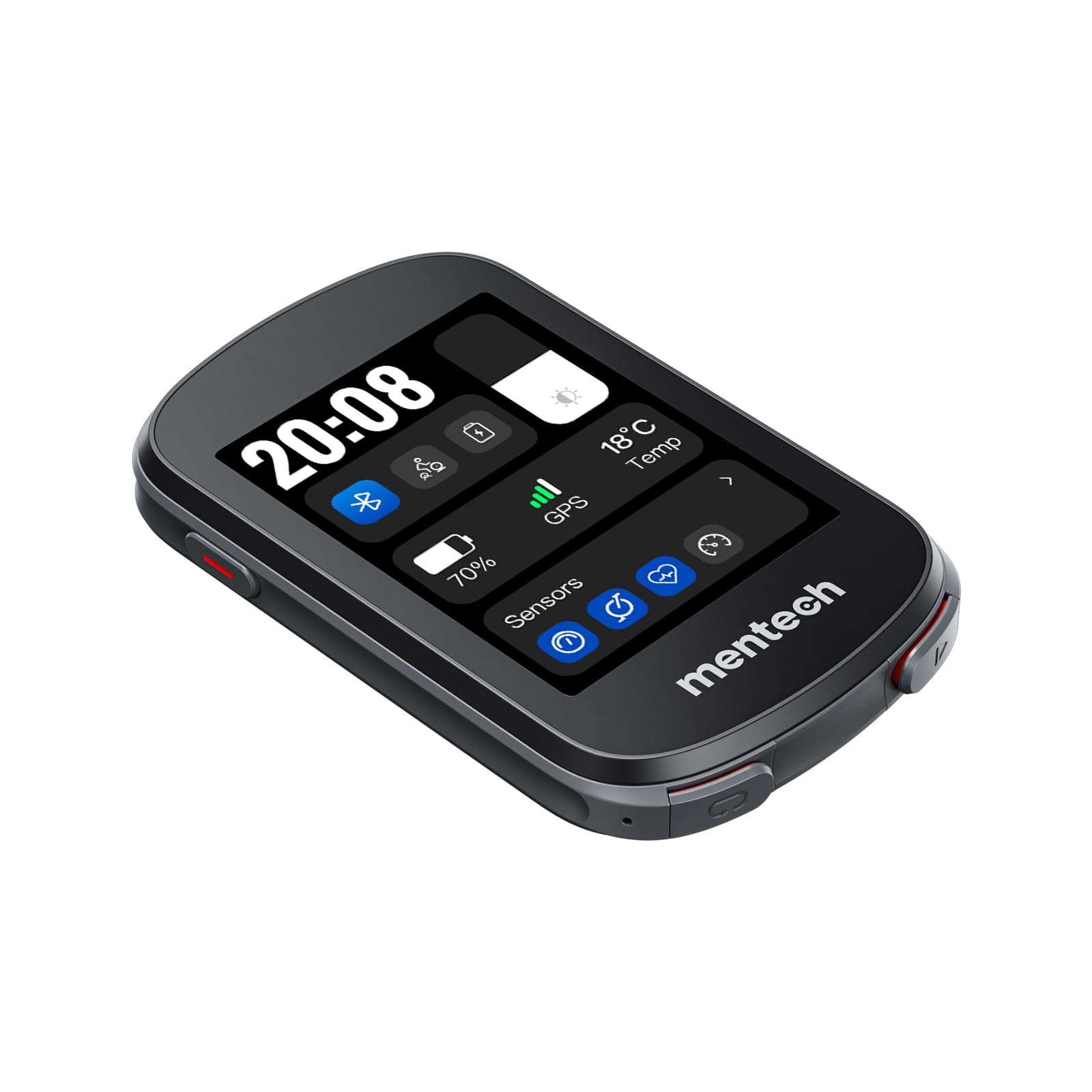
Figure 1: Mentech Avant 500 GPS Bike Computer
2. Safety Information
- Road Safety: Always prioritize road safety. Do not operate the device in a way that distracts you from cycling.
- Battery Safety: The device contains a Lithium Ion battery. Do not expose to extreme temperatures, puncture, or disassemble. Dispose of batteries according to local regulations.
- Water Resistance: The device is IPX7 waterproof, meaning it can withstand immersion in 1 meter of water for up to 30 minutes. It is not designed for underwater use or high-pressure water jets. Ensure the charging port cover is securely closed.
- Cleaning: Use a soft, damp cloth for cleaning. Avoid harsh chemicals or abrasive materials.
- Temperature: Operate and store the device within recommended temperature ranges (typically -20°C to 50°C).
3. Package Contents
Verify that all items are present in your package:
- Mentech Avant 500 GPS Bike Computer
- USB Charging/Data Cable
- Bike Mount (Standard or Out-front)
- Mounting Rubber Bands
- User Manual (this document)
4. Setup
4.1 Charging the Device
Before first use, fully charge your Avant 500. Connect the USB charging cable to the device's charging port and to a USB power adapter (not included) or a computer's USB port. The charging indicator will show the charging status. A full charge typically takes 2-3 hours and provides up to 22 hours of operation.
4.2 Mounting the Device
Attach the bike mount to your handlebar or stem using the provided rubber bands. Ensure the mount is secure and the device can be easily viewed while cycling. Align the Avant 500 with the mount and twist it clockwise until it locks into place.
4.3 Initial Power-On and Settings
- Press and hold the power button (usually on the side or bottom) for 3 seconds to turn on the device.
- Follow the on-screen prompts to select your preferred language, time zone, and measurement units (metric/imperial).
- Enter your personal profile information (e.g., weight, height) for accurate calorie and power calculations.
4.4 Pairing Sensors (ANT+/Bluetooth 5.2)
The Avant 500 supports ANT+ and Bluetooth 5.2 sensors (e.g., heart rate monitors, speed/cadence sensors, power meters).
- Go to the Settings menu on your device.
- Select Sensors or Add Sensor.
- Ensure your sensor is awake and within range. The Avant 500 will scan for available sensors.
- Select your sensor from the list and confirm pairing.
4.5 GPS Acquisition
For accurate tracking, ensure the device has a clear view of the sky. The Avant 500 uses dual-band 5 satellite systems for fast and precise positioning. It may take a few moments to acquire satellites on first use or after being moved a significant distance.
5. Operating Instructions
5.1 Basic Navigation (Touchscreen & Buttons)
The Avant 500 features a responsive 2.8" LCD touchscreen for most interactions. Physical buttons provide quick access to essential functions:
- Power Button: Press and hold to power on/off. Short press to access backlight/lock screen options.
- Start/Stop Button: Initiates or pauses ride recording.
- Lap Button: Marks a lap during a ride.
Swipe left/right on the touchscreen to switch between data screens. Tap to select options or confirm actions.
5.2 Recording a Ride
- Ensure GPS is acquired (GPS icon solid).
- Press the Start/Stop button to begin recording your ride.
- During the ride, you can view various data fields.
- To pause, press the Start/Stop button again. To resume, press it once more.
- To end and save the ride, press and hold the Start/Stop button, then select Save Ride.
5.3 Displaying Data Fields
You can customize the data fields displayed on each screen. Go to Settings > Data Fields to select metrics such as speed, distance, time, heart rate, cadence, power, and more.
5.4 Navigation Features
The Avant 500 supports turn-by-turn navigation and route following. You can upload GPX/FIT files to the device via the companion app or by connecting to a computer. Select Navigation from the main menu, choose your route, and follow the on-screen directions.
5.5 Connecting to a Smartphone App
Download the official Mentech companion app from your smartphone's app store. Pair your Avant 500 via Bluetooth to sync ride data, manage settings, and receive smart notifications.
6. Maintenance
6.1 Cleaning
Wipe the device with a soft, damp cloth. For stubborn dirt, use a mild soap solution. Ensure the charging port cover is closed before cleaning. Do not use abrasive cleaners or solvents.
6.2 Battery Care
To prolong battery life, avoid fully discharging the device frequently. If storing for an extended period, charge the battery to approximately 50% and store in a cool, dry place. Recharge every few months to prevent deep discharge.
6.3 Software Updates
Periodically check for software updates via the Mentech companion app or by connecting the device to your computer. Updates often include performance improvements, bug fixes, and new features.
6.4 Storage
Store the Avant 500 in a dry environment, away from direct sunlight and extreme temperatures, when not in use.
7. Troubleshooting
| Problem | Possible Solution |
|---|---|
| Device won't turn on. | Ensure the battery is charged. Connect to a power source and try again. If unresponsive, perform a soft reset (refer to online support for specific instructions). |
| GPS signal not acquired. | Move to an open area with a clear view of the sky. Ensure the device is not obstructed. Wait a few minutes. |
| Sensors not pairing. | Ensure sensors are awake and have fresh batteries. Check that they are not paired to another device. Restart the Avant 500 and try pairing again. |
| Touchscreen unresponsive. | Clean the screen. If the issue persists, try restarting the device. |
| Battery life is shorter than expected. | Ensure backlight brightness is not set too high. Turn off unnecessary features (e.g., Wi-Fi if available, excessive sensor connections). Extreme cold weather can also reduce battery performance. |
For further assistance, please visit the Mentech support website or contact customer service.
8. Specifications
- Model Name: Avant 500
- Display: 2.8" LCD Touchscreen
- GPS: Dual-Band 5 Satellite Systems (GPS, GLONASS, Galileo, BeiDou, QZSS)
- Connectivity: ANT+, Bluetooth 5.2
- Battery: Lithium Ion, up to 22 hours runtime
- Waterproof Rating: IPX7
- Dimensions: 9.4 x 5.84 x 1.91 cm (approx.)
- Weight: 108.86 g (approx.)
- Material: Plastic
- Operating Temperature: -20°C to 50°C
9. Warranty and Support
The Mentech Avant 500 GPS Bike Computer comes with a standard manufacturer's warranty. Please refer to the warranty card included in your package or visit the official Mentech website for detailed warranty terms and conditions.
For technical support, frequently asked questions, or to download the latest software updates, please visit the Mentech support portal:
You may also contact Mentech customer service directly for personalized assistance.