
1. Introduction
This user manual provides detailed instructions for the safe and effective use of your Checkme BP2A Upper Arm Bluetooth Blood Pressure Monitor. This device is designed for accurate blood pressure and heart rate measurements for home use. It features built-in data storage, Bluetooth connectivity for app integration, and a rechargeable battery for convenience.

Figure 1: Checkme BP2A Blood Pressure Monitor and companion app.
2. Product Overview
The Checkme BP2A is a compact and portable blood pressure monitor. It features an OLED screen for direct readings and a Start/Stop button for initiating measurements. A separate button allows access to historical data and ECG measurements. The device includes an adjustable arm cuff suitable for a wide range of arm sizes.
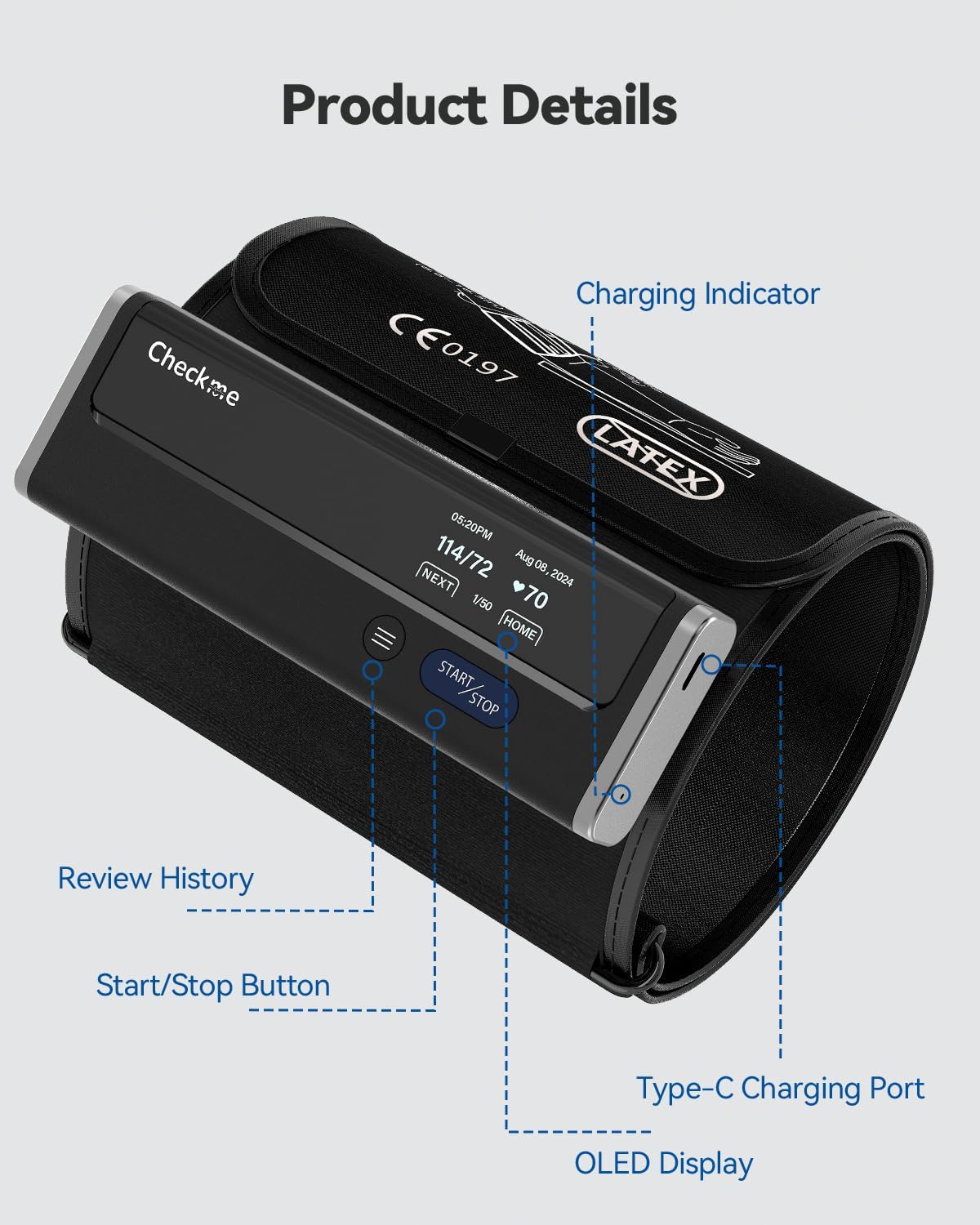
Figure 2: Key components of the Checkme BP2A monitor.
3. Setup
3.1 Charging the Device
The BP2A monitor comes with a built-in rechargeable battery. To charge, connect the provided charging cable to the USB-C port located on the side of the device. A full charge can last for approximately 3 months of typical use.

Figure 3: The compact and rechargeable design allows for easy portability.
3.2 App Installation and Pairing
For enhanced data management and tracking, download the ViHealth app from your device's app store (available for iOS and Android). Once installed, open the app and ensure Bluetooth is enabled on your smartphone. To pair the device, short press the Start/Stop button on the monitor to power it on. The screen will display the time and date, then offer options. The app should automatically detect and connect to the monitor. If not, navigate to the pairing section within the app to manually connect.

Figure 4: The ViHealth app allows tracking trends and sharing reports.
4. Operating Instructions
4.1 Taking a Blood Pressure Measurement
- Prepare for Measurement: Sit comfortably with your back supported and feet flat on the floor. Rest your arm on a table, ensuring the cuff is at heart level. Remain still and avoid talking during the measurement.
- Apply the Cuff: Wrap the adjustable arm cuff around your upper arm, approximately 1-2 cm (0.4-0.8 inches) above your elbow. Ensure it is snug but not too tight; you should be able to fit one or two fingers between the cuff and your skin. The cuff fits arm sizes ranging from 8.6 to 16.5 inches (22-42 cm).
- Start Measurement: Short press the Start/Stop button on the monitor. The device will begin inflating the cuff and taking the measurement. If connected to the ViHealth app, the measurement process and results will also be displayed on your phone.
- View Results: Once the measurement is complete, your systolic (SYS) and diastolic (DIA) blood pressure readings, along with your pulse rate, will be displayed on the monitor's OLED screen and uploaded to the app.

Figure 5: Proper arm cuff placement for accurate measurement.
4.2 Reviewing Stored Data
The Checkme BP2A monitor has built-in storage for up to 50 blood pressure readings. To review historical data directly on the device, short press the menu button (three horizontal lines) after powering on. To view previous ECG measurements, press and hold the menu button for 2 seconds. You can navigate through stored readings using the menu button.

Figure 6: Accessing built-in storage on the device.
For comprehensive historical data, including weekly and monthly trends, and the ability to export reports (PDF & CSV), use the ViHealth app. All measurements taken while the app is connected will automatically sync.
4.3 Multi-User Data Management
The ViHealth app supports multi-user record management, allowing different individuals to track their blood pressure and ECG data separately. This feature is ideal for families or shared household use.

Figure 7: Managing multiple user profiles within the ViHealth app.
5. Maintenance
5.1 Cleaning
Wipe the device and cuff with a soft, dry cloth. If necessary, use a cloth lightly dampened with water or a mild, non-abrasive cleaner. Do not immerse the device in water or use harsh chemicals.
5.2 Storage
Store the monitor in a cool, dry place away from direct sunlight, extreme temperatures, and humidity. Keep it out of reach of children and pets.
6. Troubleshooting
If you encounter any issues with your Checkme BP2A monitor, please consider the following:
- No Power: Ensure the device is fully charged.
- Inaccurate Readings: Verify correct cuff placement and ensure you are relaxed and still during measurement. Avoid talking or moving. Ensure the cuff is at heart level.
- App Connectivity Issues: Check that Bluetooth is enabled on your phone and the app is open. Restart both the device and the app if necessary.
- Error Messages: Refer to the quick guide included with your product for specific error code meanings.
For persistent issues, contact Checkme customer support.
7. Specifications
| Feature | Detail |
|---|---|
| Product Dimensions | 5.9 x 1.9 x 1.18 inches |
| Item Weight | 16 ounces (1 Pound) |
| Model Name | BP2A |
| Power Source | Battery Powered (1 Nonstandard Battery included) |
| Use For | Arm |
| Display Type | Digital (OLED Screen) |
| Arm Cuff Size | 8.6-16.5 inches (22-42cm) |
| Manufacturer | Shenzhen Viatom Technology Co., Ltd |
| Included Components | Blood Pressure Monitor, Charging Cable, User Manual, Quick Guide, Warranty Card |
8. Warranty and Support
Your Checkme BP2A Blood Pressure Monitor comes with a 1-year warranty, providing peace of mind regarding manufacturing defects and performance issues. Please refer to the Warranty Card included in your package for specific terms and conditions.
For technical support, troubleshooting assistance, or warranty claims, please visit the official Checkme website or contact their customer service department using the contact information provided in your product documentation.