

1. Introduction
This manual provides detailed instructions for the installation, operation, and maintenance of the JKBMS 2A Active Balancer, Model JK-DZ11-B2A24S. This device is designed to manage and equalize voltage across individual cells in lithium battery packs (LiFePO4, Li-ion, LTO) ranging from 2S to 24S, ensuring optimal performance and extended battery lifespan.
The active balancer features a 2A balancing current, built-in Bluetooth for real-time monitoring via a mobile application, and RS485 communication. It supports a wide input voltage range of 20V-100V and offers precise voltage detection with an accuracy of ±3mV.
2. Safety Information
- Always disconnect the battery pack before performing any wiring or maintenance.
- Ensure correct polarity when connecting the balancer to the battery cells. Incorrect connections can cause damage to the device and battery.
- Do not short-circuit the balancer terminals.
- Operate the device within its specified voltage and current limits.
- Keep the device away from moisture, extreme temperatures, and flammable materials.
- Installation should be performed by individuals familiar with battery systems and electrical safety procedures.
3. Package Contents
Verify that all items are present in the package:
- JKBMS 2A Active Balancer Unit (Model JK-DZ11-B2A24S)
- Balance Wire Harness (for cell connections)
- Temperature Sensor
- User Manual (this document)
4. Product Overview
The JKBMS Active Balancer is a compact unit designed for efficient cell equalization. Below is an image illustrating the device and its main connection points.
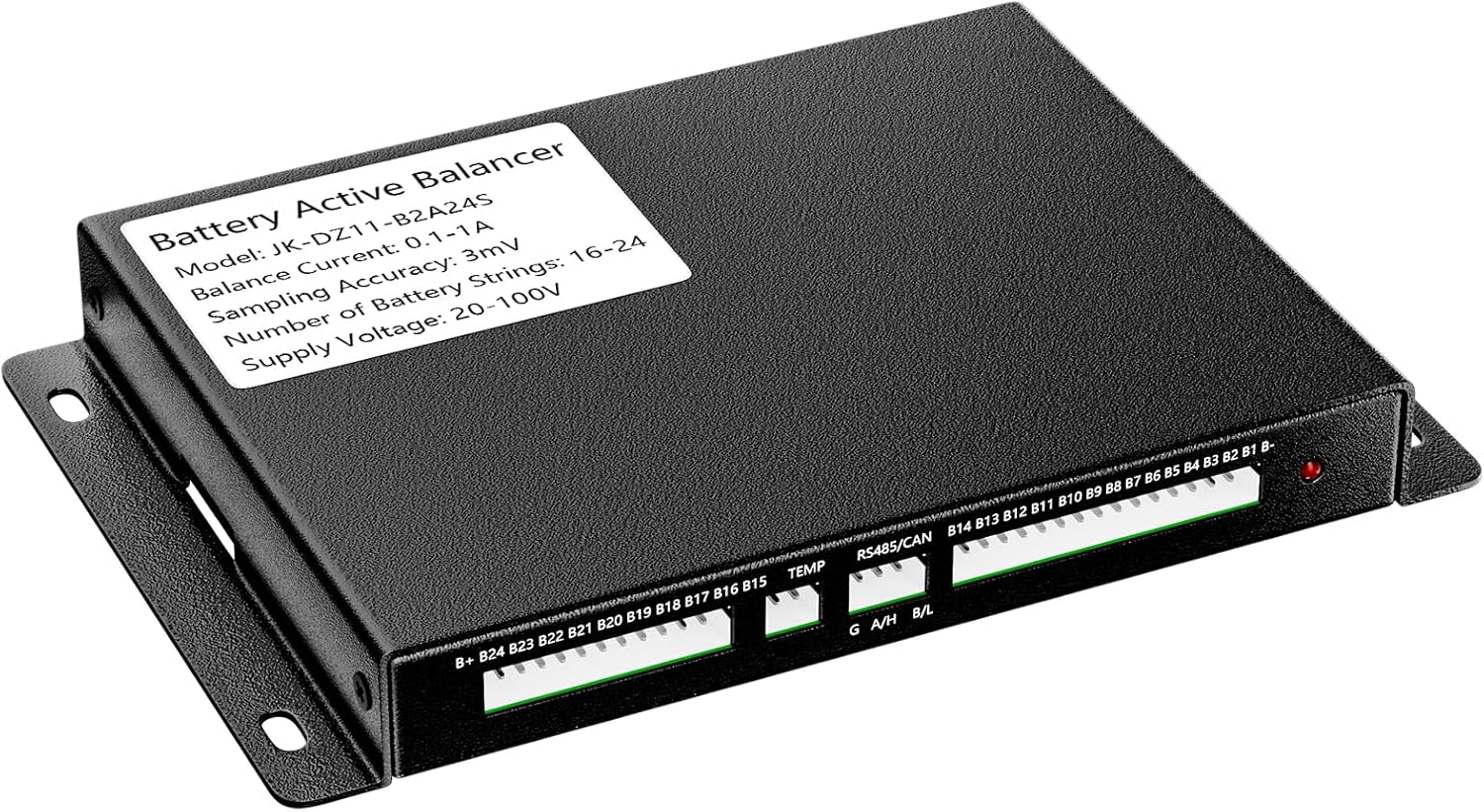
Figure 1: JKBMS 2A Active Balancer (Model JK-DZ11-B2A24S). The image shows the top view of the black rectangular unit with labels for balance current, model, sampling accuracy, number of battery strings, and supply voltage. Connection ports for B+, B-, TEMP, RS485/CAN, and balance wires (B1-B24) are visible along one edge.
Key components and indicators:
- Balance Wire Ports: Connects to individual battery cells (B1 to B24).
- TEMP Port: For connecting the external temperature sensor.
- RS485/CAN Port: For communication with external devices or systems.
- Bluetooth Module: Integrated for wireless monitoring via mobile app.
- Status LED: Indicates operational status (e.g., balancing, error).
5. Setup and Installation
Follow these steps carefully to install the JKBMS Active Balancer:
- Prepare the Battery Pack: Ensure your battery pack is within the 2S-24S configuration and the total voltage is between 20V-100V. Individual cell voltages should be within safe operating limits.
- Connect Balance Wires:
- Connect the provided balance wire harness to the corresponding balance ports on the balancer unit.
- Carefully connect each wire from the harness to its respective cell tap on your battery pack, starting from B- (negative terminal of the first cell) up to B+ (positive terminal of the last cell). Ensure the order is correct (B1, B2, ..., B24). Incorrect wiring can damage the balancer or battery.
- Connect Temperature Sensor: Plug the temperature sensor into the TEMP port on the balancer. Position the sensor appropriately to monitor battery temperature.
- Connect RS485/CAN (Optional): If using RS485 or CAN communication, connect the appropriate cables to the RS485/CAN port. Refer to the specific communication protocol documentation for detailed wiring.
- Power On: Once all connections are secure and verified, connect the main positive and negative terminals of the balancer to the battery pack's main terminals. The balancer will power on automatically.
Important: Double-check all wiring before applying power to prevent damage.
6. Operating Instructions
The JKBMS Active Balancer can be monitored and configured via its built-in Bluetooth module and a dedicated mobile application.
6.1 Mobile Application (JK App)
- Download the App: Search for "JK BMS" or "JKBMS" in your device's app store (available for iOS and Android).
- Connect via Bluetooth:
- Enable Bluetooth on your smartphone.
- Open the JK App. The app should automatically detect nearby JKBMS devices.
- Select your balancer from the list to establish a connection.
- Monitoring: Once connected, the app will display real-time data, including:
- Individual cell voltages
- Total pack voltage
- Balancing status (which cells are balancing)
- Battery temperature
- Other relevant parameters.
- Parameter Adjustment: The app allows for configuration of certain balancing parameters. Refer to the in-app help or specific JKBMS documentation for details on adjustable settings.
6.2 Status LED Indicators
The device features a status LED to provide quick visual feedback:
- Solid Green: Normal operation, cells are balanced or within acceptable deviation.
- Flashing Green: Active balancing in progress.
- Solid Red: Error condition. Check connections and app for details.
- No Light: Device is off or not receiving power.
7. Maintenance
- Cleaning: Periodically clean the exterior of the balancer with a dry, soft cloth. Do not use liquid cleaners or solvents.
- Connection Check: Regularly inspect all wiring connections for tightness and signs of corrosion or damage.
- Firmware Updates: Check the JKBMS official website or app for any available firmware updates. Follow the provided instructions carefully for any update procedures.
- Storage: If storing the balancer for an extended period, disconnect it from the battery pack and store it in a cool, dry place.
8. Troubleshooting
| Problem | Possible Cause | Solution |
|---|---|---|
| Balancer not powering on / No LED light | Incorrect main power connection; Battery voltage too low; Damaged unit. | Verify main positive and negative connections. Check battery pack voltage. Contact support if unit is damaged. |
| Cells not balancing | Balance wires incorrectly connected; Cell voltage difference too small; Balancer fault. | Check all balance wire connections for correct order and secure fit. Ensure cell voltage deviation exceeds the balancing threshold (check app settings). |
| Cannot connect via Bluetooth | Bluetooth disabled on phone; App not detecting device; Interference. | Ensure phone Bluetooth is on. Restart app and balancer. Try connecting in a different location to reduce interference. |
| Status LED is solid red | Error condition (e.g., over-voltage, under-voltage, temperature). | Check the JK App for specific error codes or warnings. Address the underlying issue (e.g., battery voltage, temperature). |
9. Specifications
| Feature | Detail |
|---|---|
| Model | JK-DZ11-B2A24S |
| Active Balancing Current | 2A (constant) |
| Cell Configuration | 2S - 24S |
| Compatible Battery Types | LiFePO4, Li-ion (NCM), LTO |
| Cell Voltage Range | 1V - 5V |
| Voltage Measurement Accuracy | ±3mV |
| Input Voltage Range | 20V - 100V |
| Communication | Bluetooth, RS485 |
| Dimensions (L x W x H) | 6.2 x 3.9 x 0.73 inches |
| Weight | 12.6 ounces |
10. Warranty and Support
JKBMS products are designed for reliability and performance. For warranty information, please refer to the official JKBMS website or your purchase documentation. If you encounter any issues or require technical assistance, please contact JKBMS customer support through their official channels or the retailer from whom you purchased the product.
For additional resources and FAQs, visit the JKBMS Store on Amazon.


