
Introduction
Thank you for choosing the ENYLAY Ergonomic Mesh Office Chair. This manual provides detailed instructions for assembly, operation, maintenance, and troubleshooting to ensure you get the most comfortable and efficient experience from your new chair. Please read this manual thoroughly before assembly and use, and retain it for future reference.
Safety Instructions
- Ensure all parts are present and undamaged before assembly. Do not use if any parts are missing or damaged.
- Follow the assembly steps precisely. Incorrect assembly may lead to instability or injury.
- Do not stand on the chair. Use it only for sitting.
- Do not use the chair as a step stool.
- Do not exceed the maximum weight capacity of 330 lbs (150 kg).
- Keep children away from moving parts during assembly.
- Regularly check all bolts and connections to ensure they remain tight.
- Avoid exposing the chair to direct sunlight or extreme temperatures to prevent material degradation.
Package Contents
Please verify that all components listed below are included in your package:

Image: All components of the ENYLAY Ergonomic Mesh Office Chair laid out for assembly.
- A: Backrest (x1)
- B: Seat (x1)
- C: Armrests (x2, 1L/1R)
- D: Mechanism (x1)
- E: Gas Lift (x1)
- F: Base (x1)
- G: Legs (x5)
- H: Casters (x5)
- I: Headrest Pillow (x1)
- J: Cap (x2)
- K: Bolts M6x20mm (x4)
- L: Bolts M6x35mm (x6)
- M: Bolts M8x14mm (x10)
- N: Bolts M6x20mm (x6)
- O: Wrench (x1)
Assembly Instructions
Follow these steps to assemble your ENYLAY Ergonomic Mesh Office Chair. An assembly video is provided for visual guidance.
Video: Easy 15 Min Assembly! ENYLAY Office Chair Setup. This video demonstrates the complete assembly process for the office chair.
- Assemble the Chair Base:
Turn the Base (F) upside down. Insert the five Legs (G) into the Base one by one. Use the Wrench (O) to secure each leg with the appropriate Bolts (M). Ensure all bolts are tightened securely.Image: A person attaching the five legs to the chair's central base using a wrench.
- Attach Casters:
Press the five Casters (H) firmly into the holes at the end of each Leg (G). Ensure they click into place and are securely seated.Image: A person pressing a caster wheel into the end of a chair leg.
- Insert Gas Lift:
Insert the Gas Lift (E) into the central hole of the assembled Base (F). No tools are required for this step; it simply rests in place.Image: The gas lift being placed into the center of the chair's five-star base.
- Attach Armrests to Backrest:
Using the Wrench (O), install the Armrests (C) (1L/1R, marked for left and right) to both sides of the Backrest (A) with Bolts (M)*4. Tighten these bolts to 50% initially to allow for adjustment.Image: A person screwing an armrest onto the backrest, with a 50% tightening indicator.
- Attach Backrest/Armrest Assembly to Seat:
Turn the Seat (B) upside down. Using the Wrench (O), install the Armrests (C) to the Seat (B) with Bolts (L)*6. Ensure the backrest and armrest assembly is correctly aligned with the seat.Image: The backrest and armrest assembly being attached to the underside of the seat cushion.
- Attach Mechanism to Seat:
Using the Wrench (O), attach the Mechanism (D) to the Seat (B) with Bolts (K)*4. Ensure the 'FRONT' label on the mechanism faces the front of the seat.Image: A person screwing the chair's mechanism onto the bottom of the seat.
- Final Tightening and Assembly:
Using the Wrench (O), 100% tighten the previously installed Bolts (N)*4 on the Armrests (C)x1Lx1R. Align the hole on the Mechanism (D) with the Gas Lift (E), and press the chair down until it is fully secured onto the gas lift.Image: A person fully tightening the armrest bolts and then placing the assembled seat onto the gas lift.
- Attach Headrest:
Fix the Headrest (I) into the backrest frame (A) by tightening the Bolts (N)*2 100%. Click the Cap (J) into place over the bolts.Image: A person attaching the headrest to the top of the chair's backrest and covering the bolts with caps.

Operating Instructions
Your ENYLAY Ergonomic Mesh Office Chair is designed with several adjustable features to enhance your comfort and support. Familiarize yourself with these functions for optimal use.
Video: ENYLAY Ergonomic Office Chair, Mesh Desk Chair Computer. This video highlights the ergonomic features and adjustability of the chair.
- Seat Height Adjustment:
Locate the lever on the right side, beneath the seat. To raise the seat, lift the lever while taking your weight off the chair. To lower the seat, lift the lever while remaining seated. Adjust to a height where your feet are flat on the floor and your knees are at a 90-degree angle.
Image: Diagram illustrating the adjustable seat height range of the chair.
- Rocking Function (Tilt Mechanism):
The chair features a rocking function for relaxation. Pull out the lever on the right side (the same lever for height adjustment) to enable rocking. Push the lever in to lock the chair in an upright position. The rocking tension can be adjusted by turning the round knob located under the seat at the front. Turn clockwise to tighten tension, counter-clockwise to loosen.
Image: Visual guide on how to activate the rocking function and adjust its tension.
- Flip-up Armrests:
The armrests can be flipped up 90 degrees to allow the chair to be pushed closer to a desk or for space-saving storage. Simply lift the armrests upwards until they lock into the vertical position. To return them, pull them down until they lock into the horizontal position.
Image: The chair demonstrating its flip-up armrest feature, allowing it to be stored under a desk.
- Adjustable Headrest:
The headrest can be adjusted for both height and angle. Gently pull or push the headrest up or down to find your desired height. To adjust the angle, tilt the headrest forward or backward. This provides optimal support for your head and neck.
Image: Illustrations detailing the vertical and rotational adjustments of the chair's headrest.
- Lumbar Support:
The chair features integrated lumbar support designed to conform to the natural curve of your spine, providing strong support to your lower back. This is a fixed ergonomic design.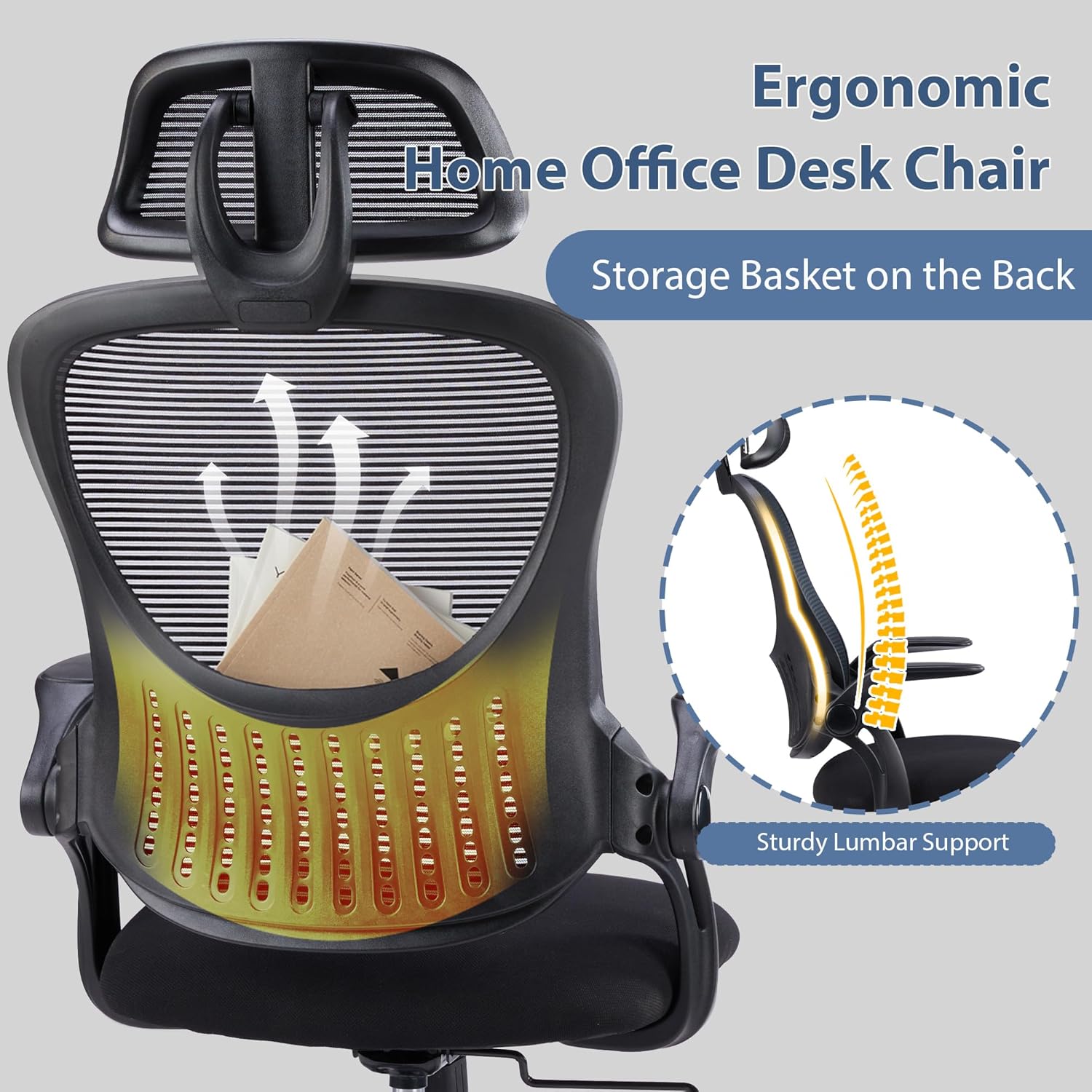
Image: Close-up of the chair's backrest highlighting the sturdy lumbar support area.
Maintenance
Proper maintenance will extend the life and appearance of your ENYLAY office chair.
- Cleaning: For mesh and fabric parts, use a soft cloth dampened with mild soap and water. Avoid harsh chemicals or abrasive cleaners. For plastic and metal parts, wipe with a clean, dry cloth.
- Inspection: Periodically check all bolts and screws to ensure they are tight. Re-tighten if necessary to maintain stability and safety.
- Casters: Clean casters regularly to remove hair, dust, and debris that can impede smooth rolling.
- Avoid Overloading: Do not exceed the chair's maximum weight capacity to prevent damage to the gas lift and frame.
- Environment: Keep the chair in a dry, well-ventilated area. Avoid prolonged exposure to direct sunlight, which can fade upholstery and degrade plastic components.
Troubleshooting
If you encounter any issues with your chair, refer to the following common problems and solutions:
| Problem | Possible Cause | Solution |
|---|---|---|
| Chair does not adjust height | Gas lift is faulty or lever is not engaged. | Ensure the height adjustment lever is fully engaged. If the problem persists, the gas lift may need replacement. Contact customer support. |
| Chair wobbles or feels unstable | Loose bolts or uneven floor. | Check and tighten all assembly bolts, especially those connecting the legs to the base and the mechanism to the seat. Ensure the chair is on a flat, even surface. |
| Casters do not roll smoothly | Debris caught in casters or casters are damaged. | Turn the chair over and remove any hair, dust, or debris from the caster wheels. If casters are damaged, they may need replacement. |
| Backrest does not recline or lock | Tilt lock lever is not engaged/disengaged correctly. | Pull the tilt lock lever out to enable rocking/recline, push it in to lock. Check the tension knob under the seat; it might be too tight. |
Specifications
Key specifications for the ENYLAY Ergonomic Mesh Office Chair:
- Brand: ENYLAY
- Model Name: EY-361901
- Color: Black
- Material: Mesh (Backrest, Seat), Metal (Frame), Sponge (Fill)
- Product Dimensions (D x W x H): 26.7" x 26.7" x 53" (67.8 cm x 67.8 cm x 134.6 cm)
- Seat Height: 22.2 Inches (56.4 cm)
- Seat Depth: 20.1 inches (51.1 cm)
- Seat Back Interior Height: 30.7 Inches (78 cm)
- Arm Height: 7.9 Inches (20.1 cm)
- Item Weight: 24.5 Pounds (11.1 kg)
- Maximum Weight Recommendation: 330 Pounds (150 kg)
- Features: Adjustable Headrest, Adjustable Height, Flip-up Armrests, Back Support, Swivel, Tilting
- Room Type: Office, Office Reception, Study Room
Warranty and Support
ENYLAY is committed to providing high-quality products and customer satisfaction.
- Warranty: This product comes with a standard manufacturer's warranty. Please refer to your purchase documentation for specific warranty terms and duration.
- Customer Support: For any questions, missing parts, or assistance with assembly or operation, please contact ENYLAY customer service.
- Contact Information: Please visit the official ENYLAY store on Amazon or refer to your product packaging for the most current contact details.