
Introduction
This manual provides detailed instructions for the proper setup, operation, and maintenance of your Catchallway 4K Mini Body Camera H88. Please read this manual thoroughly before using the device to ensure optimal performance and longevity.
The Catchallway H88 is a compact, high-resolution body camera designed for versatile recording. It features 4K video capture, a 140° wide-angle lens, and a built-in 128GB memory card. Its robust design includes full waterproof protection, making it suitable for various environments. The camera supports wireless connectivity for live preview, playback, and data transfer via a smartphone application.
What's in the Box
Upon unboxing your Catchallway 4K Mini Body Camera H88, please ensure all the following items are present:
- Mini Body Camera (Built-in 128GB Card) x 1
- 360° Rotating Removable Clamp & Stretchable Magnetic Lanyard x 1
- Bicycle holder & Waterproof case x 1
- Card Reader & Date / Charger Cable (Type-C to C, Type-C to USB) x 1
- 1-Year Guarantee (gogoing6868@gmail.com)
Product Overview
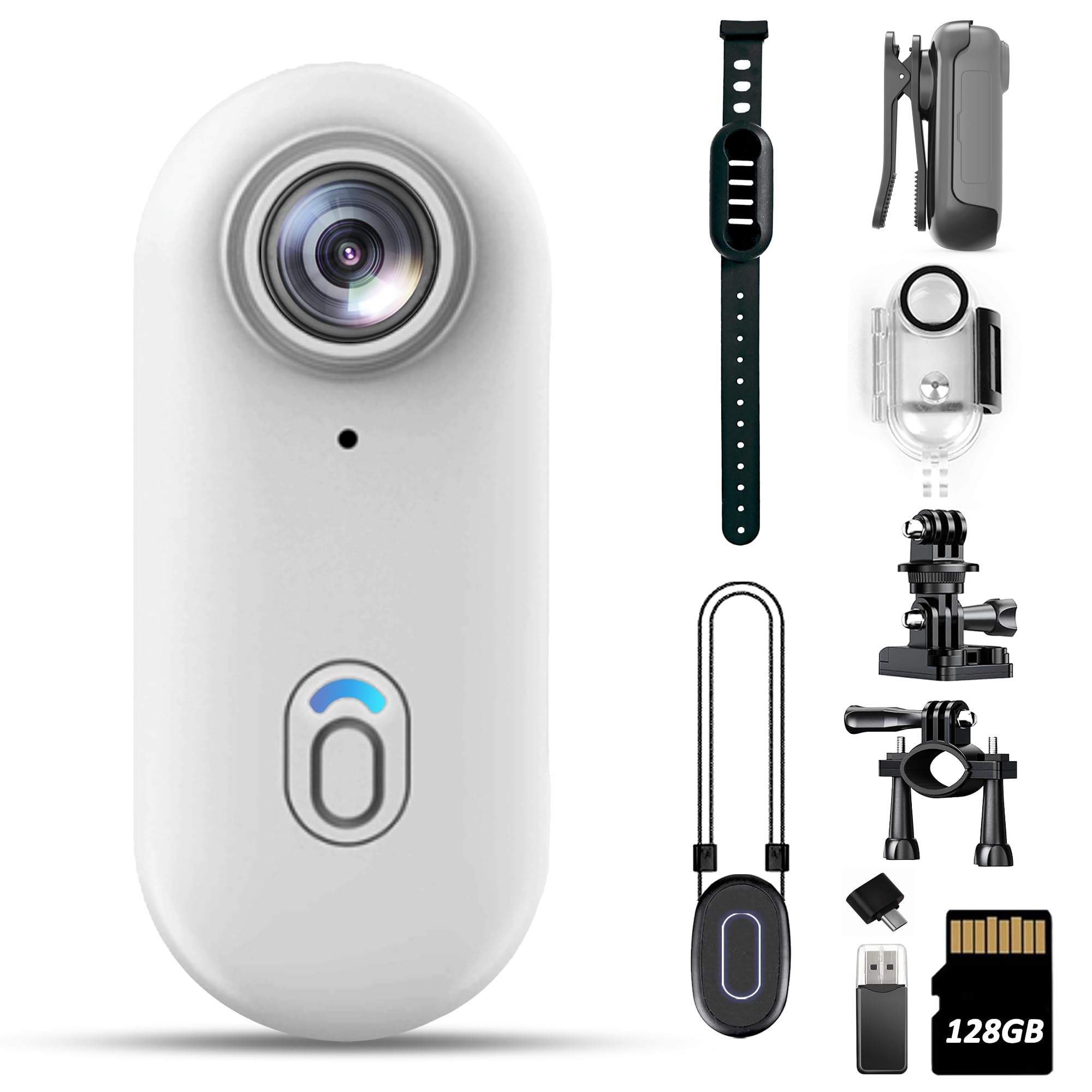
Figure 1: Catchallway 4K Mini Body Camera H88
The camera features a compact design with a single main button for operation. The lens is located at the top. On the side, beneath a protective rubber cover, you will find the USB-C charging port and the microSD card slot. The device also includes an LCD screen for live preview and playback.
Setup
1. Charging the Camera
Before first use, fully charge the camera. Connect the provided USB-C cable to the camera's charging port and a power source. The red LED will flash during charging and turn solid when fully charged. An 800mAh battery supports up to 90 minutes of continuous use.
2. Inserting/Removing the SD Card
The camera comes with a built-in 128GB memory card. To access the card slot, gently open the protective rubber cover on the side of the camera. Insert the microSD card with the gold contacts facing down until it clicks into place. To remove, press the card gently until it springs out. Use the included card reader for easy data transfer to your computer.
3. App Installation
For wireless preview, playback, and file transfer, download the 'Viidure' application from your smartphone's app store. Scan the QR code in the user manual for direct access to the app download.
4. Wi-Fi Connection
To connect your camera to the 'Viidure' app via Wi-Fi:
- Long-press the main button to turn on the camera. The blue LED will be solid.
- Quick-press the main button twice to turn on Wi-Fi mode. The green LED will flash, indicating Wi-Fi is on.
- On your smartphone, go to Wi-Fi settings and look for a network named beginning with "H88".
- Connect to this network. The default password is "12345678".
- Open the 'Viidure' app. The app will automatically detect and connect to the camera. The green LED on the camera will turn solid, indicating a successful Wi-Fi connection.
Video 1: How to Realize Wi-Fi Connection - Mini Thumb Cam. This video demonstrates the steps to connect your camera to the smartphone app via Wi-Fi for live preview and file management.
Operating
1. Power On/Off
- Power On: Long-press the main button until the blue LED turns solid.
- Power Off: Long-press the main button until the blue LED turns off.
2. Start/Stop Recording
- Start Recording: With the camera powered on (solid blue LED), quick-press the main button once. The blue LED will slowly flash, indicating recording is in progress.
- Stop Recording: While recording (slowly flashing blue LED), quick-press the main button once. The blue LED will turn solid, indicating recording has stopped and the file is saved.
3. Hands-Free Recording
The camera comes with a 360° swivel detachable clip and a magnetic lanyard. These accessories allow for easy attachment to clothing or bags, providing hands-free recording. The powerful magnet and stable stand design also enable mounting on metal surfaces or flat areas for flexible angle capture.
4. Waterproof Usage
Utilize the fully waterproof casing for reliable underwater performance up to 66 feet (20 meters). Ensure the casing is properly sealed before submerging the camera. This also provides protection in various weather conditions.
5. Loop Recording
The camera's loop recording function automatically overwrites the oldest footage when the memory card is full. This ensures uninterrupted recording without manual intervention.
6. Wireless Preview & Data Transfer
After connecting the camera to your smartphone via Wi-Fi, use the 'Viidure' app for live previews of your recording, instant video playback, and seamless file transfers. With a maximum wireless range of 32 feet, you can quickly access, share, and edit your footage anytime, anywhere.
Video 2: Quick Guidance - 4K Mini Body Camera. This video provides a quick overview of the camera's basic functions and operation.
Maintenance
To ensure the longevity and optimal performance of your Catchallway 4K Mini Body Camera H88, follow these maintenance guidelines:
- Cleaning: Use a soft, dry cloth to clean the camera body and lens. Avoid abrasive materials or harsh chemicals.
- Storage: Store the camera in a cool, dry place away from direct sunlight and extreme temperatures.
- Battery Care: For long-term storage, ensure the battery is partially charged (around 50%) to prevent degradation.
- Resetting the Camera: If the camera freezes or malfunctions, locate the reset button (typically a small pinhole) and press it gently with a thin object (e.g., a paperclip) to restart the device.
Troubleshooting
If you encounter issues with your Catchallway 4K Mini Body Camera H88, refer to the following common problems and solutions:
- Camera Not Turning On: Ensure the battery is charged. Connect the camera to a power source and try again. If unresponsive, perform a reset.
- Recording Not Starting/Stopping: Check if the SD card is properly inserted and has sufficient free space. Ensure the camera is not in Wi-Fi mode when attempting to record.
- Wi-Fi Connection Issues: Verify that the camera's Wi-Fi mode is activated (flashing green LED). Ensure you are connecting to the correct Wi-Fi network (starting with "H88") and entering the correct password ("12345678"). Keep the camera and smartphone within the 32-foot range.
- Poor Video Quality: Ensure the lens is clean and free from smudges. Record in well-lit conditions for optimal 4K resolution.
- Camera Freezes: Perform a camera reset using the reset button.
Specifications
| Feature | Specification |
|---|---|
| Product Dimensions | 0.9 x 1 x 2.4 inches |
| Item Weight | 5.6 ounces |
| Item Model Number | H88 |
| Batteries | 1 Nonstandard Battery (included) |
| Photo Sensor Technology | CMOS |
| Video Capture Resolution | 4K |
| Flash Memory Type | Micro SD (128GB built-in) |
| Video Capture Format | MOV |
| Supported Audio Format | Mp4 |
| Connectivity Technology | App Transfer, Type-C to C, Type-C to USB |
| Special Feature | H.264 |
| Camcorder Type | Video Camera |
Warranty
Your Catchallway 4K Mini Body Camera H88 comes with a 1-Year Guarantee. Please retain your proof of purchase for warranty claims.
Support
For any technical assistance or support inquiries regarding your camera, please contact us via email at gogoing6868@gmail.com.