
Product Overview
The Kismile Water Cooler Dispenser with Ice Maker is a versatile appliance designed to provide hot, cold, and ice water for home and office environments. This integrated unit saves space by combining multiple functions into one compact design, offering convenience and efficiency for daily hydration needs.

Figure 1: Kismile Water Cooler Dispenser with Ice Maker (Black model).

Figure 2: The dispenser offers three functions: hot water, cold water, and ice production.
Setup Instructions
1. Unpacking
- Carefully remove the appliance from its packaging.
- Inspect for any shipping damage. If damaged, do not operate and contact customer support.
- Remove all packing materials, including any tape or protective films.
2. Placement
Place the water cooler on a flat, stable surface away from direct sunlight and heat sources. Ensure adequate ventilation around the unit, leaving at least 4 inches of space from walls or other objects.

Figure 3: Product dimensions are 11.42"D x 11.81"W x 32.91"H, allowing for versatile placement.

Figure 4: The compact design is suitable for various locations such as living rooms, kitchens, and offices.
3. Water Bottle Installation
This water dispenser uses a top-loading system and is compatible with 2, 3, or 5-gallon water bottles. Ensure the bottle has a puncturable seal lid.
- Clean the neck of the water bottle.
- Remove the protective cap from the water bottle.
- Carefully lift the water bottle and invert it, placing its neck into the support collar on top of the dispenser. The probe will push the seal open.
- Ensure the bottle is seated firmly and water begins to flow into the dispenser's reservoirs.

Figure 5: The top-mounted tank accommodates 2, 3, or 5-gallon bottles, allowing easy monitoring of water levels.
4. Initial Startup
- Once the water bottle is installed and water has filled the internal reservoirs (this may take a few minutes), plug the power cord into a grounded electrical outlet.
- Allow the unit to sit for at least 30 minutes before dispensing water or activating heating/cooling/ice making functions to allow refrigerants to settle.
- Dispense and discard at least two cups of hot and two cups of cold water to flush the system before first use.
Operating Instructions
The Kismile Water Cooler features a user-friendly control panel with both touch and mechanical buttons for intuitive operation.

Figure 6: The control panel combines touch buttons for water dispensing and safety lock, and mechanical buttons for heating, cooling, and ice-making.
1. Hot Water Dispensing
- Press the Heating mechanical button to activate hot water heating. The indicator light will illuminate.
- Once the water reaches the desired temperature (≥90°C / ≥194°F), the light may turn off or change color.
- To dispense hot water, press and hold the Child Lock touch button, then press the Hot Water Dispense touch button.
- Release the dispense button to stop the flow.

Figure 7: The child safety lock prevents accidental hot water dispensing, enhancing safety.
2. Cold Water Dispensing
- Press the Cooling mechanical button to activate cold water cooling. The indicator light will illuminate.
- Once the water reaches the desired temperature (≤8°C / ≤46.4°F), the light may turn off or change color.
- To dispense cold water, press the Cold Water Dispense touch button.
- Release the dispense button to stop the flow.
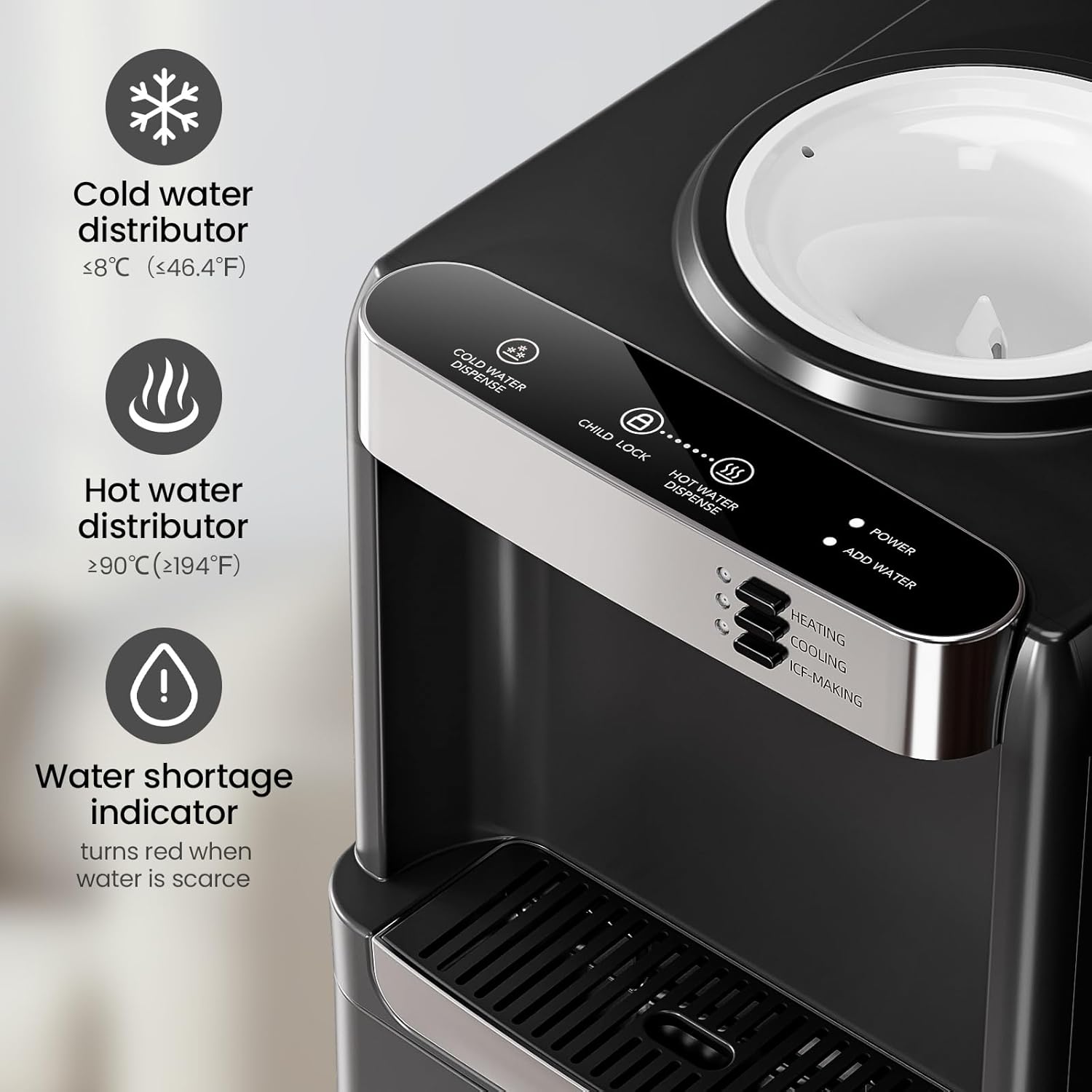
Figure 8: Indicators show the status of cold water (≤8°C / ≤46.4°F) and hot water (≥90°C / ≥194°F) distribution, along with a water shortage alert.
3. Ice Making
- Press the Ice-Making mechanical button to start ice production. The indicator light will illuminate.
- The unit can produce 9 bullet-shaped ice cubes in approximately 6-11 minutes per batch.
- It has a daily ice production capacity of up to 33 pounds (33Lbs/24H) and an ice storage capacity of 2.5L.
- The machine will automatically stop making ice when the ice bin is full.

Figure 9: The ice maker produces 9 ice cubes in 6-11 minutes, with a daily capacity of 33 lbs.

Figure 10: The ice full indicator light turns green when the ice storage is at capacity, and the machine pauses ice production.
4. Indicators
- Power Indicator: Illuminates when the unit is powered on.
- Add Water Indicator: Turns red when the water bottle is low or empty, prompting a refill.
- Heating Indicator: Illuminates when the hot water heating function is active.
- Cooling Indicator: Illuminates when the cold water cooling function is active.
- Ice-Making Indicator: Illuminates when the ice production function is active.

Figure 11: The "Add Water" indicator light turns red when the water level is low, signaling the need for a new bottle.
Maintenance
1. Cleaning the Drip Tray
The drip tray should be emptied and cleaned regularly to prevent overflow and maintain hygiene.
- Gently pull the drip tray forward to remove it from the dispenser.
- Empty any collected water.
- Wash the drip tray with mild soap and warm water.
- Rinse thoroughly and dry completely before reinserting.

Figure 12: The drip tray can be easily removed for cleaning.
2. Cleaning the Ice Bin
Periodically clean the ice storage bin to ensure fresh and clean ice.
- Turn off and unplug the unit.
- Open the ice bin door.
- Remove any remaining ice.
- Wipe the interior of the ice bin with a clean cloth dampened with mild soap and water.
- Rinse with a clean, damp cloth and dry thoroughly.
- Ensure the bin is completely dry before restarting ice production.
3. Descaling
Over time, mineral deposits can build up in the water system, affecting performance. Descaling should be performed every 3-6 months depending on water hardness.
- Unplug the unit and remove the water bottle.
- Drain all water from the hot and cold reservoirs using the drain plugs (refer to diagram in full manual for location).
- Prepare a descaling solution (e.g., a mixture of white vinegar and water, or a commercial descaling agent as per product instructions).
- Pour the solution into the top reservoir.
- Allow the solution to sit for 30 minutes to an hour.
- Drain the solution completely.
- Rinse the reservoirs thoroughly by filling with clean water and draining several times until no vinegar smell remains.
- Replace drain plugs and reinstall the water bottle.
Troubleshooting
| Problem | Possible Cause | Solution |
|---|---|---|
| No water dispensing. | Water bottle empty or not properly installed; unit unplugged. | Replace water bottle; ensure proper installation; check power connection. |
| Water not hot/cold enough. | Heating/Cooling function not activated; unit recently plugged in; poor ventilation. | Ensure Heating/Cooling buttons are pressed; allow sufficient time for temperature adjustment (up to 1 hour); ensure adequate space around the unit. |
| No ice production. | Ice-Making function not activated; water shortage; ice bin full. | Ensure Ice-Making button is pressed; check water level and replace bottle if needed; empty ice bin. |
| Unusual noise. | Unit not level; normal compressor operation. | Ensure unit is on a flat, stable surface. Some noise during cooling/ice making is normal. |
If problems persist after attempting these solutions, please contact Kismile customer support.
Specifications
| Feature | Detail |
|---|---|
| Brand | Kismile |
| Model Number | WD5815-BLACK |
| Color | Black |
| Material | Stainless Steel |
| Product Dimensions (D x W x H) | 11.42" x 11.81" x 32.91" |
| Item Weight | 34.4 pounds |
| Water Bottle Capacity | 5 Gallons (compatible with 2, 3, or 5-gallon bottles) |
| Ice Production Capacity | 33 lbs / 24 hours |
| Ice Making Speed | 9 cubes in 6-11 minutes |
| Heating Power | 320W |
| Cooling Power | 155W |
| Ice-making Power | 155W |
| Hot Water Temperature | ≥90°C (≥194°F) |
| Cold Water Temperature | ≤8°C (≤46.4°F) |
Warranty and Support
Kismile products are designed for reliability and performance. For specific warranty details, please refer to the documentation included with your purchase or contact Kismile customer support directly.
For assistance, troubleshooting, or to inquire about parts and service, please visit the official Kismile Store or contact their customer service department.
Kismile Store: https://www.amazon.com/stores/Kismile/page/A3C3772F-A601-41A1-8AF5-1B827D42C0D8


