
WIIS' IDEA S1
WIIS' IDEA Vanity Dressing Table User Manual
Model: S1
1. Product Overview
The WIIS' IDEA Vanity Dressing Table with LED Mirror is a versatile furniture piece designed for makeup application, personal grooming, and storage. It features an integrated LED mirror with adjustable lighting, multiple storage compartments including drawers and open shelves, and a convenient AC/USB charging station. Its compact yet spacious design makes it suitable for various room sizes.

Figure 1: Complete WIIS' IDEA Vanity Dressing Table setup.
2. Key Features
- LED Mirror with Adjustable Lighting: The integrated LED mirror offers 3 adjustable brightness levels (dark, moderate, bright) to suit different lighting needs. The LED light strips are designed for safety and efficiency.
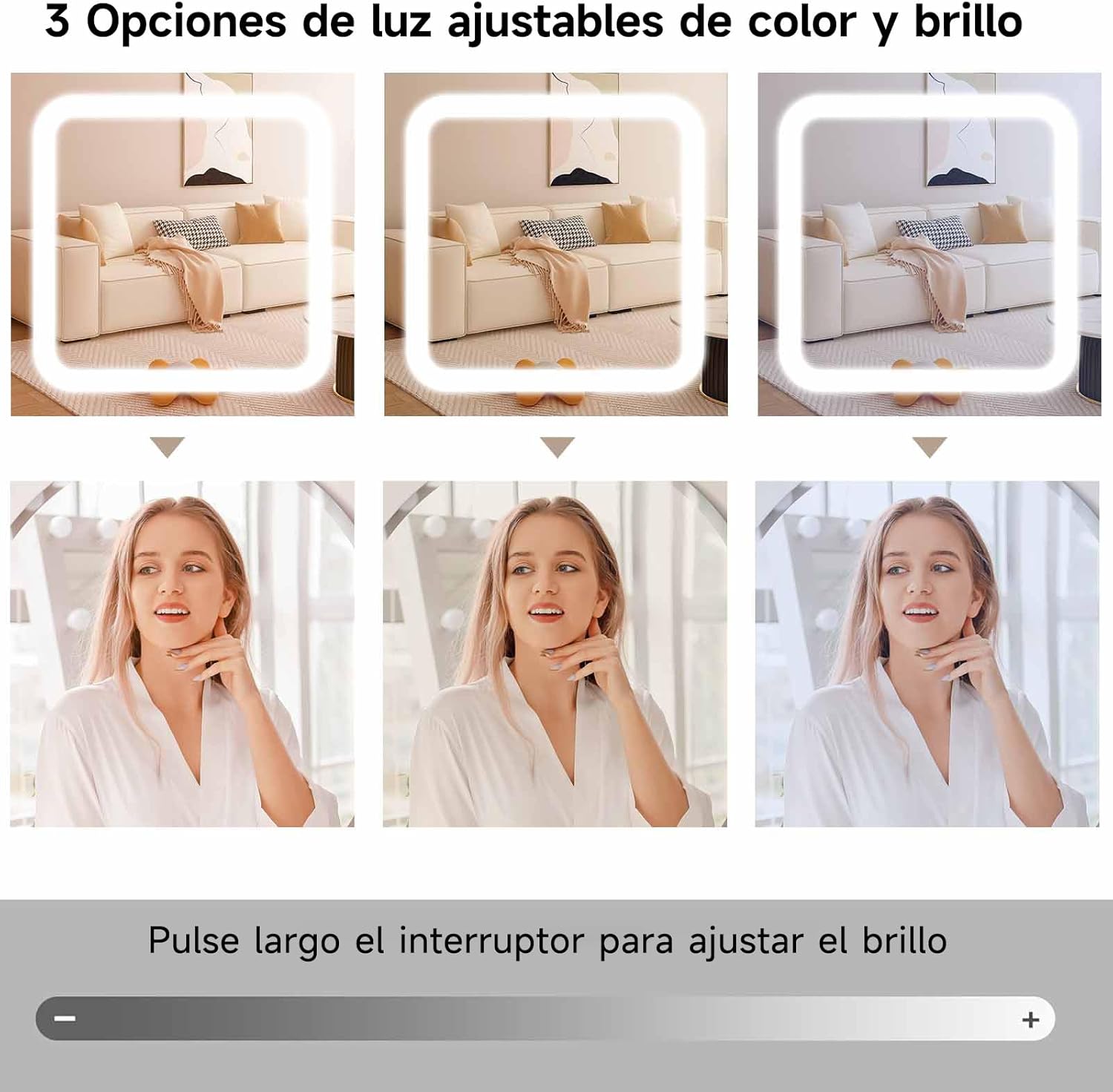
Figure 2: Illustration of the three adjustable light modes on the LED mirror.
- Ample Storage Capacity: This vanity features 4 spacious drawers and 3 layers of open shelves, varying in height and size, ideal for organizing cosmetics, skincare products, perfumes, and other essentials.

Figure 3: View of the open storage shelves and cabinet.
- Sliding Mirror Design: The mirror functions as a sliding cabinet door, effectively concealing and protecting stored items from dust. This unique sliding design also helps save space.

Figure 4: The sliding mirror mechanism, showing hidden storage behind.
- Integrated Charging Station: Two built-in AC/USB charging ports are provided for convenient charging of mobile phones, tablets, or other electronic devices.
- Multi-functional Desktop: The spacious desktop (80x40x130CM) allows the vanity to double as a regular table or a laptop desk, providing ample workspace. The generous legroom ensures comfortable seating.
3. Assembly Instructions
Assembly is required for this product. Please follow the steps below carefully. It is recommended to have a second person assist with assembly.
- Unpack and Verify Components: Upon receiving the package, carefully unpack all components. Verify that all accessories and parts are present and undamaged by comparing them against the included parts list in the assembly manual.
- Follow Step-by-Step Manual: Assemble the vanity according to the detailed installation instructions provided in the separate assembly manual. Each part is typically numbered for easy identification.
- Secure All Fasteners: Ensure all screws, bolts, and other fasteners are securely tightened to ensure stability and safety of the assembled unit. Do not overtighten.
Note: If you encounter any questions or difficulties during assembly, please refer to the "Customer Support" section for assistance.
4. Operating Instructions
- LED Mirror Operation:
- To turn the LED light on/off, gently tap the touch sensor on the mirror surface.
- To adjust brightness, press and hold the touch sensor. The brightness will cycle through the three levels (dark, moderate, bright). Release when the desired brightness is achieved.
- Sliding Mirror Usage:
- To access the hidden storage, gently slide the mirror to the left or right along its track.
- To close and conceal the storage, slide the mirror back to its central position.
- Charging Station Usage:
- Plug your device's AC adapter or USB cable into the corresponding port on the integrated charging station.
- Ensure the vanity is connected to a power source for the charging ports to function.
5. Maintenance and Care
To ensure the longevity and appearance of your WIIS' IDEA Vanity Dressing Table, follow these care instructions:
- Cleaning: Wipe surfaces with a damp cloth. Avoid using harsh chemicals or abrasive cleaners, which may damage the finish.
- Spills: Immediately wipe up any spills to prevent staining or damage to the wood material.
- Placement: Place the vanity in a dry environment, away from direct sunlight and excessive heat or humidity, to prevent warping or discoloration.
- Mirror Care: Clean the mirror surface with a glass cleaner and a soft, lint-free cloth. Do not spray cleaner directly onto the mirror; apply it to the cloth first.
6. Troubleshooting
This section addresses common issues you might encounter with your vanity table.
| Problem | Possible Cause | Solution |
|---|---|---|
| LED mirror does not light up. | Not connected to power; power outlet issue; faulty wiring. | Ensure the vanity's power cord is securely plugged into a working electrical outlet. Check the circuit breaker. If the issue persists, contact customer support. |
| Charging ports are not working. | Vanity not powered; device cable issue; port malfunction. | Confirm the vanity is powered on. Try a different charging cable or device. If still not working, contact customer support. |
| Drawers or sliding mirror are stiff/difficult to move. | Misalignment during assembly; debris in tracks; lack of lubrication. | Check assembly for proper alignment of tracks. Clean tracks of any dust or debris. Apply a small amount of silicone lubricant to the tracks if necessary. |
| Vanity feels unstable or wobbly. | Loose fasteners; uneven floor; incorrect assembly. | Check and tighten all screws and fasteners. Ensure the vanity is placed on a level surface. Review assembly instructions to confirm all parts are correctly installed. |
7. Product Specifications
- Brand: WIIS' IDEA
- Model Number: S1
- Dimensions (L x W x H): 80 x 40 x 130 cm (31.5 x 15.7 x 51.2 inches)
- Product Weight: 23 kg (50.7 lbs)
- Material: Engineered Wood
- Color: White
- Assembly Required: Yes
- Power Source: AC/USB (for charging station and LED mirror)

Figure 5: Detailed product dimensions.
8. Customer Support
For any questions regarding assembly, missing parts, or product functionality, please contact WIIS' IDEA customer service. We aim to provide a solution within 24 hours.
Please refer to your purchase documentation or the product packaging for specific contact information.
Warranty Information: While specific warranty details are not provided here, please retain your proof of purchase. Any warranty claims would typically require this documentation.
Ask a question about this manual
Ask about setup, troubleshooting, compatibility, parts, safety, or missing instructions. Manuals+ will review the question and use this page’s manual context to help answer it.