
1. Introduction
This manual provides detailed instructions for the safe and effective operation of your Catchallway 4K Mini Body Camera H88. Please read this manual thoroughly before using the device to ensure proper functionality and to prevent damage.
The Catchallway H88 is a compact, wearable camera designed for capturing high-resolution video and audio. Its features include 4K video recording, a 140° wide-angle lens, built-in 128GB storage, and Wi-Fi connectivity for smartphone control and data transfer. The camera is also waterproof when used with its protective casing.
2. Safety Information
- Do not expose the camera to extreme temperatures or direct sunlight for prolonged periods.
- Ensure the waterproof case is properly sealed before submerging the camera in water.
- Keep the device away from strong magnetic fields to prevent data corruption.
- Use only the provided charging cable and adapter to avoid damage to the battery.
- Do not attempt to disassemble or modify the camera, as this will void the warranty and may cause damage.
3. Package Contents
Verify that all items are present in your package:
- Mini Body Camera with Built-in 128GB Card
- 360° Rotating Removable Clamp
- Stretchable Magnetic Lanyard
- Bicycle Holder
- Waterproof Case
- Card Reader
- Date / Charger Cable (USB-C to USB-A)
- USB to Type-C Adapter
- User Manual (this document)

4. Product Overview
The Catchallway H88 is designed for portability and ease of use. Its compact size allows for discreet and hands-free recording.
Camera Components:
- Lens: 140° wide-angle glass lens for capturing broad views.
- Power/Record Button: Main control button for power and recording functions.
- LED Indicator: Provides status feedback (e.g., power, recording, Wi-Fi).
- USB-C Port: For charging and data transfer.
- Microphone: For audio recording.
- Built-in 128GB Memory: Internal storage for recorded footage.
5. Setup
5.1 Charging the Camera
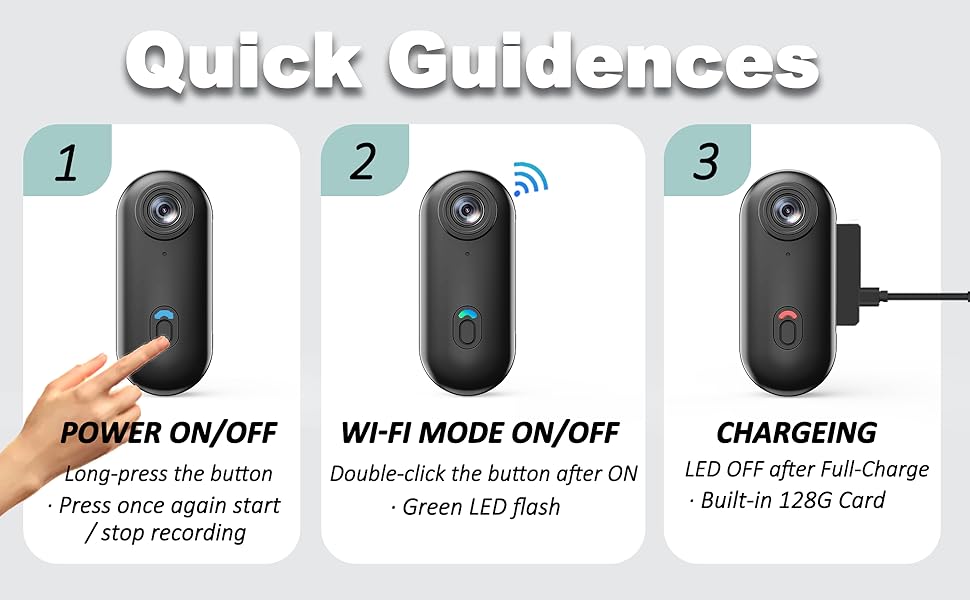
Before first use, fully charge the camera. Connect the provided USB-C cable to the camera's USB-C port and the other end to a USB power adapter (not included) or a computer's USB port. The LED indicator will show charging status and turn off when fully charged.
5.2 Memory Card
The camera features a built-in 128GB memory card, capable of storing up to 24 hours of H.264 footage. No external memory card installation is required for basic operation.
5.3 App Installation and Wi-Fi Connection
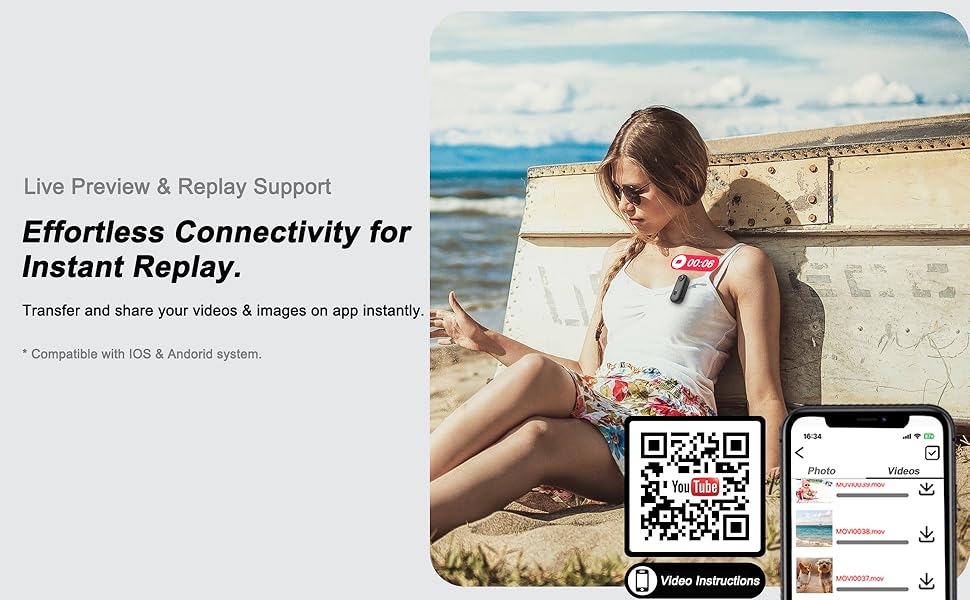
To utilize live preview, remote control, and file transfer features, download the dedicated smartphone application. Refer to the QR code below for video instructions on app usage and connection.

For video instructions on app usage and connection, visit: https://qrco.de/bftV2x
6. Operating Instructions

6.1 Power On/Off and Recording
- Power On: Long-press the main button until the indicator light illuminates.
- Start Recording: After powering on, press the button once to begin video recording. The indicator light will change to confirm recording is active.
- Stop Recording: Press the button once again during recording to stop.
- Power Off: Long-press the main button until the indicator light turns off.
6.2 Wi-Fi Mode
To activate Wi-Fi mode for app connection, double-click the main button after the camera is powered on. A green LED flash will indicate that Wi-Fi is active.
6.3 Loop Recording
The camera supports loop recording, which automatically overwrites the oldest footage when the built-in 128GB memory is full. The default video clip length is 3 minutes and can be adjusted via the smartphone application (1-9 minutes).
6.4 Waterproof Usage
For underwater recording or use in wet conditions, the camera must be enclosed in the provided waterproof case. Ensure the case is securely sealed before exposure to water. The camera is rated for use up to 66 feet (20 meters) underwater with the case.
6.5 Connecting to Phone/Computer for Playback and Transfer
To access recorded files:
- Computer Connection: Use the provided USB-C to USB-A cable to connect the camera directly to your computer. The camera will appear as a removable storage device, allowing you to transfer files. A card reader is also included for direct access to the internal memory if needed.
- Phone Connection: Connect via the Wi-Fi mode using the dedicated app for live preview, instant playback, and seamless file transfers. A Type-C to Type-C cable or adapter (included for USB-A to Type-C) can also be used for direct connection to compatible Android phones.

7. Accessories
The Catchallway H88 comes with a variety of accessories to enhance its versatility:

- 360° Rotating Removable Clamp: Attach to clothing, backpacks, or other surfaces for hands-free recording.
- Magnetic Lanyard: Wear the camera around your neck for convenient POV recording.
- Bicycle Holder: Mount the camera securely to bicycle handlebars.
- Waterproof Case: Provides protection for underwater activities up to 66 feet (20 meters).
- Card Reader: For direct access to the built-in memory via computer.
8. Specifications
| Feature | Specification |
|---|---|
| Model Number | H88 |
| Video Capture Resolution | 4K |
| Photo Sensor Technology | CMOS |
| Lens Angle | 140 Degrees |
| Internal Storage | 128GB (Built-in) |
| Battery Capacity | 800mAh |
| Continuous Recording Time | Up to 90 minutes (without Wi-Fi) |
| Waterproof Rating | Up to 66 feet (20 meters) with waterproof case |
| Connectivity | Wi-Fi (32ft range), USB-C |
| Video Format | MOV (H.264) |
| Audio Format | AAC, MP3 |
| Product Dimensions | 0.9 x 1 x 2.4 inches |
| Item Weight | 12.6 ounces |
9. Maintenance
- Cleaning: Use a soft, dry cloth to clean the camera body. For the lens, use a specialized lens cleaning cloth and solution. Do not use abrasive cleaners.
- Storage: Store the camera in a cool, dry place away from direct sunlight and moisture. If storing for extended periods, ensure the battery is partially charged (around 50%) to prolong its lifespan.
- Battery Care: Avoid fully discharging the battery frequently. Recharge the camera regularly, even if not in use, to maintain battery health.
- Waterproof Case: After each use in water, rinse the waterproof case with fresh water and allow it to air dry completely before storing. Inspect the seals for any damage.
10. Troubleshooting
Refer to the common questions and answers below for assistance with typical issues:

- Q: How long per video in loop record?
A: Default is 3 minutes (adjustable from 1-9 minutes via the App). - Q: Does it have image stabilization? How about battery life?
A: No, it does not have image stabilization. Battery life is approximately 90 minutes without Wi-Fi, and 40-60 minutes under Wi-Fi mode. - Q: Is it waterproof?
A: Yes, but it requires the use of the provided waterproof case. - Q: How can I recognize the camera with my phone/computer?
A: 1. Use the Type-C data cable to connect the camera to your devices. 2. Via the Wi-Fi mode to playback (direct transfer via Wi-Fi is not recommended due to slower speeds).
For more detailed instructions and video guides, please refer to the online resources linked via the QR code in Section 5.3.
11. Warranty and Support
Your Catchallway 4K Mini Body Camera H88 comes with a 1-Year Guarantee. For technical support, warranty claims, or any inquiries, please contact customer service at gogoing6868@gmail.com.


