
Introduction
This manual provides comprehensive instructions for the installation, operation, and maintenance of your juckeyroot Universal Electric Wheelchair Controller Joystick. Please read this manual thoroughly before use to ensure safe and efficient operation of the device.
Important Safety Information
- Always ensure the controller is securely mounted before operation.
- Verify all connections are correct and secure to prevent malfunction.
- The product has an IPX3 waterproof rating, meaning it is protected against spraying water. It is not designed for immersion and should not be exposed to heavy rain or submerged in water.
- The controller includes safety features such as a ramp parking brake, short-circuit protection, battery protection, temperature protection, and anti-interference capabilities.
- Use only with compatible 24V DC brush motors.
- Do not attempt to modify or disassemble the controller, as this may void the warranty and pose safety risks.
Product Overview
The juckeyroot Universal Electric Wheelchair Controller Joystick is a versatile and responsive control unit designed for various mobile applications, including electric wheelchairs, intelligent robots, and other mobile products. It offers precise 360° steering and smooth control transitions.
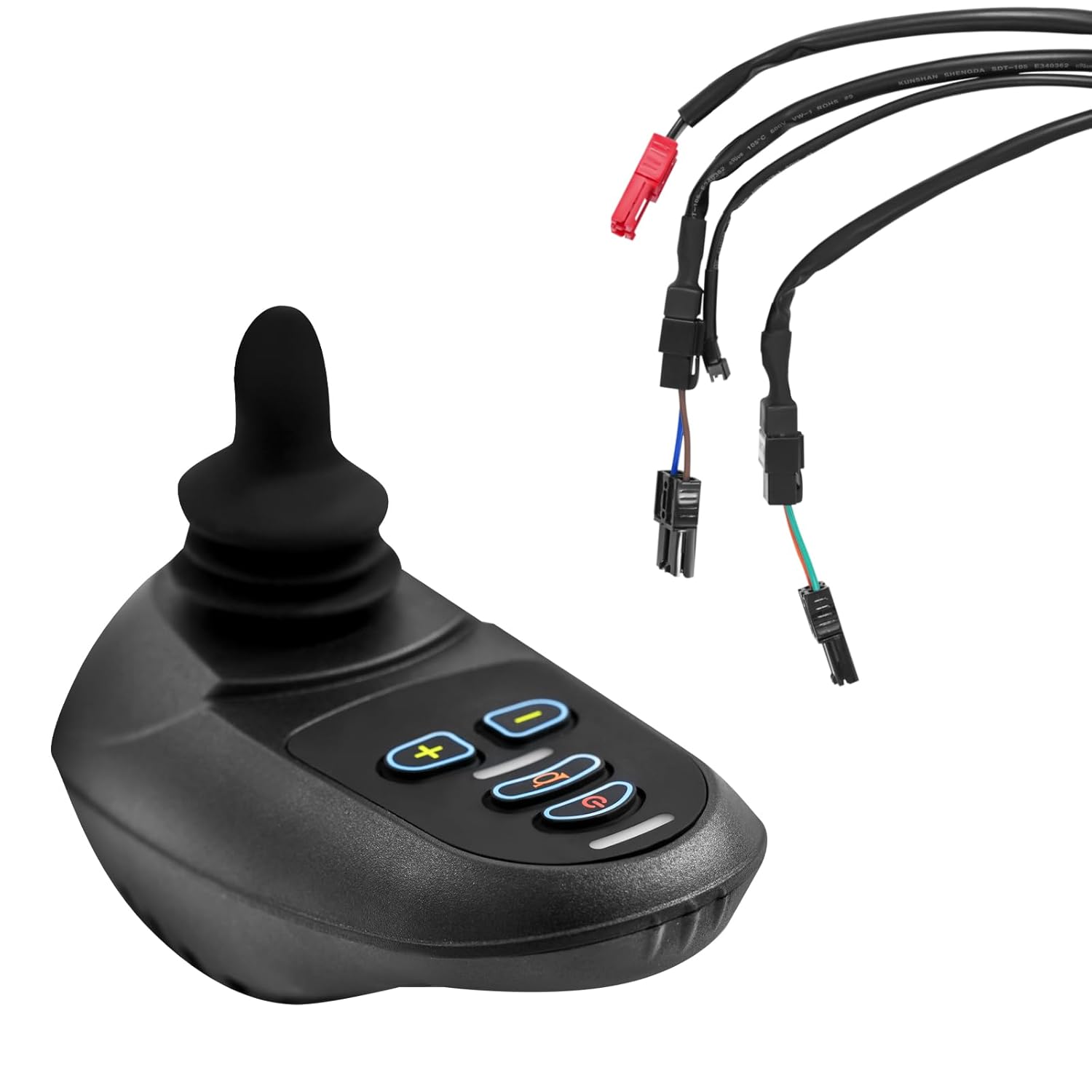
Image: The juckeyroot Universal Electric Wheelchair Controller Joystick, showing the main unit and its connecting cables.
Key Features
- Smooth Control: Intelligent control system ensures seamless operation with smooth acceleration, gentle deceleration, and natural speed transitions.
- Wide Compatibility: Adaptable for most power wheelchairs and custom setups.
- 360° Free-Steering: Provides precise and effortless control for flexible maneuverability.
- Powerful Functionality: Advanced control algorithm for stable starts, variable current, high sensitivity, and five adjustable speed settings. Includes sound prompts for reverse and gear changes.
- Enhanced Safety: Features a ramp parking brake, short-circuit protection, battery protection, temperature protection, and anti-interference capabilities.
- Integrated Horn: A dedicated horn button provides audible warnings for increased safety.
- Optional Wireless Control: Supports an optional remote wireless control (not included) for operation up to 65.62 feet (20 meters).

Image: Close-up view of the joystick's control panel, highlighting the speed adjustment, horn, and power buttons.
Package Contents
Please verify that all items listed below are included in your package:
- 1 × Electric Wheelchair Joystick Controller
- 2 × Cable Ties
- 2 × Screws

Image: All items included in the package: the joystick controller, cable ties, and screws.
Specifications
| Item Type | Electric Wheelchair Controller |
| Color | Black |
| Material | Aluminum, ABS |
| Connection Mode | ML2P+ Adapter Cable |
| Supply Voltage | DC 24V |
| Operating Voltage | DC 19-32V |
| Peak Voltage | DC 35V |
| Output Current | 50A |
| Brake Voltage | DC 24V |
| Brake Current | 3A Max. (Single Circuit) |
| Battery Charging Current | Maximum 6A (Through Controller Charging) |
| Standby Current (Stationary) | ≤ 50mA |
| Standby Current (Power Off) | 0.1 ± 0.05mA |
| Operating Temperature | -25~60°C / -13~140°F |
| Storage Temperature | -45~80°C / -49~176°F |
| Applicable Drive Motor | 24V DC Brush Motor |
| Mounting Hole Distance | 40mm / 1.57in |
| Drive Mode | PWM Duty Cycle Adjustment, Soft Start, Electrical Differential |
| Adjustable Speed | 5 Gears |
| Waterproof Level | IPX3 |
| Line Length | 1.2 m / 3.93ft |
| Product Size (L×W×H) | 19×9.3×8.8cm / 7.48×3.66×3.46in |
| Net Weight | 1.24kg / 2.73 lbs |

Image: Dimensional diagram of the joystick controller, indicating its length, width, and height.
Setup and Installation
- Mounting: Securely attach the joystick controller to the desired location on your electric wheelchair or mobile product using the provided screws. Ensure the mounting hole distance of 40mm (1.57in) is compatible with your setup.
- Connection: Connect the ML2P+ adapter cable from the joystick controller to your 24V DC brush motor system. Ensure all connections are firm and correctly polarized.
- Cable Management: Use the provided cable ties to neatly secure the cables, preventing them from interfering with moving parts or becoming damaged.
- Power Supply: Ensure your system provides a stable DC 24V supply voltage. The controller operates within DC 19-32V.
- Initial Check: Before full operation, perform a basic power-on test to ensure the controller powers up correctly and responds to initial inputs.

Image: Examples illustrating the versatile application of the joystick controller on electric wheelchairs and other mobile platforms.
Operating Instructions
- Power On/Off: Press the power button (usually marked with a circle and vertical line) to turn the controller on or off.
- Speed Adjustment: Use the '+' and '-' buttons to cycle through the five adjustable speed settings. Start with a lower speed until you are comfortable with the control.
- Directional Control: Move the joystick in the desired direction (forward, backward, left, right) for 360° free-steering. The controller provides smooth acceleration and deceleration.
- Horn Function: Press the horn button (usually marked with a horn icon) to activate the audible warning.
- Parking Brake: The integrated ramp parking brake automatically engages when the joystick is in the neutral position, preventing unintended movement.
- Sound Prompts: Pay attention to sound prompts for reverse movement and gear changes, which enhance operational awareness.
Maintenance
- Cleaning: Wipe the controller with a soft, damp cloth. Do not use abrasive cleaners or immerse the unit in water.
- Water Exposure: The controller has an IPX3 waterproof rating, protecting it from spraying water. Avoid exposure to heavy rain or submersion.
- Cable Inspection: Regularly inspect all cables and connections for signs of wear, fraying, or damage. Replace any damaged components immediately.
- Storage: Store the controller in a dry environment within the specified storage temperature range (-45~80°C / -49~176°F) when not in use for extended periods.
Troubleshooting
| Problem | Possible Cause | Solution |
|---|---|---|
| Controller does not power on. | No power supply; loose connection; faulty power button. | Check power source (DC 24V). Ensure all cables are securely connected. If problem persists, contact support. |
| Joystick unresponsive. | Loose motor connection; internal fault. | Verify motor connections. Ensure the controller is powered on. If unresponsive, contact support. |
| Unexpected movement or erratic behavior. | Interference; faulty sensor; loose wiring. | Check for sources of electromagnetic interference. Inspect wiring for damage. Power cycle the device. If issues continue, contact support. |
| Horn not working. | Faulty horn button; wiring issue. | Ensure the controller is powered on. Check for visible damage to the button. Contact support if necessary. |
Warranty and Support
Specific warranty information is not provided in this manual. For warranty details, technical support, or service inquiries, please refer to the product packaging or contact juckeyroot customer service directly.