
1. Introduction
The EnhanBili XA50 Pro is a high-end 5G receiving card designed for advanced LED display control systems, part of the new-generation COEX series. This card is engineered to deliver superior visual performance for various video sources and display configurations.
It supports resolutions up to 1024×512@60Hz for 8-bit and 10-bit video sources with PWM driver ICs. For 12-bit video sources, the XA50 Pro supports resolutions up to 620×512@60Hz. The card integrates exclusive NovaStar technologies such as Adaptive Thermal Compensation, Dynamic Booster, Full-Grayscale Calibration, and Image Booster to enhance image quality. Additional features include Multi-Mode, Brightness Overdrive, Seam Correction with Mobile Phones, Frame Rate Adaptive 3.0, Shutter Fit, HDR, Pixel Level Brightness and Chroma Calibration, Quick Adjustment of Dark or Bright Lines, Low Latency, 3D, and 90° Image Rotation. These capabilities ensure a uniform, smooth, and lifelike image, providing an optimal visual experience. The XA50 Pro also supports NCP files for convenient content display, firmware upgrades, and image quality optimization.
2. Key Features
- High Resolution Support: Up to 1024×512@60Hz for 8/10-bit video sources, and 620×512@60Hz for 12-bit video sources.
- Advanced Image Processing: Incorporates NovaStar's Adaptive Thermal Compensation, Dynamic Booster, Full-Grayscale Calibration, and Image Booster technologies.
- Versatile Display Functions: Includes Multi-Mode, Brightness Overdrive, Seam Correction with Mobile Phones, Frame Rate Adaptive 3.0, Shutter Fit, HDR, Pixel Level Brightness and Chroma Calibration.
- Enhanced Visual Experience: Features Quick Adjustment of Dark or Bright Lines, Low Latency, 3D display capabilities, and 90° Image Rotation.
- Efficient Management: Supports NCP files for streamlined content display, firmware updates, and image quality optimization.
- Input Voltage: DC 3.8-5.5V.
- Operating Temperature: -20℃ to 70℃.
- Low Power Consumption: Overall consumption of 5W.
3. Product Overview
The XA50 Pro receiving card is a compact electronic component designed for integration into LED display systems. Understanding its physical layout is crucial for proper installation and operation.

Figure 3.1: Top view of the XA50 Pro LED Screen Receiving Card. This image shows the component side of the receiving card, highlighting the various integrated circuits and connectors.
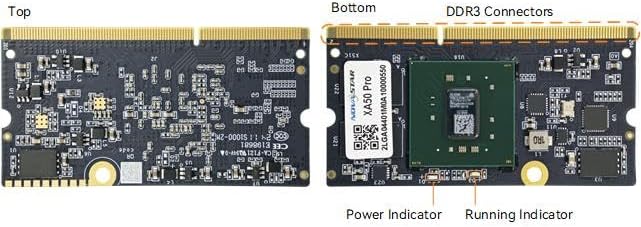
Figure 3.2: Top and bottom views of the XA50 Pro LED Screen Receiving Card. The top view displays the general circuitry, while the bottom view clearly labels the DDR3 connectors, the main processor (XA50 Pro), and indicator lights for power and running status.
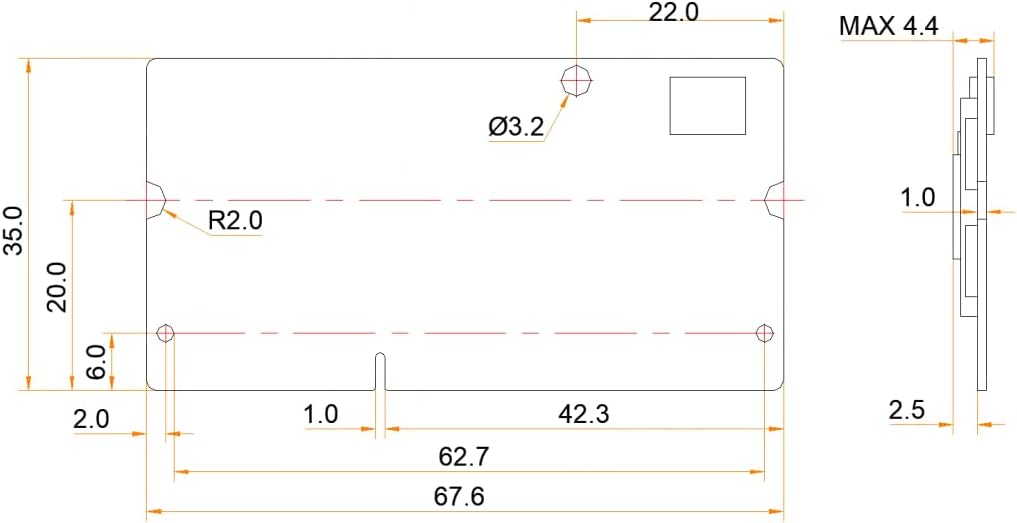
Figure 3.3: Dimensional drawing of the XA50 Pro LED Screen Receiving Card. This diagram provides precise measurements in millimeters, including length, width, thickness, and mounting hole positions, essential for physical integration.
4. Setup and Installation
Proper installation of the XA50 Pro receiving card is critical for stable operation of your LED display. Ensure all power is disconnected before beginning installation.
- Preparation: Ensure the LED display cabinet or module has a compatible slot for the XA50 Pro card. Refer to Figure 3.3 for dimensions.
- Insertion: Carefully align the DDR3 connectors of the XA50 Pro card with the corresponding slot on the LED display module or hub board. Apply even pressure to insert the card fully until it is securely seated.
- Power Connection: Connect the power supply to the LED display system. The XA50 Pro requires a DC input voltage of 3.8-5.5V.
- Data Connection: Connect the data cables from the sending card or controller to the input ports on the LED display system, which will then route data to the XA50 Pro receiving card.
- Verification: After installation, power on the system. Observe the Power Indicator and Running Indicator lights on the XA50 Pro card (refer to Figure 3.2). A steady power light and a blinking running light typically indicate normal operation.
Note: Always consult the specific documentation for your LED display cabinet or module for detailed installation instructions and compatibility information.
5. Operating Instructions
The XA50 Pro receiving card operates as part of a larger LED display control system. Configuration and operation are primarily managed through dedicated LED control software (e.g., NovaLCT for NovaStar systems) on a connected computer.
- Software Installation: Install the appropriate LED display control software on your computer.
- System Connection: Connect your computer to the LED sending card or controller via USB, Ethernet, or other specified interface.
- Display Configuration:
- Launch the control software.
- Detect the sending card and receiving cards (XA50 Pro).
- Configure the display parameters, including screen resolution, cabinet layout, and connection topology.
- Utilize the software's calibration tools for brightness, grayscale, and chroma adjustments to optimize image quality.
- Apply advanced features such as HDR, 3D, and image rotation as needed through the software interface.
- Content Playback: Once configured, use the control software to upload and play back video content, images, or other media on the LED display.
- Firmware Updates: The XA50 Pro supports firmware updates via NCP files. Follow the instructions provided by the control software for performing updates to ensure optimal performance and access to new features.
Important: Always refer to the software's user manual for detailed instructions on configuration and operation specific to your LED display system.
6. Maintenance
The XA50 Pro receiving card is designed for reliability and requires minimal maintenance. However, adhering to these guidelines can prolong its lifespan and ensure consistent performance:
- Environmental Control: Operate the card within its specified temperature range (-20℃ to 70℃) and avoid environments with high humidity, dust, or corrosive gases.
- Cleaning: If necessary, gently clean the card's surface with a soft, dry, anti-static brush or cloth. Do not use liquid cleaners or solvents. Ensure the system is powered off and disconnected before cleaning.
- Firmware Updates: Regularly check for and apply official firmware updates. These updates often include performance improvements, bug fixes, and new features.
- Connection Integrity: Periodically inspect all connections (DDR3 slot, data cables, power) to ensure they are secure and free from damage.
- Power Supply: Ensure a stable and clean power supply within the specified voltage range (DC 3.8-5.5V) to prevent damage to the card.
7. Troubleshooting
This section provides solutions to common issues you might encounter with the XA50 Pro receiving card.
| Problem | Possible Cause | Solution |
|---|---|---|
| LED display is black or shows no signal. |
|
|
| Display shows abnormal colors or flickering. |
|
|
| Part of the display is dark or shows incorrect content. |
|
|
| Running Indicator light is off or solid. |
|
|
8. Technical Specifications
| Parameter | Value |
|---|---|
| Model Number | XA50 Pro |
| Brand | EnhanBili |
| Input Voltage | DC 3.8-5.5V |
| Operating Temperature | -20℃ to 70℃ |
| Overall Consumption | 5W |
| Net Weight | 0.02 Kg |
| Gross Weight | 0.1 Kg |
| Max Resolution (8/10-bit) | 1024×512@60Hz |
| Max Resolution (12-bit) | 620×512@60Hz |
9. Warranty and Support
Warranty Information: The product specifications indicate "Warranty Description: NO". Please refer to your point of purchase or reseller for any applicable return policies or limited warranties they may offer.
Technical Support: For technical assistance, troubleshooting beyond this manual, or inquiries regarding product functionality, please contact your product supplier or the manufacturer, EnhanBili. Ensure you have your product model number (XA50 Pro) and any relevant purchase information ready when seeking support.