
U UNNI UN0582+UN03A
UN0582 Indoor Outdoor Thermometer Wireless User Manual
Model: UN0582+UN03A | Brand: U UNNI
Introduction
Thank you for purchasing the U UNNI UN0582 Indoor Outdoor Thermometer. This device provides accurate temperature and humidity readings for both indoor and up to three outdoor locations. It features a clear 4.5-inch display and comes with a UN03 outdoor sensor protection shield for enhanced durability. This manual will guide you through the setup, operation, and maintenance of your new thermometer system.
What's Included
- 1 x UN0582 Main Display Unit
- 3 x Wireless Outdoor Sensors
- 1 x UN03 Outdoor Sensor Protection Shield
- 1 x USB Power Cable
- Installation parts for UN03 shield (screws, anchors)
- User Manual (this document)

Image: The UN0582 main display unit shown alongside three white wireless outdoor sensors.
Setup
1. Powering the Main Display Unit
The main display unit can be powered via the included USB cable or by batteries (not included). For continuous backlight and adjustable brightness, use the USB power. For battery-only operation, the backlight will illuminate for 10 seconds when a button is pressed.
- USB Power: Connect the USB cable to the main unit and a compatible USB power adapter (not included).
- Battery Power: Open the battery compartment on the back of the main unit and insert the required batteries (e.g., 3 x AAA, check unit for specific type).
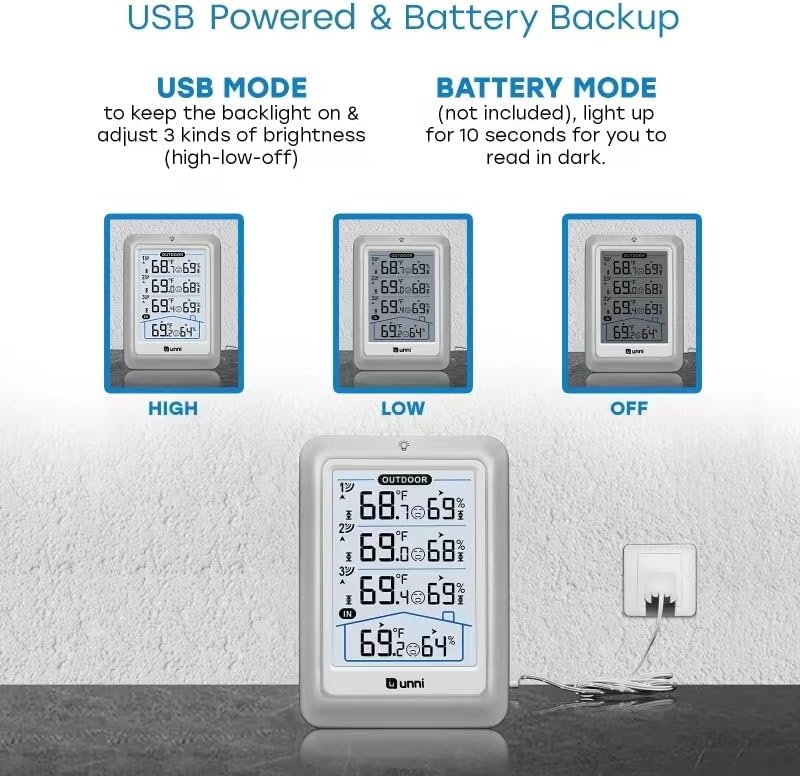
Image: Illustrations demonstrating the main unit's backlight settings (High, Low, Off) when powered by USB, and its battery mode operation.
2. Installing Batteries in Outdoor Sensors
Each outdoor sensor requires batteries (not included). Open the battery compartment on each sensor and insert the required batteries (e.g., 2 x AA, check sensor for specific type). Ensure correct polarity.
3. Pairing Sensors with Main Unit
The sensors are pre-calibrated and should automatically connect to the main unit upon battery installation. If a sensor does not connect, ensure it is within range and press the reset button on the sensor (if available) or re-insert batteries. The main unit will display readings for each connected sensor.
4. Installing the UN03 Outdoor Sensor Protection Shield
The UN03 shield is designed to protect your outdoor sensor from direct sunlight and rain, ensuring more accurate readings and extending sensor lifespan. It can be wall-mounted or placed on a flat surface.
- Wall Mounting: Use the included screws and anchors to secure the shield to a wall in a suitable outdoor location.
- Flat Surface Placement: The shield can also stand on its base on a flat, stable surface.
- Insert one of the wireless outdoor sensors into the UN03 shield.

Image: The main display unit shown next to the white, multi-layered UN03 outdoor sensor protection shield, indicating how they are used together.

Image: A close-up view of the UN03 outdoor sensor protection shield, showing its cylindrical, layered design and the 'unni' logo with model information.
Operating Instructions
Display Overview
The 4.5-inch LCD displays indoor temperature and humidity, along with readings from up to three outdoor sensors. Each outdoor sensor reading is clearly labeled (1, 2, 3).
- Indoor Readings: Displayed at the bottom, indicated by a house icon.
- Outdoor Readings: Displayed at the top, labeled 1, 2, and 3.
- Temperature Units: Can be switched between Fahrenheit (°F) and Celsius (°C). Refer to the unit's buttons for specific instructions on changing units.
- MAX/MIN Records: The device automatically records the maximum and minimum temperature and humidity values for both indoor and outdoor sensors. These records reset automatically every 24 hours.
Backlight Control
When powered by USB, the backlight can be set to High, Low, or Off. When powered by batteries, the backlight will temporarily illuminate for 10 seconds when a button is pressed to conserve power.
Sensor Synchronization
If a sensor loses connection, ensure it is within the wireless range (typically up to 330 feet in open air) and free from major obstructions. The main unit will attempt to re-establish connection automatically. If issues persist, try re-inserting batteries in the sensor or main unit.
Maintenance
- Cleaning: Wipe the display unit and sensors with a soft, dry cloth. Do not use abrasive cleaners or immerse in water.
- Battery Replacement: Replace batteries in both the main unit and sensors when the low battery indicator appears on the display.
- Sensor Placement: For optimal accuracy, place outdoor sensors in a shaded, well-ventilated area, away from direct sunlight, heat sources, or extreme moisture. The UN03 shield helps with this.
- Storage: If storing the device for an extended period, remove all batteries to prevent leakage.
Troubleshooting
| Problem | Possible Cause | Solution |
|---|---|---|
| No display on main unit | No power; batteries inserted incorrectly or dead; USB cable not connected. | Check battery polarity and charge; replace batteries; ensure USB cable is securely connected. |
| Outdoor sensor not displaying readings | Sensor out of range; low sensor battery; interference; sensor not paired. | Move sensor closer to main unit; replace sensor batteries; reduce interference (e.g., large metal objects); re-pair sensor by re-inserting batteries. |
| Inaccurate readings | Sensor exposed to direct sunlight/rain; sensor near heat/cold source; unit not calibrated (though pre-calibrated). | Relocate sensor to a shaded, well-ventilated area (use UN03 shield); ensure proper placement away from extreme temperatures. |
| MAX/MIN records not resetting | Misunderstanding of feature. | Records reset automatically every 24 hours. No manual reset is required or possible for this feature. |
Specifications
| Feature | Detail |
|---|---|
| Model | UN0582+UN03A |
| Brand | U UNNI |
| Indoor Temperature Range | +14.2°F ~ +122°F (-9.9°C ~ +50°C) |
| Outdoor Temperature Range | -40°F ~ +158°F (-40°C ~ +70°C) |
| Indoor/Outdoor Humidity Range | 20% ~ 95% RH |
| Temperature Accuracy | +/-1.8°F (+/-1°C) |
| Humidity Accuracy | +/-5% RH |
| Display Type | LCD |
| Power Source (Main Unit) | USB Powered / Battery Powered (Batteries not included) |
| Power Source (Sensors) | Battery Powered (Batteries not included) |
| Connectivity Technology | Proprietary Wireless |
| Special Features | Pre-calibrated Sensors, Automatic MAX/MIN Reset (every 24h) |
| UN03 Shield External Size | 3.35 x 4.13 x 7.05 inches (approx.) |

Image: A diagram showing the approximate dimensions of the UN0582 main display unit and the remote sensors.
Warranty and Support
Your U UNNI UN0582 Indoor Outdoor Thermometer comes with a one-year warranty from the date of purchase. This warranty covers manufacturing defects but does not include batteries.
For technical support, warranty claims, or any questions regarding your product, please contact U UNNI customer service. Refer to the product packaging or the official U UNNI website for the most current contact information.
You may also contact us via email at unni_technology@hotmail.com for support.
Ask a question about this manual
Ask about setup, troubleshooting, compatibility, parts, safety, or missing instructions. Manuals+ will review the question and use this page’s manual context to help answer it.