
EcoExplorer RFg6Tg_3m6zjOd1J1FJAQgTC030
EcoExplorer 15x15 Heat Press Machine User Manual
Model: RFg6Tg_3m6zjOd1J1FJAQgTC030
Introduction
Thank you for choosing the EcoExplorer 15x15 Heat Press Machine. This professional digital sublimation heat press is designed for transferring designs onto various materials such as T-shirts, clothes, canvas bags, mouse pads, puzzles, and ceramic tiles. Featuring advanced U-shaped tube heating technology for rapid and even heat distribution, a large 15x15 inch heating plate, and precise digital controls, this machine ensures high-quality and vibrant transfers. Please read this manual thoroughly before operation to ensure safe and efficient use of your heat press.
Safety Instructions
- Always connect the heat press to a grounded power outlet.
- Do not operate the machine with wet hands or in damp environments.
- Keep hands and body parts away from the heating plate during operation, as it reaches very high temperatures. Use heat-resistant gloves if necessary.
- Ensure adequate ventilation in your workspace to dissipate any fumes from materials or inks.
- Unplug the machine from the power outlet when not in use or before cleaning and maintenance.
- Do not leave the machine unattended while it is powered on or operating.
- Keep children and pets away from the heat press.
- Do not attempt to modify or repair the machine yourself. Contact qualified service personnel for assistance.
- Place the heat press on a stable, heat-resistant surface.
Product Overview
Components and Features

The EcoExplorer 15x15 Heat Press Machine, shown with example items like T-shirts and a canvas bag, demonstrating its versatility for various sublimation and heat transfer projects.
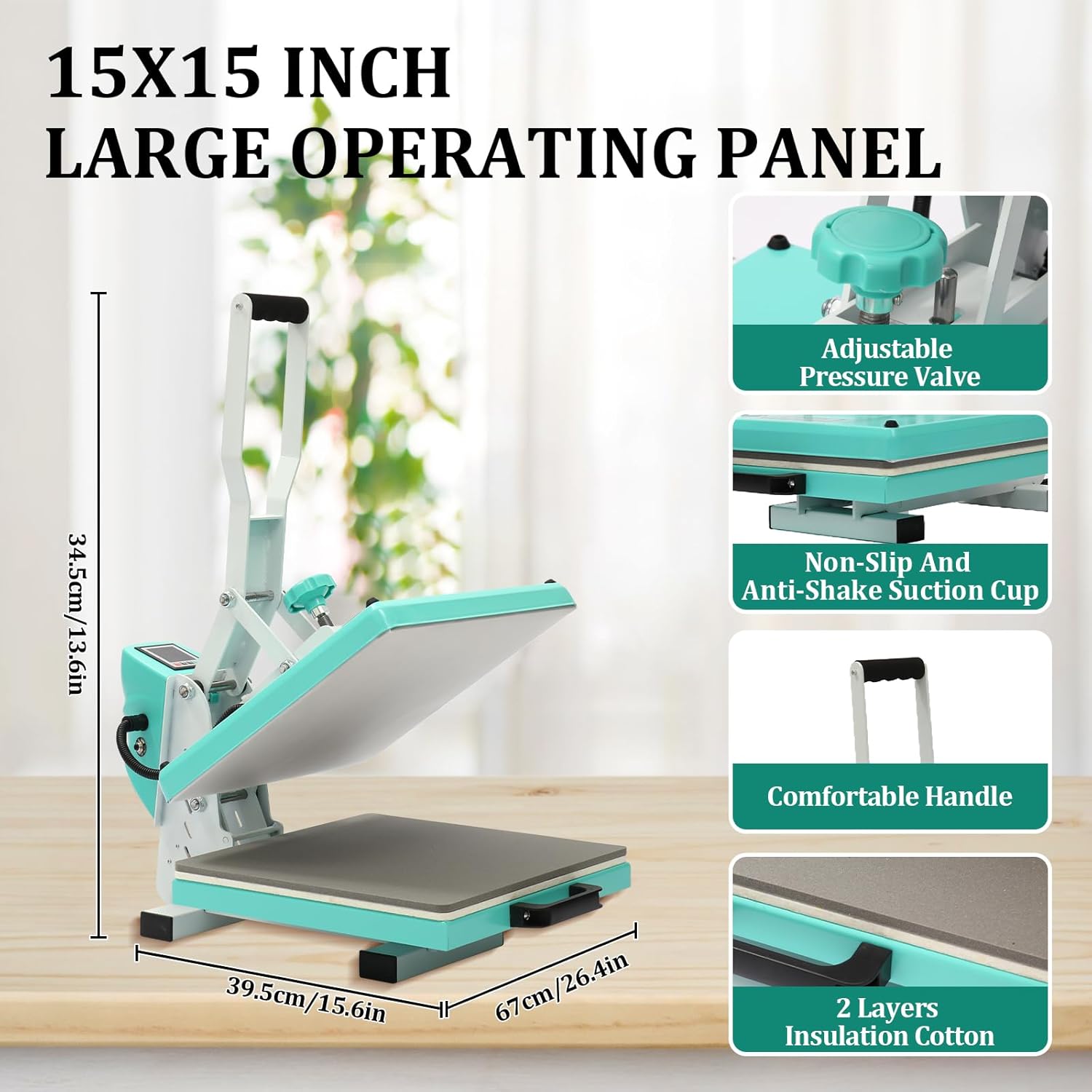
Detailed view of the heat press highlighting its dimensions (39.5cm/15.6in width, 67cm/26.4in length, 34.5cm/13.6in height) and key features including the adjustable pressure valve, non-slip and anti-shake suction cups, comfortable handle, and two layers of insulation cotton.

A close-up of the digital control panel, showing buttons for Time, Minus, Plus, and Temp, along with icons indicating Time Control, Temperature Control, Bell Alarm, and Auto Shutdown functions for precise operation.

Illustration of the heat press's dual-layer pad with Teflon coating, designed to prevent burns, scorching, and ensure easy cleanup, highlighting the internal heating elements.
Key Features:
- Fast & Even Heating: Advanced U-shaped tube heating technology for rapid heating and uniform heat distribution.
- Large Heating Plate: Sturdy 15x15 inch heating plate made from durable thick steel, compatible with various heat transfer vinyl (HTV) and sublimation projects.
- Wide Temperature Range: Operates from 32°F to 450°F (0°C to 232°C).
- Safety & Reliability: Dual-layer high-temperature resistant pad with Teflon coating, automatic beep, and power-off function.
- Easy Operation: Handy pressure adjustment knob and large digital display for precise temperature and time settings.
- Integrated Counter: Helps track yields during batch production.
- Upgraded Metal Shell: More durable and drop-resistant than composite materials.
Setup
- Unpacking: Carefully remove the heat press from its packaging. Inspect for any damage during transit.
- Placement: Place the machine on a sturdy, flat, and heat-resistant surface. Ensure there is enough space around the machine for safe operation and ventilation.
- Power Connection: Connect the power cord to the heat press and then plug it into a grounded electrical outlet. Ensure the power supply matches the machine's requirements (120V~60Hz).
- Initial Inspection: Before first use, ensure the heating plate is clean and free of debris. Check that the pressure adjustment knob turns smoothly.
Operation
Follow these steps for successful heat transfers:

Visual guide to the simple operation steps: 1. Set the Appropriate Pressure, 2. Set Temperature and Time, 3. Start the Transfer, 4. Done.
- Power On: Turn on the main power switch, usually located on the side or back of the machine.
- Set Temperature: Press the "TEMP" button on the control panel. Use the "Plus" and "Minus" buttons to set your desired temperature. Refer to your transfer material's instructions for recommended settings. The machine will begin heating up.
- Set Time: Press the "TIME" button. Use the "Plus" and "Minus" buttons to set the desired transfer time in seconds.
- Adjust Pressure: Use the pressure adjustment knob (typically located on top of the heating plate) to set the appropriate pressure. Turn clockwise for more pressure, counter-clockwise for less. Test on a scrap material if unsure.
- Prepare Item: Place your garment or item on the silicone pad on the lower platen. Position your transfer material (e.g., HTV, sublimation paper) onto the item. You may use heat-resistant tape to secure it.
- Begin Transfer: Once the machine reaches the set temperature (indicated by the display), carefully lower the heating plate handle until it locks into place. The timer will automatically start counting down.
- Complete Transfer: When the timer reaches zero, an audible beep will sound. Lift the handle to open the heat press. Carefully remove your item, being mindful of the heat.
- Power Off: After use, turn off the main power switch and unplug the machine.
Maintenance
- Cleaning the Heating Plate: Allow the heating plate to cool completely. Use a soft, damp cloth to wipe down the Teflon-coated surface. For stubborn residue, a non-abrasive cleaner specifically designed for heat press platens can be used. Do not use harsh chemicals or abrasive pads.
- Cleaning the Silicone Pad: The silicone pad can be wiped clean with a damp cloth. If it becomes damaged or worn, it should be replaced to ensure even pressure.
- General Cleaning: Wipe down the exterior of the machine with a dry or slightly damp cloth to remove dust and debris.
- Storage: Store the heat press in a dry, dust-free environment when not in use.
Troubleshooting
| Problem | Possible Cause | Solution |
|---|---|---|
| Machine does not power on. | Power cord not plugged in; power switch off; circuit breaker tripped. | Check power connections; ensure power switch is on; reset circuit breaker. |
| Uneven heat transfer. | Uneven pressure; damaged heating element; worn silicone pad. | Adjust pressure knob; contact support if heating element is faulty; replace silicone pad. |
| Temperature not reaching set value. | Faulty temperature sensor; insufficient warm-up time. | Allow more warm-up time; contact support if sensor is faulty. |
| Transfers are peeling or not adhering. | Incorrect temperature or time; insufficient pressure; wrong material type. | Verify temperature/time settings for your material; increase pressure; ensure material compatibility. |
Specifications
- Product Dimensions: 27.17 x 18.5 x 16.54 inches (69 x 47 x 42 cm)
- Item Weight: 50.4 pounds (22.86 kg)
- Heating Plate Size: 15 x 15 inches (38 x 38 cm)
- Voltage Frequency: 120V~60Hz
- Power: 1200W
- Temperature Range: 32°F to 450°F (0°C to 232°C)
- Timer Control: 0-999 seconds
- Material: Metal Q235B
- Color: Blue
- Model Number: RFg6Tg_3m6zjOd1J1FJAQgTC030
Warranty and Support
For any questions, technical assistance, or warranty claims, please contact EcoExplorer customer support. Refer to your purchase documentation for specific warranty terms and contact information.
We are committed to providing excellent service and support for your EcoExplorer product.