
1. Introduction
Welcome to the Kslysuty Gaming Chair user manual. This guide provides detailed instructions for the assembly, operation, maintenance, and troubleshooting of your new gaming chair. Please read this manual thoroughly before use to ensure proper function and safety.

Figure 1: Kslysuty Gaming Chair (Beige-leather model)
2. Important Safety Information
WARNING:
- Always assemble the chair according to the provided instructions.
- Do not exceed the maximum weight recommendation of 300 pounds to ensure stability and safety.
- Keep small parts away from children during assembly.
- Ensure all screws and bolts are securely tightened before use. Periodically check and re-tighten as necessary.
- Avoid standing on the chair or using it as a step stool.
- Do not use abrasive cleaners or harsh chemicals on the chair's surfaces.
3. Parts List
Before beginning assembly, ensure all parts are present and accounted for. Refer to the assembly diagram for visual identification of each component.
- Seat Base with Mechanism
- Backrest
- Armrests (2)
- Five-Star Base (Metal)
- Casters (5)
- Gas Lift Cylinder
- Gas Lift Cover
- Headrest Pillow
- Lumbar Support Pillow
- Footrest Assembly
- Hardware Pack (Screws, Washers, Allen Wrench)

Figure 2: Key components of the chair base and mechanism.
4. Setup and Assembly
Follow these steps to assemble your Kslysuty Gaming Chair. It is recommended to have a second person assist with certain steps for ease and safety.
- Attach Casters to Base: Insert each of the five casters into the holes at the end of the five-star base. Push firmly until they click into place.
- Install Gas Lift: Place the gas lift cylinder into the center hole of the five-star base. Cover it with the gas lift cover.
- Attach Mechanism to Seat: Align the seat mechanism with the pre-drilled holes on the underside of the seat cushion. Secure it using the provided screws and the Allen wrench. Ensure the "FRONT" arrow on the mechanism points towards the front of the seat.
- Connect Seat to Base: Carefully place the assembled seat onto the gas lift cylinder, ensuring it is centered and stable.
- Attach Backrest to Seat: Align the backrest with the metal brackets on the seat base. Secure with screws.
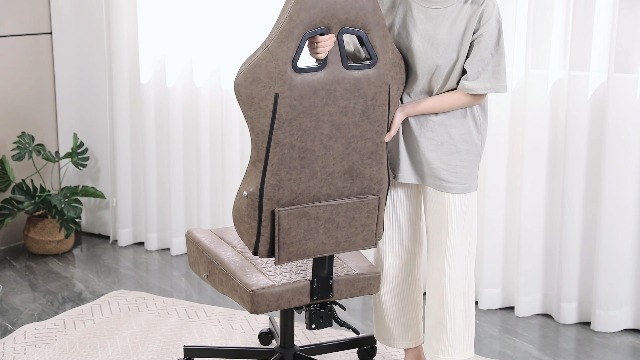
Figure 3: Securing the backrest to the seat.
- Install Armrests: Attach the armrests to the sides of the seat and backrest using the designated screws.

Figure 4: The new linkage armrest design provides stability.
- Assemble Footrest: Attach the footrest assembly to the underside of the seat. Ensure it slides smoothly.

Figure 5: The footrest features a detachable soft cover for comfort.
- Attach Pillows: Secure the lumbar support pillow and headrest pillow using their elastic straps and buckles. The lumbar pillow can be adjusted vertically to fit your preference.

Figure 6: The chair includes adjustable headrest and lumbar support pillows.
Assembly Video:
Video 1: Step-by-step guide on how to install the Kslysuty Gaming Chair.
5. Operating Instructions
Your Kslysuty Gaming Chair is designed for maximum comfort and adjustability. Familiarize yourself with its features:
- Height Adjustment: Use the lever on the right side (when seated) to adjust the chair's height. Pull up on the lever to raise the chair, or pull up while seated to lower it.
- Backrest Recline: The backrest can be adjusted from 90 to 145 degrees. Use the lever on the left side (when seated) to recline the backrest to your desired angle. Release the lever to lock it in place.
- Footrest Operation: Pull the footrest assembly out from under the seat to extend it. Push it back in when not in use. The soft cover is detachable for cleaning or preference.
- Lumbar Support & Headrest: The included pillows provide additional support. Adjust their vertical position by sliding them along the straps on the backrest to find your optimal comfort.
- Swivel Function: The chair features a 360-degree swivel for easy movement and access.

Figure 7: The chair offers multiple adjustable positions for various activities.

Figure 8: Levers for height and recline adjustments.
Feature Overview Video:
Video 2: A quick look at the Kslysuty Gaming Chair's features and functionality.
6. Maintenance
Proper care and maintenance will extend the life of your gaming chair.
- Cleaning: For general cleaning, wipe the leather surface with a soft, damp cloth. For tougher stains, use a mild soap solution and wipe dry immediately. Do not use harsh chemicals or abrasive cleaners.
- Hardware Check: Periodically check all screws and bolts to ensure they are tight. Re-tighten if necessary to maintain stability.
- Caster Care: Keep casters free of hair and debris to ensure smooth rolling.
- Leather Care: The vintage leather is breathable and soft. Avoid prolonged exposure to direct sunlight or extreme temperatures to prevent material degradation.
Figure 9: The chair's vintage leather is designed for comfort and durability.
7. Troubleshooting
If you encounter any issues with your chair, refer to the following common problems and solutions:
| Problem | Possible Cause | Solution |
|---|---|---|
| Chair wobbles or is unstable | Loose screws; uneven floor; damaged base/casters. | Check and tighten all assembly screws. Ensure chair is on a flat surface. Inspect base and casters for damage. |
| Gas lift not adjusting height | Gas lift cylinder malfunction; lever not engaged. | Ensure the height adjustment lever is fully engaged. If issue persists, the gas lift may need replacement (contact support). |
| Backrest not reclining or locking | Recline mechanism jammed; lever not engaged. | Check for obstructions around the recline mechanism. Ensure the recline lever is fully engaged. |
| Footrest not extending/retracting smoothly | Obstruction in mechanism; bent support rods. | Inspect the footrest mechanism for any foreign objects. Ensure rods are straight and lubricated if necessary. |
8. Specifications
| Feature | Detail |
|---|---|
| Brand | Kslysuty |
| Model Number | ec978c9b-4bb3-44dd-9fa8-317ade9beda3 |
| Color | Beige-leather |
| Product Dimensions | 23"D x 24.4"W x 48.8"H |
| Back Style | Cushion Back |
| Special Features | Adjustable Lumbar, Adjustable Height, Arm Rest, Swivel, Cushion Availability |
| Maximum Weight Recommendation | 300 Pounds |
| Fill Material | Sponge |
| Reclining Position Range | 90 to 145 degrees |
| Item Weight | 45 pounds |
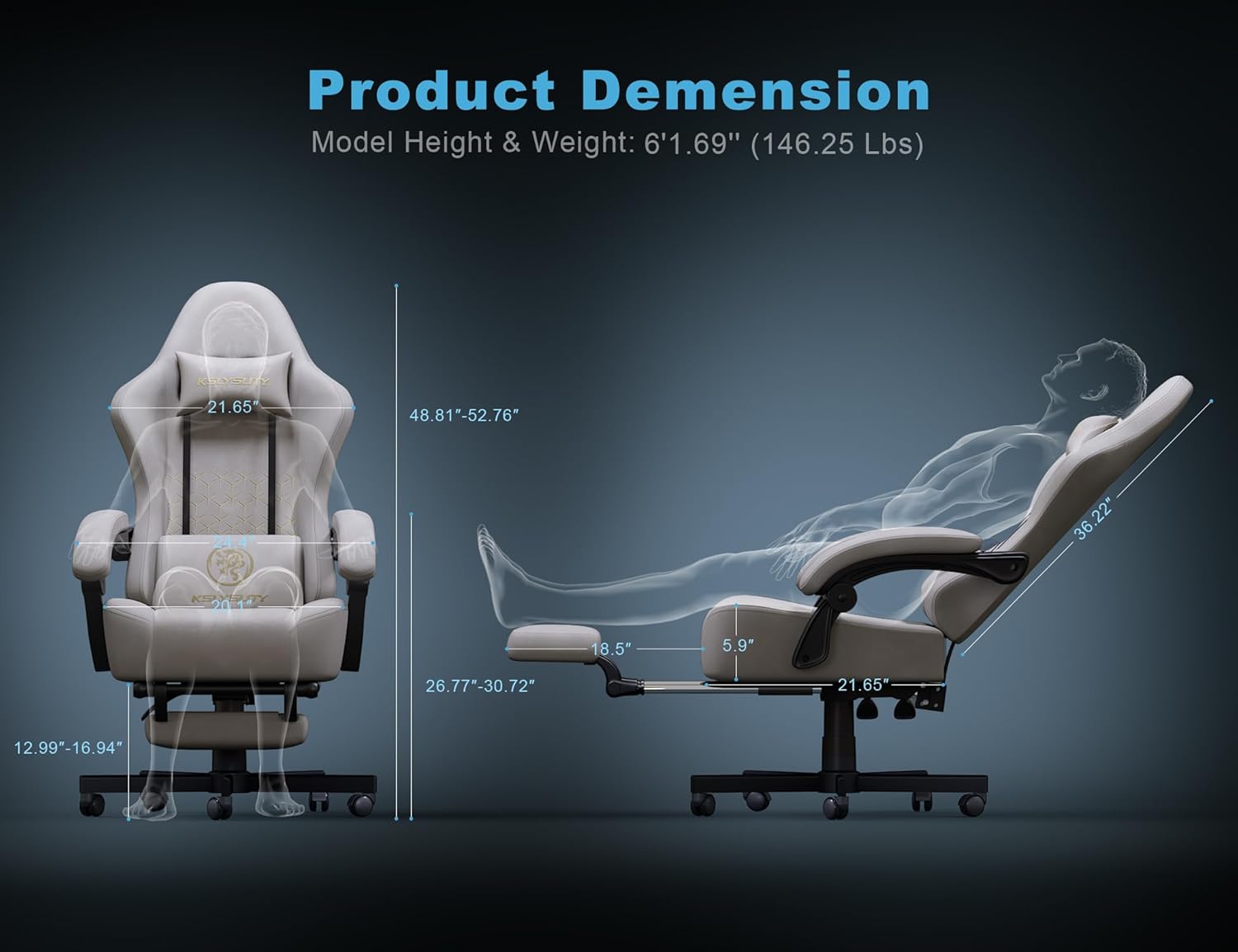
Figure 10: Detailed product dimensions.

Figure 11: The seat cushion features independent pocket springs and high-density sponge for comfort.
9. Warranty and Support
For warranty information, technical support, or replacement parts, please contact Kslysuty customer service through the retailer where you purchased the product. Please have your model number (ec978c9b-4bb3-44dd-9fa8-317ade9beda3) and purchase date ready.