
Product Overview
The XINFUTE AT6400 RC1534820/04B is a replacement remote control designed for Cisco Cable Box systems. It features an ergonomic design and infrared connectivity for reliable operation.
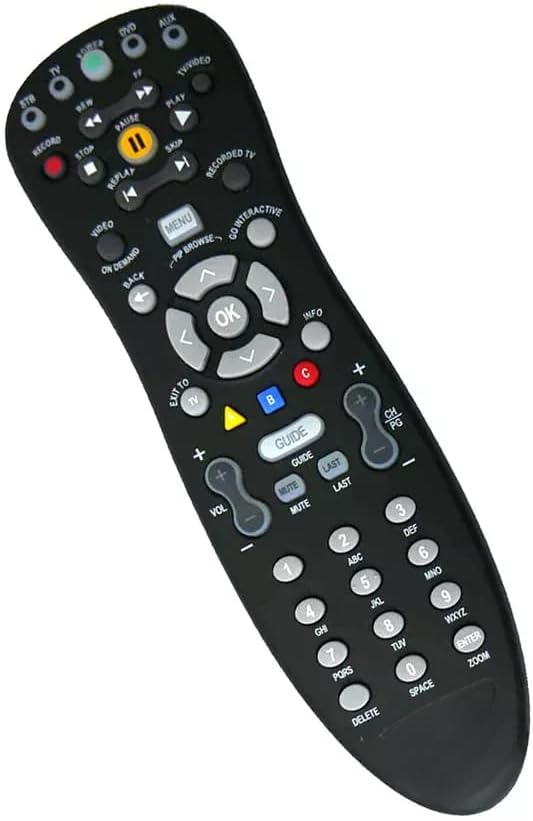
Figure 1: Front view of the remote control, displaying its button layout.

Figure 2: Back view of the remote control.
Setup
1. Battery Installation
- Locate the battery compartment on the back of the remote control.
- Press down on the latch and slide the battery cover off.
- Insert two (2) AA batteries, ensuring the positive (+) and negative (-) terminals align correctly with the markings inside the compartment.
- Slide the battery cover back into place until it clicks securely.

Figure 3: Battery compartment with batteries installed.
2. Initial Use
This remote control is designed to work with compatible Cisco Cable Box systems without complex programming. After installing batteries, point the remote directly at your cable box and begin operation.
Operating Instructions
The remote control features a standard layout for easy navigation and control of your television and cable box functions.
- Power Button: Turns your cable box and/or TV on or off.
- Number Pad (0-9): For direct channel entry.
- Channel Up/Down (CH PG +/-): Changes channels sequentially.
- Volume Up/Down (VOL +/-): Adjusts the audio volume.
- Mute Button: Silences the audio.
- Navigation Pad (Arrows and OK): Used to navigate menus and select options.
- Menu Button: Accesses the main menu of your cable box.
- Guide Button: Displays the program guide.
- Playback Controls (Play, Pause, Stop, Record, Rewind, Fast Forward, Skip): Controls media playback functions.
- Info Button: Displays information about the current program.
Ensure a clear line of sight between the remote control and the infrared receiver on your device for optimal performance. The maximum effective range is approximately 5 meters (16 feet).
Maintenance
Battery Replacement
Replace batteries when the remote control's response becomes inconsistent or stops working. Always replace both batteries simultaneously with new AA batteries.
Cleaning
To clean the remote control, use a soft, dry cloth. For stubborn dirt, lightly dampen the cloth with water. Avoid using harsh chemicals or abrasive cleaners, as these can damage the remote's surface or internal components.
Storage
Store the remote control in a cool, dry place away from direct sunlight and extreme temperatures. If storing for an extended period, remove the batteries to prevent leakage.
Troubleshooting
- Remote not responding:
- Check if the batteries are correctly inserted and have sufficient charge. Replace if necessary.
- Ensure there is a clear line of sight between the remote and the device. Remove any obstructions.
- Verify that the remote is pointed directly at the device's infrared sensor.
- Limited range:
- Replace the batteries with new ones.
- Ensure no strong light sources (like direct sunlight or bright fluorescent lights) are interfering with the infrared signal.
Specifications
| Feature | Detail |
|---|---|
| Brand | XINFUTE |
| Model Number | RC1534820/04B |
| Compatible Devices | Television, Cisco Cable Box |
| Connectivity Technology | Infrared |
| Maximum Number of Supported Devices | 1 |
| Button Quantity | 20 |
| Maximum Range | 5 Meters |
| Battery Type | 2 AA batteries (not included) |
| Material | ABS Material |
| Item Weight | 0.08 Kilograms |
Warranty Information
This XINFUTE remote control comes with a 1 Year Manufacturer Warranty. Please retain your proof of purchase for any warranty claims.
Support
For further assistance, troubleshooting, or warranty inquiries, please contact the manufacturer, XINFUTE, through their official support channels. Refer to your purchase documentation for specific contact details.