
1. Introduction
This manual provides detailed instructions for the installation, operation, and maintenance of your Eujgoov Digital Irrigation Timer. This device is designed to automate your outdoor watering system, offering convenience and efficient water management for various applications, including gardens, lawns, and greenhouses.
Key features include a rain delay function, flexible scheduling options, and a durable, waterproof design suitable for outdoor use.
2. Package Contents
- 1 x Digital Irrigation Timer
- 2 x Thread Conversion Adapters (3/4 inch to 1/2 inch)

Image: The digital irrigation timer shown with its two thread conversion adapters.
3. Product Overview
3.1 Components and Controls

Image: Diagram illustrating the LCD screen, dial, buttons, hose tap connection, filter, and outlet of the irrigation timer.
- LCD Screen: Displays current time, watering schedule, and status.
- Dial: Used to select different programming modes (OFF, SET CLOCK, START TIME, HOW LONG, HOW OFTEN, AUTO).
- OK Button: Confirms selections and settings.
- +/- Buttons: Adjust values (time, duration, frequency).
- DELAY/+ Button: Activates and adjusts the rain delay function.
- Manual Button: Initiates manual watering.
- Hose Tap Connection: Connects the timer to your water source.
- Filter: Prevents debris from entering the timer.
- Outlet: Connects to your garden hose or irrigation system.

Image: Front view of the digital irrigation timer, showing the display, control dial, and buttons.
4. Specifications
| Specification | Value |
|---|---|
| Item Type | Digital Sprinkler Timer |
| Working Pressure | 0.5bar - 8bar (7.25psi - 116.03psi) |
| Maximum Flow Rate | 10 Gal/Min (35 L/min) at 3bar |
| Waterproof Rating | IP54 |
| Working Temperature | 3℃ - 50℃ (37.4℉ - 122℉) |
| Watering Duration | Minutes: 1-59; Hours: 1-4 |
| Watering Frequency | Hours: 1-12; Days: 1-7 |
| Thread Type | US for 3/4 Inch Taps, EU for 3/4 Inch or 1 Inch Taps |
| Battery | 2 x AAA 1.5V Alkaline Battery (not included) |
| Working Voltage | DC2.3V-3V |
| Housing Material | ABS |
| Product Dimensions | 5.91"D x 5.12"W x 3.15"H |
| Item Weight | 368 Grams |
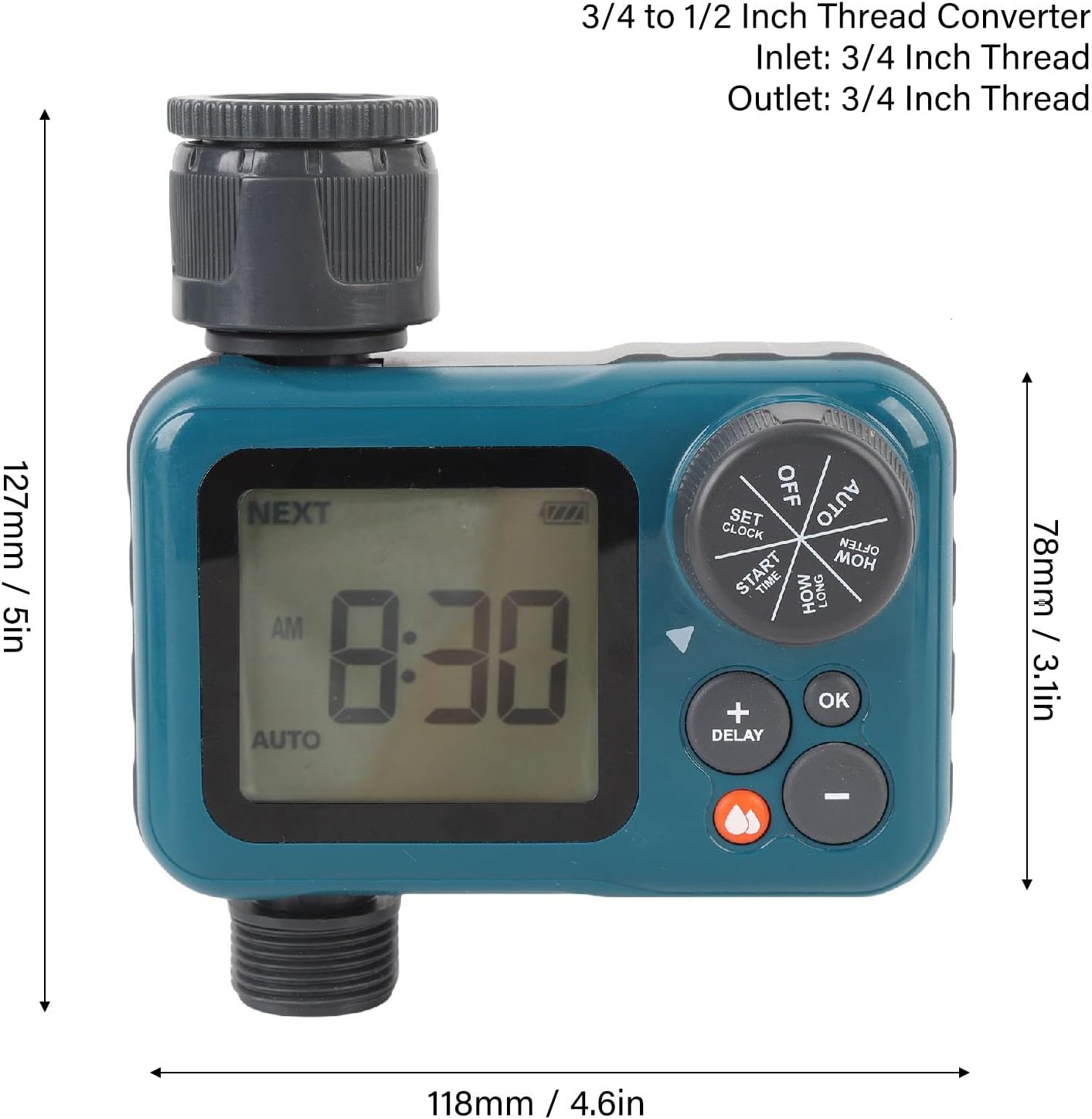
Image: The digital irrigation timer with its dimensions labeled: 127mm (5in) height, 118mm (4.6in) width, and 78mm (3.1in) depth.
5. Setup
5.1 Battery Installation
- Locate the battery compartment on the back of the timer.
- Open the battery compartment cover.
- Insert two (2) AAA 1.5V alkaline batteries, ensuring correct polarity (+/-).
- Close the battery compartment cover securely to maintain the IP54 waterproof rating.
5.2 Connecting the Timer
- Ensure the filter is properly seated in the hose tap connection.
- Screw the timer's hose tap connection onto your outdoor faucet or tap. Hand-tighten only. Do not overtighten.
- Connect your garden hose or irrigation system to the timer's outlet. If necessary, use the provided thread conversion adapters for a secure fit.
- Ensure all connections are tight to prevent leaks.

Image: Close-up view of the timer's inlet connection, showing the integrated filter screen.
6. Operating Instructions
Use the central dial to select the desired programming mode and the +/- buttons to adjust values. Press the OK button to confirm each setting.
6.1 Setting the Clock
- Turn the dial to SET CLOCK.
- Use the + and - buttons to set the current time (AM/PM).
- Press OK to confirm.
6.2 Setting Start Time
- Turn the dial to START TIME.
- Use the + and - buttons to set the desired watering start time (AM/PM).
- Press OK to confirm.
6.3 Setting Watering Duration (HOW LONG)
- Turn the dial to HOW LONG.
- Use the + and - buttons to set the watering duration from 1 to 59 minutes or 1 to 4 hours.
- Press OK to confirm.
6.4 Setting Watering Frequency (HOW OFTEN)
- Turn the dial to HOW OFTEN.
- Use the + and - buttons to set the watering frequency from 1 to 12 hours or 1 to 7 days.
- Press OK to confirm.
6.5 Automatic Watering Mode
- After setting the clock, start time, duration, and frequency, turn the dial to AUTO.
- The timer will now operate according to your programmed schedule.
6.6 Manual Watering
- Press the Manual button.
- Use the + and - buttons to set the desired manual watering duration.
- Press OK to start manual watering.
- To stop manual watering, press the Manual button again or turn the dial to OFF.
6.7 Rain Delay Function
The rain delay function temporarily pauses your watering schedule for a set period, conserving water after rainfall.
- Press the DELAY/+ button.
- Use the + and - buttons to select a delay period of 24, 48, or 72 hours.
- Press OK to activate the rain delay. The timer will resume its schedule after the delay period ends.
- To cancel the rain delay, press the DELAY/+ button again and set the delay to 0, then press OK.

Image: The digital irrigation timer operating in an outdoor environment, with sprinklers watering a field in the background, demonstrating its application.
7. Maintenance
7.1 Cleaning
- Periodically clean the exterior of the timer with a soft, damp cloth. Do not use abrasive cleaners or solvents.
- Inspect and clean the inlet filter regularly to prevent blockages and ensure proper water flow. Remove the timer from the faucet, carefully extract the filter, rinse it under running water, and reinsert it.
7.2 Battery Replacement
- When the low battery indicator appears on the LCD screen, replace the batteries promptly to avoid interruption of your watering schedule.
- Follow the battery installation steps in Section 5.1.

Image: The digital irrigation timer with text overlays indicating its IP54 water and dust proof rating and low battery prompt feature.
7.3 Winter Storage
- Before the first frost, disconnect the timer from the faucet and hose.
- Remove the batteries.
- Store the timer in a dry, frost-free location indoors.
8. Troubleshooting
| Problem | Possible Cause | Solution |
|---|---|---|
| Timer not turning on | Dead or incorrectly installed batteries | Replace batteries with new AAA alkaline batteries, ensuring correct polarity. |
| No water flow | Faucet off, clogged filter, low water pressure, or timer not in AUTO mode. | Ensure faucet is fully open. Clean the inlet filter. Check water pressure. Turn dial to AUTO. |
| Timer not watering at scheduled time | Incorrect clock/start time, duration/frequency settings, or rain delay active. | Verify all settings (SET CLOCK, START TIME, HOW LONG, HOW OFTEN). Check if rain delay is active. Ensure dial is on AUTO. |
| Water leaking from connections | Loose connections or missing/damaged washers. | Hand-tighten all connections. Check for and replace any worn rubber washers. |
9. Safety Information
- This timer is for outdoor use with cold water only.
- Do not immerse the timer in water.
- Do not use with appliances or systems under pressure other than standard household water pressure.
- Remove batteries before prolonged storage or freezing temperatures.
- Keep out of reach of children.
10. Warranty and Support
For warranty information, technical support, or further assistance, please refer to the official Eujgoov website or contact their customer service directly. Please have your model number (Eujgoov5mwu0r4edg) and purchase details available when contacting support.