
1. Introduction
The AEGTEST HOUND-1085 is a compact, rechargeable radon detector designed for continuous monitoring of radon levels in your home. It features a TFT LCD display, audible and visual alarms, and the ability to track radon levels over short and long periods. This manual provides essential information for setting up, operating, and maintaining your device.

Image: The AEGTEST HOUND-1085 Radon Detector, emphasizing its role in protecting against radon gas.
2. Setup
2.1 Unboxing and Initial Charge
The HOUND-1085 comes ready to use. Inside the box, you will find the radon detector, a charging data cable, and this user manual. Before first use, ensure the device is fully charged. A full charge takes approximately 3.5 hours and provides over 1 month of continuous monitoring.
2.2 Placement
Due to its palm-sized and lightweight design, the HOUND-1085 can be easily moved between rooms for comprehensive radon tracking. For accurate readings, place the detector in areas where occupants spend significant time, such as living rooms, bedrooms, or basements. Avoid placing it near drafts, windows, or heating/cooling vents, as this can affect measurement accuracy.
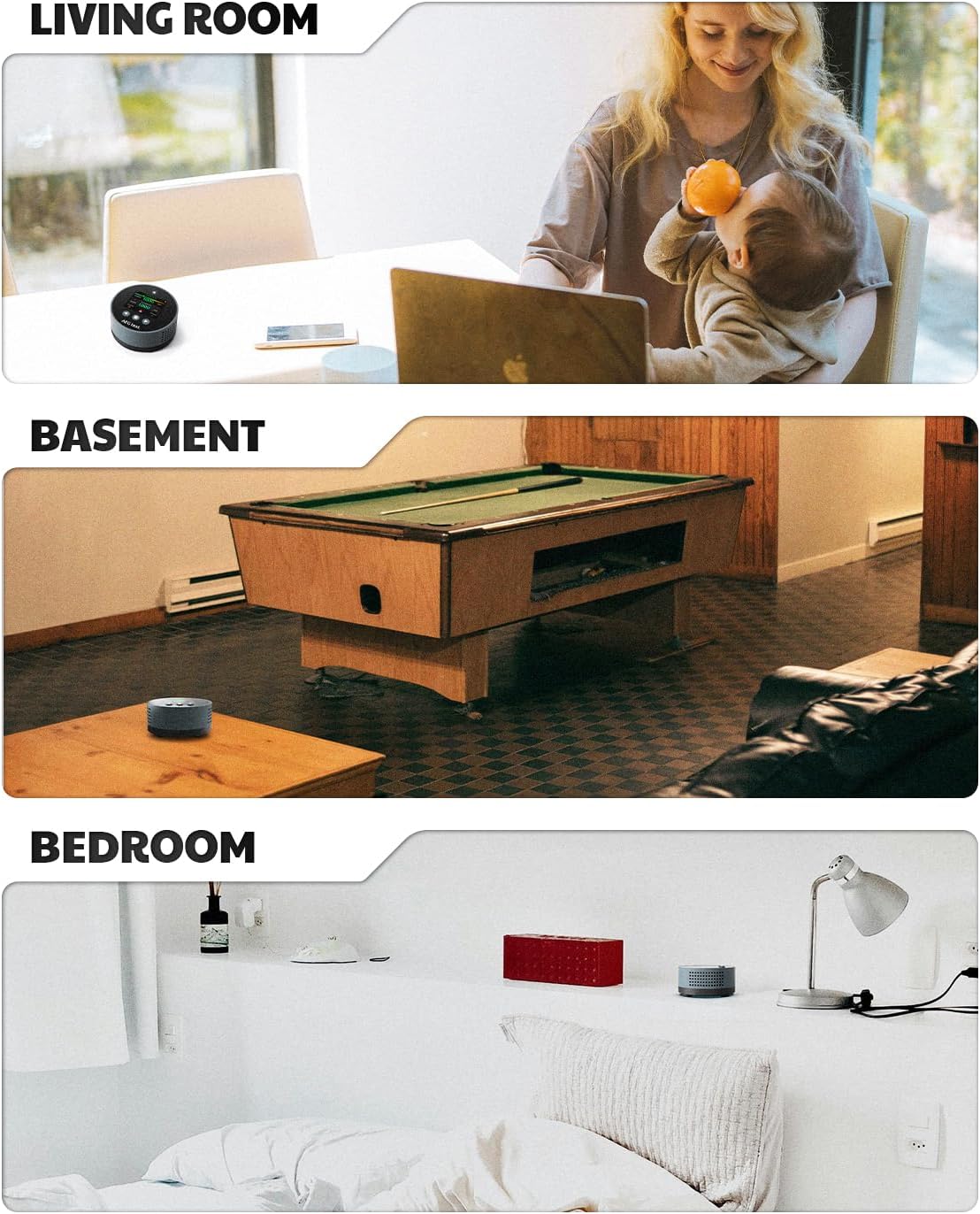
Image: Examples of optimal placement for the HOUND-1085 Radon Detector in various home environments.
2.3 First Reading
The device provides an initial radon reading within 6 hours of activation, with automatic hourly updates for real-time accuracy.
3. Operating Instructions
3.1 Display and Navigation
The HOUND-1085 features a TFT LCD display that shows current and historical radon levels. Navigation is typically done via intuitive buttons on the device.

Image: The HOUND-1085 display interface, showing current radon readings and navigation buttons.
3.2 Monitoring Modes
The device supports both short-term and long-term tracking. You can easily review radon levels for various timeframes:
- Short-term overviews: 6, 24, 48, or 96 hours.
- Long-term history data: Up to 504 days.
Live hourly updates are provided, with 6-hour auto-logging, all displayed instantly on the device without the need for lab delays.

Image: Real-time radon level display and the history data menu on the HOUND-1085.
3.3 Alarms
The HOUND-1085 features both audible and visual alarms. Radon levels are indicated by color-coded bars on the display. Customizable sound alerts will promptly warn you of elevated concentrations, allowing for timely action to protect your family's health.

Image: The HOUND-1085 displaying an elevated radon level, triggering visual and audible alarms.
3.4 Unit Settings
You can select your preferred unit of measurement for radon levels, either pCi/L or Bq/m³.

Image: The settings interface of the HOUND-1085, allowing customization of units and alarm thresholds.
4. Maintenance
4.1 Charging
The HOUND-1085 is powered by a rechargeable lithium battery. Connect the provided charging data cable to the device and a suitable USB power source. A full charge takes approximately 3.5 hours and provides over 1 month of continuous monitoring.

Image: The HOUND-1085 in a home setting, highlighting its long battery life on a single charge.
4.2 Cleaning
To ensure optimal performance, keep the device clean and free from dust. Use a soft, dry cloth to wipe the exterior. Do not use liquid cleaners or immerse the device in water.
5. Troubleshooting
If you encounter any issues with your HOUND-1085 Radon Detector, please refer to the following general troubleshooting tips:
- No Display/Device Not Turning On: Ensure the device is fully charged. Connect it to the charging cable and allow it to charge for at least 30 minutes before attempting to power it on again.
- Inaccurate Readings: Verify that the device is placed in an optimal location, away from drafts, direct sunlight, or extreme temperatures. Allow sufficient time (at least 6 hours for initial reading, longer for stable averages) for the sensor to stabilize.
- Alarm Not Functioning: Check the alarm settings in the device menu to ensure audible and visual alarms are enabled and set to appropriate thresholds.
- Data Not Updating: Ensure the device is continuously powered or sufficiently charged for auto-logging. If issues persist, a device reset (if available in settings) might be necessary, though this may clear historical data.
6. Specifications
- Manufacturer: AEGTEST
- Part Number: HOUND-1085
- Item Model Number: HOUND-1085
- Product Dimensions: 8 x 8 x 4 cm
- Item Weight: 123 g
- Colour: Blue
- Style: Portable compact radon detector
- Power Source: Rechargeable Lithium Battery
- Batteries: 1 D batteries required (included)
- Battery Cell Type: Lithium Ion
- Sensor Type: Advanced Semiconductor Sensor
- Operating Humidity: <90%RH
- Alarm: Yes (Audible & Visual)
7. Warranty and Support
7.1 Warranty
The AEGTEST HOUND-1085 Radon Detector comes with a 36-Month Manufacturer's Warranty.
7.2 Customer Support
For any inquiries or support needs, please contact AEGTEST customer service at support@aegtest.tech.
