
LINGDU LD4K
LINGDU LD4K 12" Mirror Dash Cam User Manual
4K UHD Front and 2.5K Rear View Dash Camera for Car
Introduction
This manual provides detailed instructions for the installation, operation, and maintenance of your LINGDU LD4K 12" Mirror Dash Cam. This device is designed to enhance driving safety and provide comprehensive video recording capabilities for your vehicle. Please read this manual thoroughly before using the product to ensure proper function and to maximize its features.
What's in the Box
Carefully unpack the contents and verify that all items listed below are present and in good condition.
- 1 * LINGDU LD4K 12" 4K Mirror Dash Cam
- 1 * 2.5K Rear Camera with Screws and Adhesive Mount
- 1 * 12FT Car Charger
- 1 * 20FT Rear Camera Cable
- 1 * External GPS Antenna
- 1 * 64GB microSD Card
- 1 * User Manual (this document)
- 5 * Cable Clips
- 4 * Straps for Mirror Mounting
- 1 * Pry Tool
- 1 * Cleaning Wipe
- 1 * Anti-Glare Protective Film

Image: All components included in the LINGDU LD4K Mirror Dash Cam package.
Product Overview
The LINGDU LD4K Mirror Dash Cam integrates a high-resolution front camera into a 12-inch touchscreen rearview mirror, complemented by a separate rear camera. It features advanced functionalities such as ADAS, BSD, LCA, GPS, G-Sensor, loop recording, parking monitoring, and voice control.

Image: Overview of the LINGDU LD4K Mirror Dash Cam and its primary accessories.
Installation Guide
Follow these steps for proper installation of your LINGDU LD4K Mirror Dash Cam.
- Mounting the Mirror Dash Cam: Secure the 12" mirror dash cam over your existing rearview mirror using the provided straps. Ensure it is centered and firmly attached.
- Connecting the Front Camera: The front camera is integrated into the mirror unit. Adjust its angle to capture the desired view of the road ahead.
- Installing the Rear Camera: Mount the rear camera on the rear license plate area or inside the rear window. Connect the rear camera cable to the main mirror unit. Route the cable neatly along the vehicle's interior trim.
- Connecting Power: Plug the 12FT car charger into your vehicle's cigarette lighter socket and connect the other end to the mirror dash cam. Route the power cable discreetly. For 24/7 parking monitoring, a hardwire kit (sold separately) is required.
- GPS Antenna Installation: Attach the external GPS antenna to the windshield, ensuring it has a clear view of the sky for optimal signal reception. Connect the GPS antenna cable to the main mirror unit.
- Insert MicroSD Card: Insert the provided 64GB microSD card into the designated slot on the dash cam. Ensure it is inserted correctly.
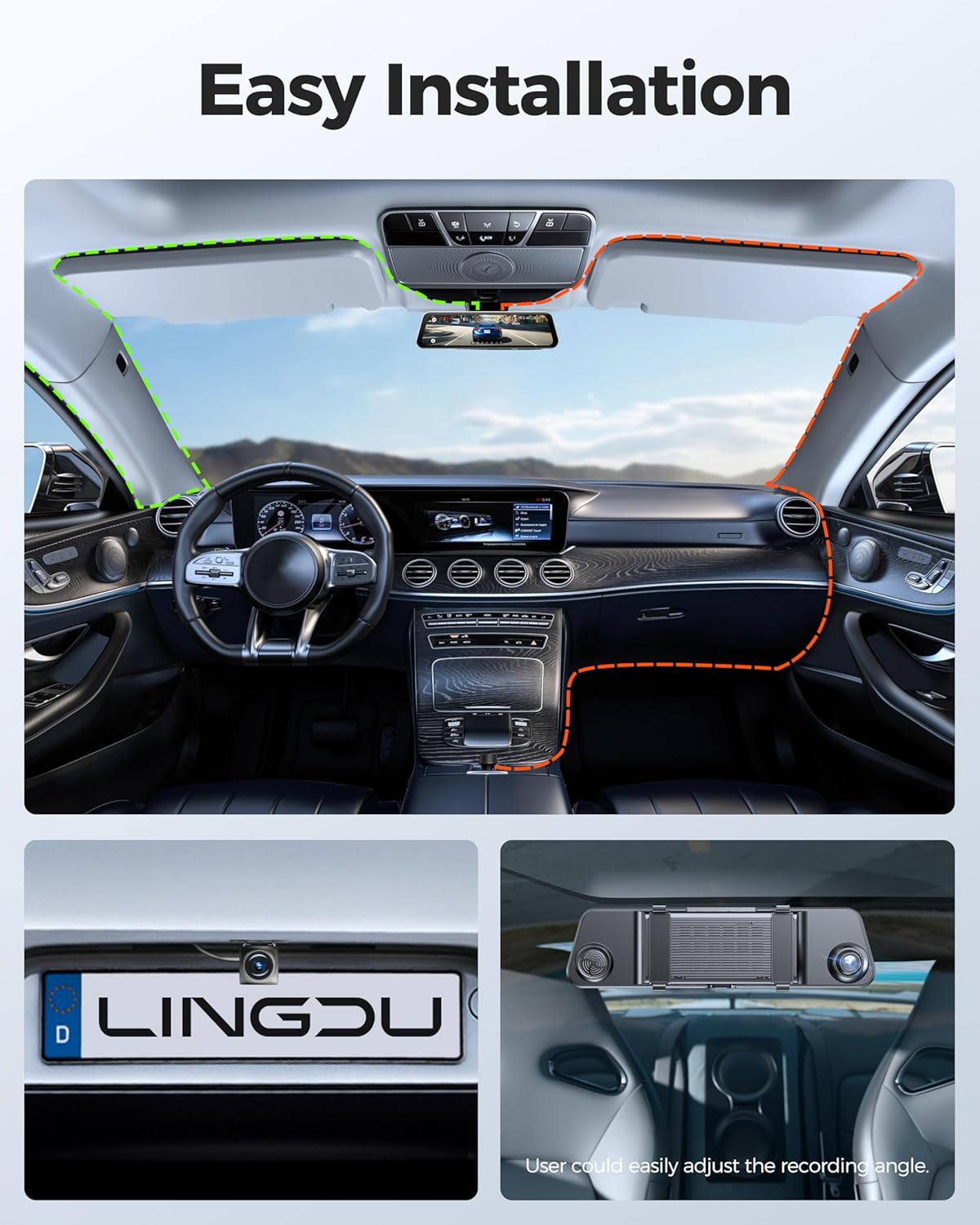
Image: Visual guide for the installation of the LINGDU LD4K Mirror Dash Cam and its components.
Basic Operation
Power On/Off
The dash cam will automatically power on and begin recording when your vehicle's ignition is turned on (if connected to a switched power source). It will power off automatically when the ignition is turned off.
Touch Screen Interface
The 12-inch display is a full touch screen. Swipe left/right to switch between front and rear camera views. Tap icons to access settings, playback, and other functions.
Loop Recording
The dash cam records video in continuous loops. When the microSD card is full, the oldest unlocked footage will be overwritten by new recordings. This ensures continuous recording without manual management.
G-Sensor
The built-in G-Sensor detects sudden impacts or collisions. In such an event, the current video segment will be automatically locked and saved to prevent it from being overwritten by loop recording.
Voice Control
The LD4K supports hands-free operation through voice commands. Speak clearly to activate functions without diverting attention from the road.
- "Turn on WiFi"
- "Turn off WiFi"
- "Take Picture"
- "Lock the Video"
- "Open Recording"
- "Turn off Recording"
- And other intuitive commands.
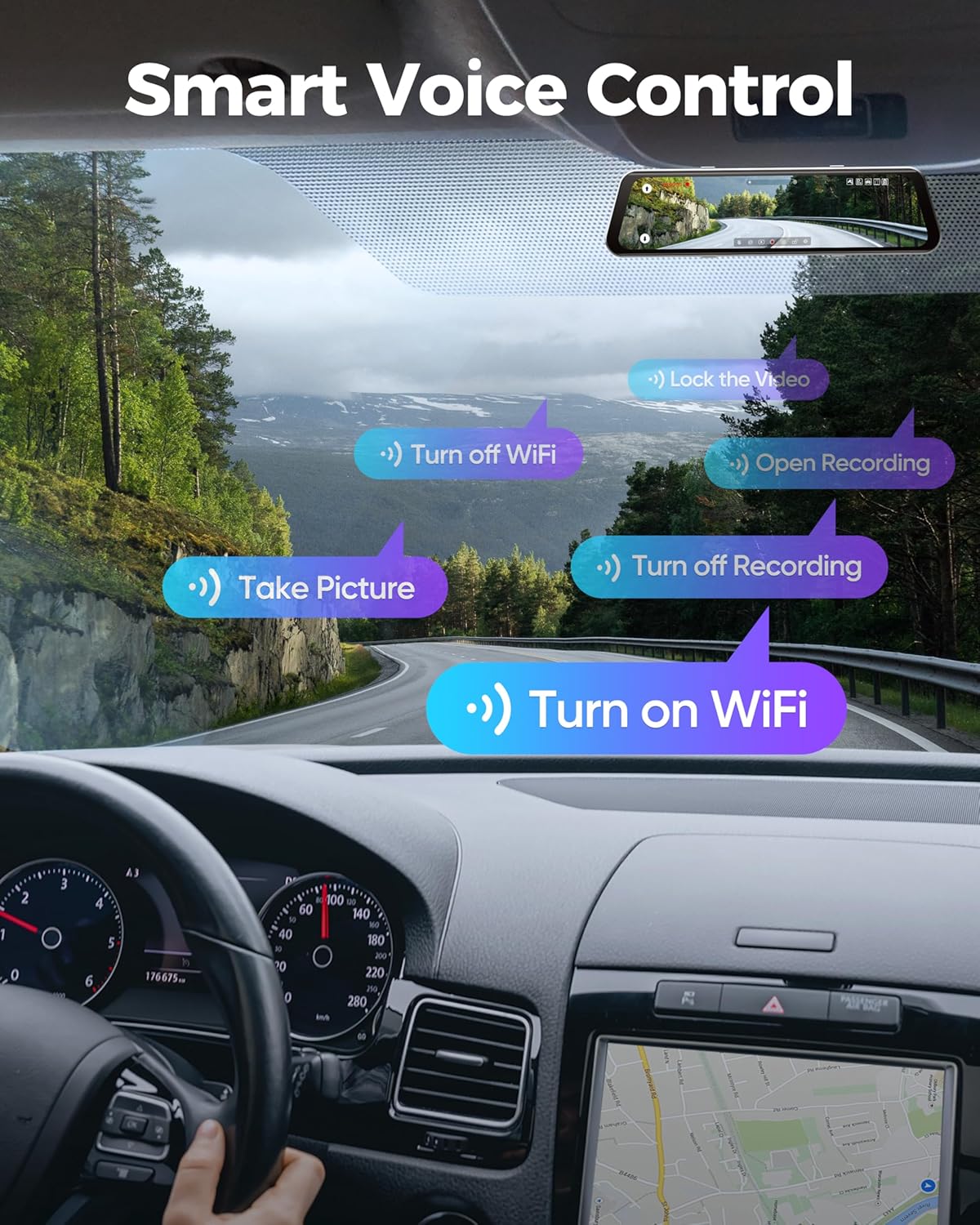
Image: Illustration of the voice control feature, showing available commands for hands-free operation.
Advanced Features
High-Resolution Recording
The front camera records in UHD 4K (3840x2160@30fps, 8MP) and the rear camera in QHD 2.5K (2560x1440@30fps, 3.7MP), ensuring clear and detailed footage.

Image: Demonstrates the 4K front and 2.5K rear recording resolution with HDR technology.
Smart ADAS Warnings
The Advanced Driver Assistance System (ADAS) provides real-time audio and visual alerts to enhance driving safety.
- Forward Collision Warning: Alerts you if you are approaching a vehicle too quickly.
- Lane Departure Warning: Notifies you if your vehicle drifts out of its lane.
- Pedestrian Collision Warning: Detects pedestrians in the vehicle's path.
- Front Vehicle Movement: Informs you when the vehicle ahead starts moving.
- Safe Distance Monitoring: Helps maintain a safe following distance.

Image: Visual representation of the Smart ADAS safety alert features.
Blind Spot Detection (BSD) & Lane Change Assist (LCA)
The LD4K constantly monitors your blind zones on both sides and the rear, providing instant alerts when changing lanes. This feature is particularly useful for highway driving and in busy traffic conditions, reducing the risk of side and rear collisions.
Superfast 5.8GHz WiFi & App Control
Connect your smartphone to the dash cam via the LINGDU app (available for iOS & Android) using the upgraded 5.8GHz WiFi for ultra-fast video transfers. You can preview live footage, download recordings, and share them directly from your phone.
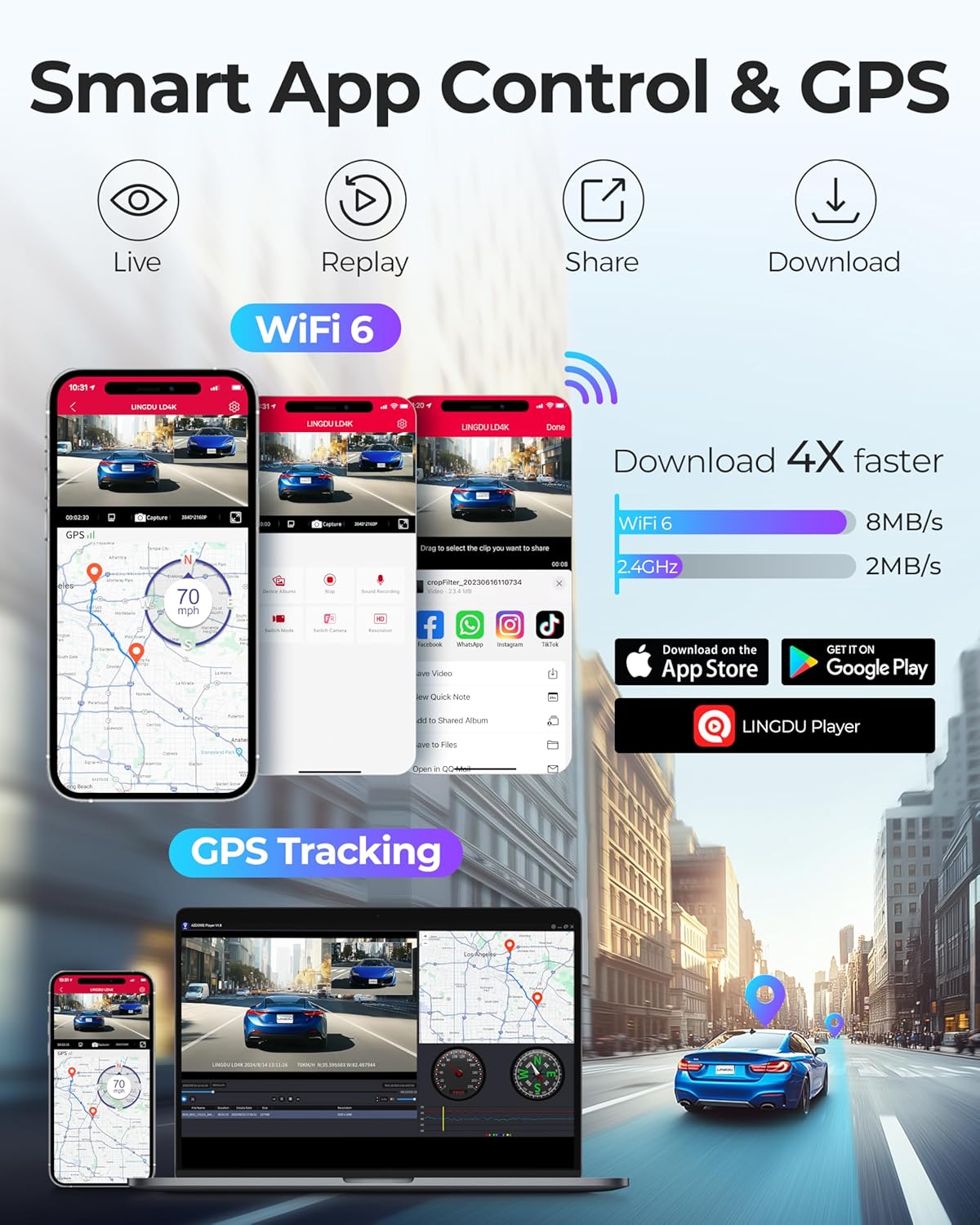
Image: Depicts the LINGDU app interface for smart control and GPS tracking via WiFi.
24H Parking Monitoring
When the vehicle is parked, the dash cam can monitor for incidents. This feature requires a hardwire kit (sold separately) for continuous power.
- Collision Detection: If an impact is detected while parked, the dash cam will automatically record and lock the footage.
- Time-Lapse Parking Mode: Records continuously at a low frame rate (e.g., 1fps) to save storage space while providing a full overview of events during parking.
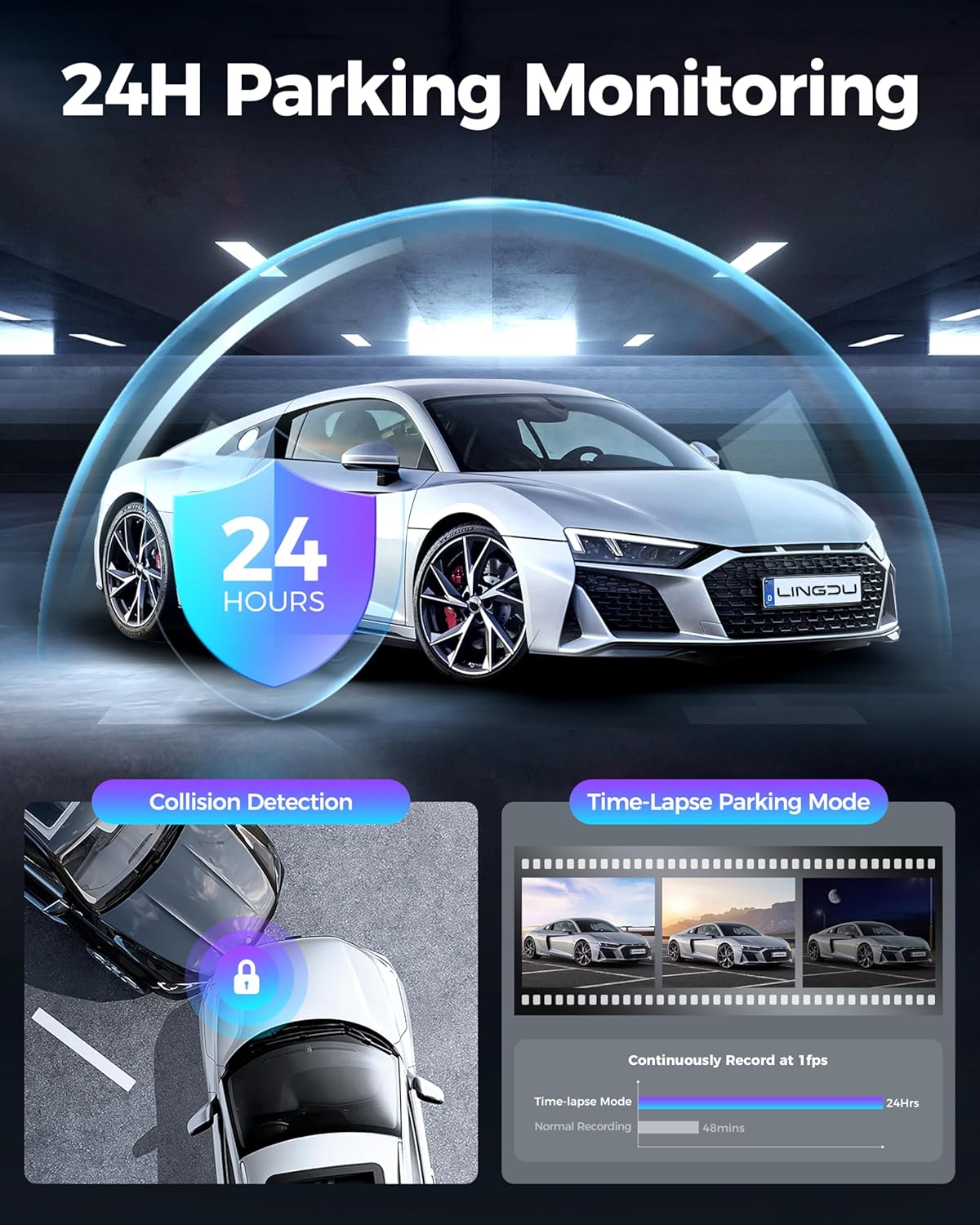
Image: Explanation of 24-hour parking monitoring features, including collision detection and time-lapse recording.
Super Night Vision
Equipped with a Stavis Sensor, WDR (Wide Dynamic Range), and an F/1.8 aperture, the LD4K provides enhanced clarity and detail in low-light conditions, ensuring clear recordings even at night.

Image: Example of footage recorded with Super Night Vision, highlighting clarity in dark environments.
Settings Menu
Access the settings menu by tapping the gear icon on the touchscreen. Here you can customize various parameters:
- Video Resolution: Adjust front and rear camera recording quality.
- Loop Recording Duration: Set the length of each video segment (e.g., 1, 3, 5 minutes).
- G-Sensor Sensitivity: Adjust the sensitivity for impact detection.
- Parking Monitor Settings: Configure collision detection and time-lapse modes (requires hardwire kit).
- ADAS Settings: Enable or disable specific ADAS warnings and adjust their sensitivity.
- Date/Time: Set the correct date and time for accurate timestamps on recordings.
- Audio Recording: Enable or disable microphone recording.
- Screen Saver: Set the display to turn off after a period to avoid distraction.
- Language: Select your preferred language for the menu interface.
- Format SD Card: Format the microSD card to ensure optimal performance and clear old data.
Maintenance
- Cleaning the Lens: Regularly clean the front and rear camera lenses with a soft, lint-free cloth to ensure clear video quality.
- Cleaning the Screen: Use a microfiber cloth to gently wipe the touchscreen. Avoid abrasive cleaners.
- MicroSD Card Management: Format the microSD card periodically (e.g., once a month) to prevent data corruption and maintain optimal recording performance. Back up important files before formatting.
- Firmware Updates: Check the LINGDU official website or app for any available firmware updates to ensure your dash cam has the latest features and bug fixes.
Troubleshooting
| Problem | Possible Cause | Solution |
|---|---|---|
| Dash cam does not power on. | No power supply; faulty car charger. | Check car charger connection and vehicle's cigarette lighter socket. Try a different power source if available. |
| Recording stops or freezes. | Faulty or full microSD card; low-quality microSD card. | Format the microSD card. Replace with a high-speed (Class 10 or U3) microSD card if issues persist. |
| Poor video quality. | Dirty lens; protective film still on lens; incorrect resolution settings. | Clean camera lenses. Ensure protective films are removed. Check video resolution settings in the menu. |
| GPS signal not found. | GPS antenna not properly connected or obstructed. | Ensure GPS antenna is securely connected and has a clear view of the sky. Move antenna if necessary. |
| Voice control not responding. | Microphone obstructed; unclear commands; high background noise. | Ensure microphone is clear. Speak clearly and directly. Reduce cabin noise. |
| WiFi connection issues. | Incorrect app settings; interference; dash cam WiFi off. | Ensure WiFi is enabled on the dash cam. Reconnect via the LINGDU app. Check for app updates. |
Specifications
| Feature | Detail |
|---|---|
| Model Name | LD4K |
| Front Camera Resolution | UHD 4K (3840x2160@30fps, 8MP) |
| Rear Camera Resolution | QHD 2.5K (2560x1440@30fps, 3.7MP) |
| Display | 12-inch Touch Screen |
| Field Of View | 150 Degrees |
| Connectivity | Wi-Fi (2.4G/5G support), GPS |
| Special Features | ADAS, BSD, LCA, Voice Control, G-Sensor, Loop Recording, Parking Monitor, Supercapacitor, Built-In Display, Microphone, Speaker, App Control, Reverse Assist, Touch Screen, Voice Alert, Automatic Incident Detection |
| Storage | Supports up to 512GB microSD card (64GB included) |
| Power Source | Car Charger (12FT), Hardwire Kit (for 24H parking, sold separately) |
| Batteries | 1 Lithium Metal battery (included) |
| Product Dimensions | 0.8 x 12 x 3 inches |
| Item Weight | 2.09 pounds |
| Manufacturer | LINGDU |
Warranty and Support
The LINGDU LD4K Mirror Dash Cam comes with a 1-YEAR GUARANTEE from the date of purchase. This warranty covers manufacturing defects and ensures the product functions as intended under normal use.
For technical support, warranty claims, or any questions regarding your product, please refer to the contact information provided on the LINGDU official website or the support section within the LINGDU mobile application. Please have your product model number (LD4K) and purchase details ready when contacting support.
Related documentsLD4K


Ask a question about this manual
Ask about setup, troubleshooting, compatibility, parts, safety, or missing instructions. Manuals+ will review the question and use this page’s manual context to help answer it.