
1. Introduction
Thank you for choosing the EasyCom Under Desk Printer Stand. This versatile 2-tier stand is designed to optimize your workspace by providing dedicated storage for your printer, paper, and office supplies. Its robust construction and thoughtful design ensure durability and functionality in various settings, from home offices to living rooms.
2. Package Contents
Please inspect the package contents to ensure all parts are present and undamaged. Each component is individually wrapped and labeled for easy identification during assembly.
- Top Shelf (1x)
- Bottom Shelf (1x)
- Side Frames (2x)
- Cross Braces (2x)
- Fabric Storage Drawer (1x)
- Drawer Knob (1x)
- Casters with Brake (2x)
- Casters without Brake (2x)
- Adjustable Leveling Feet (4x)
- L-Hook (1x)
- Assembly Hardware (Screws, Allen Wrenches, Wrench)
3. Assembly Instructions
Assembly is straightforward and typically takes about 15 minutes. All necessary tools are included. Follow these steps carefully:
- Prepare Components: Unpack all components and verify against the package contents list. Ensure all parts are labeled correctly (numbered or lettered).
- Attach Side Frames to Bottom Shelf: Secure the side frames (parts 3 and 4) to the bottom shelf (part 1) using the provided screws (e.g., type C). Ensure the holes for the cross braces face outwards as per the diagram.
- Attach Top Shelf: Place the top shelf (part 2) onto the assembled frame and secure it with the appropriate screws (e.g., type D).
- Install Casters or Leveling Feet: Decide whether to use the rolling casters or adjustable leveling feet. Screw the chosen option into the bottom of the stand's legs. If using casters, ensure the two with brakes are placed diagonally for stability.
- Insert Fabric Storage Drawer: Unfold the fabric drawer and insert the rigid bottom panel. Slide the assembled drawer into the designated slot under the top shelf. Attach the drawer knob (part E) to the front of the drawer.
- Attach L-Hook: Secure the L-hook (part H) to the side frame as desired for hanging cables or headphones.
Video 1: Official product overview and assembly demonstration by EasyCom US.
4. Features and Benefits
- Large Spacious Tabletop: The 23.6"L x 15.7"W tabletop accommodates various devices such as large printers, fax machines, 3D printers, or scanners.
- Under Desk Storage: Designed to slide under most desks, freeing up valuable desktop space.
- Fabric Storage Drawer: A convenient fabric drawer provides hidden storage for printer paper, pens, scissors, and other office essentials, reducing clutter.
- 360° Rolling Casters with Lock: Four smooth-rolling casters allow for easy movement across carpets or tiles. Two casters include locking mechanisms to secure the stand in place.
- Adjustable Leveling Feet: Alternatively, the stand can be used with adjustable leveling feet for stationary placement on uneven surfaces.
- Sturdy and Durable Construction: Built with a solid steel frame and particleboard surfaces, supporting up to 60 lbs. The anti-scratch surfaces ensure long-term use.
- Side L-Hook: A convenient hook is included for hanging headphones, cables, or other small accessories.
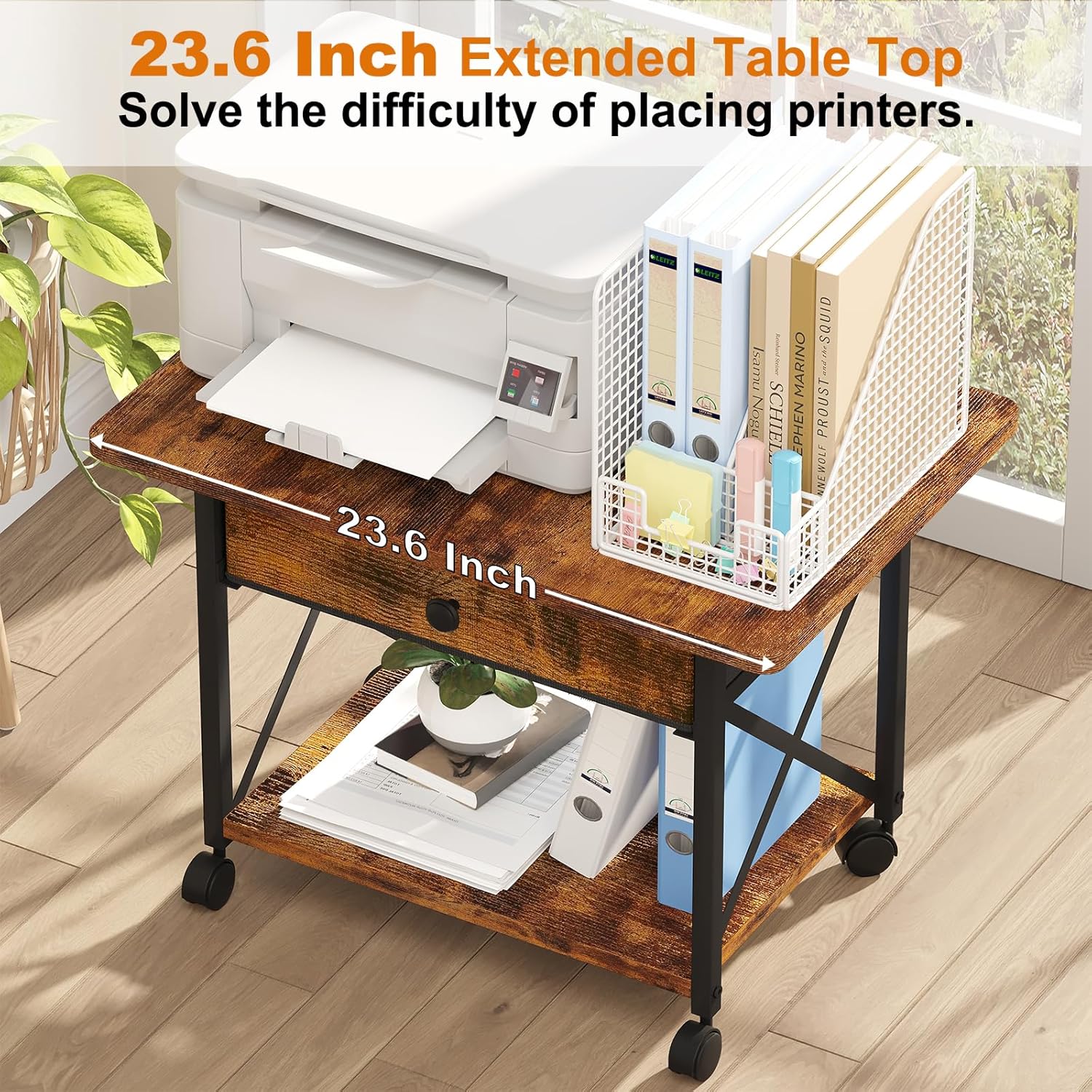
Image 1: The spacious tabletop comfortably holds a printer, with additional storage below.

Image 2: The stand fits neatly under a desk, optimizing workspace.

Image 3: The fabric drawer offers discreet storage for various items.

Image 4: Choose between lockable casters for mobility or adjustable feet for stability.

Image 5: The X-frame design enhances the stand's stability and durability.
5. Usage Scenarios
The EasyCom printer stand is designed for versatility and can be integrated into various environments:
- Home Office: Ideal for keeping your printer and office supplies organized and accessible.
- Living Room: Can serve as a small side table with storage.
- Bedroom: Functions as a compact nightstand or additional storage.
- Kitchen: Useful as a small utility cart for appliances or storage.

Image 6: The stand's versatile design allows it to fit into multiple rooms and serve various purposes.
6. Maintenance
To ensure the longevity and appearance of your printer stand, follow these simple maintenance guidelines:
- Cleaning: Wipe surfaces with a soft, damp cloth. Avoid harsh chemicals or abrasive cleaners.
- Dusting: Regularly dust the stand to prevent buildup.
- Caster Care: Periodically check casters for debris and clean as needed to maintain smooth rolling.
- Tighten Fasteners: Occasionally check and tighten all screws and fasteners to ensure stability.
7. Troubleshooting
- Wobbly Stand:
- Ensure all screws are securely tightened.
- If using leveling feet, adjust them to compensate for uneven floors.
- Casters Not Rolling Smoothly:
- Check for hair or debris caught in the wheels and remove.
- Ensure the caster locks are disengaged.
- Drawer Sticking:
- Ensure the fabric drawer is properly unfolded and the bottom panel is flat.
- Check for any obstructions in the drawer slot.
8. Specifications
| Attribute | Detail |
|---|---|
| Brand | EasyCom |
| Model Name | Large Printer Stand with Drawer Rustic Brown |
| Item Dimensions (L x W x H) | 23.6 x 15.7 x 17 inches |
| Material | Particleboard, Steel, Non-Woven Fabric |
| Weight Capacity | Up to 60 lbs |
| Color | Rustic Brown |
| Form Factor | Desk |
| Mounting Type | Floor, Table Top |
| Special Features | 360° Swivel Casters, Large Tabletop, Under Desk Design, Storage Drawer, L-Hook, Adjustable Leveling Feet |

Image 7: Detailed dimensions of the printer stand and its drawer.
9. Warranty and Support
The EasyCom Under Desk Printer Stand comes with a 1-Year Warranty from the date of purchase, covering manufacturing defects. For warranty claims, technical support, or any questions regarding your product, please contact EasyCom customer service through the retailer's platform or visit the official EasyCom website for contact information.