
1. Introduction
Thank you for choosing the AGold Premium Wireless Lavalier Microphone Kit. This kit provides a high-quality, wireless audio solution for various recording needs, including videos, interviews, online classes, and podcasts. Designed for ease of use, it features intelligent noise cancellation and broad compatibility with Android (USB-C) and iPhone (Lightning) devices, as well as cameras and PCs.
This manual will guide you through the setup, operation, maintenance, and troubleshooting of your new microphone kit to ensure optimal performance.
2. Package Contents
Before you begin, please verify that all items are present in your package:
- 2x Wireless Microphones
- 1x USB-C Receiver
- 1x Lightning Receiver
- 2x Windproof Foams (Microphone Covers)
- 1x USB Charging Cable
- 1x User Manual (this document)
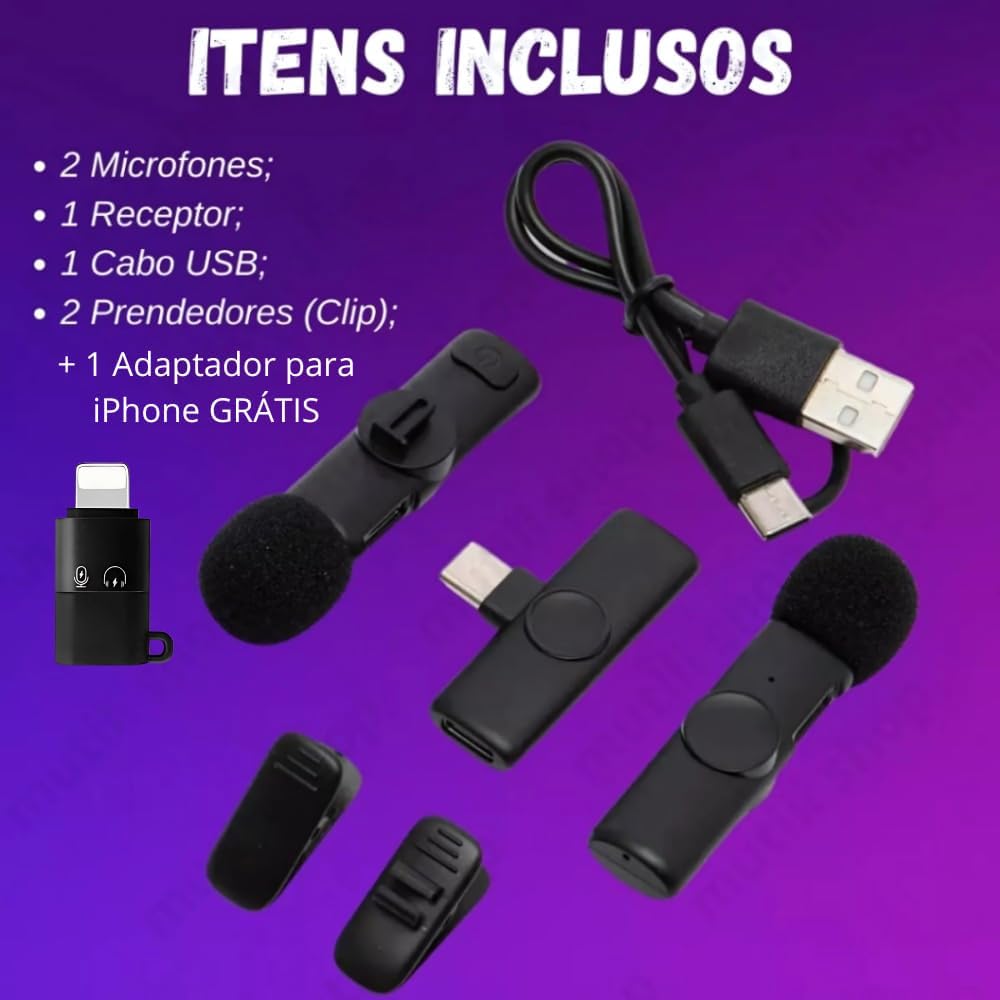
Image Description: This image displays all components included in the AGold Premium Wireless Lavalier Microphone Kit. It shows two black wireless lavalier microphones, one USB-C receiver, one Lightning receiver, two black windproof foam covers, and a black USB charging cable. The items are neatly arranged, indicating a complete kit ready for use.
3. Product Overview and Features
The AGold Premium Wireless Lavalier Microphone Kit is designed for portability and high-quality audio capture. Key features include:
- Plug and Play: No application required; simply connect and use.
- 2.4GHz Wireless Connection: Ensures stable and clear audio transmission with low latency.
- Intelligent Noise Cancellation: Captures clear audio even in noisy environments.
- Long Battery Life: Up to 6 hours of continuous use per microphone.
- Compact Design: Lightweight and discreet lavalier clip for easy attachment.
- Omnidirectional Pickup: Captures sound from all directions, suitable for interviews and group recordings.
- Wide Compatibility: Includes both USB-C and Lightning receivers for Android and iPhone devices.

Image Description: This graphic highlights the main features of the microphone kit. Icons and text indicate 'Plug and Play', '20 Meter Range', 'Precise Audio with Clarity and No Noise', 'Clean Sound Quality', 'High Capture Sensitivity', and 'Wide Compatibility'. A small box containing the two microphones and receivers is shown at the bottom.
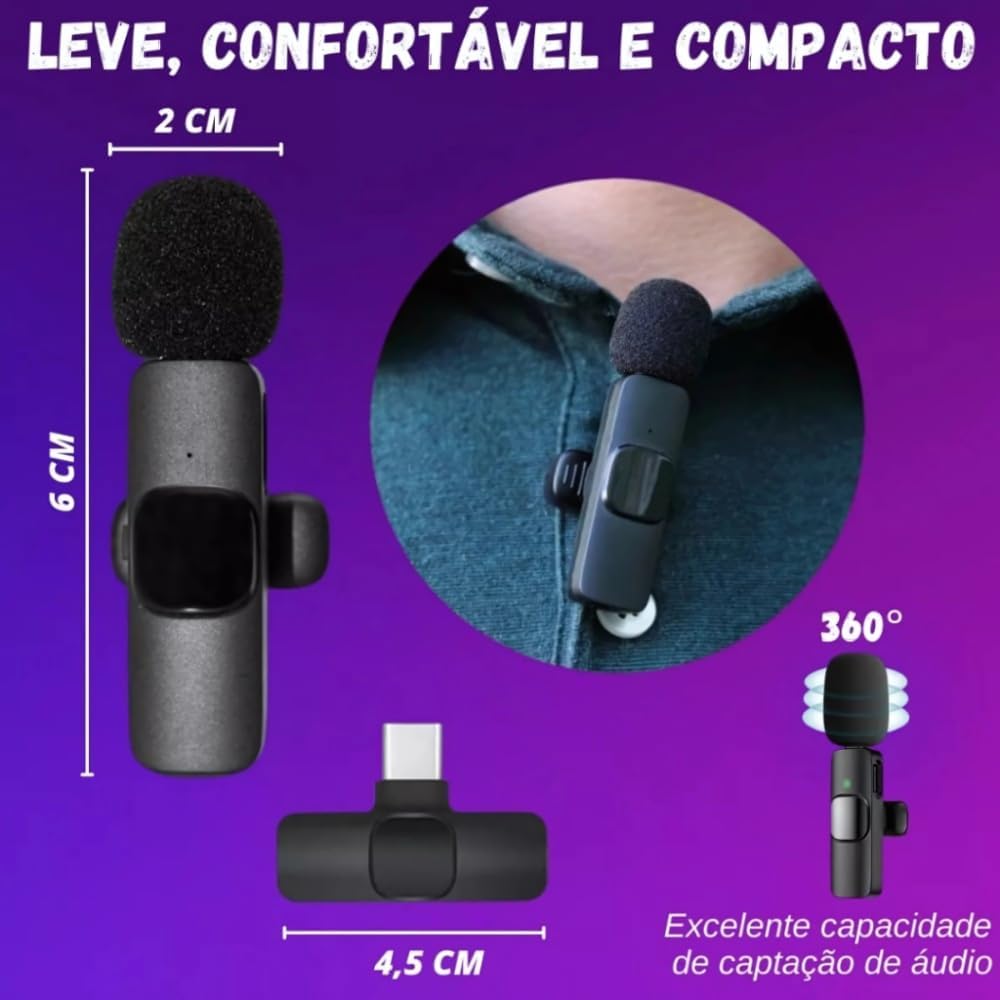
Image Description: This image illustrates the compact size and design of the microphone. It shows a microphone attached to a shirt collar, highlighting its discreet nature. Dimensions are provided: 6 cm in length and 2 cm in width for the microphone, and 4.5 cm for the receiver. A 360-degree audio capture icon emphasizes its omnidirectional capability.
4. Setup Instructions
Follow these steps to set up your AGold Premium Wireless Lavalier Microphone Kit:
- Charge the Microphones: Before first use, ensure both microphones are fully charged using the provided USB charging cable. Connect the cable to the microphone's charging port and a standard USB power source. The indicator light will show charging status.
- Select the Correct Receiver: Identify the appropriate receiver for your device. Use the USB-C receiver for Android phones, PCs, and other USB-C compatible devices. Use the Lightning receiver for iPhones and other Lightning compatible devices.
- Connect the Receiver: Plug the selected receiver directly into your device's charging/data port. The receiver's indicator light will illuminate.
- Power On the Microphone(s): Press and hold the power button on each microphone you intend to use. The indicator light on the microphone will blink, then turn solid green when successfully paired with the receiver.
- Verify Connection: Once connected, your device should recognize the external microphone. You can now open your recording application (e.g., camera app, voice recorder) and begin recording.

Image Description: This image provides a visual guide to the 'Plug and Play' setup. It shows three steps: 1) Plug the receiver into the phone, 2) Press the microphone button, and 3) The device is connected. Below, it illustrates both dual and individual microphone usage scenarios.

Image Description: This image highlights the broad compatibility of the microphone kit. It shows two microphones wirelessly connected to a smartphone via a USB-C receiver, with an additional Lightning adapter for iPhone compatibility. The text confirms compatibility with all device types.
5. Operating Instructions
Once set up, operating your AGold Premium Wireless Lavalier Microphone is straightforward:
- Single Microphone Use: If using only one microphone, simply power on that microphone and ensure its indicator light is solid green.
- Dual Microphone Use: For two-person interviews or recordings, power on both microphones. Both will connect to the single receiver simultaneously.
- Noise Cancellation: The microphone features intelligent noise cancellation. This function is typically active by default to reduce ambient noise and enhance voice clarity. No manual adjustment is usually required.
- Monitoring Audio: Some devices and applications allow real-time audio monitoring through headphones connected to the device. Check your device's settings or recording app for this feature.
- Battery Status: The indicator light on the microphone will change or blink to indicate low battery. Refer to the 'Specifications' section for battery life details.

Image Description: This image showcases different applications for the microphone kit, including online classes, video recording, meetings, and live streaming. It demonstrates how the microphones can be used in various professional and casual settings to capture clear audio.
6. Maintenance
To ensure the longevity and optimal performance of your microphone kit, follow these maintenance guidelines:
- Cleaning: Use a soft, dry cloth to clean the microphones and receivers. Avoid using liquids or abrasive cleaners.
- Storage: Store the kit in a cool, dry place away from direct sunlight and extreme temperatures.
- Windproof Foams: The included windproof foams help reduce plosives and wind noise. Replace them if they become damaged or worn.
- Charging: Always use the provided USB charging cable. Avoid overcharging the microphones.
- Handle with Care: Avoid dropping the devices or exposing them to strong impacts.
7. Troubleshooting
If you encounter issues with your AGold Premium Wireless Lavalier Microphone Kit, refer to the following troubleshooting tips:
- Microphone Not Connecting/Working:
- Ensure the receiver is fully inserted into your device's port.
- Verify that the microphone is powered on and fully charged.
- Check the indicator lights on both the microphone and receiver; they should be solid green when connected.
- Restart your recording device (phone, PC, camera) and try connecting again.
- Ensure your device's settings allow external microphone input.
- Poor Audio Quality/Noise:
- Ensure the windproof foam is properly attached to the microphone.
- Check for strong electromagnetic interference sources nearby (e.g., Wi-Fi routers, other wireless devices).
- Ensure you are within the effective operating range (up to 20 meters) of the receiver.
- Avoid speaking too close to the microphone, as this can cause audio clipping or 'popping' sounds. Maintain a suitable distance.
- Short Battery Life:
- Ensure the microphones are fully charged before use.
- Battery life can vary based on usage and environmental conditions.
- If battery life significantly degrades, contact customer support.
8. Specifications
| Feature | Detail |
|---|---|
| Model | MCF-09 (0001) |
| Special Features | Noise Reduction |
| Compatible Devices | Mobile phones (Android, iPhone), PC, Camera |
| Color | Black |
| Polar Pattern | Omnidirectional |
| Audio Sensitivity | 10 Decibels |
| Impedance | 1 Ohm |
| Microphone Form Factor | Plug On |
| Power Source | Battery Powered |
| Material | Plastic |
| Signal-to-Noise Ratio | 80 dB |
| Hardware Platform | Smartphone |
| Number of Channels | 2 |
| Connectivity Technology | 2.4GHz Wireless (Bluetooth mentioned in title, but 2.4GHz in description is more specific for connection type) |
| Connector Type | USB Type-C (with Lightning adapter) |
| Wireless Range | Up to 20 meters |
| Battery Autonomy | Up to 6 hours continuous use |
| Recharge Time | Approx. 1.5 hours via USB-C |
| Product Weight | 60 g |
| Package Dimensions | 13.4 x 8.3 x 3.2 cm |
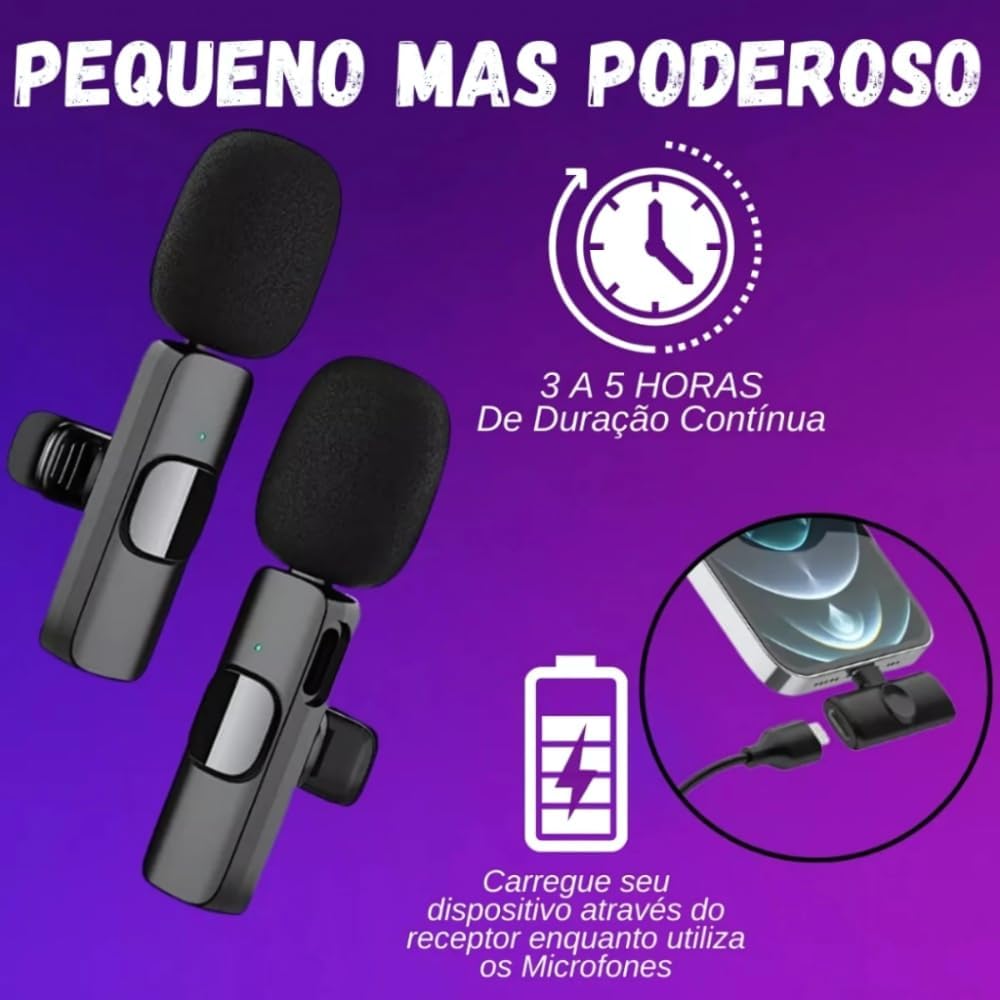
Image Description: This image illustrates the battery performance of the microphone. It shows a microphone with an indicator light and text stating '3 to 5 Hours of Continuous Duration'. Another graphic indicates that the device can be charged via the receiver while the microphones are in use.

Image Description: This image provides detailed battery specifications. It highlights a charge time of 1.5 hours, a resistance (usage time) of 6 hours, and a battery capacity of 65 mAh, emphasizing the long battery life of the device.
9. Warranty and Support
Your AGold Premium Wireless Lavalier Microphone Kit comes with a manufacturer's warranty of 30 days from the date of purchase. This warranty covers manufacturing defects. Please retain your proof of purchase for any warranty claims.
For technical support, warranty claims, or any questions regarding your product, please contact your retailer or the manufacturer's customer service through the contact information provided at the point of purchase.
Extended warranty options may be available from your retailer:
- Extended Warranty against failures and defects for 12 months
- Extended Warranty against failures and defects for 24 months


