
1. Product Overview
The Casio Baby-G BGD10K-6 is a versatile digital watch designed for durability and customizable style. It features a unique 2-in-1 design allowing the watch module to be detached from its band and used with an included silicone holder, transforming it into a charm. This model incorporates Y2K-inspired aesthetics with pixel animations on the display and is built to withstand daily use with 100-meter water resistance and shock resistance.
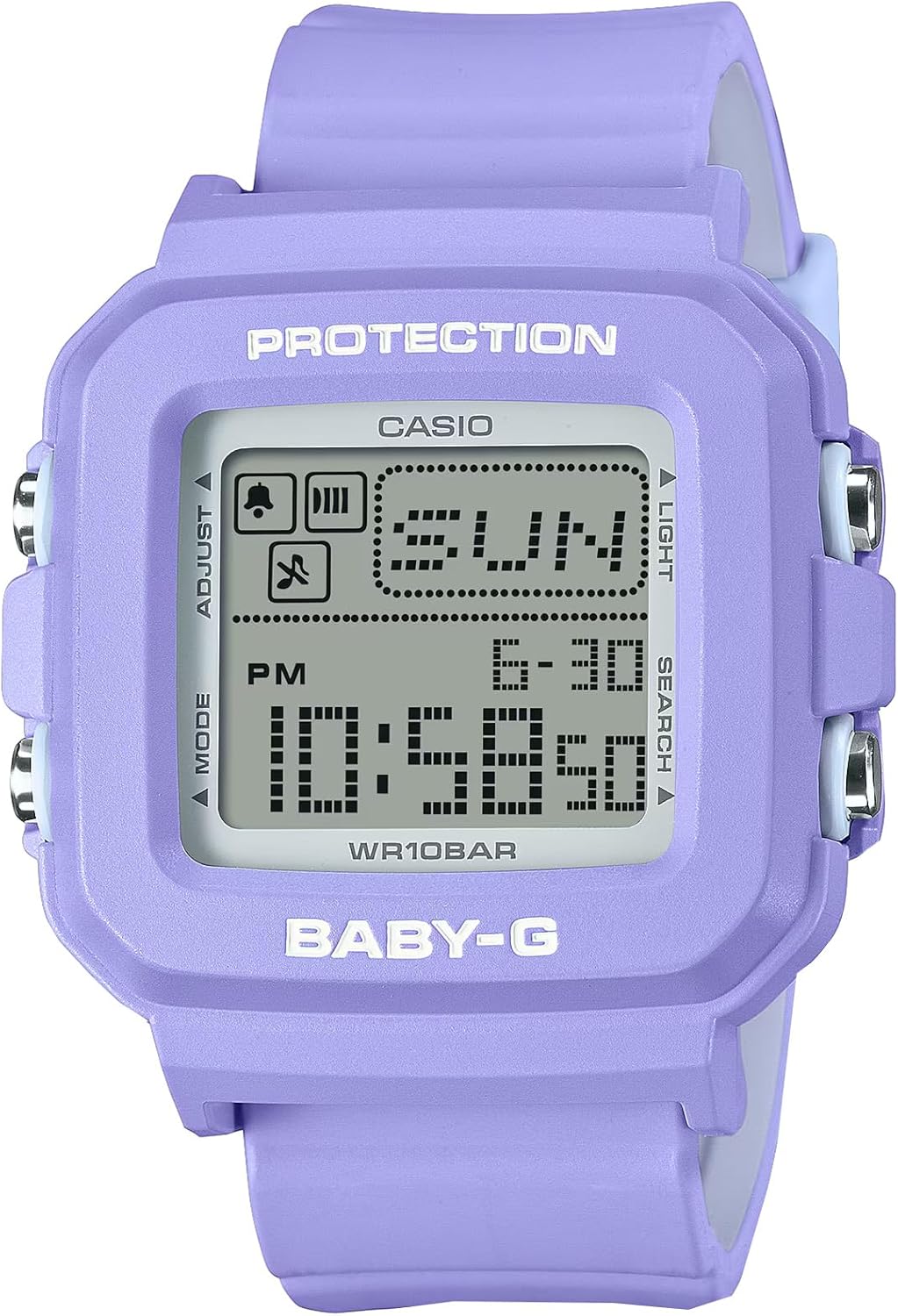
Figure 1: Front view of the Casio Baby-G BGD10K-6 digital watch, highlighting its display and button labels.
2. Setup
2.1 Initial Setup
- Unboxing: Carefully remove the watch and all accessories from the packaging. Verify that all components, including the watch module, band, and silicone holder, are present.
- Power On: The watch is typically powered on from the factory. If the display is blank, ensure it is exposed to light for a period to charge the solar cell (if applicable, though not specified as solar, it's a common Casio feature) or check battery status.
- Time Zone Selection: Before setting the time, select your home city (time zone). This is usually done by holding the "Adjust" button until the city code flashes, then using the "Search" or "Light" buttons to navigate and "Mode" to confirm.
- Time and Date Setting:
- In Timekeeping Mode, press and hold the ADJUST button until the seconds begin to flash, indicating the setting screen.
- Press the MODE button to cycle through the settings: Seconds → Hour → Minute → Year → Month → Day.
- Use the LIGHT or SEARCH buttons to change the flashing value.
- Once all settings are correct, press the ADJUST button to exit the setting screen.
- Wearing the Watch: Attach the watch module to the band or insert it into the silicone holder as desired. Ensure the band is securely fastened to your wrist, or the holder is clipped to your bag.
3. Operating Instructions
3.1 Button Functions
- ADJUST Button (Top Left): Used to enter and exit setting modes, and to confirm settings.
- MODE Button (Bottom Left): Cycles through the watch's different modes (Timekeeping, World Time, Stopwatch, Countdown Timer, Alarm).
- LIGHT Button (Top Right): Activates the Super Illuminator LED backlight for display illumination. Also used to increase values during setting.
- SEARCH Button (Bottom Right): Used to decrease values during setting or to search for specific data in certain modes.
3.2 Timekeeping Mode
This is the default mode, displaying the current time, date, and day of the week. Pixel animations may appear periodically on the display.
3.3 World Time Mode
Allows you to view the current time in 29 different time zones (48 cities) around the world. Press the SEARCH button to cycle through different city codes.
3.4 Stopwatch Mode
Measures elapsed time, split times, and two finishes.
- Press MODE to navigate to Stopwatch Mode.
- Press SEARCH to start/stop the stopwatch.
- Press ADJUST to reset the stopwatch.
3.5 Countdown Timer Mode
Functions as a 24-hour countdown timer.
- Press MODE to navigate to Countdown Timer Mode.
- Hold ADJUST to set the countdown time.
- Press SEARCH to start/stop the timer.
3.6 Alarm Mode
The watch features 5 daily alarms and an hourly time signal.
- Press MODE to navigate to Alarm Mode.
- Use SEARCH to select an alarm (AL1, AL2, etc.) or the hourly time signal (SIG).
- Hold ADJUST to set the alarm time.
- Press ADJUST to toggle alarms ON/OFF.
4. Key Features
- Customizable 2-in-1 Design: The watch features a detachable bezel and band, allowing the core module to be transformed into a wearable charm using the included silicone holder with a strap. This provides flexibility in how the timepiece is worn and displayed.
- Y2K-Inspired Aesthetics: The design incorporates pop-casual colorways and retro pixel-art animations, such as a dog or cat, that appear on the display. These animations cycle in 30-second intervals, adding a nostalgic and playful element reminiscent of early 2000s fashion.
- 100M Water Resistance & Shock Resistant: Engineered for durability, the watch is resistant to shocks and can withstand water pressure up to 100 meters. This makes it suitable for everyday wear, including swimming and showering, but not for deep-sea diving.
- World Time & 24-Hour Timer: Equipped with a World Time function covering 29 time zones, enabling users to easily check times globally. It also includes a 24-hour countdown timer, stopwatch, and 5 daily alarms for comprehensive time management.
- Super Illuminator LED: The display is equipped with a bright LED backlight, ensuring clear visibility in low-light conditions. The backlight features a 2-second afterglow for extended illumination after activation.
5. Maintenance
5.1 Cleaning
Wipe the watch case and band with a soft, dry cloth. For stubborn dirt, use a soft cloth dampened with water and a mild neutral detergent, then wipe dry. Avoid using volatile agents like thinner, gasoline, or alcohol, as they may damage the resin components.
5.2 Water Resistance Precautions
While the watch is 100M water resistant, avoid operating buttons underwater. After exposure to saltwater, rinse the watch with fresh water and wipe it dry. Do not expose the watch to hot water or steam, as this can compromise the water resistance seals.
5.3 Battery Replacement
The watch uses a long-life battery. When the display becomes dim or functions become erratic, it indicates low battery power. Battery replacement should be performed by a qualified technician or an authorized Casio service center to ensure proper sealing and water resistance.
5.4 Storage
When not in use for extended periods, store the watch in a cool, dry place away from direct sunlight and extreme temperatures. Avoid storing it near strong magnetic fields.
6. Troubleshooting
- Display is blank or dim:
Ensure the watch is not in Power Saving mode (if applicable). If the display remains dim, the battery may be low. Contact a service center for battery replacement.
- Time is incorrect:
Check if the home city (time zone) setting is correct. Re-adjust the time and date settings as described in Section 2.1.
- Buttons are not responding:
Ensure the watch is not in a frozen state. Try pressing all buttons firmly. If the issue persists, a reset may be required (consult a service center), or the battery may be critically low.
- Water appears inside the watch:
This indicates a breach in the water resistance. Immediately stop using the watch and take it to an authorized service center for inspection and repair to prevent further damage.
7. Specifications
| Feature | Detail |
|---|---|
| Model Number | BGD10K-6 |
| Manufacturer | Casio |
| Water Resistance | 100 meters (10 BAR) |
| Shock Resistance | Yes |
| Display Type | Digital with Pixel Animation |
| Timekeeping Features | Hour, Minute, Second, PM, Month, Date, Day |
| World Time | 29 time zones (48 cities + UTC) |
| Stopwatch | 1/100-second, measuring capacity: 23:59'59.99'' |
| Countdown Timer | Measuring unit: 1 second, countdown range: 24 hours |
| Alarms | 5 daily alarms, hourly time signal |
| Illumination | Super Illuminator LED backlight with afterglow |
| Package Dimensions | 3.94 x 3.5 x 3.41 inches |
| Item Weight | 1.16 ounces |
| Date First Available | April 23, 2025 |
8. Warranty and Support
This Casio product is covered by a manufacturer's warranty against defects in materials and workmanship. The specific terms and duration of the warranty may vary by region. Please refer to the warranty card included with your purchase for detailed information.
For technical support, service, or warranty claims, please contact Casio customer service or visit their official website. Keep your proof of purchase for warranty validation.
You can find more information and support resources by visiting the official Casio website or contacting their customer service department.


