Introduction
This manual provides detailed instructions for the safe and correct installation, operation, and maintenance of the Generic replacement bake element, compatible with GE WB44X5082 oven models. Please read all instructions carefully before proceeding with installation or use.
Safety Information
- Always disconnect power to the oven at the circuit breaker or fuse box before attempting any installation, maintenance, or repair. Failure to do so can result in electric shock, serious injury, or death.
- Wear appropriate personal protective equipment, such as gloves, to prevent injury.
- Ensure the replacement part is compatible with your oven model (GE WB44X5082) before installation. Refer to your oven's original manual for specific instructions or consult a qualified technician if unsure.
- Handle the bake element carefully to avoid bending or damaging it.
- Keep children and pets away from the work area during installation.
Setup and Installation
This section outlines the steps for replacing the oven bake element. Ensure all safety precautions are followed.
Tools Required:
- Screwdriver (Phillips or flathead, depending on oven model)
- Work gloves
Installation Steps:
- Disconnect Power: Turn off the electrical power to the oven at the main circuit breaker or fuse box. Verify that the power is off before proceeding.
- Access Oven Interior: Open the oven door completely and remove any oven racks to provide clear access to the bake element.
- Locate and Inspect Old Element: Identify the existing bake element at the bottom of the oven cavity. Note how it is secured and the position of its electrical terminals.
- Remove Securing Screws: Using a screwdriver, carefully remove the screws that hold the bake element in place at the back of the oven.
- Gently Pull Element Forward: Carefully pull the old bake element forward a few inches into the oven cavity. This will expose the electrical wires connected to its terminals. Do not pull too far, as the wires are still attached.
- Disconnect Wires: Note the orientation of the wires. Disconnect the two electrical wires from the terminals of the old bake element. It may be helpful to take a photo before disconnecting. Ensure the wires do not retract into the back wall of the oven.
- Connect New Element: Connect the electrical wires to the terminals of the new Generic WB44X5082 bake element. Ensure connections are secure.
- Position and Secure New Element: Carefully push the new bake element into its position at the back of the oven. Align the mounting holes and secure the element with the screws previously removed. Do not overtighten.
- Reassemble Oven: Replace the oven racks and close the oven door.
- Restore Power: Turn the electrical power back on at the circuit breaker or fuse box.
- Test Operation: Turn on the oven to a low bake setting and observe the new element to ensure it heats up properly.
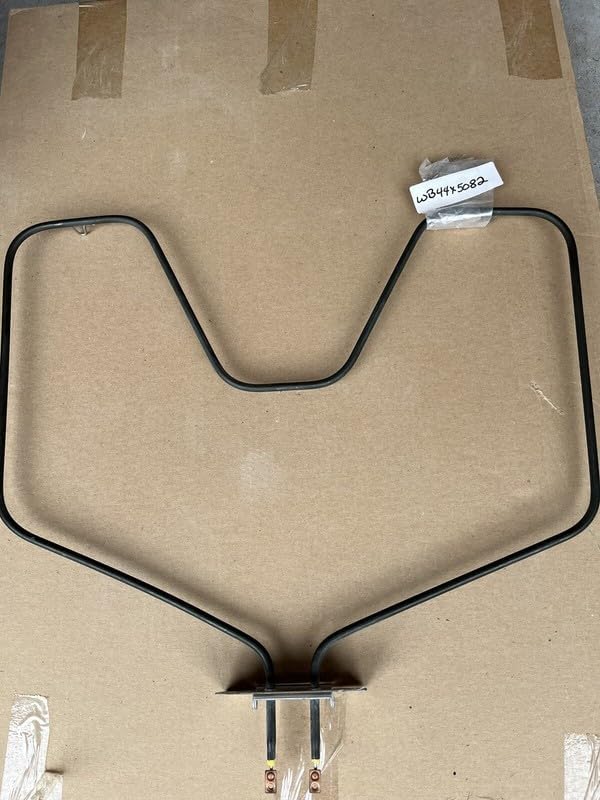
Image: The Generic replacement bake element for GE WB44X5082 ovens. This image displays the U-shaped heating coil with two electrical terminals at the base, designed for installation at the bottom of an oven cavity.
Operating
Once the Generic WB44X5082 bake element is correctly installed and power is restored, your oven should operate as usual. Select your desired cooking function and temperature according to your oven's original operating instructions. The bake element will heat up to provide the necessary temperature for baking.
Maintenance
- Regular Inspection: Periodically inspect the bake element for any visible signs of damage, such as cracks, blisters, or discoloration. If damage is observed, disconnect power and replace the element.
- Cleaning: Avoid direct contact with the bake element during oven cleaning. Spills on the element should be cleaned gently once the oven is cool and power is disconnected. Do not use abrasive cleaners on the element.
- Prevent Damage: Avoid placing heavy items directly on the bake element or allowing food to spill excessively onto it, as this can cause premature wear or damage.
Troubleshooting
| Problem | Possible Cause | Solution |
|---|---|---|
| Oven not heating or heating unevenly | Element not receiving power, element damaged, loose wiring connection. | Ensure power is connected. Disconnect power and check element for visible damage. Verify electrical connections are secure. If element is damaged, replace it. |
| Element sparks or arcs | Damaged element, foreign material on element, faulty wiring. | Immediately disconnect power. Inspect element for damage or debris. If element is damaged, replace it. If issue persists, consult a qualified technician. |
| Oven takes too long to preheat | Element not fully functional, thermostat issue. | Inspect element for partial damage. If the element appears fine, the issue might be with the oven's thermostat or other components, requiring professional diagnosis. |
Specifications
- Part Number: bakepart#352479
- Compatibility: GE WB44X5082 Oven Models
- Item Package Quantity: 1 Set
- Manufacturer: Generic
- ASIN: B0F63741XY
- First Available: April 23, 2025
Support
For further assistance or if you encounter issues not covered in this manual, please contact the seller or the manufacturer of this replacement part. Always provide your product's model number (WB44X5082) and the part number (bakepart#352479) when seeking support.


