
1. Introduction
Thank you for choosing the Nasonet Night Stand Set 2. This modern bedside table features a fluted design, a convenient charging station, a drawer, and an open storage shelf. Designed for versatility, it enhances any bedroom, living room, or office space. This manual provides essential information for safe assembly, operation, and maintenance of your new nightstands.

Image 1.1: Nasonet Night Stands in a bedroom setting. This image illustrates the product's aesthetic and placement.
2. Safety Information
Please read and understand all safety instructions before assembly and use. Failure to follow these instructions may result in injury or damage to the product.
- Always follow the assembly instructions carefully.
- Do not exceed the maximum weight recommendation of 100 pounds (45 kg) to ensure stability and prevent accidents.
- Ensure all screws and fasteners are securely tightened before use. Periodically check and re-tighten as necessary.
- Keep small parts away from children during assembly to prevent choking hazards.
- Use the provided anti-tip design feature to secure the nightstand to a wall, especially if children are present.
- Do not place hot items directly on the tabletop without protection.
- Avoid exposing the product to direct sunlight or extreme humidity to prevent material damage.

Image 2.1: Key features including the anti-tip design for enhanced safety.
3. Package Contents
Before beginning assembly, ensure all parts are present and undamaged. If any parts are missing or damaged, please contact Nasonet customer support.
- Nightstand components (for two units)
- Instruction manual
- Accessory bags (containing screws, fasteners, and tools)
4. Specifications
| Feature | Detail |
|---|---|
| Brand | Nasonet |
| Product Dimensions (D x W x H) | 11.8" x 15.8" x 23.4" (30 cm x 40 cm x 59.4 cm) |
| Item Weight | 32.9 pounds (14.9 kg) |
| Maximum Weight Recommendation | 100 pounds (45 kg) |
| Frame Material | Engineered Wood |
| Color | Natural Oak |
| Number of Drawers | 1 |
| Charging Station | 2 AC Outlets (120V/20A), 2 USB Ports (5V/2A) |
| Power Cord Length | 4.9 feet (1.5 meters) |
| Assembly Time (Approx.) | 2 hours per unit (may vary with power tools) |
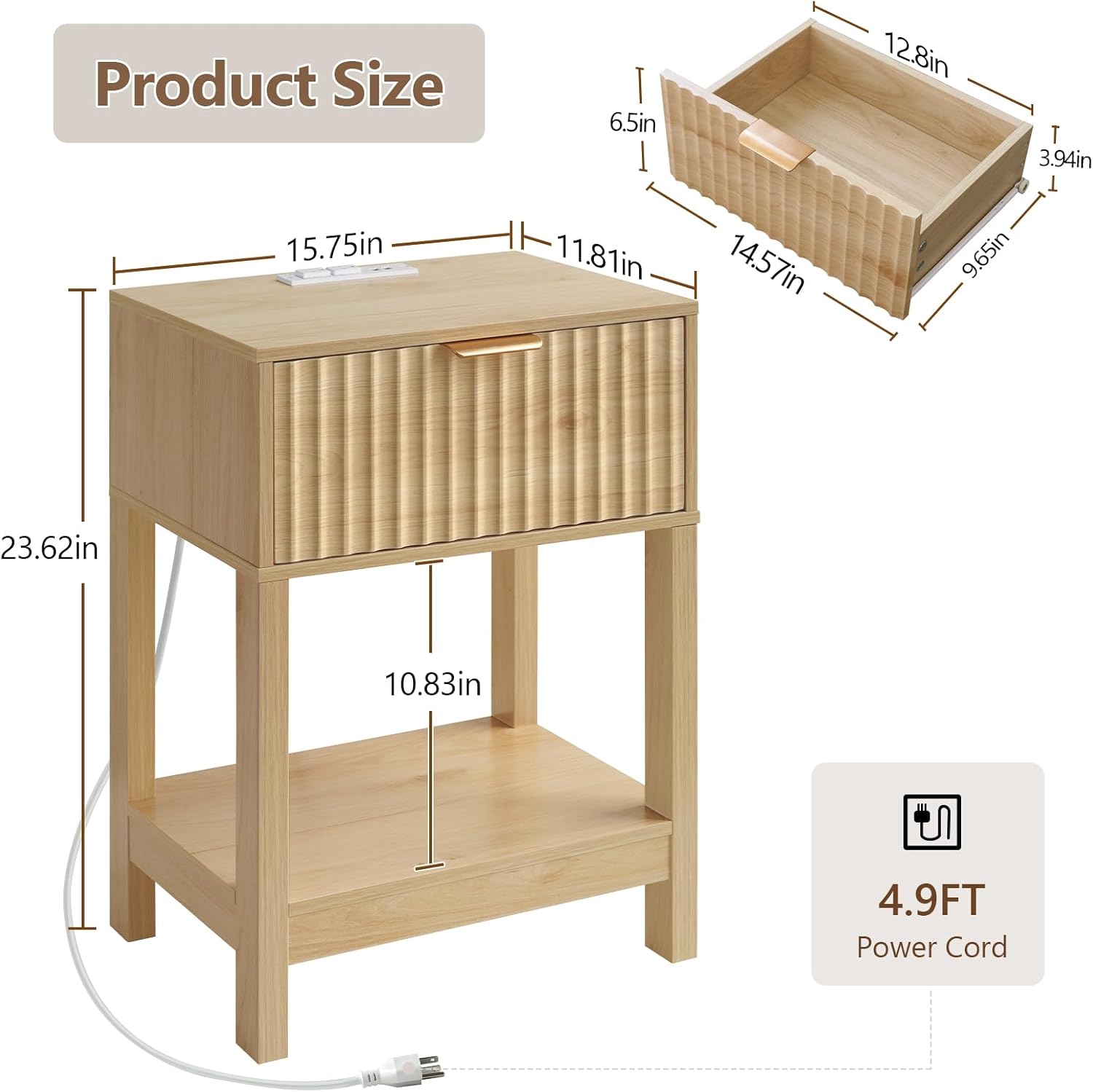
Image 4.1: Detailed product dimensions and power cord length.
5. Assembly Instructions
Assembly is designed to be straightforward. It is recommended to have a clear, spacious area for assembly. Refer to the included instruction manual and accessory bags for detailed, step-by-step guidance.
Tools Recommended:
- Hammer
- Screwdriver (Phillips head recommended)
- Optional: Power drill for faster assembly (use with caution to avoid overtightening)
General Assembly Steps:
- Unpack and Identify Parts: Carefully remove all components from the packaging. Lay them out and compare them against the parts list in your included manual to ensure everything is present.
- Assemble the Frame: Follow the diagrams in your manual to connect the main frame pieces using the provided screws and fasteners. Ensure all connections are snug but do not overtighten initially.
- Install Shelves: Attach the bottom storage shelf to the frame as indicated in the instructions.
- Assemble the Drawer: Construct the drawer box according to the manual. Install the drawer slides onto both the drawer and the nightstand frame.
- Attach Drawer Front and Handle: Secure the fluted drawer front and the metal handle to the drawer box.
- Install Charging Station: Carefully place the charging station into the designated cutout on the tabletop and secure it with screws.
- Final Tightening and Placement: Once all components are assembled, go back and securely tighten all screws. Place the nightstand in its desired location and connect the anti-tip device to a wall stud if possible.
Video 5.1: An overview of the Nasonet Natural Oak nightstand. This video provides a general look at the product, which may assist in understanding its components and overall structure during assembly.
6. Operating Instructions (Charging Station)
Your Nasonet Night Stand is equipped with a convenient charging station to power your electronic devices.
- Connect to Power: Plug the nightstand's power cord into a standard wall outlet.
- AC Outlets: Use the two 120V/20A AC outlets for devices requiring standard wall power, such as lamps, laptops, or small appliances.
- USB Ports: Use the two 5V/2A USB ports to charge smartphones, tablets, and other USB-powered devices.
- Safety Note: Do not overload the charging station. Ensure total power draw does not exceed the rated capacity. Unplug the nightstand from the wall outlet when not in use for extended periods.

Image 6.1: The integrated charging station in use, powering a phone and a lamp.
7. Maintenance
Proper care will help maintain the appearance and longevity of your Nasonet Night Stand.
- Cleaning: Wipe the surfaces with a damp cloth. Avoid harsh chemicals or abrasive cleaners, which can damage the finish.
- Spills: Promptly wipe up any spills to prevent water damage, especially on the waterproof-coated tabletop.
- Hardware: Periodically check all screws and fasteners to ensure they remain tight. Re-tighten as needed.
- Environment: Keep the nightstand away from direct heat sources and prolonged direct sunlight to prevent warping or fading.
8. Troubleshooting
If you encounter any issues with your Nasonet Night Stand, refer to the following common solutions:
- Problem: The nightstand feels wobbly after assembly.
Solution: Ensure all screws and fasteners are fully tightened. Check that the nightstand is placed on a level surface. - Problem: Drawer does not slide smoothly.
Solution: Verify that the drawer slides are correctly installed and aligned. Apply a small amount of silicone lubricant to the slides if necessary. - Problem: Charging station is not providing power.
Solution: Check if the nightstand's main power cord is securely plugged into a working wall outlet. Test the wall outlet with another device. Ensure the devices you are trying to charge are properly connected to the AC outlets or USB ports. - Problem: Missing or damaged parts during assembly.
Solution: Do not proceed with assembly. Contact Nasonet customer support immediately for assistance and replacement parts.
9. Warranty and Support
Nasonet is committed to providing quality products. For any questions, concerns, or support needs regarding your Night Stand Set 2, please contact Nasonet customer service. Please have your purchase information and product model (Night Stand Set 2, Natural Oak, 1 Drawer) available when contacting support.
While specific warranty details are not provided in this manual, Nasonet stands behind its products. Contact information can typically be found on the product packaging or the official Nasonet website.