1. Introduction
This manual provides essential information for the proper use and maintenance of your VBESTLIFE 10.1 Inch Android Tablet. Please read this guide thoroughly before operating the device to ensure optimal performance and longevity. This tablet features a 10.1-inch HD touchscreen, an MT6753 core CPU, 8GB RAM, 256GB ROM, and runs on Android 14.0.

Image 1.1: Front and back view of the VBESTLIFE 10.1 Inch Android Tablet, showcasing its design and display.
2. Setup
2.1 Package Contents
Verify that all items are present in the package:
- 1 x VBESTLIFE 10.1 Inch Tablet PC
- 1 x Data Cable (Type-C)
- 1 x Tablet Stand
- 1 x Wired Headphones
- 1 x Screen Protector
- 1 x User Manual (this document)
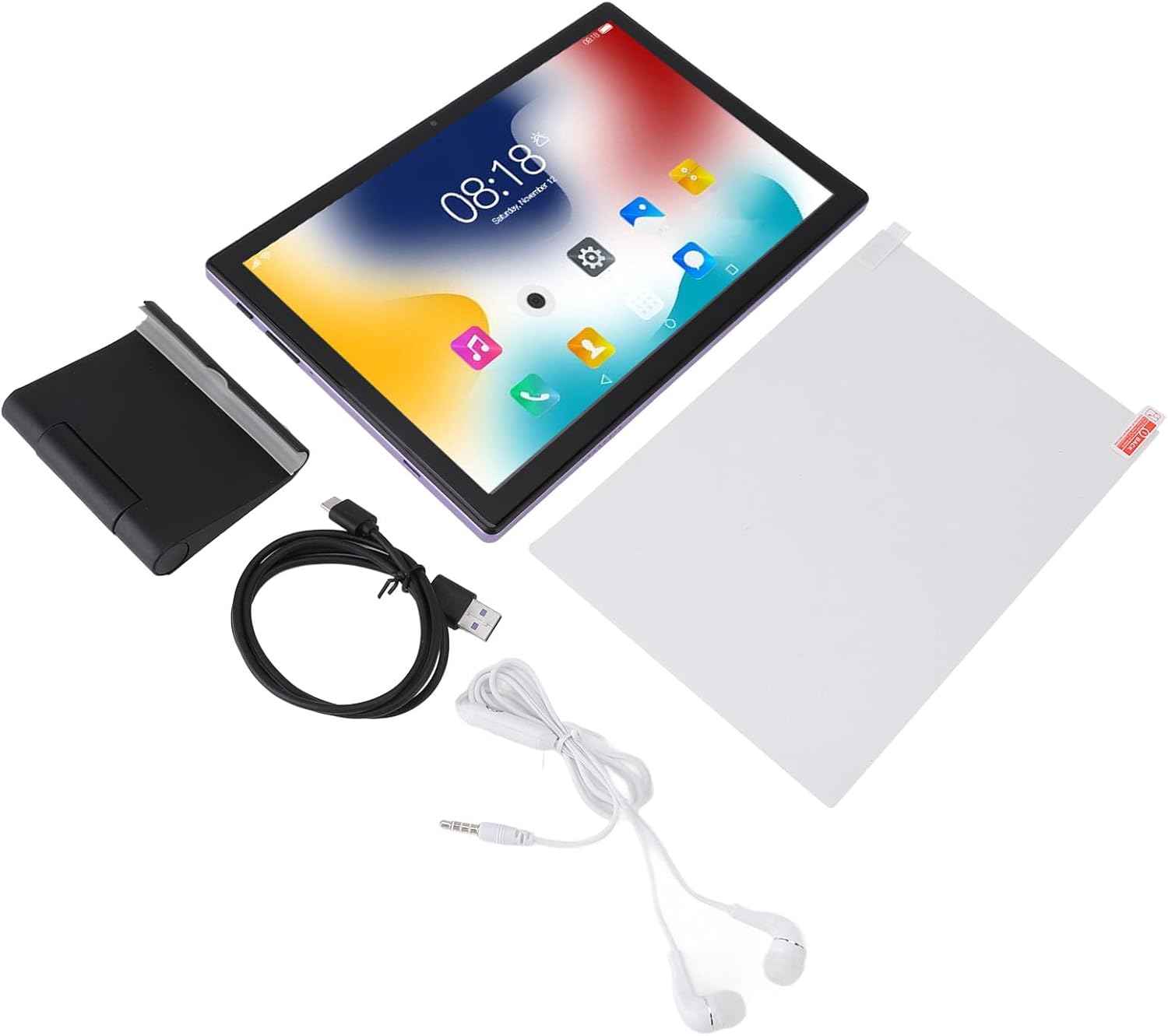
Image 2.1: The VBESTLIFE tablet displayed with its included accessories: data cable, tablet stand, wired headphones, and screen protector.
2.2 Initial Charging
Before first use, fully charge the tablet using the provided Type-C data cable and a compatible power adapter. The 8000mAh lithium battery ensures extended usage.
2.3 Powering On/Off
- To Power On: Press and hold the Power button until the screen illuminates.
- To Power Off: Press and hold the Power button, then select 'Power off' from the options on the screen.
- To Restart: Press and hold the Power button, then select 'Restart' from the options.
2.4 SIM Card and Memory Card Installation
The tablet supports dual card slots, allowing for simultaneous installation of a SIM card (for cellular data/calls) and a MicroSD memory card (for storage expansion up to 128GB). Locate the card slot on the side of the tablet, open it carefully, and insert the cards as indicated by the tray design.
3. Operating Instructions
3.1 Basic Navigation
The 10.1-inch 1920x1200 HD touchscreen supports five-point capacitive touch for intuitive interaction. Use gestures such as tap, swipe, pinch-to-zoom, and long-press to navigate the Android 14.0 interface.

Image 3.1: The VBESTLIFE tablet in use, demonstrating its vibrant 10.1-inch HD display with a 16:10 screen ratio and wide viewing angles.
3.2 Wi-Fi and Bluetooth Connectivity
- Wi-Fi: Access Settings > Network & internet > Wi-Fi. Turn on Wi-Fi and select your desired network. The tablet supports 2.4G and 5G dual-band Wi-Fi (802.11a/b/g/n/ac).
- Bluetooth: Access Settings > Connected devices > Bluetooth. Turn on Bluetooth to pair with compatible devices such as headphones or speakers. The tablet features Bluetooth 5.0 for stable connections.
3.3 Camera Usage
The tablet is equipped with an 8MP front camera and a 20MP rear camera. Open the Camera application to capture photos and videos. Switch between front and rear cameras as needed for video calls or photography.
3.4 GPS and FM Radio
- GPS: The tablet supports GPS and Glonass for location services and navigation. Ensure location services are enabled in Settings for optimal performance with mapping applications.
- FM Radio: Use the built-in FM radio feature to listen to local radio stations. Wired headphones may be required to act as an antenna.

Image 3.2: The tablet screen showing a GPS navigation map, highlighting its location capabilities.
3.5 App Management
As a GMS certified device, the tablet supports access to the Google Play Store for downloading millions of applications and games, including Google, YouTube, Netflix, and TikTok. Manage installed apps through Settings > Apps.
4. Maintenance
4.1 Cleaning the Device
Use a soft, lint-free cloth to clean the screen and body of the tablet. Avoid using harsh chemicals or abrasive materials, which can damage the surfaces. For stubborn smudges, slightly dampen the cloth with water or a screen-cleaning solution.
4.2 Battery Care
To prolong the life of the 8000mAh lithium battery:
- Avoid extreme temperatures.
- Do not let the battery completely drain frequently.
- Use the provided Type-C cable for charging.
- If storing the tablet for an extended period, charge it to about 50% before turning it off.
4.3 Software Updates
Periodically check for system updates to ensure your tablet has the latest features and security patches. Go to Settings > System > System update to check for and install available updates.
4.4 Storage Management
The tablet comes with 256GB of internal ROM. If more storage is needed, you can expand it by up to 128GB using a MicroSD card. Regularly clear unnecessary files and uninstall unused applications to maintain optimal performance. Go to Settings > Storage to view and manage storage usage.
5. Troubleshooting
If you encounter issues with your tablet, refer to the following common solutions:
- Device not powering on: Ensure the battery is charged. Connect the tablet to a charger for at least 30 minutes before attempting to power it on again.
- Screen unresponsive: Try restarting the tablet. If unresponsive, press and hold the power button for about 10-15 seconds to force a restart.
- Wi-Fi connection issues: Check if Wi-Fi is enabled in settings. Restart your Wi-Fi router. Forget the network and reconnect.
- Apps crashing or freezing: Clear the cache and data for the problematic app (Settings > Apps > [App Name] > Storage & cache). If the issue persists, uninstall and reinstall the app.
- Slow performance: Close unused apps, clear cache, and ensure sufficient free storage space. Consider a factory reset as a last resort (Settings > System > Reset options > Erase all data). Note: A factory reset will erase all data on your tablet. Back up important information before proceeding.
6. Specifications
| Feature | Specification |
|---|---|
| Model Number | VBESTLIFEbga26okdeg-12 |
| System | Android 14.0 |
| CPU | MT6753 Core CPU (2.0GHz) |
| RAM | 8GB |
| ROM (Internal Storage) | 256GB |
| Expandable Storage | Up to 128GB (MicroSD, not included) |
| Display | 10.1 Inch 1920x1200 HD Touchscreen |
| Bluetooth | Bluetooth 5.0 |
| Wi-Fi | 2.4G/5G Dual Band, 802.11a/b/g/n/ac |
| Interfaces | 1 x 3.5mm Headphone Jack, 1 x Type-C Port |
| Speakers | Dual Speaker |
| Microphone | Supported |
| Network Format | GSM(B5 B8 B3 B2), WCDMA(B1 B2 B5 B8 B20 B28) |
| Front Camera | 8MP |
| Rear Camera | 20MP |
| Battery | Built-in 8000mAh Lithium Battery |
| Other Features | GPS, Glonass, FM Radio, GMS Certified |
| Package Dimensions | 11.42 x 7.87 x 2.36 inches |
| Item Weight | 2.04 pounds |
| Manufacturer | VBESTLIFE |
7. Warranty and Support
7.1 Warranty Information
For detailed warranty information, please refer to the warranty card included with your product or consult your purchase documentation. Warranty terms and conditions may vary based on region and retailer.
7.2 Customer Support
If you require further assistance or have questions not covered in this manual, please contact the retailer where you purchased the product or visit the official VBESTLIFE website for support resources.


