
1. Introduction
This manual provides comprehensive instructions for the safe and efficient operation of your SHIHUANI OCP OVP Laboratory DC Power Supply, model SPS-C3010S 30V10A. This adjustable switching DC power supply is designed for various applications including laboratory work, school projects, repairs, electroplating, lamp testing, and battery charging. It features Over Voltage Protection (OVP) and Over Current Protection (OCP) for enhanced safety of connected devices.
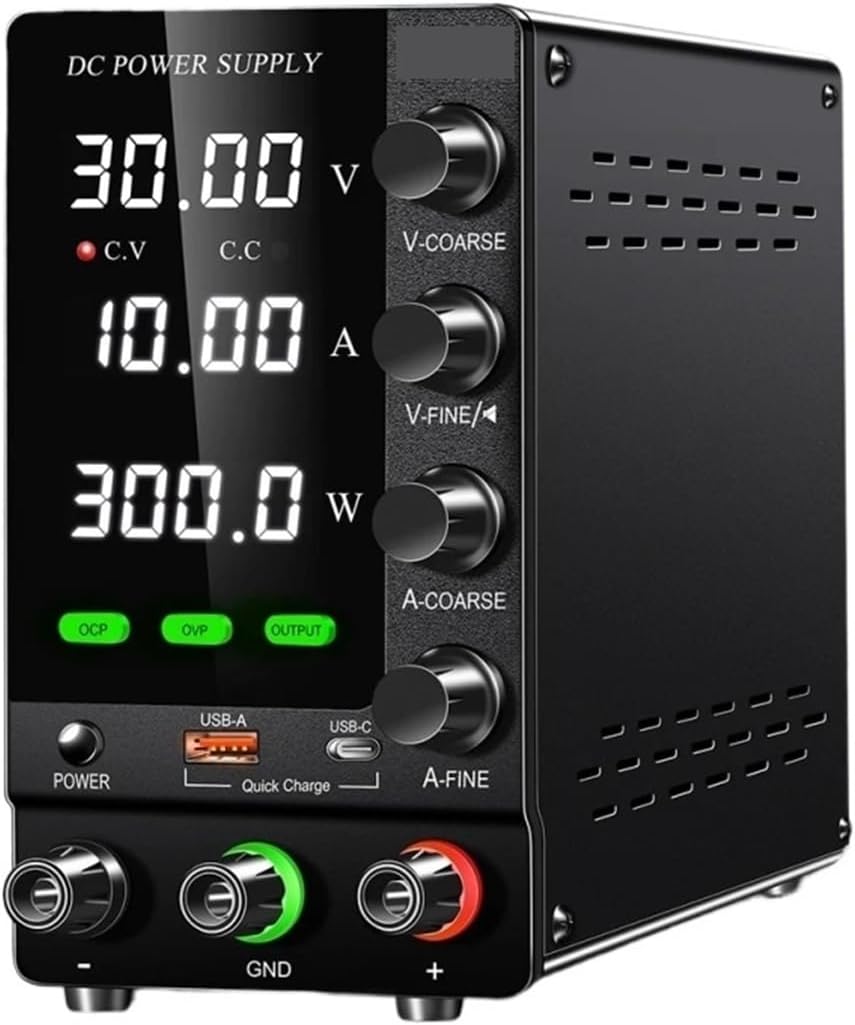
Figure 1: Front view of the SHIHUANI SPS-C3010S 30V10A Laboratory DC Power Supply.
2. Safety Instructions
- Always connect the power supply to a grounded outlet.
- Do not operate the device in wet or damp conditions.
- Ensure proper ventilation to prevent overheating. The intelligent thermal protection will activate the cooling fan when the working temperature exceeds 50°C (122°F).
- Do not open the casing; there are no user-serviceable parts inside. Refer servicing to qualified personnel.
- Verify the input voltage setting (115V/220V) matches your local power supply before connecting.
- Before connecting or disconnecting loads, ensure the power supply output is off.
- Utilize the Over Voltage Protection (OVP) and Over Current Protection (OCP) features to safeguard connected devices.
3. Package Contents
Please check the package contents upon receipt. If any items are missing or damaged, contact your vendor.
- 1x DC Power Supply (SPS-C3010S 30V10A)
- 1x Power Cable
- 1x Output Line (test leads)
- 1x Product Box
- 1x English User Manual
4. Product Overview
The SHIHUANI SPS-C3010S features a clear digital display and intuitive controls for precise voltage and current regulation.

Figure 2: Front Panel Layout and Components.
4.1 Front Panel Components:
- Voltage Display: Shows the output voltage in Volts (V).
- Current Display: Shows the output current in Amperes (A).
- Power Display: Shows the output power in Watts (W).
- C.V Indicator: Illuminates when the power supply is operating in Constant Voltage mode.
- C.C Indicator: Illuminates when the power supply is operating in Constant Current mode.
- V-COARSE Knob: Coarse adjustment for output voltage.
- V-FINE Knob: Fine adjustment for output voltage.
- A-COARSE Knob: Coarse adjustment for output current.
- A-FINE Knob: Fine adjustment for output current.
- OCP Button: Activates/deactivates Over Current Protection.
- OVP Button: Activates/deactivates Over Voltage Protection.
- OUTPUT Button: Toggles the power output ON/OFF.
- POWER Button: Main power switch for the unit.
- USB-A Port: Quick Charge USB-A output.
- USB-C Port: Quick Charge USB-C output.
- Output Terminals: Positive (+), Negative (-), and Ground (GND) terminals for connecting loads.
5. Specifications
Technical specifications for the SPS-C3010S model:
| Parameter | Value |
|---|---|
| Input Voltage | 115V±10% 60Hz / 220V±10% 50Hz |
| Output Voltage | 0-30V |
| Output Current | 0-10A |
| Output Power | 300W |
| Constant Voltage State Voltage Stability | 0.1%+3mV |
| Constant Voltage State Low Voltage | 0.2~0.3%+3mV |
| Constant Voltage State Load Stability | 0.5%+3mV |
| Constant Voltage State Ripple Noise | 30mVrms |
| Constant Current State Current Stability | 0.2%+3mA |
| Constant Current State Load Stability | 0.2%+3mV |
| Constant Current State Ripple Noise | 20mArms |
| Display Accuracy | 0.5%+2digits |
| Display Resolution (Voltage) | 0.01V |
| Display Resolution (Current) | 0.001A |
| Product Dimension | 7.59 x 3.35 x 6.1 inches (19.28 x 8.51 x 15.49 cm) |
| Product Weight | 2.6 lb (1.18 kg) |
| Fuse Standard | 5A (AC 110V Input) |
| Operating Temperature | 0-40°C |
| Relative Humidity | <80%RH |
| Storage Temperature | -10-70°C |
| Storage Humidity | <70%RH |
6. Setup
- Unpacking: Carefully remove the power supply and all accessories from the packaging. Inspect for any signs of damage.
- Placement: Place the power supply on a stable, level surface with adequate ventilation around the unit. Do not block the ventilation openings.
- Input Voltage Selection: Ensure the input voltage setting (if present, usually on the rear panel) matches your local mains voltage (115V or 220V).
- Power Connection: Connect the provided power cable to the power supply's AC inlet and then to a grounded wall outlet.
- Initial Power On: Press the main POWER button on the front panel. The display should illuminate.
7. Operating Instructions
7.1 Basic Operation:
- Power On: Press the POWER button. The display will show the last set voltage and current values.
- Adjusting Voltage:
- Use the V-COARSE knob for large adjustments of the output voltage.
- Use the V-FINE knob for precise, fine adjustments of the output voltage.
- Adjusting Current Limit:
- Use the A-COARSE knob for large adjustments of the output current limit.
- Use the A-FINE knob for precise, fine adjustments of the output current limit.
- Note: The current knobs set the maximum current the power supply will deliver. When the load draws less current than this limit, the unit operates in Constant Voltage (CV) mode. When the load attempts to draw more current than the limit, the unit switches to Constant Current (CC) mode, and the output voltage will drop to maintain the set current.
- Connecting Load: With the output OFF (ensure the OUTPUT button is not illuminated), connect your load to the output terminals: positive (+) to the load's positive, negative (-) to the load's negative, and ground (GND) to the load's ground if applicable.
- Enabling Output: Once voltage and current limits are set and the load is connected, press the OUTPUT button to enable the power output. The display will show the actual voltage and current being delivered to the load.
- Disabling Output: Press the OUTPUT button again to disable the power output before disconnecting the load.
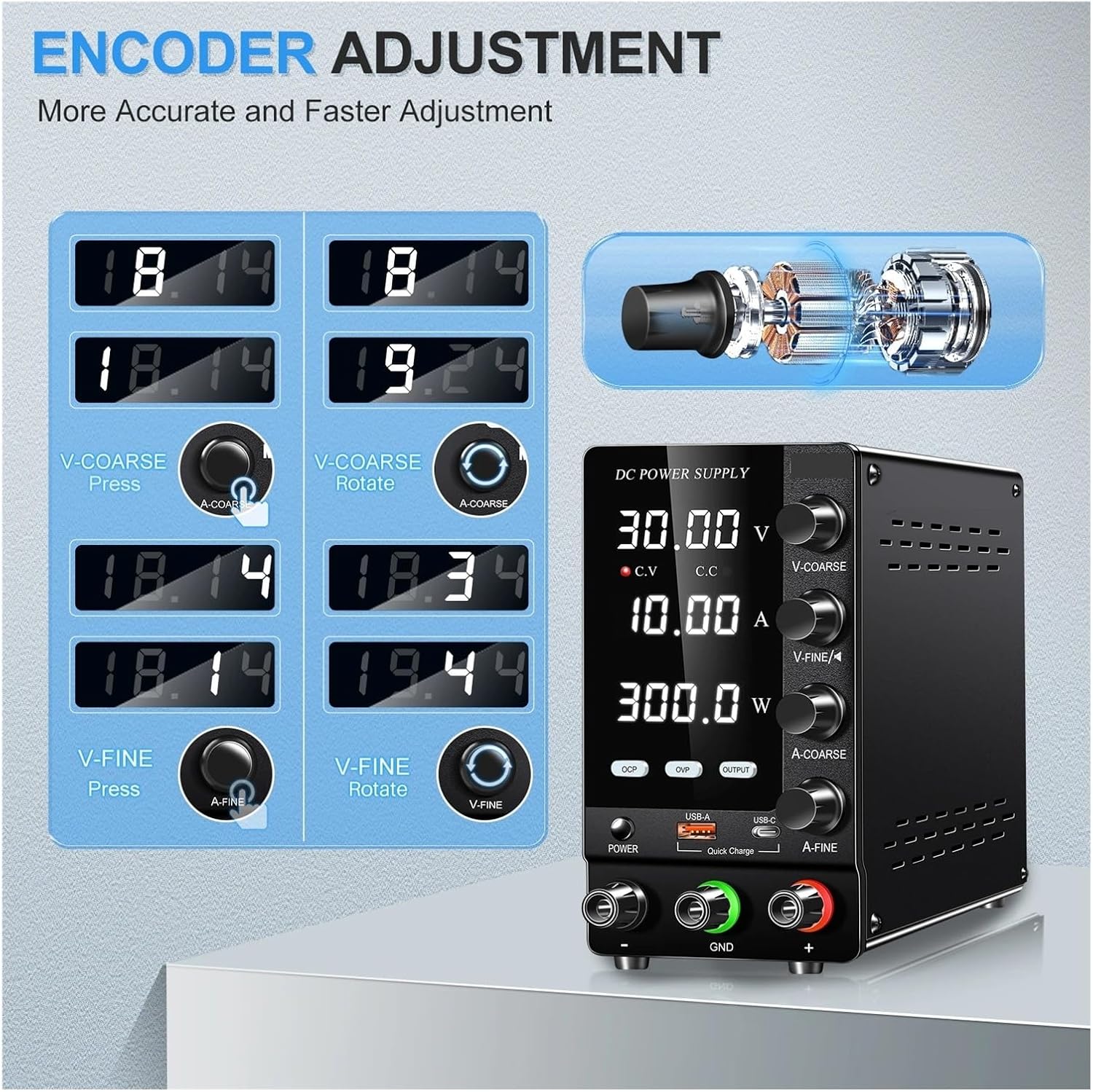
Figure 3: Encoder Adjustment for Voltage and Current.
7.2 Over Voltage Protection (OVP):
The OVP function protects connected devices from damage due to excessive voltage. When activated, if the output voltage exceeds a preset limit, the power supply will trigger an alarm and stop output.
- To activate OVP: Press the OVP button. The OVP indicator will illuminate.
- To set OVP limit: While OVP is active, adjust the voltage knobs to set the desired maximum voltage. The OVP limit is typically set slightly above the desired operating voltage.
- To deactivate OVP: Press the OVP button again.
7.3 Over Current Protection (OCP):
The OCP function protects connected devices from damage due to excessive current. When activated, if the output current exceeds a preset limit, the power supply will trigger an alarm and stop output.
- To activate OCP: Press the OCP button. The OCP indicator will illuminate.
- To set OCP limit: While OCP is active, adjust the current knobs to set the desired maximum current. The OCP limit is typically set slightly above the desired operating current.
- To deactivate OCP: Press the OCP button again.
7.4 USB Quick Charge Ports:
The power supply includes 18W USB-A and USB-C quick charge ports for convenient charging of compatible devices. These ports operate independently of the main DC output and are active when the unit is powered on.
8. Maintenance
- Cleaning: Disconnect the power supply from the mains before cleaning. Use a soft, dry cloth to wipe the exterior. Do not use abrasive cleaners or solvents.
- Ventilation: Ensure the ventilation openings are free from dust and obstructions. Periodically clean dust from the vents using a soft brush or compressed air.
- Storage: When not in use for extended periods, store the power supply in a cool, dry place, away from direct sunlight and extreme temperatures.
- Fuse Replacement: The fuse is located internally. If the unit fails to power on, and you suspect a blown fuse, contact qualified service personnel. Do not attempt to replace it yourself.
9. Troubleshooting
| Problem | Possible Cause | Solution |
|---|---|---|
| No power when turned on | Power cable not connected; Wall outlet faulty; Internal fuse blown. | Check power cable connection; Test wall outlet with another device; Contact service for fuse replacement. |
| No output voltage/current | OUTPUT button not pressed; OVP/OCP triggered; Load disconnected or faulty. | Press the OUTPUT button; Check OVP/OCP indicators and reset if necessary; Verify load connection and functionality. |
| Voltage/Current display is unstable | Poor load connection; Unstable input power; Faulty test leads. | Ensure secure connections; Use a stable power source; Replace test leads if damaged. |
| Unit overheats | Blocked ventilation; Excessive ambient temperature; Prolonged high load. | Ensure clear ventilation paths; Operate in a cooler environment; Reduce load if possible. The fan should activate automatically. |
| OVP/OCP alarm sounds frequently | OVP/OCP limits set too low; Short circuit in load; Overload condition. | Adjust OVP/OCP limits appropriately; Check load for short circuits; Reduce load demand. |
10. Warranty and Support
This product is manufactured by SHIHUANI. For warranty information, technical support, or service inquiries, please refer to the contact information provided with your purchase or visit the official SHIHUANI website. Keep your purchase receipt as proof of purchase for warranty claims.