1. Introduction
This user manual provides detailed instructions for the QUAINTBYTE SCD41 CO2 Sensor Module. This module is designed for accurate measurement of carbon dioxide (CO2) levels, temperature, and humidity. It features an I2C interface for easy integration with various microcontrollers and development boards, making it suitable for environmental monitoring, HVAC systems, and DIY projects. The breakout board includes built-in reverse polarity protection to prevent damage during installation.
2. Product Overview and Features
The SCD41 sensor module offers a comprehensive solution for environmental data collection. Key features include:
- Wide Measurement Range: Detects CO2 levels from 400 to 5000 ppm, temperature from 14°F to 140°F (-10°C to 60°C), and humidity from 0 to 95% RH.
- I2C Communication: Utilizes an I2C digital interface for straightforward integration with microcontrollers.
- Compact Design: Space-saving form factor for easy installation.
- Accurate Sensing: Provides high-precision measurements for CO2, temperature, and humidity.
- Reverse Polarity Protection: Integrated protection helps safeguard the sensor from incorrect wiring.
- Versatile Applications: Suitable for indoor air quality monitoring, HVAC systems, and various environmental sensing projects.
- Low Power Consumption: Operates on 2.5V to 5V DC power supply with efficient current usage.
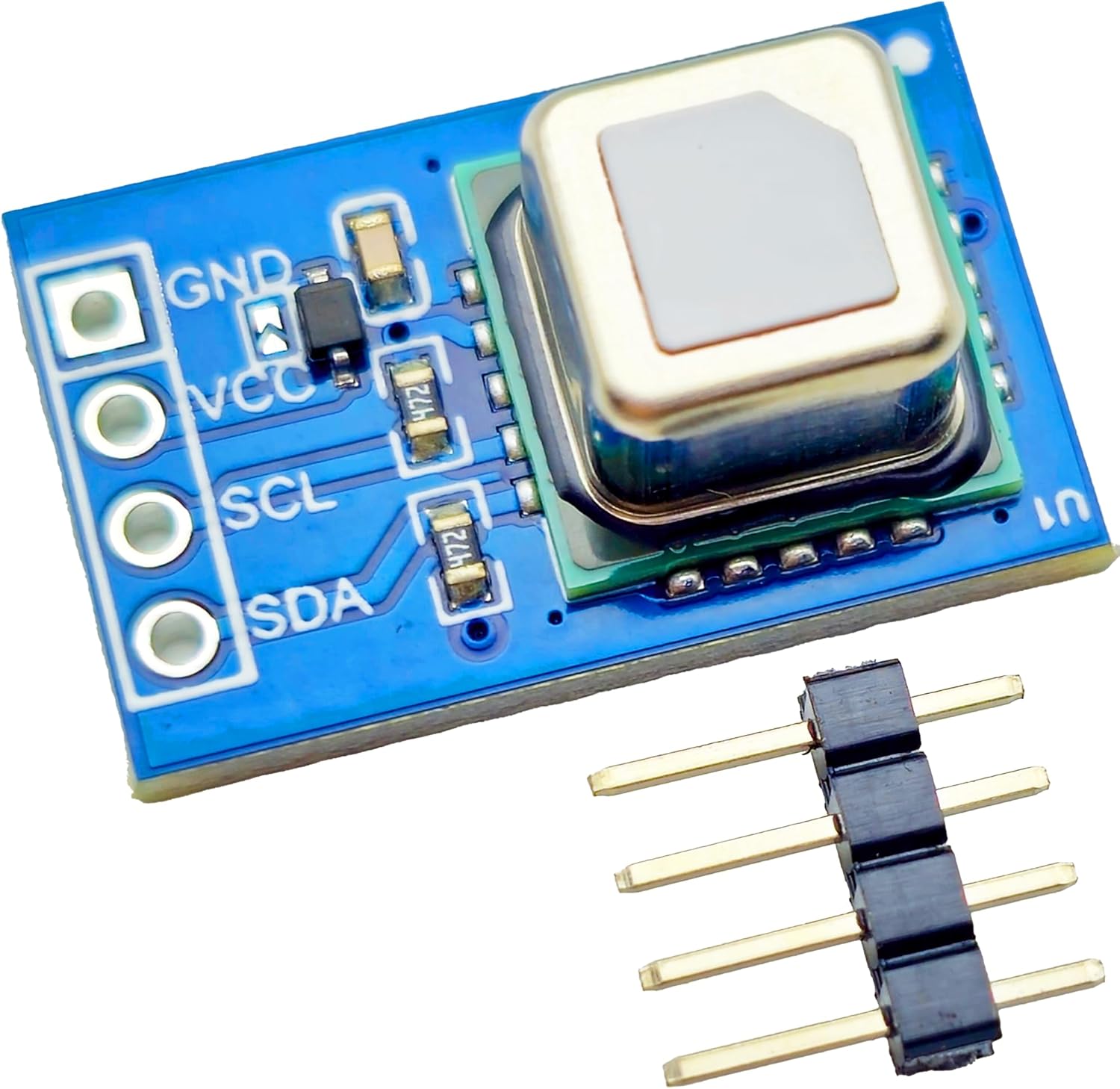
Figure 1: Front view of the SCD41 CO2 Sensor Module, showing the sensor component and the GND, VCC, SCL, and SDA pins for connection.

Figure 2: Back view of the SCD41 CO2 Sensor Module, displaying the "SCD41 CO2 Sensor" label and the VCC voltage range.
3. Setup and Installation
Follow these steps to set up your SCD41 CO2 Sensor Module:
- Unpack Components: Carefully remove the SCD41 Breakout Module and the included 2.54mm header pins from their packaging.
- Attach Header Pins: Solder the 2.54mm header pins to the module's connection pads (GND, VCC, SCL, SDA) if you intend to use it with a breadboard or jumper wires. Ensure secure connections.
- Power Supply: Connect the VCC pin to a DC power supply between 2.5V and 5V. Connect the GND pin to the ground of your power supply and microcontroller.
- I2C Connection:
- Connect the SCL (Serial Clock) pin of the module to the SCL pin of your microcontroller.
- Connect the SDA (Serial Data) pin of the module to the SDA pin of your microcontroller.
Note: The module has built-in reverse polarity protection for the power supply connections (VCC and GND), reducing the risk of damage from incorrect wiring.
- Software Setup: Install the necessary I2C library for the SCD41 sensor on your microcontroller's development environment (e.g., Arduino IDE, MicroPython). Refer to the sensor manufacturer's documentation or community resources for specific library recommendations and example code.
4. Operating Instructions
Once the module is correctly wired and the software is set up, you can begin reading data:
- Initialize Sensor: In your code, initialize the SCD41 sensor using the installed library. This typically involves calling an initialization function.
- Start Measurement: Command the sensor to start continuous measurement. The SCD41 typically requires a short period to stabilize before providing accurate readings.
- Read Data: Periodically request data from the sensor via the I2C interface. The sensor will provide readings for:
- CO2 Concentration: In parts per million (ppm).
- Temperature: In degrees Celsius (°C) or Fahrenheit (°F).
- Relative Humidity: In percentage (RH%).
- Data Interpretation: Process the received data in your microcontroller for display, logging, or control applications.
Refer to the specific library documentation for detailed function calls and data formats.
5. Maintenance
The SCD41 CO2 Sensor Module is designed for low maintenance. To ensure optimal performance and longevity:
- Keep Clean: Avoid dust and debris accumulation on the sensor's surface. If cleaning is necessary, use a soft, dry brush or compressed air. Do not use liquids or abrasive materials.
- Environmental Conditions: Operate the sensor within its specified temperature and humidity ranges to prevent damage and ensure accuracy. Avoid exposure to corrosive gases or extreme vibrations.
- Power Supply: Ensure a stable power supply within the specified voltage range (2.5V to 5V DC).
- Recalibration: While the SCD41 is designed for long-term stability, some applications may benefit from periodic recalibration. Consult the sensor's datasheet for information on calibration procedures, if applicable.
6. Troubleshooting
If you encounter issues with your SCD41 CO2 Sensor Module, consider the following:
- No Readings or Incorrect Data:
- Check Wiring: Verify all connections (VCC, GND, SCL, SDA) are secure and correctly connected to your microcontroller.
- Power Supply: Ensure the module is receiving stable power within the 2.5V to 5V DC range.
- I2C Address: Confirm the I2C address used in your software matches the sensor's default address (refer to the SCD41 datasheet).
- I2C Communication: Use an I2C scanner sketch (available for most microcontrollers) to confirm the sensor is detected on the I2C bus.
- Library Issues: Ensure the correct sensor library is installed and properly initialized in your code.
- Unstable Readings:
- Environmental Stability: Ensure the sensor is in a stable environment, away from direct airflow, heat sources, or rapid temperature/humidity changes.
- Warm-up Time: Allow sufficient warm-up time after power-on for the sensor to stabilize.
- Sensor Not Detected:
- Power Cycle: Try power cycling the module and microcontroller.
- Solder Joints: Inspect solder joints for any cold joints or bridges.
If problems persist, consult the SCD41 datasheet or relevant online forums for further assistance.
7. Specifications
| Parameter | Value |
|---|---|
| Model | SCD41 Brekout Module |
| Brand | QUAINTBYTE |
| CO2 Measurement Range | 400 - 5000 ppm |
| Temperature Measurement Range | 14°F - 140°F (-10°C - 60°C) |
| Humidity Measurement Range | 0 - 95% RH |
| Communication Interface | I2C |
| Operating Voltage | 2.5V - 5V DC |
| Included Components | 1*SCD41 Breakout Module, 1*2.54mm header pins |
| Item Weight | 0.493 ounces |
| Package Dimensions | 2.72 x 2.17 x 0.55 inches |
8. Warranty and Support
For specific warranty information, please refer to the documentation provided at the time of purchase or contact your retailer. For technical support, consult the manufacturer's website or relevant online communities for the SCD41 sensor. Ensure you have your product model number (SCD41 Brekout Module) available when seeking support.