
1. Introduction
Thank you for choosing the SHENGJINSH Commercial Ice Cream Machine Model A126 w/Precooling. This manual provides essential information for the safe and efficient operation, maintenance, and troubleshooting of your new ice cream machine. Please read this manual thoroughly before operating the machine and retain it for future reference.
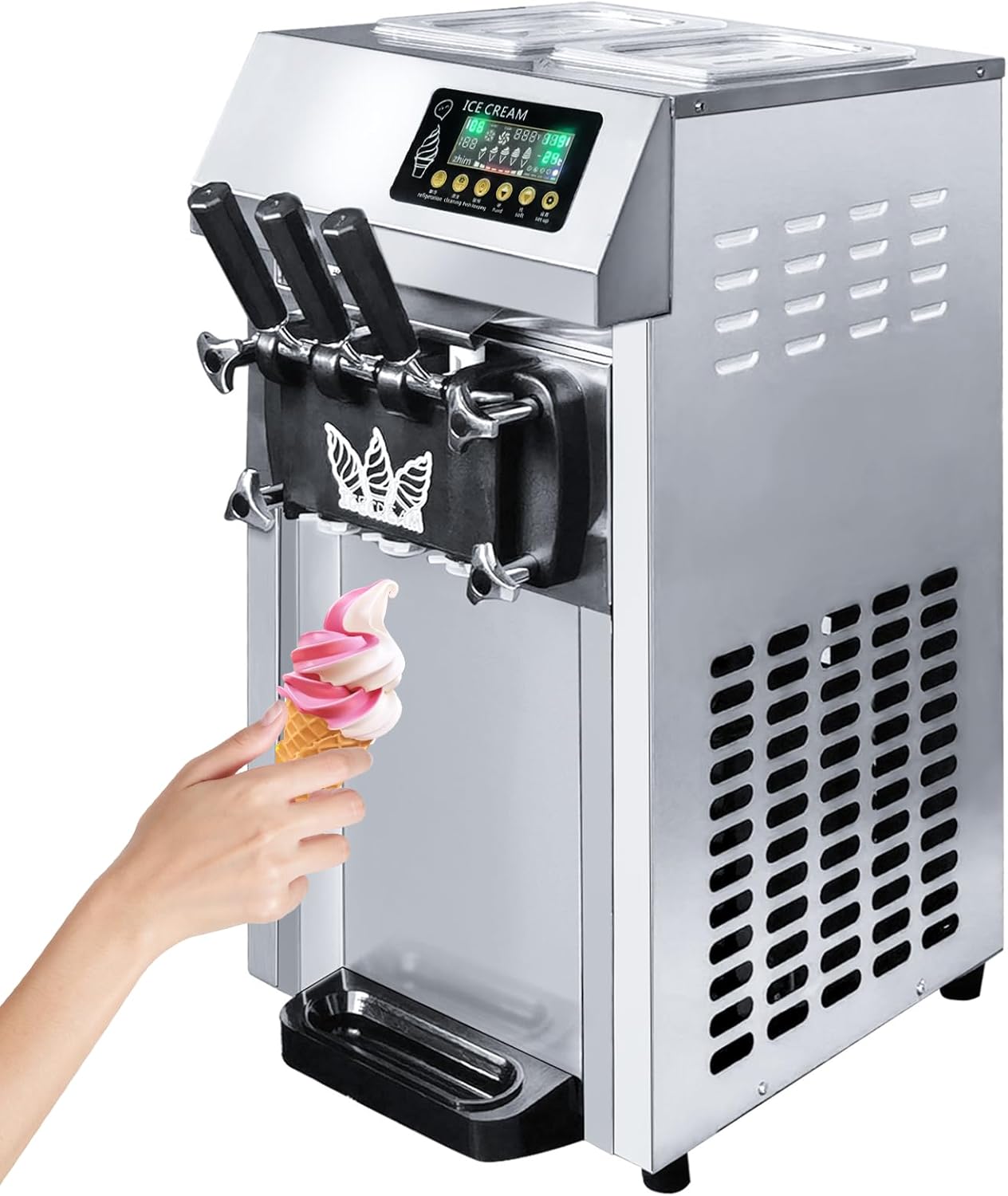
Figure 1.1: The SHENGJINSH Commercial Ice Cream Machine Model A126, a stainless steel unit designed for soft serve ice cream production. It features three dispensing handles and an integrated control panel.
2. Safety Instructions
To ensure safe operation and prevent damage to the machine or injury to personnel, please observe the following safety precautions:
- Always connect the machine to a grounded power outlet with the correct voltage as specified on the product label.
- Do not operate the machine with wet hands or in wet environments to avoid electrical shock.
- Keep hands and foreign objects away from moving parts during operation.
- Ensure proper ventilation around the machine to prevent overheating.
- Unplug the machine before cleaning, maintenance, or if it will be unused for an extended period.
- Do not attempt to repair the machine yourself. Contact qualified service personnel for assistance.
- Use only food-grade ingredients and follow proper hygiene practices when preparing and handling ice cream mix.
- Regularly inspect the power cord for damage. Do not use if damaged.
3. Product Overview
3.1 Key Features
- Pre-cooling & Fresh-keeping Function: Maintains hopper temperature to preserve ingredient freshness and taste.
- Material Shortage Alarm: Alerts users to add ingredients, preventing damage from idling.
- High Yield: Produces up to 18 L/H (approximately 5 gallons/hour) of soft serve ice cream.
- Three Flavors: Offers two single flavors and one mixed flavor option.
- Smart LED Control Panel: Displays making number, hardness, temperature, forming ratio, and molding process.
- Automatic Cleaning: Simplifies maintenance with a one-click cleaning function.
- Powerful Performance: Equipped with a 1250W compressor for rapid refrigeration and low noise operation.
- Food Grade Materials: Cylinders and covers are made from safe, sanitary food-grade materials.
- Durable Construction: Stainless steel body for longevity and easy cleaning.

Figure 3.1: A visual summary of the SHENGJINSH A126's key features, including automatic cleaning, fast cooling, intelligent control, pre-cooling, stainless steel body, brand compressor, high expansion, and material shortage alarm.

Figure 3.2: Illustration of the machine's compressor, highlighting its attributes such as low noise, rapid refrigeration, energy efficiency, and strong power output.
3.3 Components

Figure 3.3: Front view of the SHENGJINSH A126 machine, showing the control panel, three dispensing handles, and the removable drip tray.
- Control Panel: Digital display and buttons for operation and settings.
- Hopper Lids: Transparent covers for the mixing hoppers.
- Mixing Hoppers (2x4L): Containers for ice cream mix.
- Dispensing Handles (3): Two for single flavors, one for mixed flavor.
- Drip Tray: Collects drips and spills, removable for cleaning.
- Air Vents: Located on the sides for compressor cooling.
- Rubber Support Feet: Provide stability and prevent slipping.
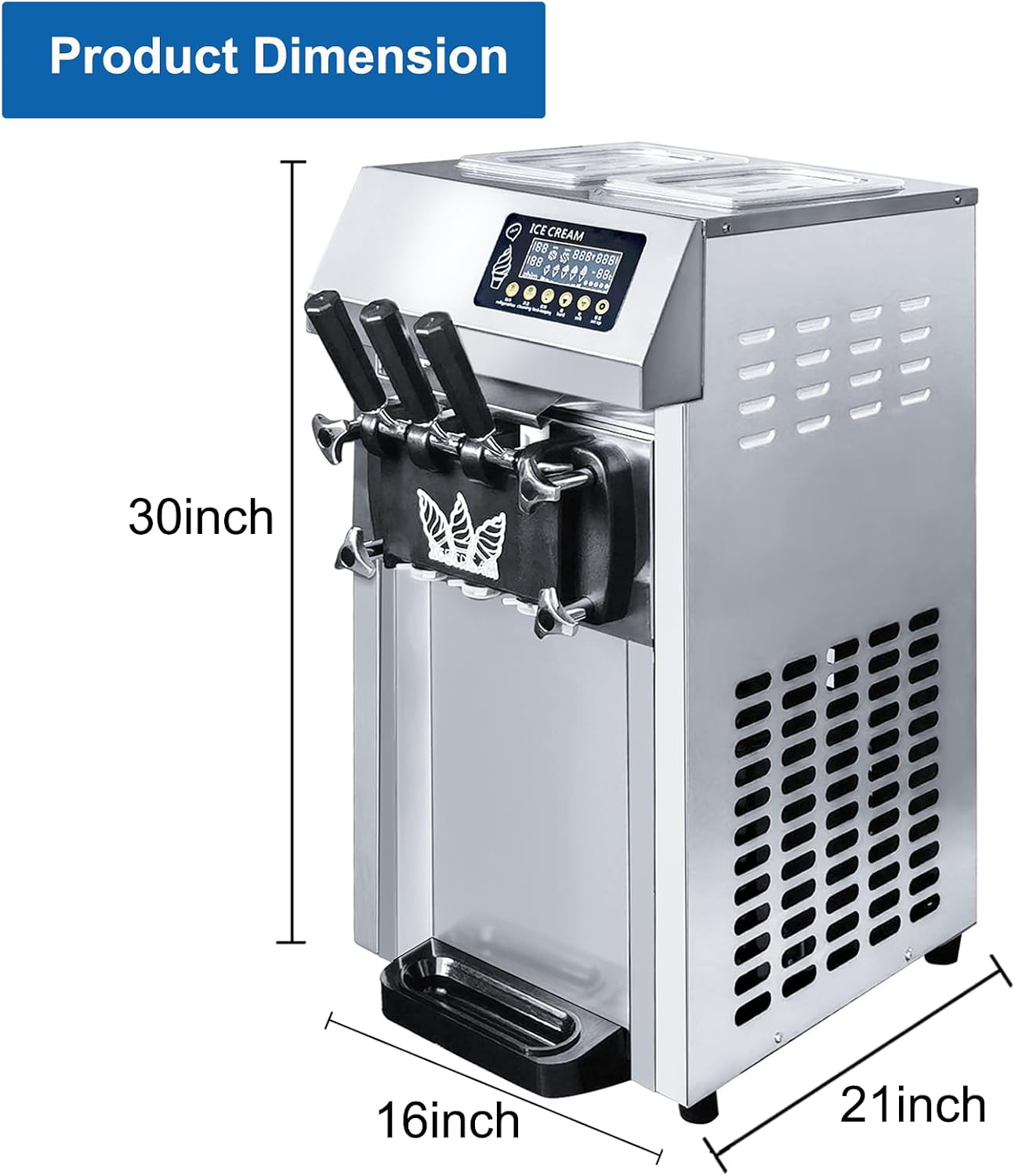
Figure 3.4: Product dimensions of the SHENGJINSH A126 machine, indicating its height (30 inches), width (16 inches), and depth (21 inches) for placement considerations.
4. Setup
4.1 Unpacking and Placement
- Carefully remove the machine from its packaging.
- Place the machine on a stable, level surface capable of supporting its weight.
- Ensure there is adequate clearance (at least 15 cm or 6 inches) around all sides for proper ventilation.
- Avoid placing the machine near heat sources or in direct sunlight.
4.2 Initial Cleaning
Before first use, thoroughly clean all parts that will come into contact with food.
- Remove the dispensing handles, dispensing valves, and mixing shafts.
- Wash these components with warm, soapy water and rinse thoroughly.
- Wipe down the hoppers and the interior of the dispensing area with a damp cloth.
- Ensure all parts are completely dry before reassembly.
4.3 Power Connection
- Verify that the power supply matches the machine's requirements (e.g., 1250W, specific voltage).
- Plug the power cord into a dedicated, grounded electrical outlet.
5. Operation
5.1 Preparing the Ice Cream Mix
- Prepare your desired soft serve ice cream mix according to its specific instructions.
- Ensure the mix is thoroughly blended and free of lumps.
- Pour the prepared mix into the two 4-liter mixing hoppers. Do not overfill.
- Close the hopper lids securely.

Figure 5.1: The two 4-liter mixing hoppers with transparent lids, allowing for two single flavors and one mixed flavor of soft serve ice cream.
5.2 Starting the Machine and Making Ice Cream
- Turn on the main power switch.
- On the Smart LED Control Panel, press the "Refrigeration" button to begin the freezing process.
- Monitor the display for the current temperature and molding process. The machine will indicate when the ice cream is ready.
- To dispense, place a cone or cup under the desired dispensing handle and pull the handle down.
- Release the handle to stop dispensing.

Figure 5.2: Detailed view of the Smart LED Control Panel, showing indicators for hardness, voltage, quantity, refrigeration, cleaning, fresh-keeping, and setup options.
5.3 Pre-cooling and Fresh-keeping Function
- The pre-cooling function helps to quickly lower the temperature of the mix in the hoppers, reducing the time required for ice cream production.
- To activate the fresh-keeping function, press the "Keep Fresh" button on the control panel. This function maintains a low temperature in the hoppers, preserving the freshness of the ingredients overnight or during periods of inactivity.

Figure 5.3: Illustration of the pre-cooling preservation feature, highlighting its role in shortening production time and maintaining ingredient flavor.
5.4 Adjusting Hardness
The hardness of the ice cream can be adjusted via the control panel. Refer to the specific settings menu on the LCD panel to increase or decrease the freezing intensity, thereby altering the ice cream's consistency.
5.5 Material Shortage Alarm
The machine is equipped with a material shortage alarm. When the mix level in a hopper is low, an alert will sound or display on the panel. Add more ice cream mix promptly to prevent the machine from running dry, which can cause damage to internal components.
6. Maintenance
6.1 Daily Cleaning (Automatic Cleaning)
The machine features an automatic cleaning function for daily sanitation.
- Ensure all ice cream mix has been dispensed or removed from the hoppers.
- Pour warm water (approximately 40-50°C / 104-122°F) into the hoppers.
- Press the "Clean" button on the control panel. The machine will agitate the water to clean the freezing cylinders.
- After the cleaning cycle, dispense the water through the handles into a bucket.
- Repeat with clean water if necessary.
- For thorough cleaning, disassemble and manually clean components as described in "Initial Cleaning" (Section 4.2) at least once a week.
6.2 Drip Tray Cleaning
- The detachable drip tray should be removed and washed with warm, soapy water.
- Rinse and dry thoroughly before reattaching.
6.3 Condenser Cleaning
Periodically clean the condenser fins to ensure efficient cooling. Unplug the machine and use a soft brush or vacuum cleaner to remove dust and debris from the air vents and condenser coils. This should be done monthly or as needed depending on usage and environment.
7. Troubleshooting
| Problem | Possible Cause | Solution |
|---|---|---|
| Machine does not turn on. | No power supply; power cord damaged; main switch off. | Check power connection and outlet; inspect power cord; ensure main switch is on. |
| Ice cream is too soft or not freezing. | Mix too warm; hardness setting too low; insufficient refrigeration; condenser dirty. | Ensure mix is pre-chilled; adjust hardness setting higher; check refrigeration button; clean condenser. |
| Ice cream is too hard. | Hardness setting too high. | Adjust hardness setting lower. |
| Material shortage alarm activates frequently. | Hoppers are low on mix. | Add more ice cream mix to the hoppers. |
| Unusual noise during operation. | Loose parts; foreign object; motor issue. | Turn off and unplug the machine. Inspect for loose parts or foreign objects. If noise persists, contact service. |
If the problem persists after attempting the suggested solutions, please contact SHENGJINSH customer support for further assistance.
8. Specifications
| Feature | Detail |
|---|---|
| Model | A126 |
| Brand | SHENGJINSH |
| Power | 1250W |
| Capacity (Hoppers) | 2 x 4 Liters (Total 8 Liters) |
| Yield | Up to 18 L/H (approx. 5 gallons/hour) |
| Flavors | 3 (2 single, 1 mixed) |
| Special Features | Pre-cooling, Fresh-keeping, Automatic Cleaning, Digital Display, Material Shortage Alarm, Built-In Compressor |
| Material | Stainless Steel |
| Operation Mode | Automatic |
| Color | Black (accents/panel) |
| Dimensions (L x W x H) | Approx. 21 x 16 x 30 inches |
9. Warranty and Support
For warranty information, please refer to the warranty card included with your product or contact SHENGJINSH customer service. Keep your purchase receipt as proof of purchase.
For technical support, spare parts, or service inquiries, please contact your retailer or the manufacturer directly. Provide your model number (A126) and purchase date when contacting support.