
A2ZWORLD GC75640
A2ZWORLD GC75640 Residual Current Circuit Breaker Instruction Manual
Model: GC75640 | Brand: A2ZWORLD
1. Product Overview
The A2ZWORLD GC75640 is a Residual Current Circuit Breaker (RCCB) designed to protect against electrical shock by detecting leakage currents to earth. This Type AC RCCB is rated for 300 mA sensitivity and 40 A current, with a 6 kA short-circuit breaking capacity. It occupies 2 DIN modules (1P+N) and is suitable for residential, commercial, and industrial electrical panels.
Key features include:
- 300 mA Type AC Sensitivity: Detects sinusoidal AC residual currents, providing protection against indirect contact.
- 6 kA Breaking Capacity: Offers enhanced safety by withstanding fault currents above standard requirements.
- Compact 2 DIN Module Design (1P+N): Space-efficient, measuring 36 mm wide, with pull-up terminals for conductors up to 35 mm².
- Integrated Test Button: Allows for quick and easy functional verification.
- Professional Construction: IP20 self-extinguishing housing, certified to IEC 61008-1.

Figure 1: Angled view of the A2ZWORLD GC75640 Residual Current Circuit Breaker, showing the main body, terminals, test button, and operating lever.
2. Safety Information
WARNING: Installation, maintenance, and repair of this device must only be performed by qualified and authorized personnel in accordance with national and local electrical codes and regulations. Failure to comply with these instructions can result in serious injury, death, or property damage.
- Always disconnect the main power supply before working on electrical circuits.
- Ensure proper grounding of the electrical system.
- Verify that the device ratings (current, sensitivity, breaking capacity) match the requirements of your electrical installation.
- Do not operate the device if it appears damaged.
- Regularly test the RCCB using the integrated test button.
3. Setup and Installation
The A2ZWORLD GC75640 RCCB is designed for DIN rail mounting within an electrical distribution board.
- Power Disconnection: Before beginning any installation, ensure that the main power supply to the electrical panel is completely disconnected and locked out to prevent accidental re-energization.
- Mounting: Clip the RCCB onto the standard 35mm DIN rail in the electrical panel. Ensure it is securely seated.
- Wiring:
- Connect the incoming phase (L) and neutral (N) conductors to the upper terminals of the RCCB. The terminals are clearly marked.
- Connect the outgoing phase (L1) and neutral (N1) conductors to the lower terminals of the RCCB, leading to the protected circuit.
- Ensure all connections are tight and secure. The pull-up terminals can accommodate conductors up to 35 mm².
- Verification: Double-check all wiring connections for correctness and tightness. Ensure no bare wires are exposed.

Figure 2: Front view of the RCCB, showing the input/output terminals, test button, and operating lever. Note the clear markings for phase (L) and neutral (N) connections.

Figure 3: Side view of the RCCB, illustrating its compact 2-DIN module width and the design for DIN rail mounting.
4. Operating Instructions
Once installed and wired correctly, the RCCB operates automatically to detect earth leakage currents.
- Switching On: After installation and power restoration, push the operating lever (typically orange) upwards to the "ON" position. This connects the protected circuit.
- Switching Off: To disconnect the protected circuit, push the operating lever downwards to the "OFF" position.
- Automatic Tripping: If an earth leakage current exceeding 300 mA is detected, the RCCB will automatically trip, moving the operating lever to the "OFF" position to interrupt the circuit and ensure safety.
5. Maintenance
Regular testing of the RCCB is essential to ensure its proper functioning and continued protection.
- Monthly Test: Press the "Test" button (marked 'T' or 'Test') on the front of the RCCB. The device should immediately trip, moving the operating lever to the "OFF" position. This simulates an earth leakage fault and verifies the internal mechanism.
- Resetting after Test: After a successful test, reset the RCCB by pushing the operating lever back to the "ON" position.
- Cleaning: Keep the device clean and free from dust. Use a dry, soft cloth for cleaning. Do not use abrasive cleaners or solvents.

Figure 4: Side view showing the product label with SKU: GC75640 and UPC: 8050627068626. This label also indicates "Made in China".
6. Troubleshooting
- RCCB Trips Frequently:
- An earth leakage fault may exist in the protected circuit. Disconnect appliances one by one to identify the faulty device.
- Check for damaged wiring or insulation in the circuit.
- If the problem persists, consult a qualified electrician.
- RCCB Does Not Trip When Test Button is Pressed:
- This indicates a malfunction of the RCCB. The device may not provide protection against earth leakage.
- Immediately disconnect power to the circuit and replace the RCCB. Do not rely on a faulty RCCB for protection.
- RCCB Does Not Switch On:
- Ensure there is no active earth leakage fault preventing it from resetting.
- Check the incoming power supply.
- If the issue persists, the device may be faulty and require replacement.
7. Specifications
| Feature | Specification |
|---|---|
| Model Number | GC75640 |
| Brand | A2ZWORLD |
| Type | RCCB Type AC, Differential |
| Poles | 1P+N (2 Modules) |
| Rated Current (In) | 40 Ampere |
| Rated Residual Operating Current (IΔn) | 300 mA |
| Rated Voltage (Ue) | 230V AC, 50/60Hz |
| Rated Short-Circuit Breaking Capacity (Icn) | 6 kA |
| Rated Residual Breaking Capacity (IΔm) | 1000A |
| Standard | IEC 61008-1 |
| Product Dimensions | 7.3 x 3.5 x 8.3 cm |
| Manufacturer | A2ZWORLD |
| UPC | 8050627068626 |
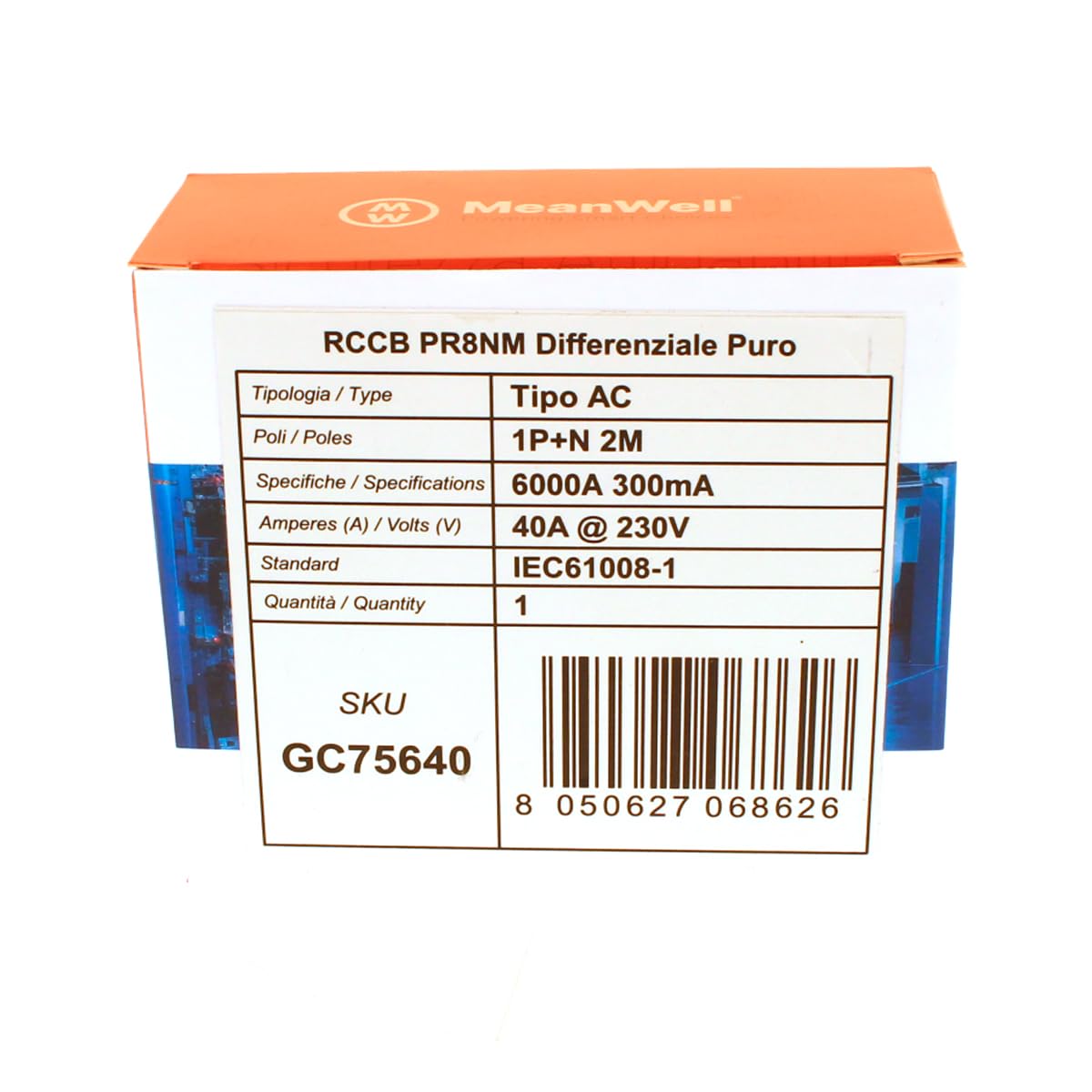
Figure 5: Packaging label displaying key specifications such as Type AC, 1P+N 2M, 6000A 300mA, 40A @ 230V, and IEC61008-1 standard. Also shows SKU GC75640 and UPC 8050627068626.

Figure 6: Product packaging for the A2ZWORLD GC75640 RCCB, featuring the "MeanWell" brand logo and various certifications like CE, KEMA EUR, and RoHS. A QR code is also visible, which links to https://uqr.to/BoxLabel.
8. Warranty and Support
Specific warranty details for the A2ZWORLD GC75640 RCCB are typically provided at the point of purchase or within the product packaging. Please refer to your purchase documentation for warranty terms and conditions.
For technical support or inquiries, please contact your retailer or the manufacturer, A2ZWORLD, through their official channels. Ensure you have your product model number (GC75640) and purchase details available when seeking support.