
LFBsZC LFBsZC135
BYHX Main Board User Manual
Model: LFBsZC135
Introduction
This user manual provides comprehensive information and instructions for the BYHX Main Board, Model LFBsZC135. This board is designed to be compatible with Allwin Human Printers and supports various printhead configurations. Please read this manual carefully before installation and operation to ensure proper functionality and longevity of the product.
Product Overview
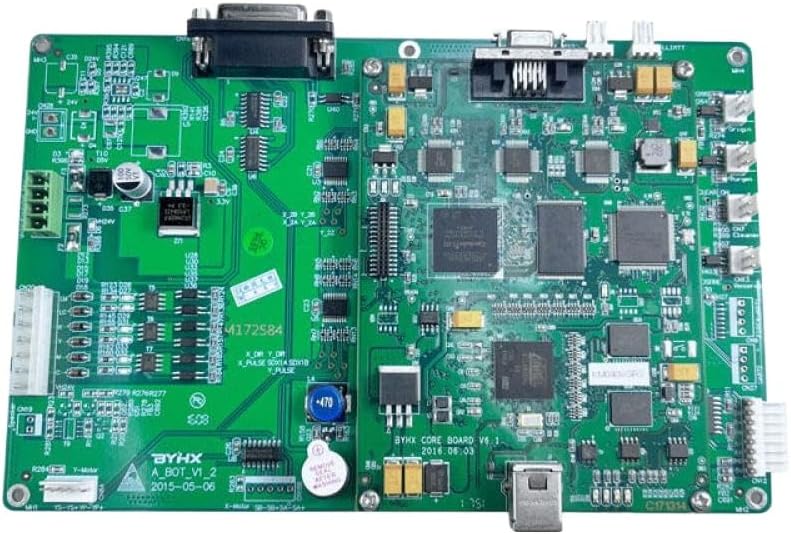
Figure 1: The BYHX Main Board, Model LFBsZC135. This image displays the green circuit board with various electronic components, connectors, and chips, including a large D-sub connector at the top and a USB port at the bottom. The board features multiple integrated circuits and capacitors, indicating its complex design for printer control.
The BYHX Main Board is a critical component for Allwin Human Printers, engineered to manage and control printing operations. Its design ensures robust performance and compatibility with specific printhead technologies.
Key Features:
- Designed for compatibility with Allwin Human Printers, supporting 8 printheads for enhanced printing capabilities.
- Supports various printhead models including the 512i and 1024, making it a versatile choice for diverse printing needs.
- Engineered specifically for KM512i and KM1024 printheads, ensuring seamless integration and optimal performance.
- Equipped with advanced circuitry for improved data processing, enhancing the overall output quality and speed of your printing tasks.
- Features a user-friendly design to facilitate a quick and efficient installation process, minimizing downtime and ensuring your printer is operational swiftly.
Setup and Installation
Installation of the BYHX Main Board requires careful handling and technical knowledge. It is recommended that installation be performed by a qualified technician to prevent damage to the board or the printer system.
General Installation Steps:
- Safety First: Ensure the printer is powered off and disconnected from the main power supply before beginning any installation.
- Static Discharge: Wear an anti-static wrist strap to prevent electrostatic discharge (ESD) damage to the sensitive electronic components.
- Access Printer Interior: Carefully open the printer casing to access the existing main board. Refer to your printer's specific service manual for instructions on accessing internal components.
- Disconnect Old Board: Document all cable connections (e.g., take photos) before disconnecting them from the old main board. Carefully remove the old board.
- Install New Board: Position the BYHX Main Board in the designated slot. Secure it with appropriate screws, ensuring it is firmly seated.
- Reconnect Cables: Reconnect all cables to the new BYHX Main Board according to your documentation. Ensure all connections are secure and correctly oriented.
- Close Casing: Carefully close the printer casing.
- Power On and Test: Reconnect the printer to power and perform initial tests to verify proper functionality. This may include driver installation or configuration as per your printer's requirements.
For detailed wiring diagrams and specific printer model instructions, consult the service manual provided by the Allwin Human Printer manufacturer.
Operation Guidelines
The BYHX Main Board operates as the central control unit for your Allwin Human Printer. Its primary function is to interpret print commands from the computer and translate them into precise movements and ink firing sequences for the printheads.
- System Integration: Once installed, the main board seamlessly integrates with the printer's existing firmware and software.
- Printhead Control: It manages the 8 printheads, ensuring synchronized operation for high-quality output.
- Data Processing: The advanced circuitry efficiently processes print data, contributing to faster and more reliable printing.
- Error Handling: The board is designed to communicate errors or malfunctions to the printer's control panel or connected computer.
Normal operation of the printer will proceed as usual after the main board replacement. Any operational issues should first be diagnosed using the printer's diagnostic tools and software.
Maintenance and Care
Proper maintenance ensures the longevity and optimal performance of your BYHX Main Board. As an internal component, direct user maintenance is minimal, but general care for the printer environment is crucial.
- Clean Environment: Operate the printer in a clean, dust-free environment to prevent accumulation of debris on the board's components.
- Temperature and Humidity: Maintain stable room temperature and humidity levels as specified by your printer manufacturer. Extreme conditions can affect electronic components.
- Power Stability: Use a surge protector or uninterruptible power supply (UPS) to protect the printer and its internal components, including the main board, from power fluctuations.
- Avoid Physical Impact: Prevent any physical shocks or impacts to the printer, which could dislodge or damage internal connections on the main board.
- Professional Cleaning: If internal cleaning is required, it should be performed by a qualified service technician using appropriate tools and anti-static measures.
Troubleshooting
If you encounter issues after installing the BYHX Main Board, consider the following general troubleshooting steps. For specific error codes or complex problems, refer to your Allwin Human Printer's diagnostic manual or contact technical support.
- No Power/Printer Not Turning On:
- Verify all power connections are secure.
- Check the power outlet and power cable.
- Ensure the main board is correctly seated and all internal power cables are connected.
- Printer Not Recognized by Computer:
- Check the USB or network cable connection between the printer and computer.
- Reinstall printer drivers on your computer.
- Ensure the main board's communication ports are properly connected.
- Print Quality Issues (after board replacement):
- Verify all printhead ribbon cables are securely connected to the main board.
- Perform printhead alignment and cleaning cycles through the printer's utility software.
- Ensure correct printhead type is selected in printer settings, if applicable.
- Unusual Noises or Behavior:
- Immediately power off the printer.
- Inspect for any loose components or foreign objects inside the printer.
- Recheck all internal cable connections to the main board.
If issues persist after basic troubleshooting, it is advisable to seek assistance from a certified technician or the manufacturer's support.
Technical Specifications
| Specification | Detail |
|---|---|
| Brand | LFBsZC |
| Model Name | LFBsZC135 |
| Item Model Number | LFBsZC135 |
| ASIN | B0F5YW7FVG |
| Compatibility | Allwin Human Printer, 8 Printhead, 512i, 1024, KM512i, KM1024 |
| Package Dimensions | 0.39 x 0.39 x 0.39 inches |
| Item Weight | 14.1 ounces |
| Manufacturer | LFBsZC |
| Country of Origin | China |
| Date First Available | April 22, 2025 |
Warranty and Support
For information regarding warranty coverage, returns, or technical support for your BYHX Main Board, please refer to the documentation provided at the time of purchase or contact the seller directly. Ensure you have your product model number (LFBsZC135) and purchase details ready when seeking support.
For printer-specific issues or integration questions, consult the official documentation for your Allwin Human Printer model or contact Allwin Human Printer support.