Introduction
This manual provides essential instructions for the setup, operation, and maintenance of your Generic Wireless Gaming Controller. This 2.4G dual-handle gamepad set is designed for two players, offering wireless connectivity for an enhanced gaming experience on compatible devices.
Package Contents
- 2 x Wireless Gamepads
- 1 x USB Receiver
Note: AAA batteries are required for operation and are not included in the package.
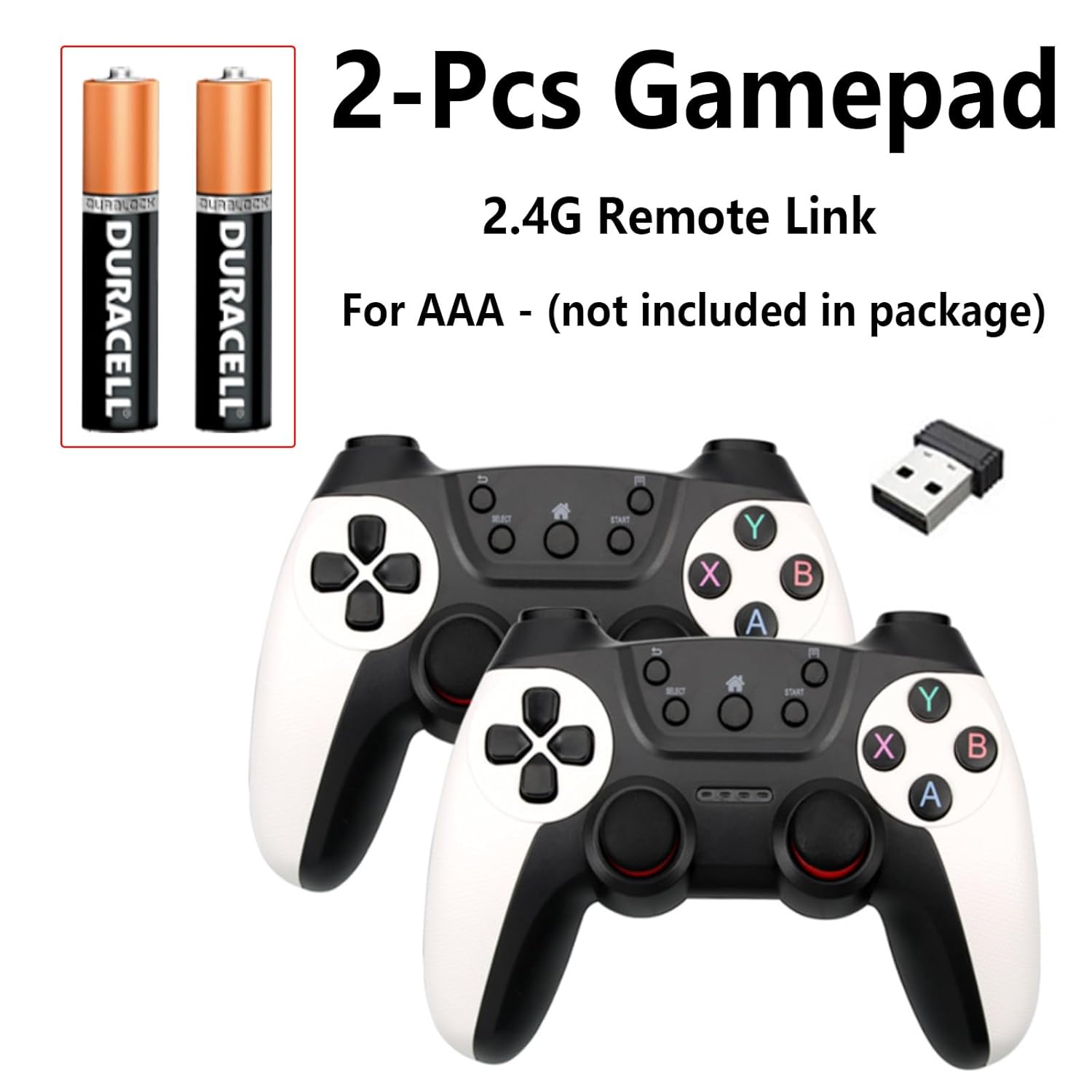
Image: Contents of the Wireless Gaming Controller package, including two gamepads and one USB receiver. AAA batteries are required but sold separately.
Product Overview
The wireless gaming controller features an ergonomic design with textured grips for comfortable use during extended gaming sessions. It includes standard gamepad buttons and dual analog sticks for precise control.

Image: Front view of the wireless gamepad, highlighting the D-pad, action buttons (A, B, X, Y), analog sticks, and central function buttons (SELECT, START, HOME).
Setup
1. Battery Installation
- Locate the battery compartment on the back of each controller.
- Open the battery compartment cover.
- Insert three (3) AAA batteries into each controller, ensuring correct polarity (+/-).
- Close the battery compartment cover securely.

Image: Rear view of the controller, indicating the location of the battery compartment.
2. Connecting the USB Receiver
- Plug the provided USB receiver into an available USB port on your PC, laptop, Android TV box, or compatible console.
- The system should automatically detect the receiver. No additional drivers are typically required for plug-and-play functionality.
3. Powering On/Off
- To power on a controller, press the HOME button. The indicator light on the controller will illuminate.
- To power off a controller, press and hold the HOME button for approximately 5 seconds until the indicator light turns off.
Operating Instructions
Compatibility
This wireless gaming controller is compatible with:
- Windows PCs
- Laptops
- Android TV boxes
- Consoles that support USB receivers
Usage
- Once the USB receiver is connected and the controllers are powered on, they should automatically pair.
- The 2.4G wireless technology provides a stable connection up to 33 feet (10 meters).
- The controllers are designed for plug-and-play operation, meaning no complex driver installations are typically needed.
Maintenance
Cleaning
- Wipe the controller surfaces with a soft, dry cloth.
- For stubborn dirt, use a slightly damp cloth and then dry thoroughly.
- Do not use harsh chemicals, solvents, or abrasive cleaners.
Storage
- Store the controllers and USB receiver in a cool, dry place away from direct sunlight and extreme temperatures.
- If storing for an extended period, remove the AAA batteries to prevent leakage.
Troubleshooting
- Controller not powering on: Ensure AAA batteries are correctly inserted with the right polarity and are not depleted. Replace batteries if necessary.
- Controller not connecting: Verify the USB receiver is securely plugged into a working USB port. Ensure the controller is powered on. Try plugging the receiver into a different USB port.
- Input lag or disconnections: Ensure the controller is within the 33-foot operating range of the USB receiver. Minimize obstructions between the controller and receiver. Check for potential interference from other 2.4G wireless devices.
- Buttons or sticks not responding: Check if the controller is properly connected. If the issue persists, the controller may require replacement.
- Compatibility issues: While designed for plug-and-play, some systems or games may require specific configurations or drivers. Consult your device's operating system settings or game's controller options.
Specifications
| Model Number | B0FKT1R77R |
| Wireless Technology | 2.4G Wireless |
| Operating Range | Up to 33 feet (10 meters) |
| Power Source | 3 x AAA batteries per controller (not included) |
| Estimated Playtime | 20+ hours per set of batteries |
| Compatibility | Windows PCs, Laptops, Android TV boxes, Consoles with USB receiver support |
| Construction Material | Shock-resistant ABS |
| Manufacturer | MOOCHII |
| Date First Available | April 23, 2025 |
Warranty and Support
For warranty information or technical support, please refer to the retailer's return policy or contact the manufacturer directly. Keep your purchase receipt for any warranty claims.