
1. Introduction
This manual provides essential information for the safe and efficient use of your Elica Boxin Advance Plus integrated hood. Please read these instructions carefully before installation, operation, or maintenance. Keep this manual for future reference.
The Elica Boxin Advance Plus is a high-performance integrated hood designed to blend seamlessly with your kitchen cabinetry. It features advanced technology for air purification, connectivity, and energy efficiency.
2. Safety Information
General Safety:
- Ensure the electrical installation complies with local regulations.
- Do not allow children to operate the appliance without supervision.
- Disconnect the appliance from the power supply before any cleaning or maintenance.
- Do not flambé under the hood.
- The air extracted must not be discharged into a flue used for fumes from gas or other fuel-burning appliances.
Installation Safety:
- Installation must be performed by qualified personnel.
- Maintain the minimum distance between the hob and the lower part of the hood as specified in the installation guide (typically 65 cm for electric hobs, 75 cm for gas hobs).
- Ensure adequate ventilation in the room when the hood is used simultaneously with other gas or fuel-burning appliances.
3. Product Overview and Features
The Elica Boxin Advance Plus hood is designed for discreet integration into your kitchen. Key features include:
- Integrated Design: Seamlessly fits into kitchen cabinets.
- High-Performance Motor: Quiet, powerful, and energy-efficient.
- Airmatic Sensor Technology: Automatically monitors air quality and activates the hood when vapors or pollutants are detected.
- Connectivity (Wi-Fi & App): Remote control via smartphone or voice assistant.
- Long Life Filters: Washable and regenerable anti-odor filters with extended lifespan.
- Hob2Hood Connection: Connects via Bluetooth to compatible Elica induction hobs for automatic power adjustment.
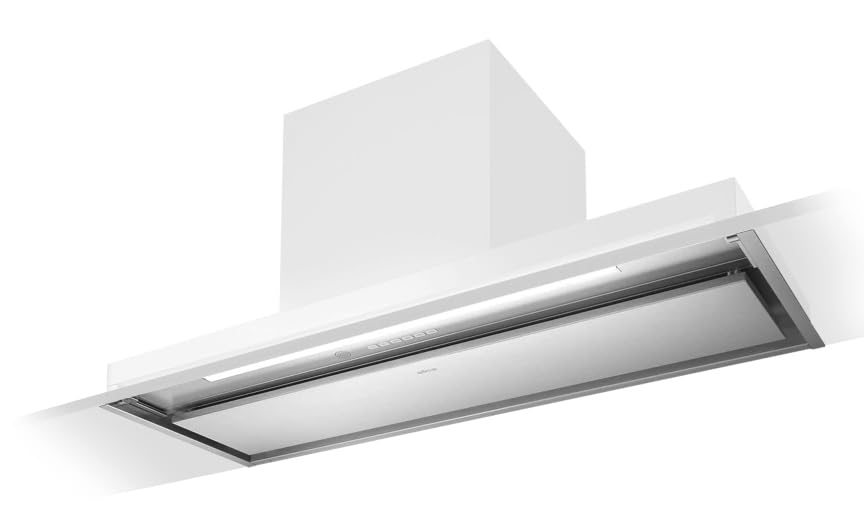
Figure 1: Elica Boxin Advance Plus Integrated Hood. This image shows the sleek, integrated design of the hood, designed to fit discreetly into kitchen cabinetry.

Figure 2: Elica Boxin Advance Plus Hood with glass visor extended. This view highlights the retractable glass visor and the integrated lighting, showcasing the functional elements of the hood.

Figure 3: Energy Efficiency Class A Label. This label indicates the high energy efficiency rating of the Elica Boxin Advance Plus hood.
4. Setup and Installation
The Elica Boxin Advance Plus hood is designed for under-cabinet mounting. Due to its integrated nature and electrical connections, professional installation is highly recommended.
Key Installation Considerations:
- Mounting Type: Under-cabinet.
- Ducting: Can be configured for ducted (extraction) or ductless (recirculating) operation. For recirculating mode, ensure carbon filters are installed.
- Electrical Connection: Connect to a properly grounded electrical outlet according to local codes.
- Clearance: Maintain appropriate clearance between the cooking surface and the bottom of the hood as per safety guidelines and local regulations.
Refer to the separate detailed installation guide provided with your product for specific measurements and steps.
5. Operating Instructions
Your Elica Boxin Advance Plus hood offers multiple ways to control its functions:
5.1 Manual Control
The hood typically features integrated controls (buttons or touch panel) for basic operations:
- Power On/Off: Activates or deactivates the hood.
- Fan Speed Adjustment: Select from multiple fan speeds (e.g., 1, 2, 3, Intensive).
- Light Control: Turns the hood lighting on or off.
Consult the specific control panel layout in your product's quick start guide for exact button functions.
5.2 Airmatic Automatic Air Purification
The Airmatic feature automatically monitors air quality. When activated, a sensor continuously checks the air for vapors or pollutants (e.g., cooking fumes, cigarette smoke). If detected, the hood will automatically turn on and adjust its suction power. It will switch off once the air quality returns to normal.
To activate/deactivate Airmatic, refer to your hood's control panel or the Elica Connect App settings.
5.3 Connectivity (Wi-Fi & App Control)
The hood can be controlled remotely via the Elica Connect smartphone app or a compatible voice assistant.
- Download the Elica Connect App: Search for "Elica Connect" in your smartphone's app store.
- Pairing: Follow the in-app instructions to connect your hood to your home Wi-Fi network and pair it with your smartphone.
- Remote Control: Once paired, you can use the app to turn the hood on/off, adjust fan speed, control lighting intensity and tone, and monitor filter status.
- Voice Assistant: Integrate with compatible voice assistants (e.g., Amazon Alexa, Google Assistant) as per the app's instructions for voice commands.
5.4 Hob2Hood Connection (Elica Induction Hobs)
If you have a compatible Elica induction hob, the hood can connect via Bluetooth to automatically adjust its suction power based on the cooking activity on the hob.
- Ensure both the hob and the hood have the Hob2Hood feature enabled.
- Refer to the specific instructions for your Elica induction hob for pairing procedures.
6. Maintenance
Regular maintenance ensures optimal performance and longevity of your Elica Boxin Advance Plus hood.
6.1 Cleaning the Hood Surface
- Clean the exterior surfaces with a soft cloth dampened with a mild, non-abrasive detergent.
- Do not use abrasive cleaners, corrosive products, or alcohol-based solvents.
- For stainless steel surfaces, use a specific stainless steel cleaner and wipe in the direction of the grain.
6.2 Cleaning/Replacing Grease Filters
The metal grease filters trap grease particles from cooking fumes. They should be cleaned regularly (approximately every 2-4 weeks, depending on usage).
- Removal: Follow the instructions in your product's specific guide to safely remove the grease filters.
- Cleaning: The filters can be washed by hand in hot water with a mild detergent or in a dishwasher on a low-temperature cycle. Ensure they are completely dry before reinstallation.
- Reinstallation: Insert the clean, dry filters back into their positions.
6.3 Long Life Anti-Odor Filters (Recirculating Mode)
If your hood operates in recirculating mode, it uses Long Life anti-odor filters (carbon filters) to remove odors. These filters can be washed and regenerated.
- Regeneration: Wash the filters by hand in hot water with a mild detergent or in a dishwasher at a maximum temperature of 65°C. Dry them in an oven at 100°C for 10 minutes.
- Frequency: Regenerate approximately every 2-3 months, or when the Elica Connect App indicates.
- Lifespan: These filters can last up to 3 years with proper regeneration.
- Replacement: Replace filters when they no longer effectively remove odors.
The Elica Connect App will provide periodic notifications regarding filter status and cleaning requirements.
7. Troubleshooting
Before contacting customer support, try the following troubleshooting steps:
| Problem | Possible Cause | Solution |
|---|---|---|
| Hood does not turn on. | No power supply; circuit breaker tripped. | Check power connection; reset circuit breaker. |
| Low suction power. | Grease filters clogged; carbon filters saturated (recirculating mode); ducting obstruction. | Clean grease filters; regenerate/replace carbon filters; check ducting for blockages. |
| Excessive noise. | Loose components; improper installation; ducting issues. | Ensure all components are secure; verify proper installation; check ducting for kinks or restrictions. |
| Lights not working. | Bulb failure; electrical issue. | Replace bulb (if applicable); check power supply. |
| App connectivity issues. | Wi-Fi signal weak; incorrect pairing; app outdated. | Check Wi-Fi signal; re-pair the device; update Elica Connect App. |
If the problem persists after attempting these solutions, please contact Elica customer support.
8. Specifications
| Feature | Detail |
|---|---|
| Brand | Elica |
| Model Number | PRF0195520 |
| Color | Stainless Steel |
| Special Feature | Automatic Air Purification (Airmatic) |
| Airflow Capacity | 640 m³/h |
| Mounting Type | Under-cabinet |
| Control Type | App, Voice |
| Filter Type | Anti-odor filter (Long Life) |
| Ventilation Type | Ductless/Recirculating |
| Smart Home Compatibility | Yes |
| Item Shape | Under-hood |
| Hood Design | Under-cabinet hood |
| Included Components | n.a. (Not specified) |
9. Warranty and Support
Warranty Information:
- Private Users: 2 years warranty.
- Businesses: 1 year warranty.
For warranty claims or technical support, please contact your retailer or Elica customer service. You can also use the Elica Connect App to contact assistance directly.
Spare Parts Availability: EU spare parts availability duration: 3 Years.