
MAXRIENY SH7 Thermal imager multimeter
User Manual for MAXRIENY SH7 Thermal Imaging Camera Multimeter
Model: SH7 Thermal Imager Multimeter
Brand: MAXRIENY
Introduction
The MAXRIENY SH7 is a versatile 2-in-1 device combining a high-resolution thermal imaging camera with a comprehensive digital multimeter. Designed for professionals, it offers advanced diagnostic capabilities for electrical, mechanical, construction, automotive, and industrial applications. Its intuitive touchscreen interface and robust features make it an essential tool for accurate measurements and thermal analysis.

Figure 1: The MAXRIENY SH7 Thermal Imaging Camera Multimeter along with its included accessories, such as test leads and charging cable.
What's in the Box
Verify that all items listed below are included in your package:
- 1 × Thermal imaging camera multimeter
- 1 × Thermocouples
- 1 × Test Leads
- 1 × Storage bag
- 1 × Charging Cable
- 1 × Instruction manual (this document)

Figure 2: All components included in the MAXRIENY SH7 package, neatly arranged.
Setup
1. Charging the Device
Before initial use, ensure the device is fully charged. Connect the provided charging cable to the device's charging port and a suitable USB power source. The battery indicator on the screen will show charging status. The device uses a 2500mAh rechargeable Li-ion battery.
2. Powering On/Off
Press and hold the power button located on the side of the device to turn it on or off. The device will display a loading screen upon startup.
Video 1: A demonstration of the MAXRIENY SH7 Thermal Imaging Camera Multimeter's features, including power-on sequence and interface navigation.
Operating Instructions
General Operation and Touchscreen
The SH7 features a 3.98-inch full viewing angle visual touch screen (480*320 resolution) for easy navigation and data display. Tap icons to select functions and swipe to navigate menus.

Figure 3: Close-up view of the MAXRIENY SH7's touchscreen, highlighting its clear display and touch functionality.
Thermal Camera Mode
The thermal camera boasts a 320 x 320 resolution with a 25Hz frame rate, providing clear and smooth real-time thermal imaging. It has a temperature range of -20℃ to 1300℃ (-4°F to 2372°F) with a resolution of 0.1℃.
- Temperature Display: Displays high/low/center temperatures.
- Thermal Palettes: Choose from 15 different color palettes (e.g., white heat, black heat, rainbow, iron red) to visualize temperature differences.
- Temperature Alarm: Set customizable temperature alarm/warning thresholds with font color alarms.
- Image Storage: The device can store up to 30,000 thermal images.
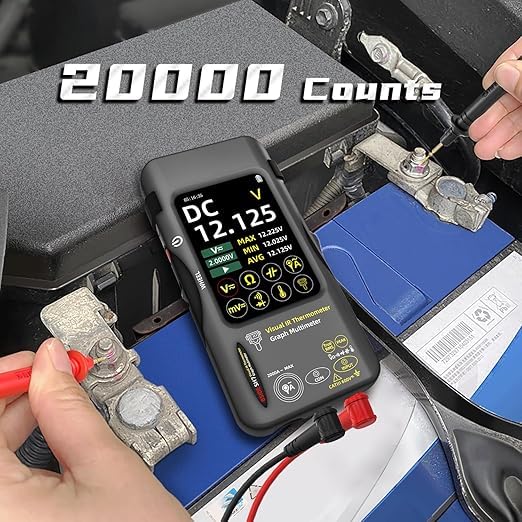
Figure 4: The thermal imaging display of the SH7, showing temperature distribution and high/low temperature points.
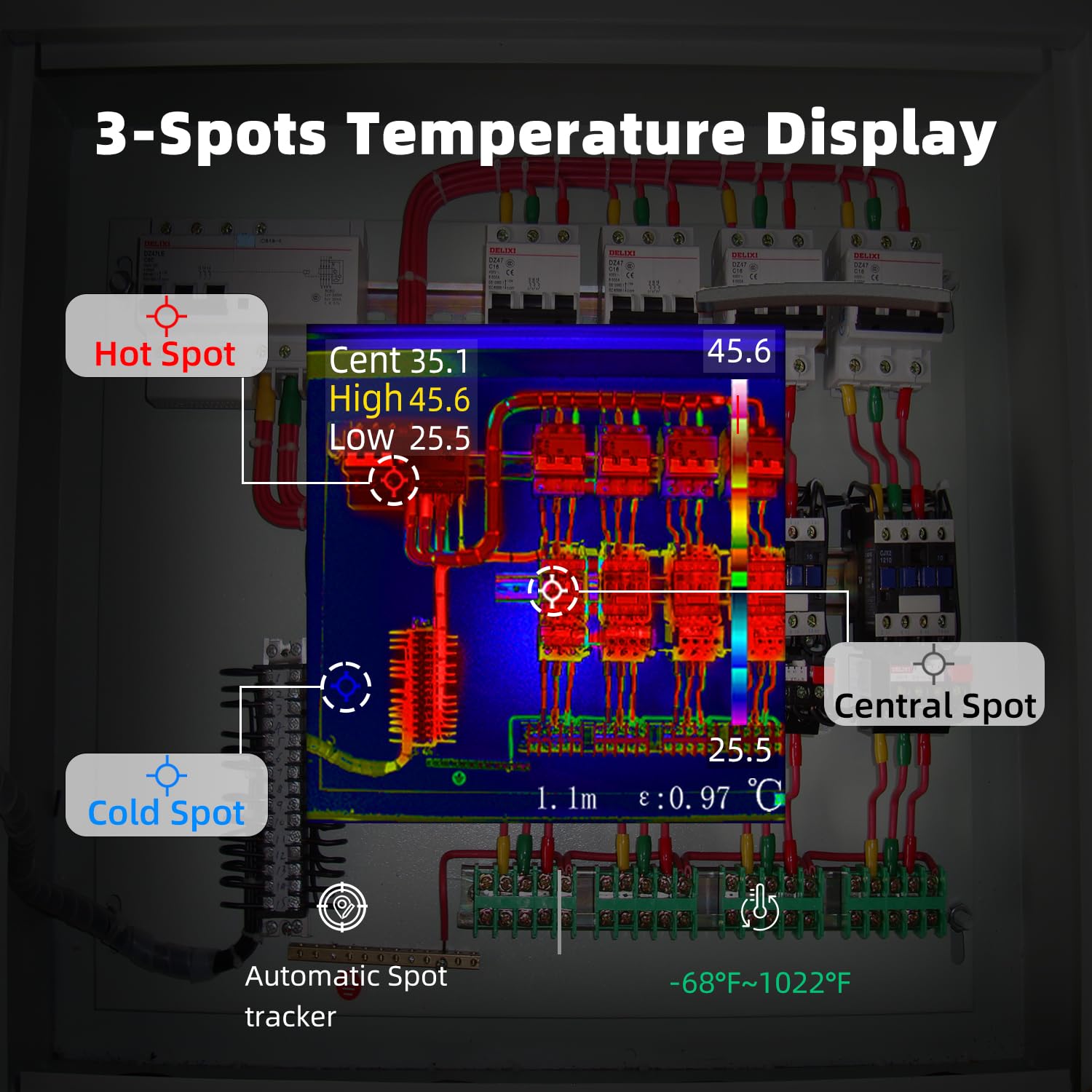
Figure 5: The SH7's 3-spot temperature display feature, indicating hot, cold, and central spots on a thermal image.
Multimeter Mode
The integrated 20,000-count digital multimeter offers high precision measurements for various electrical parameters. It supports True RMS for accurate readings of non-sinusoidal waveforms.
- DC Voltage (V/mV): Measures up to 1000V DC.
- AC Voltage (V/mV): Measures up to 750V AC.
- Resistance (Ω): Measures up to 200.00MΩ.
- Capacitance (F): Measures up to 99.999mF.
- Flexible Current Clamp AC Current: Can be used with a flexible current coil (not included, but compatible) to test up to 2000A AC current.
- Temperature: Measures from -20℃ to 1300℃ (-4°F to 2372°F) using thermocouples.
- Diodes & Continuity: Features diode test and continuity check functions.

Figure 6: The multimeter interface of the SH7, showing various measurement modes and readings.
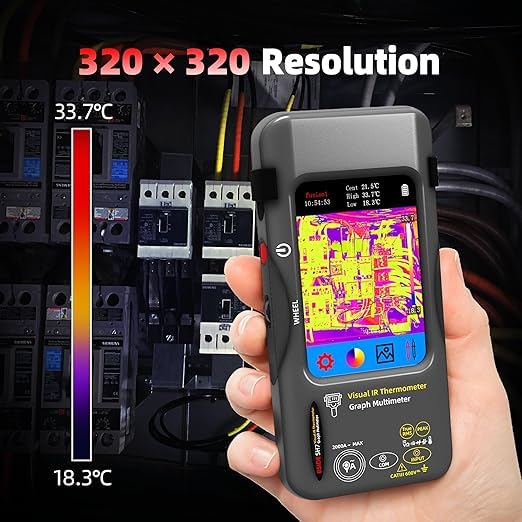
Figure 7: The SH7 being used to measure DC voltage on a car battery, demonstrating its multimeter capabilities.
Video 2: A demonstration of the MAXRIENY SH7's multimeter functions, including voltage, resistance, and capacitance measurements.
Settings and Customization
Access the settings menu via the touchscreen to customize various parameters:
- Emissivity: Adjustable emissivity (0.01-0.99) for accurate thermal readings on different surfaces.
- Distance: Adjustable temperature measurement focal length (0.3m-3m).
- Display Settings: Adjust backlight, screen brightness.
- Alarm: Configure temperature alarm thresholds.
- Unit: Change temperature measurement unit (℃/℉/K).
- Language: Select from 7 supported languages (Chinese, English, Japanese, German, Spanish, French, Italian).
- Date & Time: Set current date and time.
- Auto Shut-off: Adjustable auto shut-off time to conserve battery.
- Data Transfer: Thermal imaging camera and multimeter interface can be screenshotted and data can be transferred to a PC for analysis.
Maintenance
- Cleaning: Use a soft, dry cloth to clean the device. Do not use abrasive cleaners or solvents.
- Storage: Store the device in the provided storage bag in a cool, dry place when not in use.
- Battery Care: To prolong battery life, avoid fully discharging the battery frequently. Charge the device regularly, even if not in active use.
- Lens Care: Keep the thermal camera lens clean and free from dust or smudges to ensure accurate readings.
Troubleshooting
If you encounter issues with your MAXRIENY SH7, refer to the following common problems and solutions:
- Device does not power on:
- Ensure the battery is charged. Connect the charging cable and allow it to charge for at least 30 minutes before attempting to power on again.
- Verify the power button is pressed and held sufficiently.
- Inaccurate thermal readings:
- Check and adjust the emissivity setting to match the material being measured.
- Ensure the camera lens is clean and free from obstructions.
- Verify the measurement distance is within the recommended range (0.3m-3m).
- Multimeter readings are unstable or incorrect:
- Ensure test leads are properly connected to the device and the circuit being measured.
- Check for damaged test leads.
- Verify the correct measurement mode is selected for the parameter being tested (e.g., DC Voltage for DC circuits).
- Screen is unresponsive:
- Try restarting the device.
- Ensure the screen is clean and dry.
For issues not covered here, please contact customer support.
Specifications
| Feature | Detail |
|---|---|
| Product Dimensions | 3.19 x 1.06 x 6.65 inches; 9.56 ounces |
| Item Model Number | SH7 Thermal imager multimeter |
| Batteries | 1 C batteries required (internal rechargeable Li-ion) |
| Date First Available | April 22, 2025 |
| Manufacturer | BSIDE |
| Brand | MAXRIENY |
| Power Source | Battery Powered |
| Item Weight | 271 Grams |
| Upper Temperature Rating | 550 Degrees Celsius (for internal components, not measurement range) |
| Thermal Camera Resolution | 320 x 320 |
| Sensor Type | Vanadium Oxide (VOx) Microbolometer |
| Response Band | 8-14pm |
| Noise Equivalent Temperature Difference (NETD) | ≤60mK(@25℃,F#1.0) |
| Spatial resolution (IFOV) | 8.89mrad |
| Frame rate | 25Hz |
| Imaging lens focal length | 1.35mm |
| Temperature measurement resolution | 0.1℃ |
| Temperature measurement focal length | 0.3m-3m adjustable |
| Temperature range | -20℃~1300℃ (-4°~2372°F) |
| Temperature measurement unit | Celsius, Fahrenheit, Kelvin |
| Color Palettes | 15 types |
| Screen Display resolution | 480*320 |
| Image storage | 30000 pictures |
| Multimeter Count | 20000 Words |
| DC Voltage (V) Ranges | 2.0000V, 20.000V, 200.00V, 1000V |
| DC Voltage (mV) Ranges | 20.000mV, 200.00mV |
| AC Voltage (V) Ranges | 2.0000V, 20.000V, 200.00V, 750V |
| AC Voltage (mV) Ranges | 20.000mV, 200.00mV |
| Resistance Ranges | 200.00Ω to 200.00MΩ |
| Capacitance Ranges | 999.99nF to 99.999mF |
| Flexible Current Clamp AC Current | 200.0A, 2000A |
| Diodes | Yes |
| Continuity | Yes |
Warranty and Support
For information regarding product warranty, technical support, or service, please refer to the warranty card included with your purchase or contact the manufacturer, MAXRIENY, directly through their official website or customer service channels. Please retain your proof of purchase for warranty claims.
Ask a question about this manual
Ask about setup, troubleshooting, compatibility, parts, safety, or missing instructions. Manuals+ will review the question and use this page’s manual context to help answer it.