
HUAJUN M94
HUAJUN AI Language Translation Earbuds
User Manual
Model: M94
1. Introduction
Thank you for choosing the HUAJUN AI Language Translation Earbuds. This device is designed to facilitate seamless communication across language barriers, offering real-time translation for 144 languages and accents. With its integrated LCD touch screen, SD card support, and long battery life, it is an ideal companion for travel, business, and learning.
Package Contents:
- AI Language Translation Earbuds (Pair)
- Charging Case with LCD Touch Screen
- Charging Cable (Type-C)
- User Manual
2. Safety Information
Please read all safety instructions carefully before using the device. Keep this manual for future reference.
- Do not expose the device to extreme temperatures, humidity, or liquids.
- Avoid dropping or subjecting the device to strong impacts.
- Do not attempt to disassemble, repair, or modify the device yourself. Refer all servicing to qualified personnel.
- Use only the provided charging cable or a certified equivalent.
- Dispose of batteries and electronic components responsibly according to local regulations.
- Prolonged exposure to loud sounds may cause hearing damage. Adjust volume to a safe level.
3. Product Overview
The HUAJUN AI Language Translation Earbuds consist of two open-ear hook earbuds and a smart charging case with an integrated LCD touch screen. This innovative design allows for comfortable wear and intuitive control.
Key Features:
- Real-Time Translation: Supports 144 languages and accents for online translation.
- LCD Touch Screen: 2.64-inch full-color touch screen on the charging case for 16 application functions, including music control, notifications, GPS tracking, and camera control.
- SD Card Support: Allows insertion of an SD card (up to 128GB) for offline music playback.
- Long Battery Life: Up to 8 hours of listening time, with extended battery life via the charging compartment.
- Bluetooth 5.49: Enhanced anti-interference ability and stable transmission for clear audio.
- HIFI Stereo Sound: Enjoy high-definition audio quality.
- One Year Free Translation: Includes one year of free translation service without subscription.
Product Components:

The image above displays the two open-ear hook earbuds and the compact charging case. The earbuds feature a sleek design, while the charging case prominently displays a digital clock and battery indicators on its touch screen.
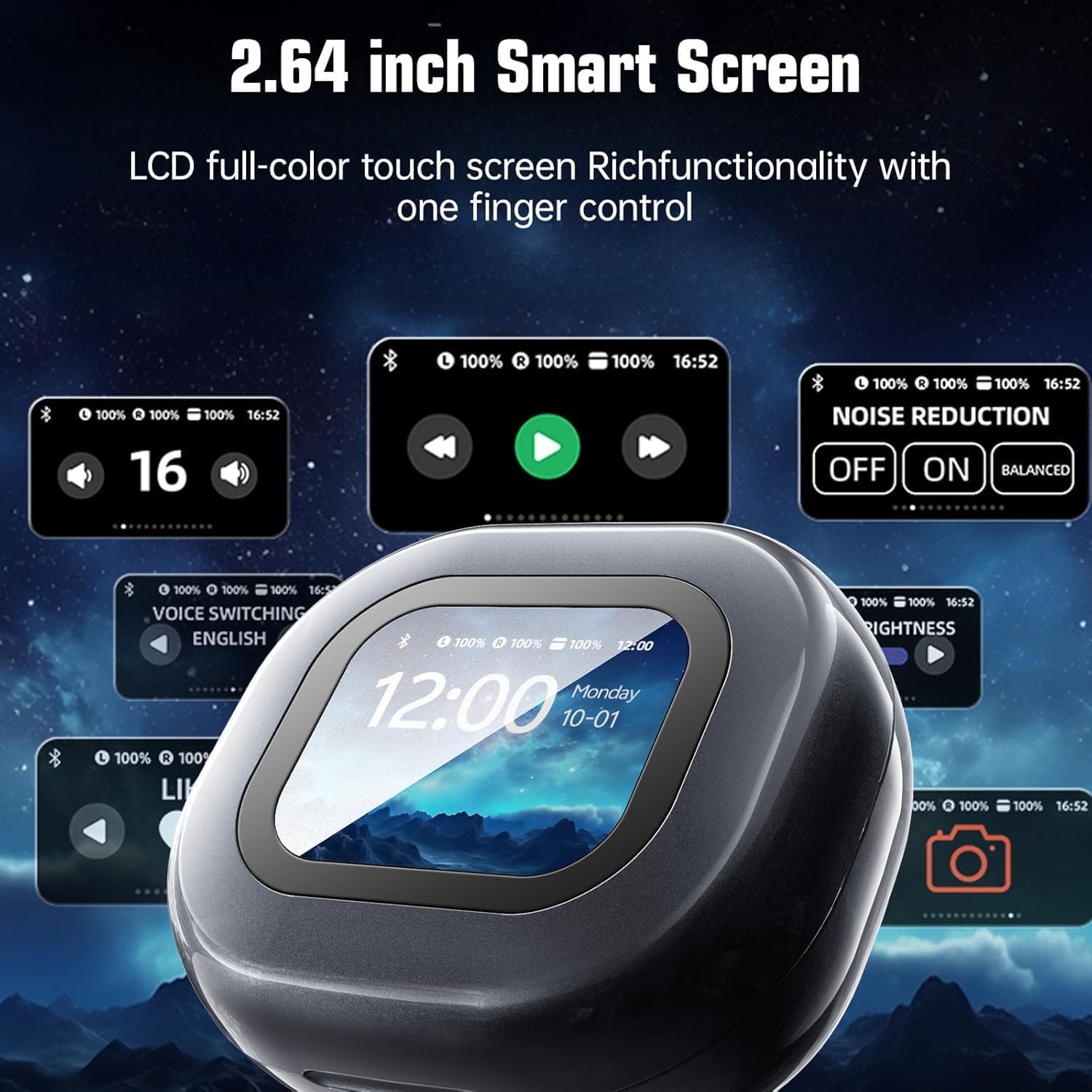
This image highlights the versatility of the 2.64-inch LCD touch screen on the charging case. It shows multiple interface options, including music controls, noise reduction settings, voice switching, brightness adjustment, and a camera control icon, demonstrating its multi-functionality.
4. Setup
4.1 Charging the Device
Before first use, fully charge the earbuds and the charging case. Connect the provided Type-C charging cable to the charging port on the case and a power source. The LCD screen will indicate the charging status.
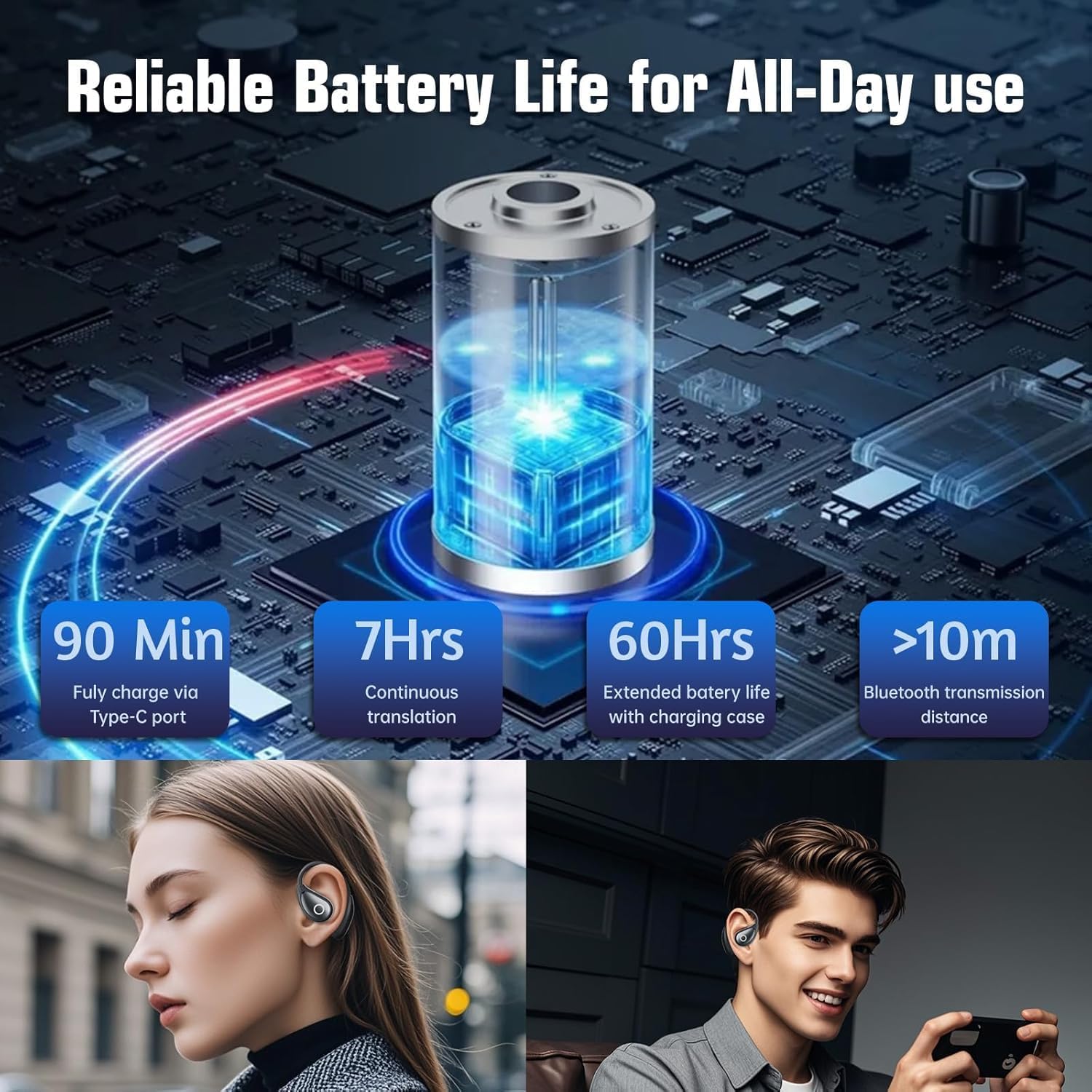
The image above details the battery performance: a full charge takes approximately 90 minutes via the Type-C port, providing 7 hours of continuous translation and up to 60 hours of extended battery life with the charging case. It also shows a Bluetooth transmission distance of over 10 meters.
4.2 Connecting to a Mobile Phone
To utilize the translation features, the earbuds must be connected to your smartphone via Bluetooth and the dedicated application.
- Download the App: Scan the QR code provided in the physical user manual or search for the official app on Google Play Store (for Android) or Apple App Store (for iOS).
- Enable Bluetooth: Turn on Bluetooth on your mobile phone.
- Pair Earbuds: Open the downloaded app. Follow the on-screen instructions to connect and activate the earbuds. The app will guide you through the pairing process.

This visual guide illustrates the four main steps for connecting the earbuds: 1. Download the app via QR code. 2. Turn on phone's Bluetooth. 3. Open the app and activate the earphones. 4. Choose your desired translation mode.
5. Operating Instructions
5.1 Translation Modes
The earbuds support various translation modes to suit different scenarios:
- Touch Mode: Ideal for one-on-one conversations. One person wears an earbud, the other speaks into the phone.
- Speaker Mode: Suitable for small groups or when you want others to hear the translation through your phone's speaker.
- Free Talk Mode: Both users wear an earbud for continuous, natural conversation.
- Earphone Mode: Use the earbuds for listening to translated audio or music.
- Two Earphone Mode: Both earbuds are used for translation, with each person wearing one.
- Silent Mode: For situations where audio output is not desired.

This image illustrates four distinct usage modes: Silent Mode (no audio), Speaker Mode (audio from phone), Two Earphone Mode (both earbuds used for translation), and Earphone Mode (earbuds for listening). These modes cater to diverse communication needs.

The image above visually explains three primary translation modes: Touch Mode (one-on-one interaction), Speaker Mode (for group listening), and Free Talk Mode (continuous conversation between two earbud wearers), showcasing their application in various scenarios.
5.2 Using the LCD Touch Screen
The 2.64-inch LCD touch screen on the charging case provides quick access to various functions without needing your phone.
- Music Control: Play, pause, skip tracks.
- Noise Reduction: Adjust noise cancellation settings (OFF, ON, Balanced).
- Brightness: Adjust screen brightness.
- Voice Switching: Change the voice output language.
- Wallpaper: Customize the screen background.
- Find Headphones: Locate misplaced earbuds.
- Camera Control: Use the case as a remote shutter for your phone's camera.
- Information Notifications: View alerts and status updates.
- GPS Tracking: Access location-based features.

This image provides a detailed view of the LCD touch screen's interface, showcasing numerous practical functions such as music playback controls, noise reduction settings, screen brightness adjustment, voice switching, wallpaper selection, and a "find headphones" feature.
5.3 SD Card Usage
The charging case supports the insertion of an SD card (up to 128GB) for playing your favorite music directly, without needing to connect to your phone via Bluetooth for music playback.
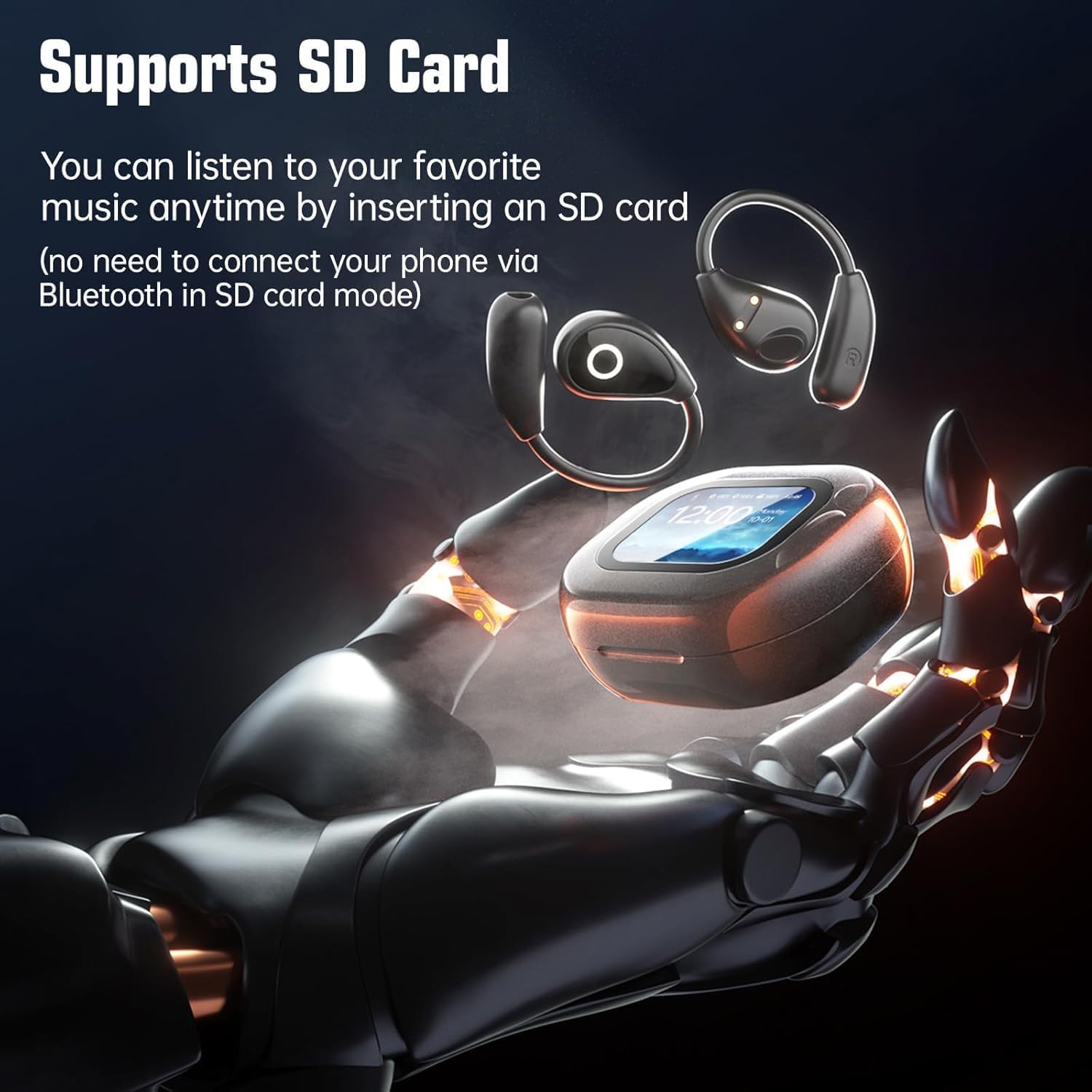
The image highlights the SD card functionality, allowing users to listen to music directly from an inserted SD card without requiring a Bluetooth connection to a phone. This feature provides a convenient music experience for various activities.
5.4 Remote Camera Control
The charging case can act as a remote control for your phone's camera, making it easier to take selfies or group photos. Ensure your phone's auxiliary touch control is enabled for this function.

This image demonstrates the wireless remote control photography feature, where the charging case can be used to trigger your phone's camera. A note reminds users to enable auxiliary touch control on their phone for this function to work.
6. Maintenance
6.1 Cleaning
- Wipe the earbuds and charging case with a soft, dry, lint-free cloth.
- Do not use abrasive cleaners, alcohol, or chemical solvents.
- Keep charging ports free of dust and debris.
6.2 Storage
- Store the device in a cool, dry place away from direct sunlight and extreme temperatures.
- When not in use for extended periods, charge the device periodically to maintain battery health.
7. Troubleshooting
| Problem | Possible Solution |
|---|---|
| Earbuds not pairing with phone. |
|
| Translation is inaccurate or delayed. |
|
| No sound from earbuds. |
|
| LCD screen unresponsive. |
|
8. Specifications
| Feature | Detail |
|---|---|
| Brand | HUAJUN |
| Model Name | M94 |
| Model Number | 2 |
| Connectivity Technology | Wireless (Bluetooth 5.49) |
| Form Factor | Over Ear / Open-ear hook |
| Material | Plastic |
| Battery Cell Composition | Lithium Ion |
| Battery Life (Listening) | Up to 8 hours |
| Communication Range | 10 meters |
| SD Card Support | Up to 128GB |
| Translation Languages | 144 languages & accents (online) |
| LCD Screen Size | 2.64 inches (Full-color touch screen) |
| Parcel Dimensions | 11.5 x 9 x 4 cm; 126 g |
9. Warranty and Support
9.1 Free Translation Service
Your HUAJUN AI Language Translation Earbuds include one year of free translation service, requiring no additional subscription. Ensure you download and use the official application as instructed in the manual to activate this service.
9.2 Customer Support
For any questions, technical assistance, or warranty claims, please refer to the contact information provided with your purchase or visit the official HUAJUN website. If you are not satisfied with the product, please unbind the device in the app before initiating a return.
Ask a question about this manual
Ask about setup, troubleshooting, compatibility, parts, safety, or missing instructions. Manuals+ will review the question and use this page’s manual context to help answer it.