
1. Product Overview
This manual provides instructions for the Toshiba La-Coo Cordless Steam Iron, model TA-FDX670. This product set includes the iron unit and one LR41H button battery. Please note that the battery may be delivered separately from the main iron unit.
Key Features:
- Cordless Design: Offers freedom of movement for comfortable ironing.
- Smooth Ironing Experience: Features a "Beautiful Miracle Base" for effortless gliding in all directions (forward, backward, left, right, and diagonally).
- Powerful Steam: Provides ample steam penetration to effectively remove wrinkles and odors from garments.
- Water Tank Sterilization: Helps maintain hygiene by sterilizing water within the tank.

Figure 1: Toshiba La-Coo Cordless Steam Iron TA-FDX670. This image shows the side view of the iron, highlighting its ergonomic design and water tank.
2. Setup
2.1 Unpacking
Carefully remove all components from the packaging. Ensure all parts are present: the iron unit, the power base, and the water filling cup (if included). Keep packaging for future storage or transport.

Figure 2: The iron stored securely in its base and protective cover. This image demonstrates how the iron is placed within its charging base, which is then covered by a protective lid for storage or portability.
2.2 Filling the Water Tank
- Ensure the iron is unplugged and cool.
- Open the water inlet cover. The design allows for easy opening, preventing damage to fingernails.
- Using the provided filling cup, pour clean tap water into the water tank up to the MAX fill line. Do not overfill.
- Close the water inlet cover securely.
Note: For optimal performance and to prevent mineral buildup, distilled or demineralized water is recommended, especially in areas with hard water.
2.3 Initial Heating
- Place the iron securely on its power base.
- Plug the power base into a suitable electrical outlet.
- Select the desired temperature setting using the temperature dial. The indicator light will illuminate, signaling that the iron is heating.
- Wait for the indicator light to turn off or change color (refer to specific model indicator details in the full manual) to confirm the iron has reached the set temperature.
3. Operation
3.1 Basic Ironing
Once the iron is heated, remove it from the power base. The cordless design allows for unrestricted movement. Iron garments by gliding the "Beautiful Miracle Base" smoothly over the fabric. For continuous heat, return the iron to its base periodically.
3.2 Steam Ironing
For steam ironing, ensure the water tank is filled and the iron is set to a steam-compatible temperature (usually medium to high settings). Select the desired steam level using the steam selector switch. The iron will release steam as you iron, helping to remove stubborn wrinkles.
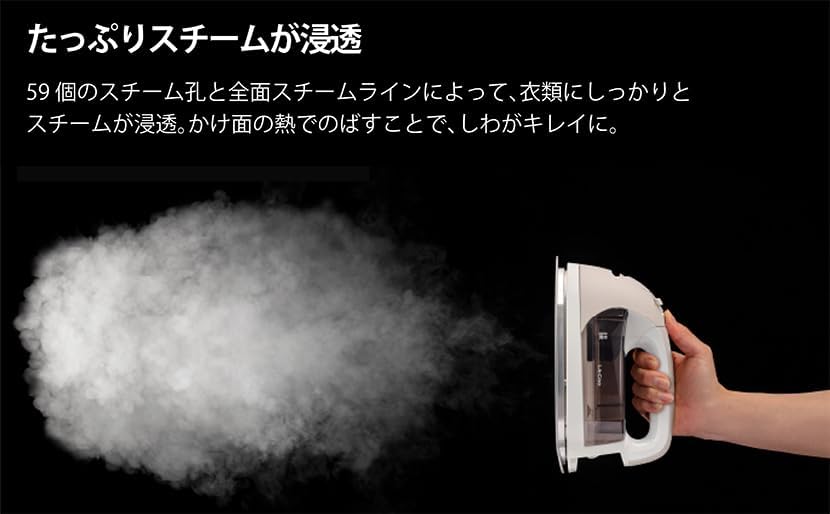
Figure 3: Demonstration of powerful steam output. This image illustrates the significant amount of steam generated by the iron, effectively penetrating fabric to smooth out wrinkles.
3.3 Vertical Steaming
The iron can be used for vertical steaming to refresh hanging garments or drapes. Hold the iron vertically, close to the fabric, and press the steam shot button (if available) or use continuous steam. This is effective for removing odors and light wrinkles without an ironing board.
3.4 Detail Ironing
The pointed tip and "Rakugake Line" (easy-ironing line) of the soleplate are designed for reaching difficult areas such as around buttons, collars, and pleats. Use the "Point Press" feature for precise ironing on small details.
4. Maintenance
4.1 Cleaning the Soleplate
Allow the iron to cool completely. Wipe the soleplate with a damp cloth. For stubborn stains, use a specialized iron soleplate cleaner according to its instructions. Do not use abrasive cleaners or metallic scouring pads.
4.2 Draining the Water Tank
After each use, or before storing for an extended period, ensure the water tank is emptied. This prevents water stagnation and mineral buildup. The iron's water tank sterilization feature helps maintain cleanliness, but regular draining is still recommended.
4.3 Storage
Store the cooled and emptied iron on its power base, ideally with the protective cover in place, in a dry, safe location away from children.
5. Troubleshooting
If you encounter issues with your Toshiba La-Coo Cordless Steam Iron, please refer to the following common solutions before contacting customer support:
- Iron not heating: Ensure the power base is securely plugged in and the iron is correctly placed on the base. Check if the temperature dial is set to an appropriate level.
- No steam or insufficient steam: Verify that the water tank is filled and the iron is heated to a steam-compatible temperature. Check the steam selector switch to ensure it's not set to "dry iron" mode.
- Water leakage: Do not overfill the water tank. Ensure the water inlet cover is securely closed. If using steam, ensure the temperature is high enough to convert water to steam; otherwise, water may drip.
- Sticking soleplate: Clean the soleplate as described in the maintenance section. Ensure the iron is not used on fabrics that are too hot for their material type.
For problems not listed here, or if the issue persists, please contact Toshiba customer support.
6. Specifications
| Brand: | Toshiba |
| Model Number: | TA-FDX670(N) |
| Color: | Beige |
| Base Material: | Ceramic |
| Other Features: | Beautiful Miracle Base, Full Steam, Water Tank Sterilization |
| Average Steam Output: | Approx. 5g/min |
| ASIN: | B0F5WF3TJ7 |
7. Warranty & Support
For warranty information, product registration, or technical support, please refer to the warranty card included with your product or visit the official Toshiba website. Keep your purchase receipt as proof of purchase for warranty claims.
For inquiries, please contact Toshiba customer service through their official channels.