1. Introduction
This user manual provides essential information for the safe and efficient operation of the EpheyFIF JLS-E-2S-2.2GB-4T Frequency Inverter. This device is designed for precise control of motor speed and torque in various industrial applications, ensuring smooth power transmission and enhanced system protection. Please read this manual thoroughly before installation, operation, or maintenance.
2. Safety Information
WARNING: Read the user manual before operation. Risk of electrical shock. Wait 10 minutes after removing power before servicing.
Always adhere to local electrical codes and safety regulations. Only qualified personnel should install, operate, and maintain this equipment. Ensure the power supply is disconnected and verified before performing any wiring or maintenance tasks. The unit must be properly grounded.

Figure 2.1: Front view of the frequency inverter, showing the control panel and safety warning.
3. Product Overview
3.1 Features
- Advanced Control and Protection: Unique control methods for high power, high torque, and precise speed regulation. Includes nine protection technologies: overvoltage, undervoltage, overcurrent, overload, overheating, power module, grounding, short circuit, and speed loss protection.
- Efficient Cooling: Equipped with a smart rapid cooler and powerful DC cooler for quiet operation, effectively reducing heat accumulation.
- Stable Performance: High-configuration double-layer design (power + motherboard) ensures stable and durable performance.
- High-Performance Design: Integrated AVR stabilizer provides continuous, pure sine wave output. IPM and IGBT module design enhances efficiency and reduces heat generation.
- User-Friendly Interface: Simple 230V wiring and easy parameter debugging with one-button preset switching. High-definition display for intuitive data monitoring. Supports 485 communication.
- Versatile Industrial Applications: Excellent anti-trip performance, resistant to temperature, humidity, and dust. Ideal for fans, pumps, CNC machines, ball mills, plastic injection molding, crushers, conveyors, and textile equipment.
3.2 Components and Control Panel
The frequency inverter features a user-friendly control panel for easy operation and monitoring. The panel is detachable and can be remotely controlled using an extension cord.
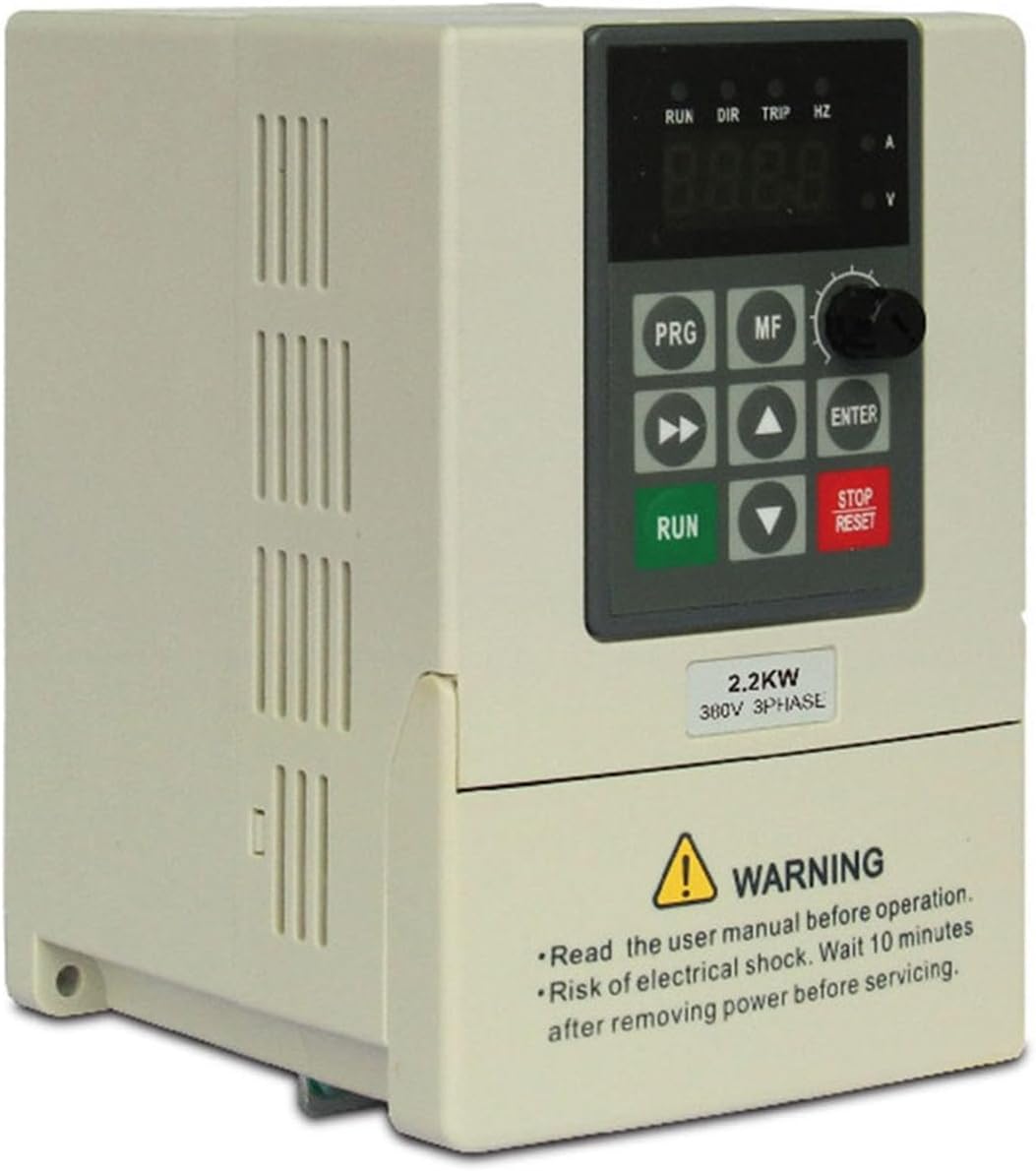
Figure 3.1: Detailed view of the control panel, indicating status lights, display, and control buttons.
- Status Indicators: RUN, DIR, TRIP, HZ (Frequency), A (Current), V (Voltage).
- Display: Digital display for showing operational parameters and values.
- PRG (Program) Key: Enters/exits parameter programming mode.
- MF (Multifunction) Key: Used for various functions depending on the mode.
- Shift Keys (<<): Moves cursor or shifts digits during parameter setting.
- Up/Down Selection Keys (▲, ▼): Navigates through menus or adjusts parameter values.
- ENTER Key: Confirms selections or parameter changes.
- RUN Key (Green): Starts the motor.
- STOP/RESET Key (Red): Stops the motor or resets fault conditions.
- Speed Control Knob: Adjusts output frequency/speed.

Figure 3.2: The control panel is detachable for remote operation using an extension cable.
4. Setup
4.1 Installation
The JLS-E-2S-2.2GB-4T Frequency Inverter supports both wall-mount and cabinet-type installations. Ensure the installation location is well-ventilated, free from excessive dust, moisture, and direct sunlight. Maintain adequate clearance around the unit for proper airflow and cooling.
4.2 Wiring
Proper wiring is critical for safe and correct operation. Refer to the wiring diagrams below for single-phase and three-phase connections. Always ensure power is disconnected before making any wiring connections.

Figure 4.1: Wiring diagrams for 220V single-phase input (left) and 380V three-phase input (right).
- Power Input (L1, L2 for 220V single-phase; R, S, T for 380V three-phase): Connect the main power supply to these terminals.
- Ground (PB): Connect to a reliable ground point.
- Motor Output (U, V, W): Connect the motor's three-phase windings to these terminals.
- Ensure all connections are tight and secure.
5. Operating Instructions
5.1 Basic Operation
- Power On: After completing all wiring and safety checks, apply power to the inverter. The display will light up.
- Start Motor: Press the RUN button to start the motor.
- Adjust Speed: Use the Speed Control Knob or the Up/Down selection keys to adjust the output frequency and motor speed.
- Stop Motor: Press the STOP/RESET button to stop the motor.
5.2 Parameter Settings
The inverter has various parameters that can be configured to suit specific application requirements. Refer to the detailed parameter list in the full product manual for comprehensive settings.
- Enter Program Mode: Press the PRG key.
- Navigate Parameters: Use the Up/Down selection keys to scroll through parameter groups and individual parameters.
- Select Parameter: Press ENTER to select a parameter.
- Adjust Value: Use the Up/Down selection keys to change the parameter value. Use the Shift keys to move between digits.
- Save Value: Press ENTER to save the new value.
- Exit Program Mode: Press the PRG key again.
6. Maintenance
Regular maintenance ensures the longevity and reliable operation of your frequency inverter.
- Cleaning: Periodically clean the exterior of the inverter and ensure cooling vents are free from dust and debris. Use a soft, dry cloth. Do not use liquid cleaners.
- Fan Check: Inspect the cooling fan for proper operation and ensure it is not obstructed.
- Connection Check: Regularly check all wiring connections for tightness and signs of wear or corrosion.
- Environmental Conditions: Ensure the operating environment remains within the specified temperature and humidity ranges.
- Power Disconnection: Always disconnect power and wait for the specified discharge time (10 minutes) before performing any internal maintenance.
7. Troubleshooting
This section provides general guidance for common issues. For complex problems, consult a qualified technician.
| Problem | Possible Cause | Solution |
|---|---|---|
| Inverter does not power on | No input power; Blown fuse; Wiring error | Check power supply; Inspect fuses; Verify wiring connections. |
| Motor does not start | Emergency stop active; Parameter settings incorrect; Motor fault | Check for active stop commands; Review parameter settings; Inspect motor. |
| Overcurrent/Overload trip | Motor overloaded; Acceleration time too short; Output short circuit | Reduce motor load; Increase acceleration time; Check motor and wiring for short circuits. |
| Overvoltage/Undervoltage trip | Input voltage fluctuation; Deceleration time too short | Check input power supply stability; Increase deceleration time. |
| Overheating trip | Poor ventilation; Ambient temperature too high; Fan failure | Ensure proper ventilation; Reduce ambient temperature; Check cooling fan operation. |
If the problem persists after attempting these solutions, please contact technical support.
8. Specifications
The following table details the technical specifications of the EpheyFIF JLS-E-2S-2.2GB-4T Frequency Inverter.

Figure 8.1: Product front view highlighting key electrical specifications.
| Specification | Value |
|---|---|
| Model | JLS-E-2S-2.2GB-4T |
| Brand | EpheyFIF |
| Rated Input Voltage | Single-phase 220V |
| Rated Output Voltage | Three-phase 380V |
| Power | 2.2 kW |
| Output Current | 5 A |
| Factory Frequency | 50 Hz |
| Output Frequency Range | 0 ~ 999 Hz |
| Installation Method | Wall-mount, Cabinet type |
| Protection Level | IP20 |
| Cooling Mode | Air cooling, with fan control |
| Dimensions (L x W x H) | 230 x 170 x 160 mm (9.06 x 6.69 x 6.30 inches) |
| Item Weight | 1.4 Kilograms |

Figure 8.2: Physical dimensions of the frequency inverter.
9. Warranty and Support
Specific warranty information for the EpheyFIF JLS-E-2S-2.2GB-4T Frequency Inverter is not provided in the product details. Please refer to your purchase documentation or contact the seller directly for warranty terms and conditions.
For technical support, troubleshooting assistance beyond this manual, or inquiries regarding spare parts, please contact the manufacturer or your authorized distributor. Ensure you have your product model number and purchase details available when seeking support.


