
1. Introduction
This manual provides detailed instructions for the installation, operation, and maintenance of the cogae KT TF02S Ebike Display. This intelligent control panel is designed for electric bike conversions, offering clear data display and reliable performance. It is compatible with 24V, 36V, and 48V ebike systems and features a waterproof connector for enhanced durability.
2. Product Overview
The KT TF02S display is an essential component for monitoring your ebike's performance. It provides accurate and sensitive readings, ensuring stable operation. Key features include:
- Waterproof Design: IP65 rated for protection against water and dust.
- Voltage Compatibility: Supports 24V, 36V, and 48V electric bike systems.
- Clear LCD Screen: Large screen font for easy readability of data.
- 5-Pin Waterproof Connector: Ensures a secure and reliable connection.
- Required Controller: Must be used with a KT controller for proper functionality.
3. Package Contents
Verify that all components are present in the package:
- 1 x KT TF02S LCD Instrument (Display)
- 1 x Support Bracket
- 2 x Rubber Pads
- 4 x Screws

Figure 3.1: Exploded view showing the display, support bracket, rubber pads, and screws included in the package.
4. Specifications
The following table outlines the technical specifications of the KT TF02S Ebike Display:
| Parameter | Value |
|---|---|
| Product Model | TF02S |
| Product Name | KT Instrument |
| Core Wire Specification | 5pins |
| Matching Controller | KT controller |
| Splice Type | Waterproof joint |
| Voltage | 24V/36V/48V |
| Waterproof Level | IP65 |
| Colour | Black |
| Product Weight | 188g (0.41 lbs) |
| Dimensions (L x W) | 95.4mm x 61.3mm |
| Mounting Diameter | 32mm |
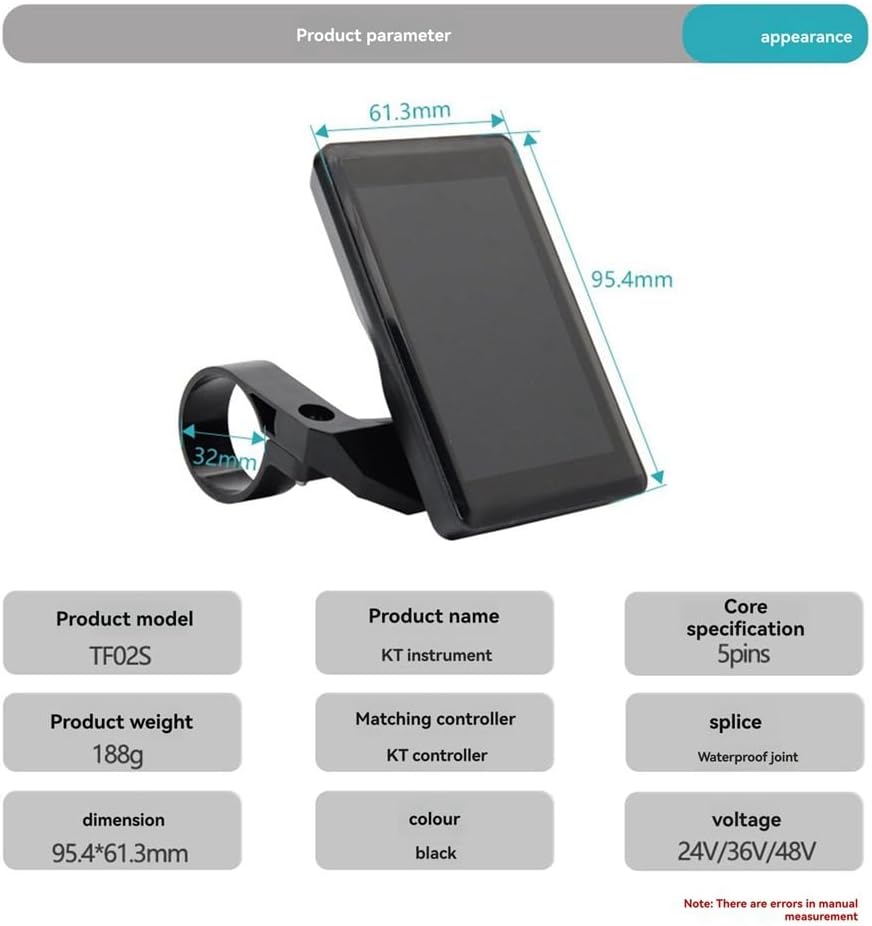
Figure 4.1: Visual representation of product dimensions and key parameters.
5. Setup and Installation
Follow these steps to properly install your KT TF02S Ebike Display:
- Mount the Display: Secure the display to your ebike handlebars using the provided support bracket, rubber pads, and screws. Ensure it is positioned for optimal visibility and accessibility. The mounting diameter is 32mm.

Figure 5.1: The display securely installed on ebike handlebars, showing button locations.

Figure 5.2: Side view illustrating the display's profile and mounting mechanism.
- Connect the Wiring: Locate the 5-pin waterproof connector on your ebike's KT controller system. Align the pins and firmly connect the display's cable to the controller's port. Ensure the connection is secure to maintain the waterproof seal. The cable length from the display to the connector is approximately 200mm (7.9 inches), and the extension cable is approximately 260mm (10.2 inches).

Figure 5.3: The 5-core waterproof head connector and cable dimensions.
Important Note: This display is designed to work exclusively with KT series controllers. Compatibility with other controller brands is not guaranteed and may result in malfunction.
6. Operating Instructions
The KT TF02S display provides a clear interface for monitoring your ebike's status. The display features a large, clear screen for easy data visibility.

Figure 6.1: The display's clear screen and secure installation.

Figure 6.2: The display in operation, demonstrating clear data presentation and stable performance.
6.1. Button Functions
The display unit includes three buttons for control:
- Up Key: Typically used to increase assistance level or navigate menus upwards.
- On-off Key: Used to power the display on or off. May also function as a mode button for cycling through display information.
- Down Key: Typically used to decrease assistance level or navigate menus downwards.
Specific button functionalities and display modes may vary slightly depending on the paired KT controller's firmware. Refer to your KT controller's manual for detailed operational instructions.
6.2. Displayed Information
The display typically shows the following information:
- Battery Level
- Current Speed (KM/H)
- Assistance Level (PAS)
- Trip Time (TTM)
- Odometer (ODO)
- Wattage (000W)
- Temperature (℃)
7. Maintenance
To ensure the longevity and optimal performance of your KT TF02S Ebike Display, follow these maintenance guidelines:
- Cleaning: Wipe the display screen and body with a soft, damp cloth. Avoid using abrasive cleaners or solvents that could damage the screen or casing.
- Connection Check: Periodically inspect the 5-pin waterproof connector for any signs of damage, corrosion, or loose connections. Ensure it remains securely fastened.
- Environmental Protection: While the display is IP65 waterproof, avoid prolonged exposure to heavy rain or submersion in water. Store your ebike in a dry place when not in use.
- Physical Damage: Protect the display from impacts or drops, which can cause internal damage or screen cracks.
8. Troubleshooting
If you encounter issues with your KT TF02S Ebike Display, consider the following:
- Display Not Powering On:
- Check if the ebike battery is charged and properly connected.
- Ensure the 5-pin waterproof connector is fully seated and undamaged.
- Verify that the KT controller is powered on and functioning correctly.
- Incorrect Readings:
- Confirm that the display is correctly paired with a compatible KT controller.
- Check for any loose wiring connections.
- If speed readings are inaccurate, ensure the speed sensor (if external) is properly installed and calibrated with the controller.
- Intermittent Operation:
- Inspect all connections for looseness or corrosion.
- Ensure no water has entered the connectors or display unit.
For persistent issues, consult the manual for your specific KT controller or contact the seller for further assistance.
9. Warranty and Support
Warranty terms and conditions for the cogae KT TF02S Ebike Display are provided by the seller or manufacturer at the time of purchase. Please retain your proof of purchase for any warranty claims.
For technical support, troubleshooting beyond the scope of this manual, or warranty inquiries, please contact the retailer or manufacturer directly through their official support channels.