
Atcall C5
Atcall C5 Cell Phone Signal Booster User Manual
Model: C5
Brand: Atcall
1. Introduction
The Atcall C5 Cell Phone Signal Booster is designed to enhance 5G/4G LTE cellular signals within your vehicle, ensuring reliable connectivity for all U.S. carriers. This manual provides comprehensive instructions for proper installation, operation, and maintenance to help you achieve optimal performance from your device.
Video: An informational video explaining the function and benefits of a car signal booster.
2. Package Contents
Please verify that all items listed below are included in your package:
- Signal Booster Unit
- Outdoor Magnetic Antenna
- Indoor Patch Antenna
- Power Supply (Car Charger)

Image: The complete Atcall C5 Cell Phone Signal Booster kit, including the main booster unit, outdoor antenna, indoor antenna, and power supply.
3. Installation Guide
Follow these steps for a successful installation. No technical experience is required, and the process can typically be completed in under 30 minutes.
3.1 Pre-Installation Checklist
- Ensure your vehicle's power supply is functional.
- Confirm all cables are tightened securely during connection.
- The booster requires at least 1 bar of existing signal outside the vehicle to function effectively. It amplifies existing signals; it does not create new ones.
3.2 Antenna Placement
Proper placement of the outdoor and indoor antennas is crucial for optimal performance and to prevent signal oscillation.
Outdoor Magnetic Roof Antenna
- Firmly attach the outdoor magnetic antenna to the roof of your vehicle.
- This omni-directional antenna receives signals from cell towers in all directions, eliminating the need for manual adjustment.
Indoor Patch Antenna
- Place the indoor patch antenna inside the vehicle where you need improved signal coverage.
- Ensure sufficient separation between the outdoor and indoor antennas to prevent interference.

Image: Proper installation requires maintaining specific distances between the outdoor and indoor antennas to prevent interference and ensure optimal performance.
Recommended separation:
- Horizontal: >3 ft (0.9m)
- Vertical: >2 ft (0.6m)
3.3 Connecting Components
- Connect the outdoor antenna cable to the designated port on the signal booster unit.
- Connect the indoor antenna cable to its designated port on the signal booster unit.
- Plug the power supply (car charger) into the booster unit and then into your vehicle's 12V power outlet.
Video: A demonstration of the Atcall Cell Phone Booster for Car, including its components and basic setup.
4. Operating Instructions
Once installed and powered on, the Atcall C5 booster will automatically begin to amplify cellular signals. The intuitive LED indicator provides real-time status.
4.1 LED Indicator
The LED indicator on the booster unit displays the operating status of each corresponding frequency band. Pay attention to these indicators for optimal performance and troubleshooting.
- Green: Functional - The band is working correctly and boosting signal.
- Orange: Self-Test and Signal Interference - The booster is performing a self-test or experiencing interference. Adjust antenna separation if interference persists.
- Red: Abnormal - There is an issue with the band. Refer to the troubleshooting section.

Image: The LED indicator on the booster provides real-time status of each frequency band, helping users monitor performance and troubleshoot issues.
4.2 Carrier Compatibility
The C5 booster supports 5G/4G LTE for all major U.S. carriers, including AT&T, Verizon, T-Mobile, Sprint, and U.S. Cellular. It supports bands 12/17, 13, 5, 2/25, and 4/66.

Image: The Atcall C5 booster is compatible with all major U.S. carriers, including AT&T, Verizon, T-Mobile, and Sprint, supporting various frequency bands.
4.3 Signal Improvement
With the Atcall C5 booster, everyone in the vehicle can experience clear calls, fewer dropped calls, faster data transfer speeds, and smoother video streaming, even in remote areas.

Image: Visual representation of signal improvement, demonstrating how the booster strengthens cellular signal for better connectivity.
5. Maintenance
To ensure the longevity and optimal performance of your Atcall C5 Cell Phone Signal Booster, follow these simple maintenance guidelines:
- Keep the booster unit and antennas clean and free from dust and debris. Use a soft, dry cloth for cleaning.
- Periodically check all cable connections to ensure they are secure and not damaged.
- Avoid exposing the unit to extreme temperatures or direct moisture.
6. Troubleshooting
If you encounter issues with your Atcall C5 booster, refer to the following common problems and solutions:
6.1 No Signal Boost / Weak Signal
- Check Power Supply: Ensure the power cord is securely tightened and your vehicle's power outlet is providing power.
- Verify Connections: Confirm all antenna cables are properly connected to the booster unit.
- Antenna Separation: Ensure sufficient distance between the outdoor and indoor antennas (refer to Section 3.2). Insufficient separation can cause oscillation and reduce performance.
- Existing Signal: Remember, the booster amplifies existing signals. If there is absolutely no signal outside the vehicle, the booster cannot create one. Try moving to an area with at least 1 bar of signal.
6.2 LED Indicator Shows Orange or Red
- Orange (Interference): This often indicates the indoor and outdoor antennas are too close. Increase the separation distance between them.
- Red (Abnormal): This could indicate a cable issue, antenna malfunction, or a problem with the booster unit itself. Double-check all connections. If the issue persists, contact customer support.
6.3 How to Check Frequency Band
Understanding which frequency band your phone is using can assist in troubleshooting specific signal issues.
For iPhone:
- Dial *3001#12345#* then press the call button.
- Choose All Metrics, then click Serving Cell Info.
- Check Band Info.
For Android Phone:
- Download "Network Cell Info Lite" app.
- Choose "GAUGE".
- Check "BAND".
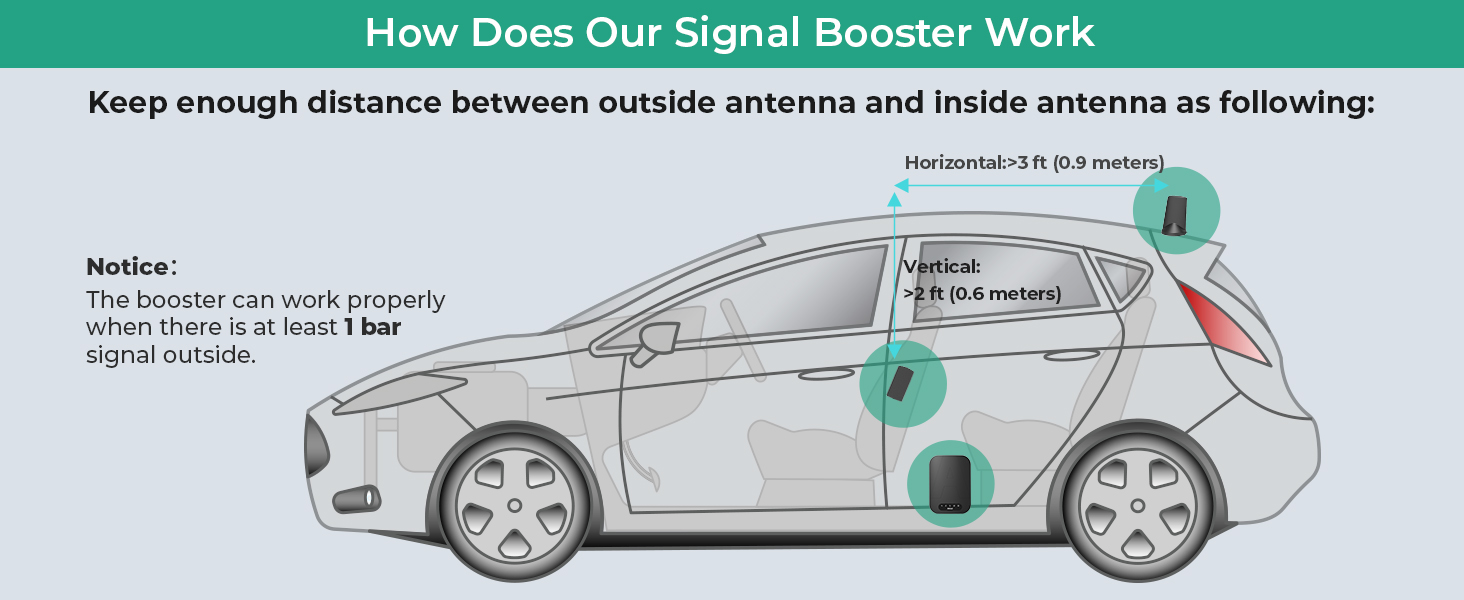
Image: This section provides step-by-step instructions for users to identify the frequency band their phone is currently using, which can be helpful for troubleshooting.
7. Specifications
| Feature | Detail |
|---|---|
| Model | C5 |
| Brand | Atcall |
| Supported Bands | Band 12/17, Band 13, Band 5, Band 2/25, Band 4/66 |
| Max Gain | 50dB |
| FCC ID | 2A34B-SFZN002 |
| Package Dimensions | 9.3 x 7.3 x 3 inches |
| Item Weight | 2.2 pounds |
| Special Feature | LED Indicator |
8. Warranty and Support
The Atcall C5 Cell Phone Signal Booster is FCC approved (FCC ID: 2A34B-SFZN002), ensuring compliance with all regulatory requirements.

Image: The Atcall C5 booster is FCC approved, ensuring it meets all regulatory standards for safe and effective operation.
Atcall provides professional online technical support. If you encounter any problems or have questions regarding your booster, please do not hesitate to contact us. We are committed to providing assistance and ensuring your satisfaction.
For support, please visit the Atcall Store on Amazon or refer to the contact information provided with your product packaging.
Ask a question about this manual
Ask about setup, troubleshooting, compatibility, parts, safety, or missing instructions. Manuals+ will review the question and use this page’s manual context to help answer it.