
LASGOO LG-MINI
LASGOO LG-MINI Self-Leveling Green Laser Level User Manual
Model: LG-MINI | Brand: LASGOO
1. Introduction
Thank you for choosing the LASGOO LG-MINI Self-Leveling Green Laser Level. This compact and versatile tool is designed to assist with various leveling and alignment tasks in home renovation, DIY projects, and light construction. Its bright green laser lines, multiple operating modes, and easy-to-use features make it an essential addition to your toolkit. Please read this manual thoroughly before use to ensure safe and optimal operation.
2. What's Included
Your LASGOO LG-MINI package contains the following items:
- 1 x LASGOO LG-MINI Laser Level
- 1 x Magnetic L-Bracket
- 1 x User Manual (this document)
- 2 x AA Batteries

Figure 2.1: Package Contents - LASGOO LG-MINI Laser Level, Magnetic L-Bracket, User Manual, and 2 AA Batteries.
3. Specifications
| Feature | Detail |
|---|---|
| Brand | LASGOO |
| Model | LG-MINI |
| Laser Color | Green |
| Laser Class | Class II (<1mW) |
| Accuracy | ±0.3mm per meter |
| Max Visible Range | Up to 100 feet (30 meters) |
| Self-Leveling Range | ±3° |
| Operation Mode | Automatic (Self-Leveling), Manual, Pulse |
| Brightness Settings | 4 adjustable levels |
| Mounting Thread | 1/4'' |
| Power Source | 2 x AA Batteries |
| Material | Plastic |
| Color | Green |
4. Setup
4.1 Battery Installation
- Locate the battery compartment on the device.
- Open the battery compartment cover.
- Insert the two AA batteries, ensuring correct polarity (+/-).
- Close the battery compartment cover securely.
4.2 Initial Power On
To power on the device, slide the pendulum lock to the 'ON' position. The laser level will emit green cross lines and automatically enter self-leveling mode.
5. Operating Modes
5.1 Self-Leveling Mode
When the pendulum lock is in the 'ON' position, the device automatically self-levels. If the tilt angle exceeds ±3°, the laser lines will flash and an audible alarm will sound, indicating that the device is out of its self-leveling range. Adjust the device's position until the laser lines are stable and the alarm stops.

Figure 5.1: Self-Leveling Mode - Pendulum Lock in 'ON' position for automatic leveling.
5.2 Manual Mode
To activate Manual Mode, slide the pendulum lock to the 'OFF' position. Then, press and hold the top button for 3 seconds. In Manual Mode, the laser lines can be projected at any angle, which is useful for tasks like stair laying or custom angle projections. The self-leveling function is disabled in this mode.
Figure 5.2: Manual Mode - Pendulum Lock in 'OFF' position for custom angle projections.
5.3 Pulse Mode
Pulse Mode extends the working range of the laser level, especially when used with a compatible laser receiver (not included). To activate Pulse Mode, ensure the device is in Self-Leveling Mode, then short-press the top button. The laser lines will pulse, allowing for detection by a receiver over longer distances, up to 164 feet.

Figure 5.3: Pulse Mode for extended range with a laser receiver.
5.4 Brightness Adjustment
The LASGOO LG-MINI features four adjustable brightness settings. In either Self-Leveling or Manual Mode, short-press the top button to cycle through the brightness levels. This allows you to optimize visibility based on ambient lighting conditions.

Figure 5.4: Adjustable Brightness Settings.
6. Mounting Options
The LASGOO LG-MINI offers versatile mounting options for various applications:
- Magnetic L-Bracket: The included magnetic L-bracket allows you to attach the laser level to metal surfaces. It features a 360° rotating design for flexible positioning.
- Tripod Thread: The device has a 1/4'' screw hole at the bottom, making it compatible with most standard tripods (not included) for stable and adjustable placement.

Figure 6.1: Multiple Mounting Methods - Magnetic L-Bracket and 1/4'' Tripod Thread.
7. Applications
The LASGOO LG-MINI is ideal for a wide range of tasks requiring precise leveling and alignment:
- Picture Hanging: Easily align multiple pictures or shelves on a wall.
- Tile Laying: Ensure straight and even tile placement on floors and walls.
- Wall Drilling: Accurately mark drilling points for fixtures or installations.
- Stair Laying: Use Manual Mode to project angled lines for stair railings or steps.
- General Home Renovation & DIY: Perfect for any task where a straight and level line is needed.
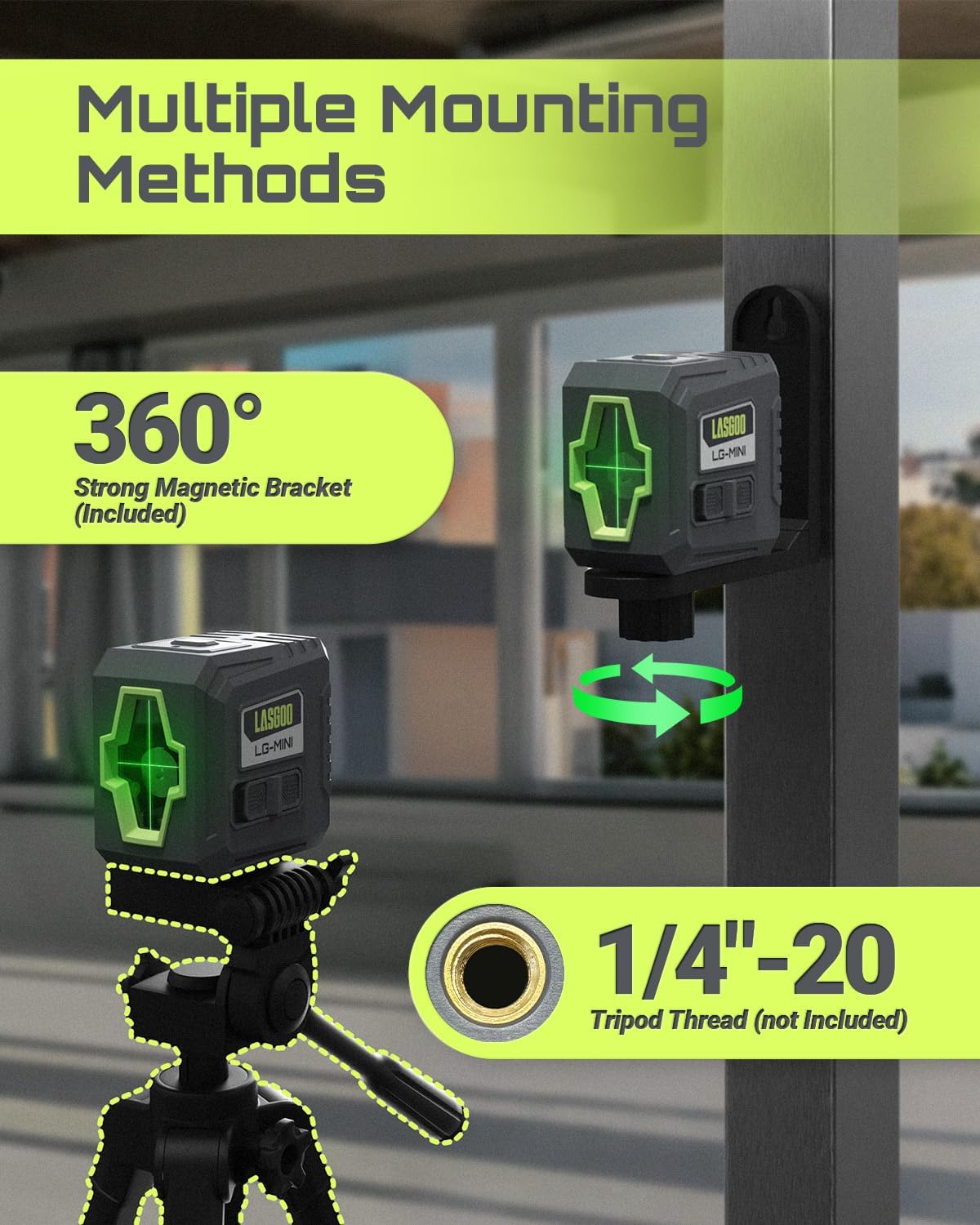
Figure 7.1: Versatile Use - Examples of the laser level in action for different projects.
8. Safety Information
WARNING: This is a Class II laser product. Avoid direct eye exposure to the laser beam. Do not aim the laser at people or animals. Do not stare directly into the laser aperture.
- Always operate the device in a well-lit area to minimize the risk of accidental eye exposure.
- Do not attempt to modify or disassemble the laser level. This can lead to hazardous laser radiation exposure.
- Keep the device out of reach of children.
- Use only the specified battery type (AA batteries).
- Avoid using the product in strong light environments, as this may reduce laser visibility.
9. Maintenance
- Clean the laser lens and housing with a soft, dry cloth. Do not use abrasive cleaners or solvents.
- Store the device in a dry, cool place when not in use.
- Remove batteries if the device will not be used for an extended period to prevent leakage.
- Regularly check the device for any signs of damage. Do not use if damaged.
10. Troubleshooting
| Problem | Possible Cause | Solution |
|---|---|---|
| Laser lines are dim or not visible. | Low battery power; Bright ambient light; Incorrect brightness setting. | Replace batteries; Use in lower light conditions or with a laser receiver; Adjust brightness settings. |
| Laser lines are flashing and alarm sounds. | Device is out of self-leveling range (±3°). | Adjust the device's position until it is within the self-leveling range. |
| Laser lines are not straight in Manual Mode. | Manual Mode is designed for angled projections; it does not self-level. | This is normal operation for Manual Mode. For straight lines, use Self-Leveling Mode. |
| Device does not power on. | Batteries are dead or incorrectly installed; Pendulum lock is not in 'ON' position. | Check and replace batteries; Ensure pendulum lock is in 'ON' position for Self-Leveling Mode or 'OFF' then long-press for Manual Mode. |
11. Warranty and Support
LASGOO products are manufactured to high-quality standards. For warranty information, technical support, or service inquiries, please refer to the contact information provided on the product packaging or visit the official LASGOO website. Keep your purchase receipt as proof of purchase.
Ask a question about this manual
Ask about setup, troubleshooting, compatibility, parts, safety, or missing instructions. Manuals+ will review the question and use this page’s manual context to help answer it.