
1. Introduction
The HLK-V20 is an intelligent voice recognition control module designed for integration into various electronic systems. It provides robust voice command processing capabilities, enabling hands-free control and interaction. This module supports multiple communication interfaces, including I2C, UART, and SPI, making it versatile for a wide range of applications.
Key features include reliable performance, precision in voice recognition, and stable operation, making it suitable for industrial, automotive, and household electronic projects.
2. Setup and Connections
Proper connection of the HLK-V20 module is crucial for its functionality. Ensure all connections are secure before applying power.
2.1 Power Supply
- Connect the module to a stable DC power source within the specified voltage range (refer to detailed specifications for exact voltage).
- Observe correct polarity for VCC and GND connections to prevent damage.
2.2 Communication Interfaces
The HLK-V20 supports I2C, UART, and SPI communication protocols. Select the appropriate interface based on your host microcontroller and application requirements.
- UART: Connect TX, RX, VCC, and GND pins to your microcontroller's corresponding UART interface.
- I2C: Connect SDA, SCL, VCC, and GND pins. Ensure pull-up resistors are correctly configured if not integrated.
- SPI: Connect MOSI, MISO, SCK, CS, VCC, and GND pins.
2.3 Audio Peripherals
Connect the provided microphone for voice input and the speaker for audio feedback or responses.
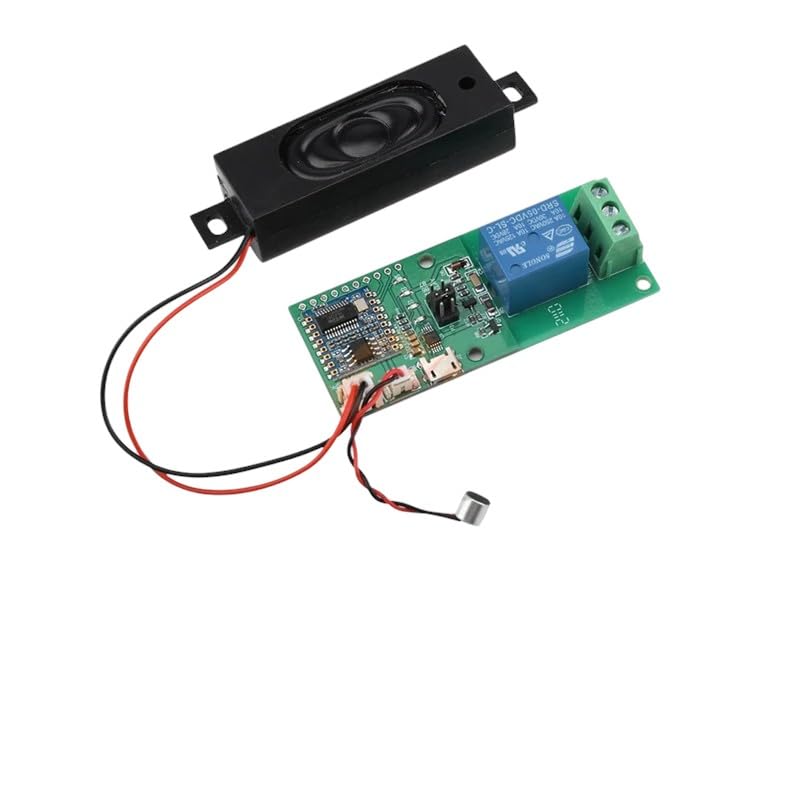
Image: The HLK-V20 module connected to a speaker and a microphone, illustrating typical peripheral connections.
3. Operating Instructions
The HLK-V20 module operates by detecting predefined "wake-up words" and then processing subsequent voice commands.
3.1 Initializing the Module
- After power-up, the module typically enters a low-power listening state.
- Your host microcontroller will need to send initialization commands via the chosen communication interface (I2C, UART, or SPI) to configure the module.
- Refer to the HLK-V20 programming guide (not included in this manual) for specific command protocols and data formats.
3.2 Voice Command Recognition
- Wake-Up Word: Speak the designated wake-up word clearly. The module will then transition to an active listening state.
- Command Input: Once activated, speak your command. The module will process the audio input and attempt to match it with its programmed command set.
- Feedback: The module may provide audio feedback via the connected speaker to confirm recognition or indicate an error.
- Output: Upon successful command recognition, the module will send a corresponding signal or data packet to the host microcontroller via the selected communication interface. The microcontroller then executes the desired action.
3.3 Customizing Commands
The HLK-V20 module allows for customization of wake-up words and command phrases. This typically requires specific software tools and firmware programming. Consult the manufacturer's development resources for detailed instructions on command customization.
4. Maintenance
The HLK-V20 module is designed for reliable, low-maintenance operation. Adhering to these guidelines will help ensure its longevity:
- Environment: Operate the module within its specified temperature and humidity ranges. Avoid exposure to extreme temperatures, moisture, or corrosive substances.
- Cleaning: If necessary, gently clean the module with a dry, soft cloth. Do not use liquid cleaners or solvents.
- Physical Handling: Handle the module with care to avoid physical damage to components or solder joints.
- Firmware Updates: Periodically check the manufacturer's website for any available firmware updates. Updates can improve performance, add features, or address known issues. Follow the provided instructions carefully when performing updates.
5. Troubleshooting
If you encounter issues with your HLK-V20 module, refer to the following troubleshooting steps:
5.1 Module Not Responding
- Power Check: Verify that the module is receiving stable power within the correct voltage range. Check all power connections (VCC, GND).
- Connections: Ensure all communication interface (I2C, UART, SPI) and audio peripheral connections are secure and correctly wired.
- Host Microcontroller: Confirm that your host microcontroller is correctly configured and sending appropriate commands to the HLK-V20. Check its firmware and communication settings.
5.2 Incorrect Voice Recognition
- Microphone Placement: Ensure the microphone is positioned correctly and not obstructed.
- Ambient Noise: Reduce background noise in the operating environment. High noise levels can interfere with recognition accuracy.
- Clarity of Speech: Speak clearly and at a normal volume.
- Wake-Up Word/Command Training: If custom commands are used, ensure they were trained correctly and are distinct enough.
- Firmware: Check for any available firmware updates that might improve recognition algorithms.
5.3 No Audio Output from Speaker
- Speaker Connection: Verify the speaker is correctly connected to the module's audio output pins.
- Volume Settings: Ensure that any software-controlled volume settings are not muted or set too low.
- Module Status: Confirm the module is in an operational state where it is expected to produce audio.
If these steps do not resolve the issue, please contact customer support for further assistance.
6. Specifications
| Feature | Description |
|---|---|
| Model | HLK-V20 |
| Function | Intelligent Voice Recognition Control Module |
| Communication Interfaces | I2C, UART, SPI |
| Voice Features | Wake-Up Words, Voice Command Recognition |
| Manufacturer | JEARTYIEST |
| ASIN | B0F5PWKBSQ |
| First Available Date | April 21, 2025 |

Image: A general representation of various electronic components, highlighting the nature of the HLK-V20 as an electronic module.
7. Warranty and Support
JEARTYIEST is committed to providing high-quality electronic components and excellent customer service.
- Money-Back Guarantee: We offer a money-back guarantee, reflecting our confidence in the quality and performance of our products. Please refer to your purchase terms for specific details regarding returns and refunds.
- Customer Support: Our knowledgeable customer support team is available to assist you with any questions, concerns, or technical issues you may encounter.
For support, please refer to the contact information provided with your purchase or visit the official JEARTYIEST website.