
Jeewoon CM7203
Jeewoon CM7203 Fully Automatic 15 Bar Espresso Coffee Machine User Manual
Model: CM7203 | Brand: Jeewoon
Introduction
This manual provides comprehensive instructions for the safe and efficient operation, maintenance, and troubleshooting of your Jeewoon CM7203 Fully Automatic Espresso Coffee Machine. Please read this manual thoroughly before first use and keep it for future reference.

Image: The Jeewoon CM7203 Fully Automatic Espresso Coffee Machine, showcasing its sleek black design and two cups of freshly brewed coffee.
Safety Instructions
Always follow basic safety precautions when using electrical appliances to reduce the risk of fire, electric shock, and injury to persons.
- Ensure the power supply voltage matches the rating label on the appliance.
- Do not immerse the appliance, power cord, or plug in water or other liquids.
- Unplug from the outlet when not in use and before cleaning.
- Keep hands and cords away from hot surfaces.
- This appliance is for household use only.
- Do not operate the appliance with a damaged cord or plug.
- Keep out of reach of children.
Product Overview
Familiarize yourself with the components of your Jeewoon CM7203 coffee machine.
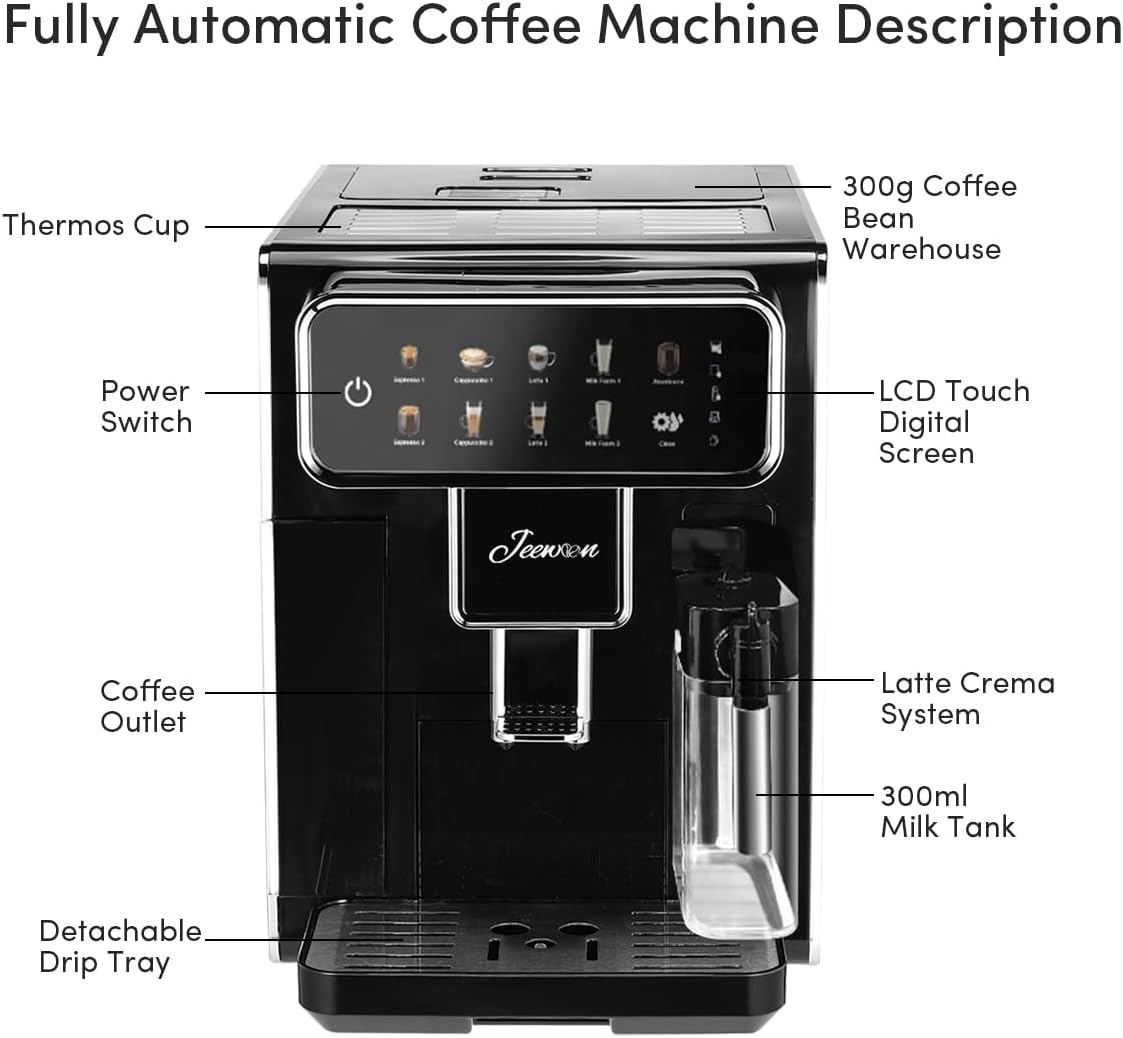
Image: Diagram illustrating the key components of the Jeewoon CM7203, including the Power Switch, LCD Touch Digital Screen, Coffee Outlet, Latte Crema System, 300ml Milk Tank, Detachable Drip Tray, and 300g Coffee Bean Warehouse.
- Power Switch: On/Off control for the machine.
- LCD Touch Digital Screen: Intuitive interface for selecting beverages and settings.
- Coffee Outlet: Where brewed coffee dispenses. Adjustable height.
- Latte Crema System: Integrated system for frothing milk.
- 300ml Milk Tank: Removable tank for milk.
- Detachable Drip Tray: Collects excess liquid and is easy to clean.
- 300g Coffee Bean Warehouse: Storage for whole coffee beans.
- 1.5L Removable Transparent Water Tank: Water reservoir for brewing.
- Top Cup Warming Area: Surface to pre-warm cups.
Setup
- Unpacking: Carefully remove all packaging materials. Retain packaging for future transport or storage.
- Placement: Place the machine on a stable, flat, and heat-resistant surface, away from direct sunlight and heat sources. Ensure adequate ventilation.
- Water Tank: Remove the 1.5L transparent water tank, rinse it with fresh water, and fill it to the MAX line. Reinsert it securely into the machine.
- Bean Hopper: Open the lid of the 300g coffee bean warehouse and fill it with your preferred whole coffee beans. Close the lid securely.
- Milk Tank (Optional): If preparing milk-based beverages, fill the 300ml milk tank with fresh milk and attach it to the machine.
- Power Connection: Plug the power cord into a grounded electrical outlet.
- Initial Rinse Cycle: Before first use, perform an initial rinse cycle as instructed on the touch screen to clean the internal components.
Operating Instructions
Your Jeewoon CM7203 offers a variety of beverages with simple touch screen operation.

Image: The touch screen interface of the Jeewoon CM7203, showing options for various coffee types and grind settings (1-3 gears for fine, 4-6 gears for fine).
Brewing a Beverage:
- Power On: Press the Power Switch to turn on the machine. It will undergo a brief warm-up cycle.
- Place Cup: Position your cup(s) under the coffee outlet. Adjust the height of the coffee spout if necessary.
- Select Beverage: On the LCD touch screen, select your desired beverage (e.g., Espresso, Americano, Cappuccino, Latte, Frothed Milk). You can choose between small or large cup sizes for most options.
- Adjust Grind (Optional): If desired, adjust the coffee grind coarseness using the settings on the screen (1-3 for finer, 4-6 for coarser).
- Start Brewing: Confirm your selection. The machine will automatically grind the beans, brew the coffee, and froth milk if applicable.
- Customization: The machine allows for automatic coffee volume control and can remember your preferred settings for future use.
Hot Water Dispensing:
The machine features a separate hot water outlet for tea or other hot beverages.
- Place a cup under the hot water outlet.
- Select the hot water option on the touch screen.
- Press to dispense hot water.
Maintenance & Cleaning
Regular cleaning ensures optimal performance and longevity of your coffee machine.
- Daily Cleaning:
- Empty and rinse the detachable drip tray daily.
- Wipe down the exterior of the machine with a soft, damp cloth.
- Rinse the milk tank after each use if milk was frothed.
- One-Touch Auto-Cleaning System:
Your machine is equipped with a convenient one-touch auto-cleaning function for internal components.

Image: Visual representation of the Jeewoon CM7203's auto-cleaning feature, highlighting its ease of use.
- Follow the prompts on the touch screen to initiate the auto-cleaning cycle.
- Ensure the water tank is sufficiently filled before starting the cycle.
- Descaling:
Perform descaling periodically to remove mineral buildup. Refer to the on-screen prompts or a separate descaling guide for detailed instructions. Use only descaling solutions recommended for coffee machines.
- Grinder Cleaning:
Use the provided cleaning brush to clear any coffee residue from the grinder area. Regular cleaning prevents blockages and ensures consistent grind quality.
Troubleshooting
Before contacting customer support, please refer to the following common issues and their solutions:
| Problem | Possible Cause | Solution |
|---|---|---|
| Machine does not turn on. | Not plugged in; power outlet issue. | Check power cord connection; try a different outlet. |
| Coffee is not brewing. | Water tank empty; bean hopper empty; machine needs descaling. | Refill water tank/bean hopper; perform descaling cycle. |
| Milk is not frothing properly. | Milk tank dirty; milk type unsuitable; steam wand blocked. | Clean milk tank and steam wand; use fresh, cold milk (dairy or suitable plant-based). |
| Coffee tastes weak or too strong. | Grind setting incorrect; coffee quantity setting. | Adjust grind coarseness; adjust coffee volume on screen. |
For issues not listed here, please contact Jeewoon customer support.
Specifications
| Feature | Detail |
|---|---|
| Brand | Jeewoon |
| Model | CM7203 |
| Power | 1350 Watts |
| Pump Pressure | 15 Bar (Espresso), 19 Bar (High-Pressure Pump) |
| Water Tank Capacity | 1.5 Liters (Removable) |
| Milk Tank Capacity | 300 ml |
| Bean Hopper Capacity | 300 grams |
| Dimensions (L x W x H) | 42 cm x 33 cm x 53.5 cm (approx.) |
| Item Weight | 14.4 Kilograms |
| Material | Aluminum |
| Features | Integrated Grinder, Milk Frother, Touch Screen, Auto-Cleaning, Adjustable Grind Coarseness, Adjustable Coffee Volume, Overheat/Overpressure Protection, Removable Drip Tray |
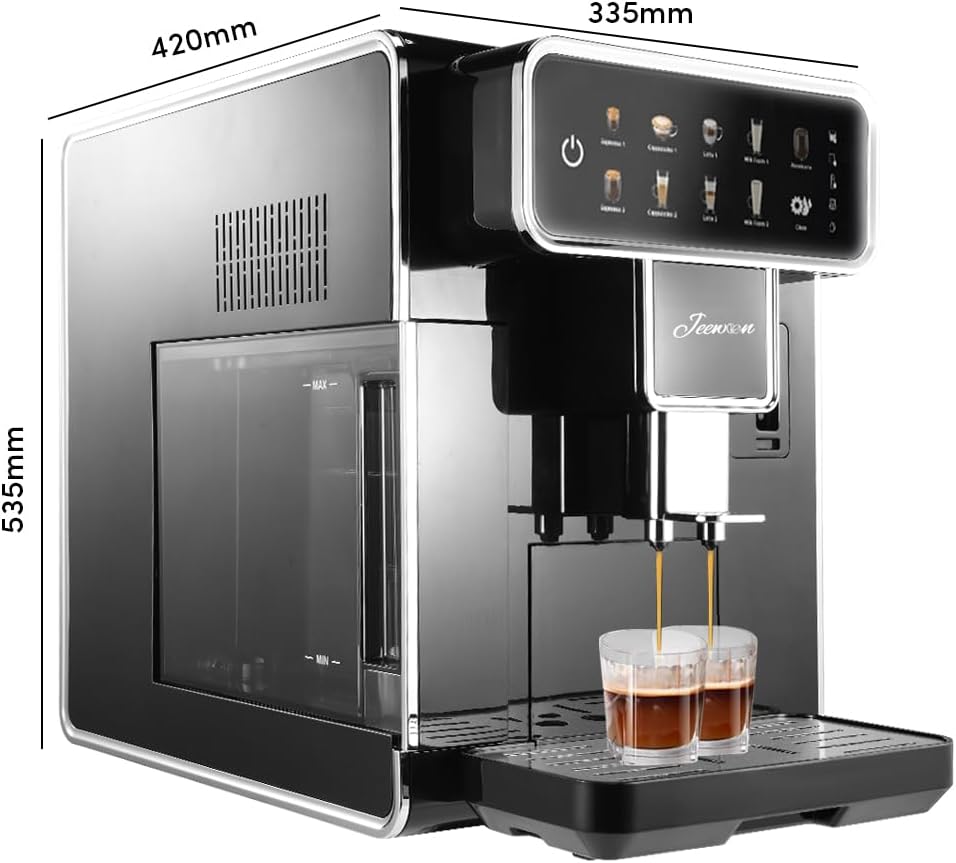
Image: Diagram showing the dimensions of the Jeewoon CM7203 coffee machine: 420mm length, 335mm width, and 535mm height.
Warranty and Support
For warranty information and customer support, please refer to the documentation included with your purchase or visit the official Jeewoon website. Keep your proof of purchase for warranty claims.
Manufacturer: Jeewoon
ASIN: B0F5PQBGGG
First Available Date: April 21, 2025
no relevant documents
Ask a question about this manual
Ask about setup, troubleshooting, compatibility, parts, safety, or missing instructions. Manuals+ will review the question and use this page’s manual context to help answer it.