
Ponovo V35
Digital Voice Recorder User Manual
Model: V35 | Brand: Ponovo
1. Introduction
This manual provides comprehensive instructions for operating your Ponovo V35 Digital Voice Recorder. Designed for high-quality audio capture, this ultra-slim device is ideal for lectures, interviews, meetings, and personal notes. Please read this manual carefully to ensure proper use and to maximize the device's capabilities.
2. Package Contents
Upon unboxing, please verify that all items listed below are included in your package:
- 1 x Ponovo Digital Voice Recorder (Model V35)
- 1 x 64GB TF card (pre-installed or separate)
- 1 x 3.5mm External Microphone
- 1 x 3.5mm Line-in Cable
- 1 x USB-C Cable
- 1 x Lanyard
- 1 x User Manual (this document)

Image: Ponovo V35 Digital Voice Recorder with its accessories, including a 64GB TF card, external microphone, and various cables.
3. Product Features
-
3.1. Dual Microphones & Stereo Sound
Equipped with professional-grade dual microphones and 720° stereo sound capture, the device ensures precise recording of every audio detail. An upgraded 2159 auto-noise reduction chip effectively filters background interference, delivering pristine, lossless 1536kbps sound quality.

Image: Visual representation of the dual microphone stereo recording capability and the advanced noise reduction chip.
-
3.2. Massive Memory & Extended Recording
The recorder combines 8GB built-in storage with a 64GB TF card, providing a total of 72GB capacity. This allows for over 10,000 hours of audio storage (at 32kbps). A 2-hour fast charge provides up to 60 hours of uninterrupted recording, suitable for extended sessions.
-
3.3. Ultra-thin Portable Design & HD Display
Crafted from lightweight zinc alloy, the Ponovo V35 features a sleek, ultra-slim design for portability. Its enlarged 1.97" screen displays 30% bigger text for improved readability.

Image: The ultra-thin and portable design of the Ponovo V35, shown being placed into a pocket.
-
3.4. Intuitive One-Touch Operations
Record instantly with a single touch, even when the device is off. Dedicated side buttons allow for quick access to functions like A-B repeat for looping segments, single-press file deletion, and easy switching between recording and music modes. A left swipe locks the screen to prevent accidental touches.
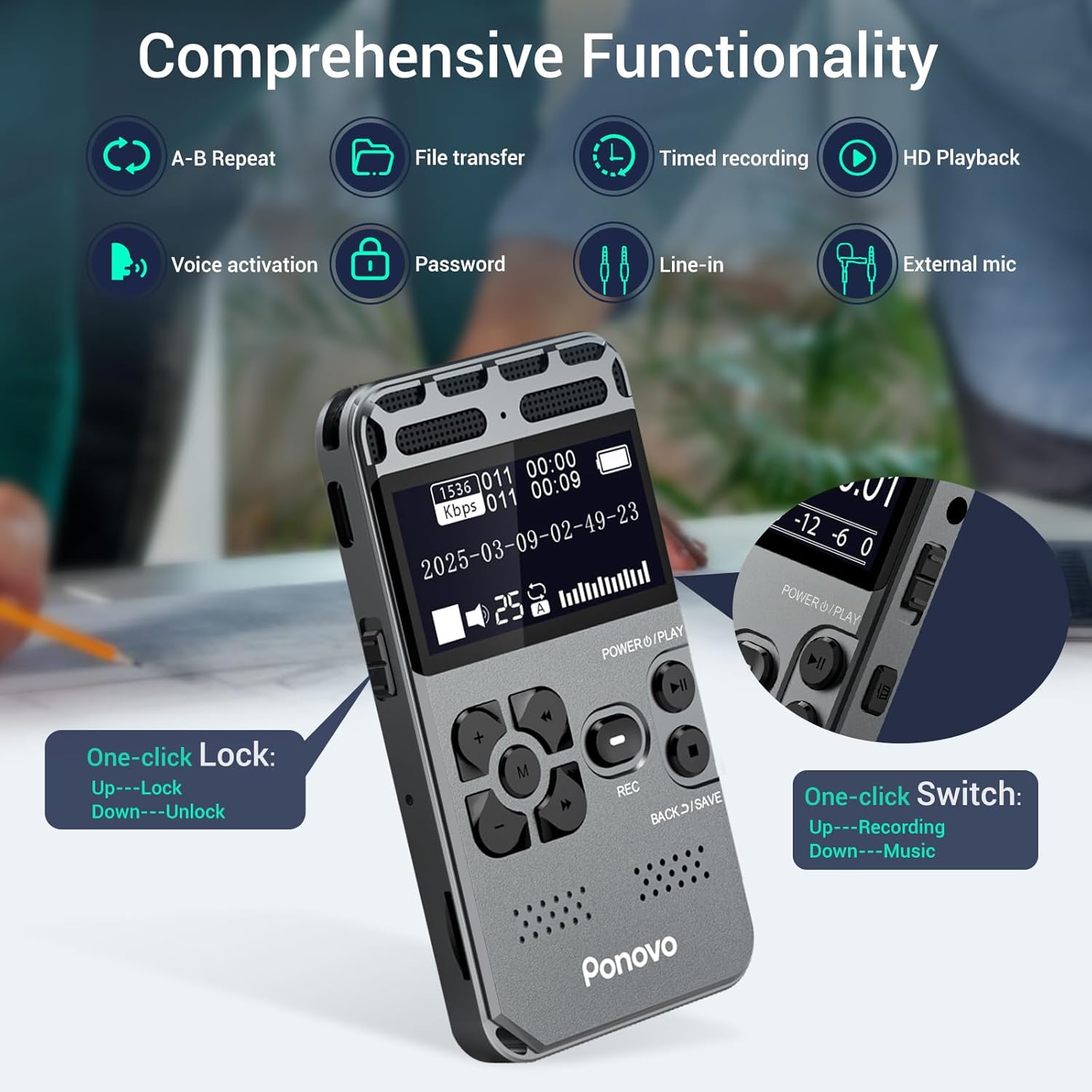
Image: An overview of the comprehensive functionality, highlighting one-click lock and one-click switch features.
-
3.5. External Microphone & Voice-Activated Recording
The device supports an external microphone for precise audio capture and line-in connectivity for lossless transfers from other devices. Voice-activated recording automatically skips silent gaps, optimizing storage. A 4-digit password lock ensures file security. Additional features include timed recording and file segmentation.

Image: Illustration of file transfer and line-in recording options, compatible with Mac, Windows, and Android systems.
4. Setup
-
4.1. Initial Charge
Before first use, fully charge the device for approximately 2 hours using the provided USB-C cable. The battery indicator on the screen will show charging status.
-
4.2. Device Formatting
For optimal performance, it is crucial to format the device's internal storage and any inserted TF card directly through the recorder's menu before initial use. Do not format the digital audio recorder or memory card on your computer, as this may cause functionality issues.
- Navigate to the 'Settings' menu on the device.
- Select 'Format Device' or 'Format TF Card' as applicable.
- Confirm the formatting process.
5. Operating Instructions
-
5.1. Power On/Off
To power on the device, slide the 'POWER/PLAY' switch upwards. To power off, slide it downwards and hold until the screen turns off.
-
5.2. Recording
Press the REC button to start recording. Press it again to pause/resume. To save the recording, press the BACK/SAVE button.

Image: The Ponovo V35 being used in various settings, demonstrating its versatility for meetings, interviews, and personal use.
-
5.3. Playback
From the main screen, use the navigation buttons to select a file. Press the 'POWER/PLAY' button to start playback. Use the volume buttons (+/-) to adjust the audio level.
-
5.4. A-B Repeat Function
During playback, press the dedicated A-B repeat button to mark the start point (A). Press it again to mark the end point (B). The device will then loop playback between points A and B.
-
5.5. Screen Lock
To lock the screen and prevent accidental touches, slide the lock switch on the side of the device. Slide it back to unlock.
-
5.6. Voice-Activated Recording (VOR)
Enable VOR in the settings menu. When activated, the recorder will automatically start recording when sound is detected and pause during periods of silence, conserving storage space.
6. Maintenance
- Keep the device clean using a soft, dry cloth.
- Avoid exposing the device to extreme temperatures, direct sunlight, or high humidity.
- Do not attempt to disassemble or repair the device yourself. Contact customer support for assistance.
- It is recommended to use the original memory card and avoid frequent replacement.
7. Troubleshooting
-
7.1. Device Not Recording/Working Properly
Ensure the device is fully charged. If using a new memory card or after initial setup, verify that the card has been formatted directly on the device, not on a computer. Incorrect formatting can lead to operational issues.
-
7.2. Poor Audio Quality
Check microphone placement. Ensure the noise reduction feature is enabled if recording in a noisy environment. For external microphone use, ensure it is securely connected.
-
7.3. Device Not Responding
If the device becomes unresponsive, locate the 'RESET' pinhole (usually on the side or back) and gently press it with a thin object (like a paperclip) to perform a soft reset.
8. Specifications
| Feature | Detail |
|---|---|
| Model Number | V35 |
| Dimensions | 3.54 x 1.97 x 0.39 inches (90 x 50 x 10 mm) |
| Item Weight | 3.32 ounces (94 grams) |
| Battery Capacity | 850mAh (up to 60 hours recording) |
| Memory Storage Capacity | 72 GB (8GB built-in + 64GB TF card) |
| Recording Format | MP3/WAV |
| Playback Audio Format | WAV/MP3/WMA/OGG/APE/FLAC |
| Microphone Form Factor | Built-In Dual Microphones |
| Hardware Interface | USB Type-C |
| Compatible Systems | Windows/MAC/Android phone |
| Manufacturer | Ponovo |
9. Warranty and Support
Your Ponovo Digital Voice Recorder comes with a 2-year warranty. We are committed to providing excellent customer service. If you encounter any questions or issues during use, please do not hesitate to contact us. Our customer service team is available 24 hours a day to assist you.
For support, please refer to the contact information provided with your purchase or visit the official Ponovo website.
Ask a question about this manual
Ask about setup, troubleshooting, compatibility, parts, safety, or missing instructions. Manuals+ will review the question and use this page’s manual context to help answer it.