
Introduction
This manual provides comprehensive instructions for the setup, operation, and maintenance of your XOTODREM M66 Global 4G POC Walkie Talkie. Please read this manual thoroughly before using the device to ensure proper functionality and safety.

Image: The XOTODREM M66 Global 4G POC Walkie Talkie, a compact and robust communication device.
What's in the Box
Upon opening your XOTODREM M66 package, verify that all the following items are included:
- 2x 365 Days Unlimited Data Plan Sim Cards
- 2x PoC fast Radios Unlimited range (XOTODREM M66 units)
- Battery
- Charger
- 2x Antenna
- User Manual

Image: The XOTODREM M66 radios and their accessories neatly organized within the included carrying case.

Image: A close-up of the XOTODREM M66 radio highlighting its 3000mAh battery and Type-C charging port.
Setup Guide
Follow these steps to prepare your XOTODREM M66 for first use:
- Battery Assembly: Carefully insert the battery into the designated compartment on the back of the radio. Ensure it clicks securely into place.
- Antenna Installation: Screw the main signal antenna clockwise into the top port of the radio until it is finger-tight. For FM radio functionality, attach the smaller FM antenna to its dedicated port.
- SIM Card Installation: Locate the SIM card slot, typically under the battery or a protective cover. Insert the provided 4G SIM card according to the diagram on the device or in the manual. Ensure it is correctly oriented.
- Secure Battery Cover: If your model has a battery cover, replace it and secure it with the provided screw using a small screwdriver to ensure a tight seal.
- Power On: Press and hold the power button (usually located on the side or top) until the screen illuminates and displays the welcome message.
Video: A demonstration of the XOTODREM M66 radio's unboxing, battery and antenna assembly, power-on sequence, and basic function tests.
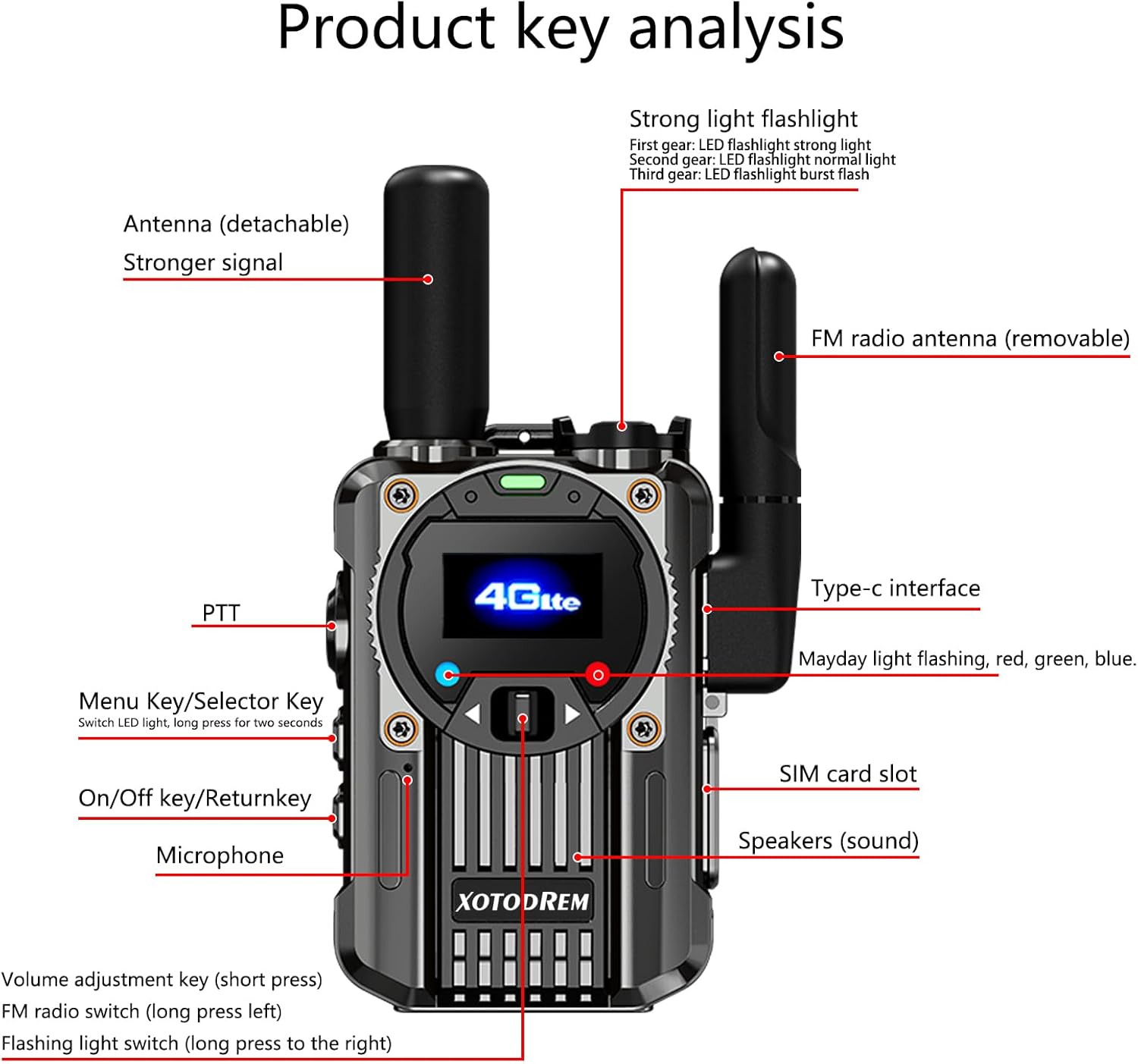
Image: A detailed diagram illustrating the various components and controls of the XOTODREM M66 radio, including PTT, antennas, SIM card slot, and charging port.
Operating Instructions
Familiarize yourself with the following operational procedures:
- PTT (Push-to-Talk) Communication: Press and hold the large orange PTT button on the side of the radio to transmit your voice. Release the button to listen. Ensure you are on the correct channel or group.
- Volume Control: Use the dedicated volume adjustment keys (short press) to increase or decrease the audio output.
- Signal Light: The signal light indicates various statuses. Refer to the display for detailed information.
- Flashlight: Press and hold the designated flashlight button to activate the built-in LED flashlight. Press again to cycle through modes (strong, normal, burst) or turn off.
- FM Radio: To use the FM radio function, ensure the FM antenna is attached. Press the FM radio switch (long press left) to activate.
- Group and Individual Calls: The radio supports both individual and group calls. Users can be selected for private calls within a group, or your voice can be broadcast to all members in a selected group channel. Up to 200 groups can be established, each accommodating up to 500 people.

Image: The XOTODREM M66 radio illustrating its "Free Grouping" feature, allowing for individual and group calls with up to 200 groups and 500 people per group.

Image: Two XOTODREM M66 radios showcasing their global communication capabilities, including clear sound, durability, persistent power, LED light, Type-C charging, and global call functionality.
Key Features
The XOTODREM M66 offers a range of features designed for reliable and versatile communication:
- Global 4G-LTE Communication (POC): Utilizes cellular networks for unlimited range and global coverage, ensuring clear voice transmission without traditional signal limitations.
- Customizable Channels: Up to 200 dedicated channels can be pre-configured for specific teams, events, or groups.
- Advanced Audio Technology: Minimizes background noise for clear conversations in various environments.
- Integrated AM/FM Radio: Equipped with an FM radio receiver for entertainment and National Weather Service alerts, crucial for outdoor enthusiasts and emergency preparedness.
- Extended Power: High-efficiency battery provides up to 7 days of standby time and features Type-C fast charging.
- Durable Design: Rugged, impact-resistant housing and sealed construction withstand moisture, accidental drops, and harsh weather.
- Built-in Flashlight: Provides illumination for low-light conditions.

Image: The XOTODREM M66 radio demonstrating its 3D noise reduction capability, providing high-definition stereo sound with enhanced clarity.

Image: The XOTODREM M66 radio highlighting its built-in LED flashlight and robust metal alloy construction, ensuring smooth operation even in dark or challenging environments.
Specifications
| Feature | Detail |
|---|---|
| Model Number | M66 |
| Item Weight | 1.75 pounds (28 Ounces) |
| Product Dimensions | 1.22 x 2.08 x 2.83 inches |
| Brand | XOTODREM |
| Color | Black |
| Number of Channels | 200 |
| Special Features | AM FM Radio, Digital Display, Fast Radios Unlimited Range, Long Range, Weather Resistant |
| Frequency Range | FDD-LTE: B2/B3/B4/B5/B7/B12/B13/B17/B26/B28 |
| Talking Range Maximum | 100,000 Miles (Network Dependent) |
| Voltage | 3.7 Volts |
| Water Resistance Level | Waterproof |
Maintenance
To ensure the longevity and optimal performance of your XOTODREM M66 radio, follow these maintenance guidelines:
- Cleaning: Use a soft, damp cloth to clean the exterior of the radio. Avoid using harsh chemicals or abrasive cleaners.
- Battery Care: Charge the battery regularly, even if the radio is not in frequent use, to maintain battery health. Avoid overcharging or completely draining the battery.
- Storage: Store the radio in a cool, dry place away from direct sunlight and extreme temperatures. If storing for extended periods, remove the battery.
- Antenna Inspection: Periodically check the antennas for any damage or loose connections. Ensure they are securely attached before use.
- Water Resistance: While the device is waterproof, ensure all ports and covers are properly sealed before exposure to water to maintain its water resistance.
Troubleshooting
If you encounter issues with your XOTODREM M66, refer to the following common troubleshooting steps:
- No Power:
- Ensure the battery is correctly inserted and fully charged.
- Check the power button for proper function.
- No Signal/Communication:
- Verify that the main signal antenna is securely attached.
- Check if the SIM card is properly installed and active.
- Ensure you are within 4G-LTE network coverage.
- Confirm you are on the correct channel or group for communication.
- Poor Audio Quality:
- Adjust the volume level.
- Check for obstructions around the microphone and speaker.
- Ensure you are within good network coverage.
- FM Radio Not Working:
- Ensure the FM antenna is properly connected.
- Check if the FM radio function is activated.
If problems persist, contact customer support for further assistance.
Warranty and Support
The XOTODREM M66 Global 4G POC Walkie Talkie comes with a warranty of 365 days for the Unlimited Data Plan SIM Cards. For specific product warranty details and customer support, please refer to the documentation included with your purchase or visit the official XOTODREM website.
For additional support or inquiries, you may contact the seller, YouHui Walkie Talkie, directly.