
1. Introduction
This manual provides essential instructions for the safe and efficient use of your ZHRCLY Donper Motor Compressor, model K230CZ1 AC115V. This compressor is designed as a general accessory for various Donper motor compressor systems, including models L72CZ1, L76CZ1, K230CZ1, K270CZ1, K325CZ1, and K375CZ1. Please read this manual thoroughly before installation and operation to ensure proper function and longevity of the unit.
2. Safety Information
Always observe the following safety precautions to prevent injury or damage to the product and associated equipment.
- Electrical Safety: Ensure the power supply matches the unit's requirements (AC115V). Disconnect power before any installation, maintenance, or repair.
- Qualified Personnel: Installation and servicing should only be performed by qualified technicians familiar with refrigeration systems and electrical components.
- Ventilation: Install the compressor in a well-ventilated area to prevent overheating.
- Secure Mounting: Ensure the compressor is securely mounted to prevent vibration and movement during operation.
- Avoid Moisture: Do not expose the compressor to water or excessive moisture.
- Personal Protective Equipment (PPE): Wear appropriate PPE, such as safety glasses and gloves, during installation and maintenance.
3. Package Contents
Verify that all items are present and undamaged upon unpacking.
- 1 x ZHRCLY Donper Motor Compressor (Model K230CZ1 AC115V)
- 1 x User Manual (This document)
4. Setup and Installation
Follow these steps for proper installation of the compressor.
4.1 Unpacking
Carefully remove the compressor from its packaging. Inspect for any visible damage that may have occurred during transit. Report any damage to your supplier immediately.
4.2 Mounting
Mount the compressor in a stable, level position using appropriate fasteners. Ensure there is adequate clearance around the unit for proper airflow and heat dissipation. Refer to the original equipment manufacturer's guidelines for specific mounting requirements within your system.
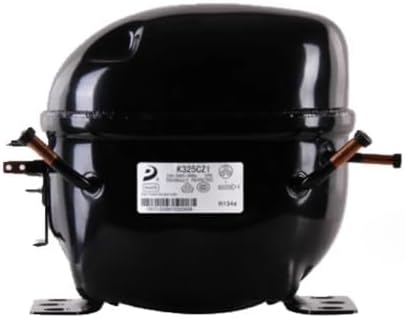
Figure 1: ZHRCLY Donper Motor Compressor, model K230CZ1 AC115V. This image shows the main unit for which this manual provides instructions, illustrating its general appearance and connection points.
4.3 Electrical Connection
Connect the compressor to an AC 115V power supply. Ensure all wiring connections are secure and comply with local electrical codes. Use appropriate gauge wiring for the power requirements of the compressor. Consult a qualified electrician if you are unsure about electrical connections.
- Verify power source is AC 115V.
- Connect power leads to the designated terminals on the compressor.
- Ensure proper grounding.
4.4 System Integration
Integrate the compressor into your existing refrigeration or air conditioning system according to the system manufacturer's specifications. This includes connecting refrigerant lines and any control wiring. Proper vacuuming and charging of the refrigerant system are critical for optimal performance and must be performed by a certified technician.
5. Operating Instructions
Once installed, the compressor operates as part of your system. Follow these general guidelines.
5.1 Initial Start-up
- After completing all installation steps and verifying connections, restore power to the system.
- Monitor the compressor during its initial cycles for any unusual noises, vibrations, or leaks.
- Check system pressures and temperatures to ensure they are within the manufacturer's recommended operating range.
5.2 Normal Operation
The compressor will cycle on and off as dictated by the system's thermostat or control unit to maintain desired conditions. It is designed for continuous operation within its specified parameters.
5.3 Shutting Down
To shut down the compressor, turn off the main power supply to the system. For extended periods of non-use, it is recommended to disconnect the power completely.
6. Maintenance
Regular maintenance ensures optimal performance and extends the lifespan of your compressor. Always disconnect power before performing any maintenance.
- Cleaning: Keep the exterior of the compressor clean and free from dust and debris. Ensure ventilation openings are not obstructed.
- Inspection: Periodically inspect electrical connections for tightness and signs of wear or corrosion. Check refrigerant lines for leaks or damage.
- Professional Service: For internal components, refrigerant levels, and complex diagnostics, consult a certified refrigeration technician. Do not attempt to open the sealed compressor unit.
7. Troubleshooting
This section addresses common issues you might encounter. For problems not listed here, contact customer support or a qualified technician.
| Problem | Possible Cause | Solution |
|---|---|---|
| Compressor does not start | No power supply; Faulty wiring; Overload protector tripped; Control system issue. | Check power connection and circuit breaker. Verify wiring. Allow unit to cool if overload tripped. Consult system manual for control issues. |
| Unusual noise or vibration | Loose mounting; Internal component issue; Refrigerant imbalance. | Check mounting bolts. If noise persists, disconnect power and contact a technician. |
| Compressor runs continuously | Low refrigerant charge; System overload; Faulty thermostat/control. | Check for refrigerant leaks (professional service required). Reduce system load. Inspect or replace control unit. |
8. Specifications
Technical specifications for the ZHRCLY Donper Motor Compressor K230CZ1 AC115V.
- Brand: ZHRCLY
- Model Number: K230CZ1 AC115V
- Power Source: AC
- Voltage: 115V AC
- Special Feature: AC & DC Adaptable (Note: This specific model is configured for AC115V)
- Manufacturer: Original factory
- Unit Count: 1 Count
- Compatible Donper Models: L72CZ1, L76CZ1, K230CZ1, K270CZ1, K325CZ1, K375CZ1
9. Warranty and Support
For warranty information and technical support, please refer to the purchase documentation or contact your seller directly. Keep your proof of purchase for any warranty claims.
Seller Contact: Keyang Mechanical parts factory (as per purchase information)
For further assistance, please visit the ZHRCLY official website or contact their customer service department.