
Introduction
This manual provides essential information for the proper installation, operation, and maintenance of your FGJDFD Display Receiver Board. This component is designed as a high-quality replacement part for specific Midea air conditioner models, ensuring optimal performance and efficiency. Please read this manual thoroughly before installation and use.
Product Overview
The FGJDFD Display Receiver Board is a critical electronic component responsible for receiving signals and displaying operational information on compatible Midea air conditioning units. It features a digital display and indicator lights for system status.
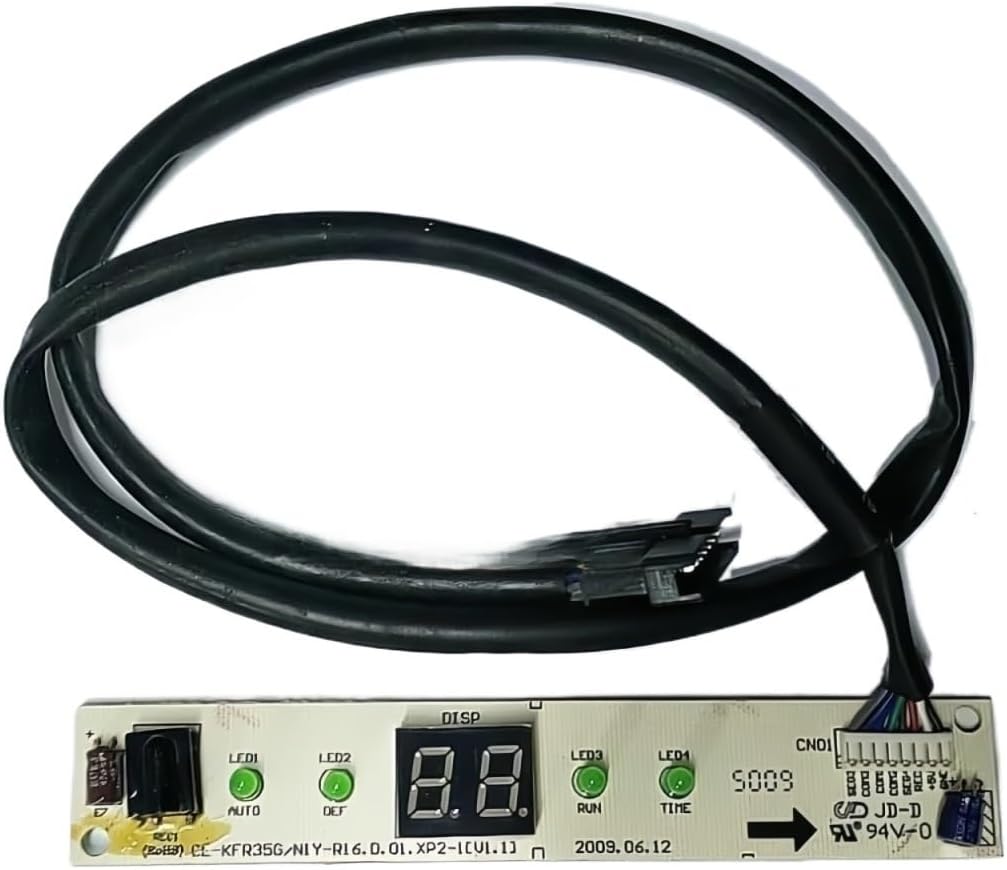
Figure 1: FGJDFD Display Receiver Board. This image shows the main display board with its digital segment display, indicator lights (yellow, green, red), and attached wiring harnesses with connectors. The board is black with mounting holes on each end.
Safety Information
- Always disconnect power to the air conditioning unit before attempting any installation or maintenance.
- Installation should be performed by a qualified technician to prevent electrical shock or damage to the unit.
- Ensure all connections are secure and correctly oriented before restoring power.
- Do not attempt to modify the board or its components.
Setup and Installation
- Power Disconnection: Locate the circuit breaker for your Midea air conditioner and switch it to the OFF position. Verify that no power is reaching the unit.
- Accessing the Old Board: Carefully open the air conditioner's indoor unit casing to access the existing display receiver board. Refer to your air conditioner's specific service manual for exact access procedures.
- Disconnecting the Old Board: Gently disconnect all wiring harnesses from the old display receiver board. Note the orientation and connection points for each harness. Taking a photograph before disconnection can be helpful.
- Removing the Old Board: Unscrew or unclip the old board from its mounting position.
- Installing the New Board: Position the new FGJDFD Display Receiver Board in the same location as the old one. Secure it using the original screws or clips.
- Connecting Wiring: Reconnect all wiring harnesses to the new board, ensuring each connector is firmly seated in its correct port. Match the connections based on your previous observations or photographs.
- Closing the Unit: Carefully close and secure the air conditioner's indoor unit casing.
- Power Restoration: Restore power to the air conditioner by switching the circuit breaker back to the ON position.
Note: This board is designed for specific Midea models. Compatibility is crucial for proper function. Refer to the product specifications for compatible models.
Operating Instructions
The FGJDFD Display Receiver Board operates in conjunction with your Midea air conditioner's main control board and remote control. Once installed, its primary function is to display operational status and temperature settings.
- Digital Display: Shows the current temperature setting or error codes.
- Indicator Lights:
- Yellow/Green Light: Typically indicates power status or operational mode (e.g., cooling, heating, fan).
- Red Light: Often signals an error condition or a specific operational state. Consult your air conditioner's main user manual for specific indicator light meanings.
Control of the air conditioner's functions (e.g., temperature adjustment, mode selection) is performed via the standard Midea air conditioner remote control or main unit controls. The display board will reflect these changes.
Maintenance
The FGJDFD Display Receiver Board requires minimal maintenance. Regular cleaning of the air conditioner's indoor unit, including dust removal from internal components, can help ensure the longevity of all electronic parts.
- Cleaning: If the display or indicator lights become obscured by dust, gently wipe the surface with a soft, dry cloth. Do not use liquid cleaners directly on the board.
- Inspection: Periodically inspect the wiring connections to ensure they remain secure.
Always disconnect power before performing any cleaning or inspection inside the air conditioner unit.
Troubleshooting
| Problem | Possible Cause | Solution |
|---|---|---|
| Display is blank or not lighting up. | No power to the unit; loose wiring connection; faulty board. | Check circuit breaker. Verify all wiring harnesses are securely connected. If power is present and connections are good, the board may be faulty and require replacement. |
| Incorrect temperature displayed. | Sensor issue; main control board issue; incorrect setting. | Ensure the air conditioner is set to the desired temperature. If the issue persists, consult a qualified technician as it may indicate a problem with the temperature sensor or the main control board, not necessarily the display board itself. |
| Indicator lights are not functioning correctly. | Faulty board; main control board issue. | If the display is working but lights are not, the display board may be faulty. If neither display nor lights work, check power and connections first. |
| Air conditioner not responding to remote control. | Remote control batteries dead; remote control faulty; display receiver board faulty; main control board faulty. | Replace remote control batteries. Test the remote. If other functions work but the display doesn't update, the display receiver board might be the issue. If no functions work, the problem might be with the main control board or the remote itself. |
For complex issues or if troubleshooting steps do not resolve the problem, it is recommended to contact a certified HVAC technician.
Specifications
- Product Type: Display Receiver Board / Circuit Board
- Compatibility: Midea Air Conditioners (Models: R16, CE-JFE26G/N2Y-M1, KFR-26G/Y-E1, CE-KFR35G/N1Y-R16.D.01.XP2-1)
- Brand: FGJDFD
- Application: Household Air Conditioning Units
- Dimensions: Approximately 0.39 x 0.39 x 0.39 inches (Package Dimensions, actual board size may vary slightly)
- Item Weight: Approximately 1.76 ounces
Warranty and Support
Specific warranty details for this FGJDFD product are typically provided at the point of purchase or within the product packaging. Please retain your proof of purchase for warranty claims.
For technical support or inquiries regarding this display receiver board, please contact the seller or refer to the contact information provided with your purchase. When contacting support, please have your product model number and purchase date available.