
1. Introduction
This instruction manual provides essential information for the safe and efficient installation, operation, and maintenance of your ZHRCLY Donper Motor Compressor, model A120CY1 120W AC115V. Please read this manual thoroughly before attempting to install or operate the compressor. Retain this manual for future reference.
This compressor is designed for general accessory applications requiring a 120W motor operating on AC115V. Ensure this model meets your specific application requirements.
2. Safety Instructions
WARNING: Failure to follow these safety instructions may result in electric shock, fire, serious injury, or death.
- Always disconnect power before performing any installation, maintenance, or repair work.
- Ensure that all electrical connections are made by a qualified electrician and comply with local and national electrical codes.
- Verify the power supply voltage (AC115V) matches the compressor's requirements before connection.
- Do not operate the compressor in wet or damp conditions.
- Keep hands, clothing, and tools clear of moving parts during operation.
- Use appropriate personal protective equipment (PPE) such as safety glasses and gloves.
- Do not modify the compressor or its components. Use only genuine replacement parts.
- Ensure adequate ventilation around the compressor to prevent overheating.
3. Product Overview
The ZHRCLY Donper Motor Compressor A120CY1 is a robust unit designed for various industrial and home improvement applications. It features a 120W motor and operates on AC115V.
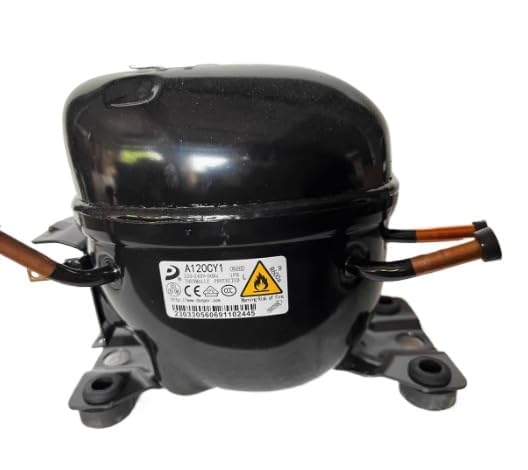
Figure 1: ZHRCLY Donper Motor Compressor A120CY1. This image shows the compact design of the compressor unit, highlighting its main body and connection points.
Key Features:
- Model: A120CY1
- Power: 120W
- Voltage: AC115V
- Power Source: AC
- Special Feature: AC & DC Adaptable (Note: This specific model is AC115V, but the series may have adaptable features)
- Included Components: New unit
4. Setup and Installation
Proper installation is crucial for the compressor's performance and longevity. If you are unsure about any step, consult a qualified professional.
4.1 Unpacking
- Carefully remove the compressor from its packaging.
- Inspect the unit for any signs of shipping damage. If damage is found, contact the seller immediately.
- Ensure all components listed in the packaging are present.
4.2 Mounting
- Mount the compressor on a stable, level surface capable of supporting its weight (approximately 6.6 pounds).
- Ensure there is sufficient clearance around the unit for ventilation and maintenance access.
- Use appropriate fasteners to secure the compressor to prevent vibration and movement during operation.
4.3 Electrical Connection
- DANGER: Ensure the power supply is disconnected before making any electrical connections.
- Connect the compressor to a dedicated AC115V power source.
- Follow all wiring diagrams provided with your specific application or consult a qualified electrician.
- Ensure proper grounding to prevent electrical hazards.
5. Operating Instructions
Once installed and connected, the compressor is ready for operation.
5.1 Initial Start-up
- Double-check all connections (electrical, mounting) to ensure they are secure.
- Restore power to the compressor.
- Activate the compressor via its control mechanism (if applicable to your setup).
- Monitor the compressor for any unusual noises, vibrations, or smells during the first few minutes of operation. If any are detected, immediately shut down the unit and investigate.
5.2 Normal Operation
- Allow the compressor to operate within its specified parameters.
- Avoid continuous operation beyond recommended duty cycles to prevent overheating.
- Ensure the ambient temperature remains within the compressor's operating range.
5.3 Shut Down
- To shut down, deactivate the compressor via its control mechanism.
- For extended periods of non-use, disconnect the power supply.
6. Maintenance
Regular maintenance ensures optimal performance and extends the lifespan of your compressor. Always disconnect power before performing maintenance.
6.1 Cleaning
- Keep the exterior of the compressor clean and free of dust and debris.
- Use a soft, dry cloth for cleaning. Do not use harsh chemicals or abrasive cleaners.
- Ensure ventilation openings are clear and unobstructed.
6.2 Inspection
- Periodically inspect all electrical connections for tightness and signs of wear or damage.
- Check mounting bolts for tightness.
- Listen for any unusual noises during operation that might indicate a problem.
6.3 Storage
- If storing the compressor for an extended period, ensure it is clean and dry.
- Store in a cool, dry place, protected from direct sunlight and extreme temperatures.
7. Troubleshooting
This section addresses common issues you might encounter. For problems not listed here, contact customer support.
| Problem | Possible Cause | Solution |
|---|---|---|
| Compressor does not start | No power supply; Loose electrical connection; Faulty switch/control. | Check power source and circuit breaker; Verify all connections are secure; Test switch/control, replace if faulty. |
| Unusual noise or vibration | Loose mounting; Internal component issue; Obstruction. | Tighten mounting bolts; Disconnect power and inspect for obstructions; Contact support if internal issue suspected. |
| Overheating | Insufficient ventilation; Continuous heavy load; High ambient temperature. | Ensure clear airflow around the unit; Reduce load or duty cycle; Operate in a cooler environment. |
8. Specifications
Technical specifications for the ZHRCLY Donper Motor Compressor A120CY1 120W AC115V.
- Brand: ZHRCLY
- Model Name: A120CY1
- Part Number: A120CY1 120W
- Item Model Number: A120CY1 120W AC115V
- Power Source: AC
- Special Feature: AC & DC Adaptable (Note: This specific model is AC115V)
- Item Weight: 6.6 pounds
- Package Dimensions: 1 x 1 x 1 inches (Note: These dimensions appear to be placeholder values and may not reflect actual product size.)
- Manufacturer: Original factory
- Recommended Uses For Product: General accessory applications
9. Warranty and Support
This product is covered by a standard manufacturer's warranty against defects in materials and workmanship. The specific terms and duration of the warranty may vary. Please refer to the documentation included with your purchase or contact the seller for detailed warranty information.
For technical support, troubleshooting assistance, or to inquire about replacement parts, please contact the seller or the manufacturer directly. When contacting support, please have your model number (A120CY1 120W AC115V) and purchase date available.
Seller: Keyang Mechanical parts factory