
1. Important Safety Information
WARNING: Choking Hazard - Small Parts. Not for children under 3 years of age.
This product contains small parts and is intended for users aged 8-14 years, or adults. Adult supervision is recommended for younger builders. Keep all components away from small children to prevent accidental ingestion.
2. Package Contents
Verify that all components are present before beginning assembly.
- 564 Building Blocks
- Master Control Unit (Power Unit)
- Lamp (Light Strip)
- USB Charging Cable
- Instruction Manual (This document)

Image: Overview of the Suplanet Aircraft Turbofan Engine Model kit contents, showing the main engine model, the box, a smartphone displaying the app interface, the master control unit, building blocks, the light strip, a USB cable, and the instruction manual.
3. Product Overview
The Suplanet Aircraft Turbofan Engine Model is a detailed building kit designed to replicate the complex structure and function of a real turbofan engine. It features motorized components, lighting effects, and app-controlled speed settings for an interactive experience.

Image: The fully assembled Suplanet Aircraft Turbofan Engine Model displayed next to its product packaging. The model features a detailed turbofan design with visible internal components.
4. Assembly Instructions
Follow the step-by-step instructions provided in the included printed manual for detailed assembly. The kit consists of 564 building blocks. Pay close attention to the orientation and connection points of each piece.
Key Assembly Features:
- Power Motor Integration: The power motor is a one-key switch for strong power. Ensure it is securely integrated into the model as per the instructions.
- Transparent Components: Utilize transparent materials to bring a richer visual experience, allowing observation of internal mechanisms.
- Metal Rotor: The metal rotor is designed to rotate in motion. Ensure its free movement during assembly.
- Light Strip Installation: The light strip restores the high-speed rotation of the engine lighting effects. Install it carefully to ensure proper illumination.
- Geared Mechanical Chain Drive System: The model simulates a geared mechanical chain drive system. Assemble gears precisely to ensure smooth operation.
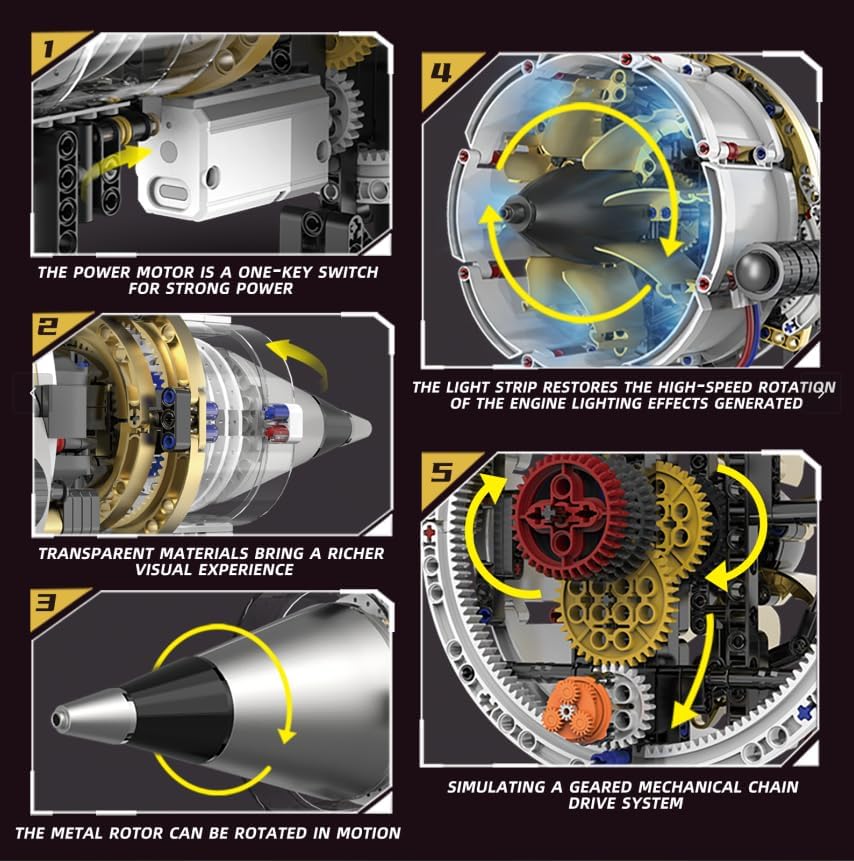
Image: A collage of five detailed images showcasing various internal components and mechanisms of the Suplanet Turbofan Engine Model. These include the power motor, transparent casing, metal rotor, light strip, and the geared mechanical chain drive system.
Note: Some parts may require a firm but gentle push to connect. If you encounter difficulty, refer to the specific steps in the printed manual or contact support.
5. Setup
5.1 Power Unit Charging
The model comes with a rechargeable power unit. Before first use, fully charge the power unit using the provided USB cable. Connect the USB cable to the power unit and a compatible USB power source (e.g., computer USB port, wall adapter).
5.2 App Installation and Connection
- Download the exclusive control app from your device's app store. Search for "Suplanet Control" or refer to the QR code in the printed manual.
- Ensure Bluetooth is enabled on your smartphone or tablet.
- Turn on the power unit of the engine model.
- Open the app and follow the on-screen instructions to connect to your engine model via Bluetooth.

Image: A smartphone screen showing the "REMOTE CONTROL MODE" interface of the Suplanet app. It features controls for adjusting engine speed, a speed display table, and buttons for hastening or decelerating the engine, along with a Bluetooth connection indicator.
6. Operating Instructions
Once the model is assembled and connected to the app, you can begin operation.
6.1 Basic Operation
- Power On/Off: Use the one-key switch on the power motor to turn the engine model on or off.
- Propeller Rotation: The model features a two-way propeller rotation function. This is controlled via the app.
- Lighting Effects: The integrated light strip simulates engine lighting effects during operation.
6.2 App Control
The exclusive app allows for advanced control of the engine model:
- Speed Adjustment: Use the app interface to adjust the engine speed with three available options. The engine sound generated by the app will correspond to the speed.
- Direction Control: Control the two-way rotation of the propeller through the app.
- Realistic Engine Sounds: The app generates simulated engine sounds that enhance the operational experience.

Image: A person's hands holding a smartphone, displaying the control app, while the Suplanet Aircraft Turbofan Engine Model operates in the background. Red light effects emanate from the engine, indicating its active state.
7. Maintenance
- Cleaning: Use a soft, dry cloth to gently wipe the model. Avoid using harsh chemicals or abrasive materials.
- Storage: Store the model in a cool, dry place away from direct sunlight and extreme temperatures.
- Battery Care: Recharge the power unit regularly, even if not in frequent use, to maintain battery health. Do not overcharge.
- Component Check: Periodically inspect all connections and moving parts to ensure they are secure and functioning correctly.
8. Troubleshooting
| Problem | Possible Cause | Solution |
|---|---|---|
| Model does not power on. | Power unit is not charged or not connected properly. | Ensure the power unit is fully charged. Check all connections to the power unit and motor. |
| Motor runs slowly or binds. | Gears are misaligned or obstructed. Low battery. | Inspect all gears for proper alignment and ensure no parts are binding. Recharge the power unit. |
| App cannot connect to the model. | Bluetooth is off. Model is off. App not installed correctly. | Ensure Bluetooth is enabled on your device. Turn on the model's power unit. Restart the app or reinstall it. |
| Lights are not working. | Light strip not connected or damaged. | Check the connection of the light strip to the power unit. Ensure the light strip is not damaged. |
If you continue to experience issues, please contact Suplanet customer support.
9. Specifications
- Model Number: K96208
- Brand: Suplanet
- Number of Pieces: 564
- Product Dimensions: 15.7 x 7.4 x 8.11 inches (40 x 18.8 x 20.6 cm)
- Item Weight: 1.76 pounds
- Recommended Age: 8 - 14 years
- Power Source: Rechargeable 9V battery (included)
- Control: App-controlled via Bluetooth with 3 speed settings
- Features: Motorized operation, two-way propeller rotation, simulated lighting effects, realistic engine sounds (via app).
10. Warranty and Support
Suplanet products are manufactured with quality and care. For warranty information or technical support, please refer to the contact details provided on the product packaging or visit the official Suplanet website. Please have your model number (K96208) available when contacting support.
Online Resources:
- Suplanet Store: Visit Suplanet Store on Amazon