
SNGXRFHD WF-LD40U-24V
SNGXRFHD WF-LD40U-24V LED Power Supply User Manual
Constant Voltage Driver for LED Applications
1. Introduction
Thank you for choosing the SNGXRFHD WF-LD40U-24V LED Power Supply. This constant voltage driver is designed to provide stable and efficient power for various LED lighting applications, including cabinet lights, furniture lights, bathroom lights, light strips, aluminum strip lights, and showcase lights. Please read this manual thoroughly before installation and operation to ensure safe and optimal performance.

Figure 1: SNGXRFHD WF-LD40U-24V LED Power Supply (Top View)
This image displays the top view of the SNGXRFHD WF-LD40U-24V LED Power Supply. Key markings visible include the model number, input voltage range (AC100-240V), output voltage (DC24V), maximum output current (1.67A), and various safety certifications such as CE, FC, RoHS, and UL Listed. The compact, thin design is evident, highlighting its suitability for integration into various lighting fixtures.
2. Safety Instructions
WARNING: Failure to follow these safety instructions may result in fire, electric shock, serious injury, or death.
- Always disconnect power at the circuit breaker before installing or servicing the power supply.
- Installation should be performed by a qualified electrician in accordance with all local and national electrical codes.
- Do not exceed the maximum output power (40W) or current (1.67A) of the power supply.
- Ensure proper ventilation around the power supply to prevent overheating.
- Do not expose the power supply to moisture or extreme temperatures outside its operating range.
- Verify input and output voltage compatibility with your LED fixtures before connecting.
- This device is designed for external installation.
- The power supply is equipped with overload, short circuit, overvoltage, over temperature, and overcurrent protection. However, proper installation is still critical.
3. Product Features
- Model: WF-LD40U-24V
- Type: Constant Voltage Source
- Input Voltage: AC 100-240V, 50/60Hz
- Output Voltage: DC 24V
- Maximum Output Power: 40W
- Maximum Output Current: 1.67A
- Efficiency: 88%
- Power Factor: ≥0.92
- Protections: Overload, Short Circuit, Overvoltage, Over Temperature, Overcurrent
- Installation Location: External
- Protection Level: IP20 (Indoor use, protected against solid objects >12.5mm, no water protection)
- Operating Temperature: Up to 45°C
- Applicable Lamps: LED cabinet lights, LED furniture lights, LED bathroom lights, LED light strips, LED aluminum strip lights, LED showcase lights.
4. Setup and Installation
Before beginning installation, ensure all power is disconnected at the main circuit breaker. This power supply is designed for external installation and should be mounted in a location that allows for adequate ventilation and is protected from moisture.
4.1 Input Power Connection
Connect the AC input power to the designated input terminals on the power supply. The input voltage range is AC 100-240V at 50/60Hz. Ensure the wiring is secure and correctly polarized. Refer to Figure 2 for the input terminal layout.
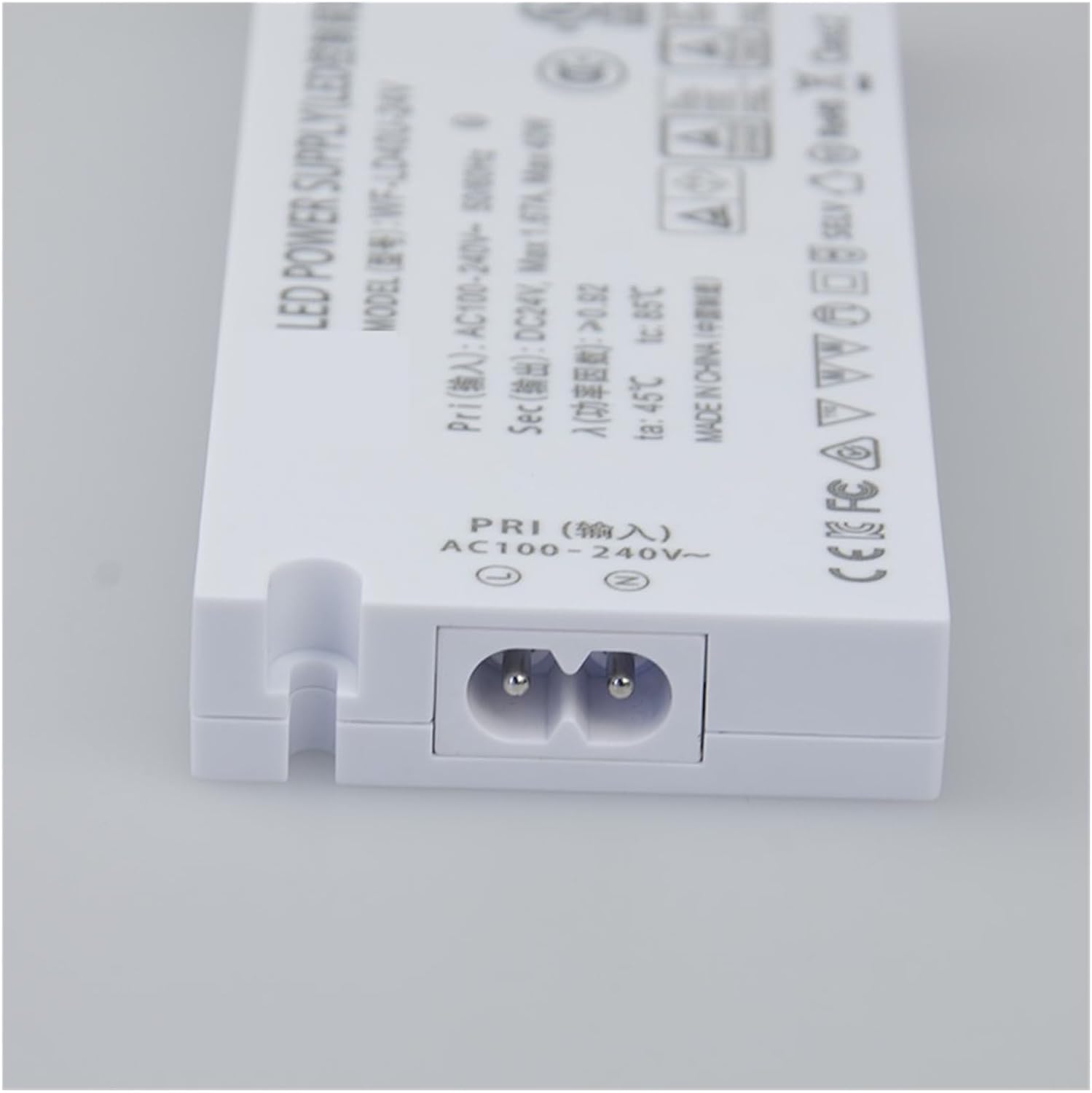
Figure 2: Input Power Connection (AC 100-240V)
This image shows the input side of the power supply. The "PRI (输入)" label indicates the primary (input) connection. It features a two-pin connector for AC 100-240V power, clearly marked with the voltage range and frequency. Ensure the correct AC power cable is used and securely connected.
4.2 Output Power Connection
Connect your 24V DC LED lighting fixtures to the output terminals. The power supply provides a constant DC 24V output. This model features multiple output channels (OUT1, OUT2, OUT3, OUT4), each capable of supplying up to 1.67A (total 40W). Ensure the positive (+) and negative (-) terminals of your LED fixtures match the corresponding terminals on the power supply. Refer to Figure 3 for the output terminal layout.

Figure 3: Output Power Connection (DC 24V)
This image illustrates the output side of the power supply. Labeled "SEC (输出)", it shows four distinct output channels (OUT1, OUT2, OUT3, OUT4), each with positive (+) and negative (-) terminals. A central yellow connector is also visible, possibly for a specific type of LED connection or accessory. Each output channel is rated for a maximum of 1.67A at 24V DC. Ensure correct polarity when connecting LED loads.
Important: Do not connect more than 40W total load to the power supply. Distribute the load evenly across the output channels if using multiple fixtures.
5. Operating Instructions
Once the power supply is correctly installed and all connections are secure, restore power at the circuit breaker. The connected LED lights should illuminate. There are no user-adjustable settings on this constant voltage driver; it operates automatically to provide a stable 24V DC output.
- Power On: Apply AC power to the input terminals.
- Power Off: Disconnect AC power from the input terminals.
- Normal Operation: The power supply will maintain a constant 24V DC output as long as the total load does not exceed 40W and is within the specified operating conditions.
6. Maintenance
The SNGXRFHD WF-LD40U-24V LED Power Supply requires minimal maintenance. To ensure longevity and safe operation:
- Periodically inspect the power supply and its connections for any signs of damage, loose wiring, or discoloration.
- Keep the unit clean and free from dust and debris. Use a dry, soft cloth for cleaning. Do not use liquid cleaners.
- Ensure that the ventilation around the unit is not obstructed.
- If any issues are observed, disconnect power immediately and consult the troubleshooting section or a qualified technician.
7. Troubleshooting
If you encounter problems with your power supply, refer to the following common issues and solutions:
| Problem | Possible Cause | Solution |
|---|---|---|
| LED lights do not turn on. | No AC input power. Loose wiring connections. Faulty LED fixture. Overload protection activated. | Check circuit breaker and power outlet. Verify all input and output connections are secure. Test LED fixture with a known good power source. Reduce total load; ensure it's below 40W. Disconnect power, wait a few minutes, then reconnect. |
| LED lights flicker or dim. | Insufficient power. Loose connections. Overheating. | Ensure total load is within 40W limit. Check all wiring connections. Ensure adequate ventilation around the power supply. |
| Power supply feels excessively hot. | Overload. Poor ventilation. High ambient temperature. | Reduce connected load. Ensure clear space around the unit for airflow. Relocate to a cooler environment if possible. |
If the problem persists after attempting these solutions, discontinue use and contact customer support.
8. Specifications
| Parameter | Value |
|---|---|
| Model | WF-LD40U-24V |
| Type | Constant Voltage Source |
| Input Voltage | AC 100-240V |
| Input Frequency | 50/60Hz |
| Output Voltage | DC 24V |
| Max Output Current | 1.67A |
| Max Output Power | 40W |
| Efficiency | 88% |
| Power Factor | ≥0.92 |
| Protections | Overload, Short Circuit, Overvoltage, Over Temperature, Overcurrent |
| Installation Location | External |
| Protection Level | IP20 |
| Operating Temperature | Up to 45°C |
| Item Weight | 1.76 ounces (50 Grams) |
| Manufacturer | SNGXRFHD |
9. Warranty and Support
For warranty information or technical support, please contact the manufacturer, SNGXRFHD, or your point of purchase. Please have your product model number (WF-LD40U-24V) and purchase details available when contacting support.
Ask a question about this manual
Ask about setup, troubleshooting, compatibility, parts, safety, or missing instructions. Manuals+ will review the question and use this page’s manual context to help answer it.