
Wuden 500417826
Wuden V41 Heads Up Display User Manual
Model: 500417826
Introduction
The Wuden V41 Heads Up Display (HUD) is an advanced automotive accessory designed to project essential driving data onto your car's windshield. This device enhances driving safety by allowing you to view information such as speed, RPM, water temperature, and more, without diverting your eyes from the road. It features a 5.5-inch screen, 12 main functions, and various alarms to keep you informed and safe.
Package Contents
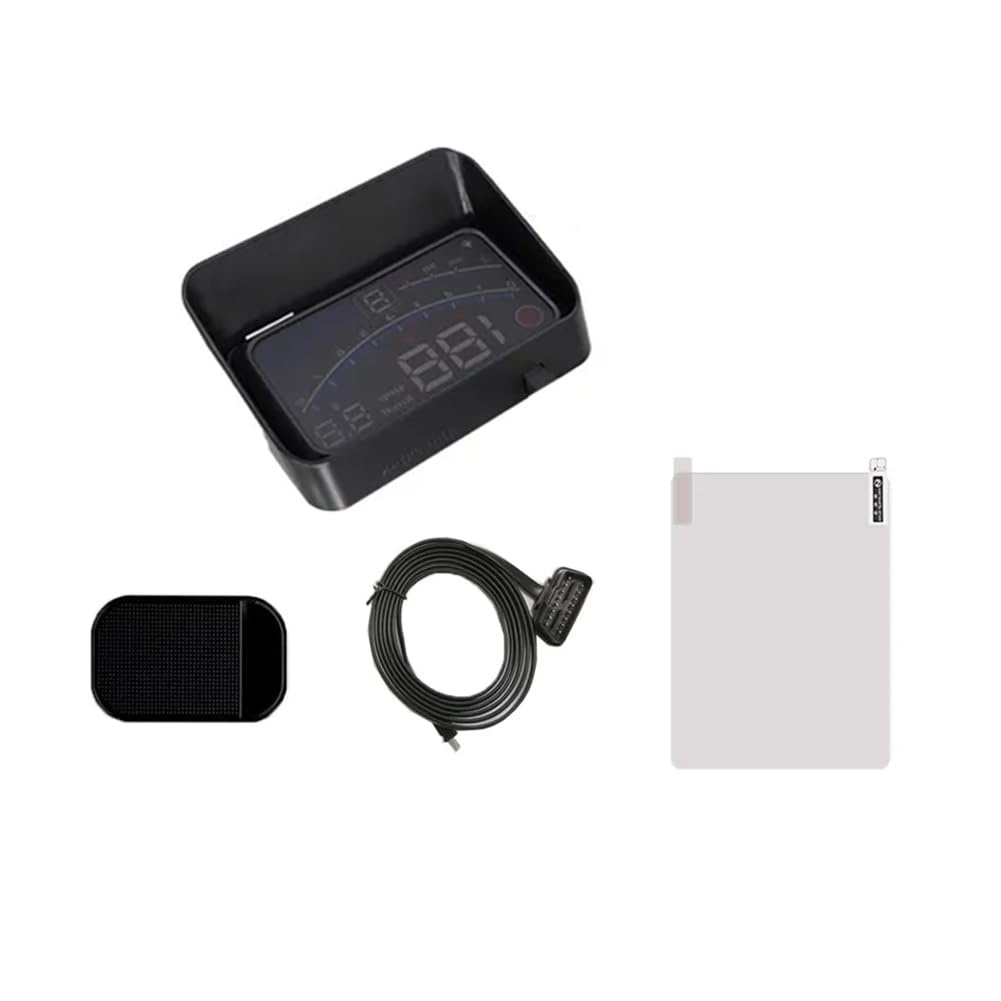
Figure 1: Contents of the Wuden V41 HUD package, including the display unit, OBD cable, and mounting bracket.
- 1 x Automotive HUD Head-Up Display
- 1 x 16 pin OBD Cable
- 1 x Bracket
Note: Other products shown in promotional images are not included unless specified above.
Specifications
| Product Dimensions | 9.45 x 6.69 x 3.54 inches |
| Item Weight | 14.02 ounces (397.5 Grams) |
| Model Number | 500417826 |
| Screen Size | 5.5 inches |
| Material | Plastic |
| Color | Black |
| Connectivity | 16-pin OBD Cable (EUOBD & OBD compatible) |
Setup and Installation
- Locate OBD-II Port: Identify your vehicle's OBD-II diagnostic port, typically located under the dashboard on the driver's side.
- Connect OBD Cable: Plug the provided 16-pin OBD cable into the vehicle's OBD-II port. Ensure a secure connection.
- Connect to HUD: Connect the other end of the OBD cable to the Wuden V41 HUD unit.
- Position HUD: Place the HUD unit on your dashboard using the provided bracket. Ensure it is positioned where the projected display is clearly visible on the windshield without obstructing your view of the road.
- Adjust Viewing Angle: Adjust the angle of the HUD unit and your seating position to optimize the clarity and placement of the projected display on the windshield.
- Power On: Start your vehicle. The HUD unit should power on automatically and begin displaying data.

Figure 2: The Wuden V41 HUD installed on a car dashboard, showing the projected display on the windshield during daytime conditions.

Figure 3: Comparison of the HUD display visibility during daytime and nighttime driving conditions, demonstrating automatic brightness adjustment.
Operating Instructions
Display Functions and Data
The Wuden V41 HUD displays a variety of critical driving data. The 5.5-inch screen provides clear visibility of information.

Figure 4: Overview of the HUD's key features, including its 5.5-inch screen, 12 functions, and shift reminder capability.
- Vehicle Driving Speed: Displays current speed in KM/H or MPH.
- RPM: Engine Revolutions Per Minute.
- Water Temperature: Engine coolant temperature.
- Voltage: Vehicle battery voltage.
- Fuel Consumption: Instantaneous and average fuel consumption (L/100km).
- Single Mileage: Distance traveled in the current trip.
- Total Cumulative Mileage: Total distance recorded by the HUD.
- Travel Time: Duration of the current trip.
- System Time: Current time.
- Intake Pressure: Engine intake manifold pressure.
- Acceleration Test: Measures vehicle acceleration performance.
- Brake Test: Measures vehicle braking performance.
Interface Options
The HUD allows for customization of the displayed interface, enabling you to choose the data layout that best suits your preferences.
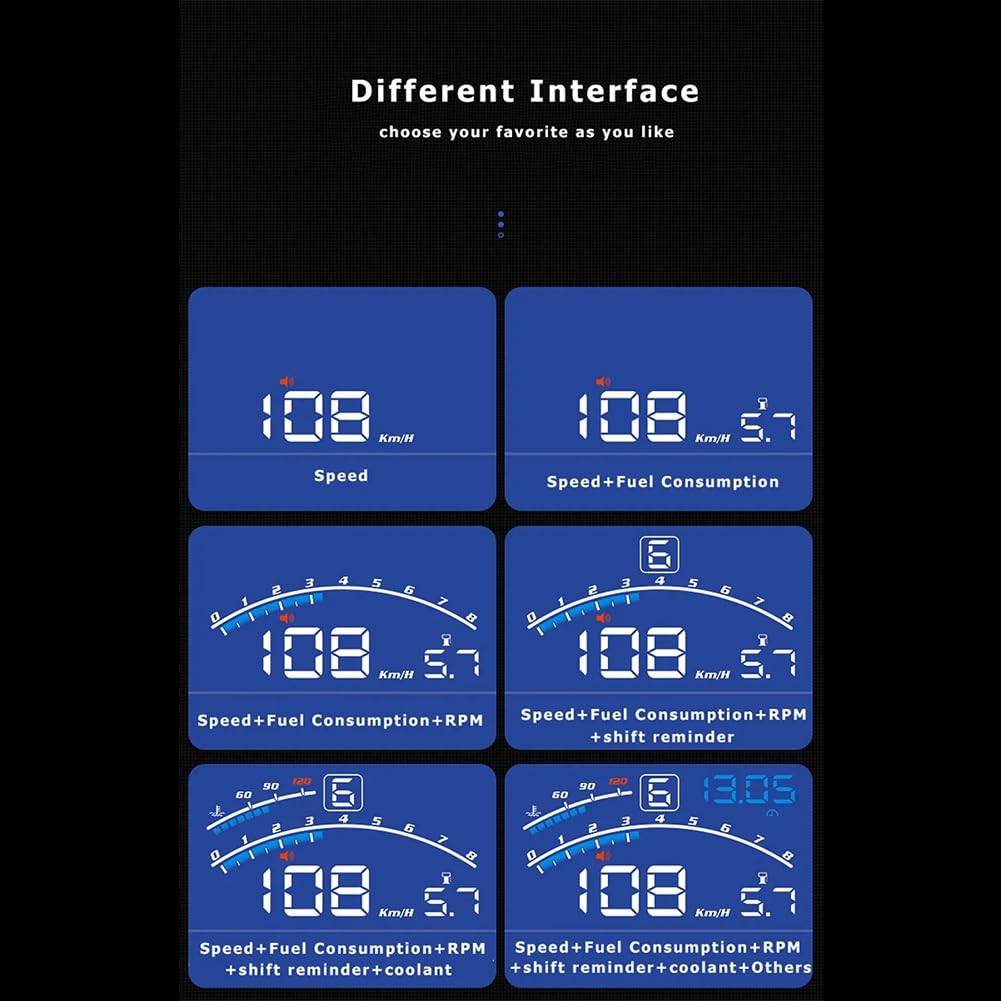
Figure 5: Examples of different display interfaces available on the Wuden V41 HUD, allowing users to customize the information shown.
You can switch between various interfaces to display combinations of speed, fuel consumption, RPM, shift reminders, and coolant temperature. Refer to the device's menu button (as indicated in Figure 6) for navigation and selection of interface options.
Automatic Brightness Adjustment
The HUD is equipped with a bright sensor that automatically adjusts the display brightness according to ambient light conditions, ensuring optimal visibility during both day and night driving.

Figure 6: Detailed view of the HUD display, highlighting the location of the light sensor and menu button for user interaction.
Alarms and Reminders
The Wuden V41 HUD includes several alarm functions to alert the driver to potential issues or important driving conditions:
- Overspeed Alarm: Alerts when the vehicle exceeds a preset speed limit.
- High Water Temperature Alarm: Warns if the engine coolant temperature becomes excessively high.
- Low Voltage Alarm: Indicates when the vehicle's battery voltage drops below a safe level.
- Shift Reminder: Suggests optimal gear shifts for fuel efficiency or performance.
- Engine Fault Alarm: Notifies of detected engine errors.
- Fatigue Driving Reminder: Prompts the driver to take a break after extended driving periods.
The HUD also allows for clearing fault codes directly from the device. Units for speed (KM/h & MPH) and temperature (°C & ℉) can be freely switched.
Compatibility
The Wuden V41 HUD operates using the OBD2 protocol. Please note the following compatibility considerations:
- Incompatible Vehicles:
- Almost 98% of cars manufactured before the year 2004 (including 2004 models).
- Some old oil and electricity mixing (hybrid) vehicles, powered cars, pickup trucks, SUVs, ORVs, and mini buses.
- A few specific car models may also be incompatible.
- Recommendation: It is highly recommended to confirm the compatibility of your vehicle with an OBD2 HUD before purchasing.
Troubleshooting
This section provides solutions to common issues you might encounter with your Wuden V41 HUD.
No Display / No Power
- Check Cable Connection: Ensure the OBD cable is securely plugged into both the vehicle's OBD-II port and the HUD unit.
- Vehicle Ignition: Make sure the vehicle's ignition is on or the engine is running. The HUD typically powers on with the vehicle.
- OBD-II Port Functionality: Verify that your vehicle's OBD-II port is functional. You can test it with another OBD-II device if available.
- Vehicle Compatibility: Confirm your vehicle is OBD2 compatible (refer to the Compatibility section).
Inaccurate Speed Reading
- Unit Setting: Ensure the speed unit (KM/H or MPH) is correctly set on the HUD to match your preference.
- Calibration: Some HUDs allow for speed calibration. Consult the device's menu settings (using the menu button, Figure 6) to check for calibration options if a significant discrepancy exists.
Display Not Clear / Double Image
- Windshield Angle: Adjust the angle of the HUD unit or your viewing position.
- Protective Film: Ensure any protective film on the HUD's display surface has been removed.
- Windshield Condition: A very curved or multi-layered windshield can sometimes cause a double image. If provided, apply the reflective film (not included in package contents, but often supplied with HUDs) to the windshield where the display is projected.
Alarms Triggering Incorrectly
- Alarm Thresholds: Check the settings for alarm thresholds (e.g., overspeed limit, high water temp limit) and adjust them as needed via the menu button.
- Engine Fault Alarm: If an engine fault alarm persists, it indicates an actual issue with your vehicle. It is recommended to have your vehicle inspected by a qualified mechanic.
Maintenance
To ensure the longevity and optimal performance of your Wuden V41 HUD, follow these simple maintenance guidelines:
- Cleaning: Use a soft, dry, or slightly damp cloth to clean the display screen and the unit's exterior. Avoid using harsh chemicals, abrasive cleaners, or solvents, as these can damage the plastic and display.
- Temperature Exposure: Avoid exposing the unit to extreme temperatures (very hot or very cold) for prolonged periods, as this can affect electronic components.
- Secure Placement: Ensure the unit is securely mounted to prevent it from moving or falling during driving, which could cause damage.
- Cable Care: Do not bend or crimp the OBD cable excessively. Store it neatly to prevent damage.
Warranty and Support
Specific warranty information for the Wuden V41 HUD is not provided in this manual. For details regarding warranty coverage, technical support, or service, please refer to the product packaging, the seller's website, or contact Wuden customer service directly.
For further assistance, please contact your point of purchase or the manufacturer.
Ask a question about this manual
Ask about setup, troubleshooting, compatibility, parts, safety, or missing instructions. Manuals+ will review the question and use this page’s manual context to help answer it.